

A TikTok cooking video can provide an estimated macro breakdown, but accuracy depends on the ingredients and portions you use. To convert cooking videos to macro counts, identify each ingredient, estimate its quantity, and calculate calories, protein, carbohydrates, and fat for the full recipe and each serving.
You can follow the visible steps and still be unsure how much oil went into the pan or how many portions the finished dish makes. Those details affect the estimate because ingredient quantities and serving sizes change the totals.
This guide shows how to identify ingredients in a video, handle unclear quantities, and calculate a practical estimate. It also explains raw versus cooked food weights and compares video import, manual calculation, and chatbot estimates, so you can choose a method suited to the recipe details available.
Key Takeaways
- List each ingredient and estimate its amount before calculating the recipe’s nutrition.
- Use consistent portion sizes to make per-serving estimates more useful.
- Separate raw and cooked weights, since cooking can change food weight without removing the recipe’s total calories.
- Calculate calories, protein, carbohydrates, and fat for the full recipe, then divide by the number of portions.
- Choose video import, manual calculation, or a chatbot based on the detail and control you need.
Handling vague ingredient quantities and portion sizes
AI can identify visible ingredients in video frames, captions, and on-screen recipe text. It may estimate quantities from utensils, package labels, and serving cues, but hidden oil or unclear portions still call for an explicit assumption.
For substitutions, replace the original ingredient with the quantity you actually use, then recalculate the recipe. Include optional ingredients only if they go into the dish, such as a topping added before serving.
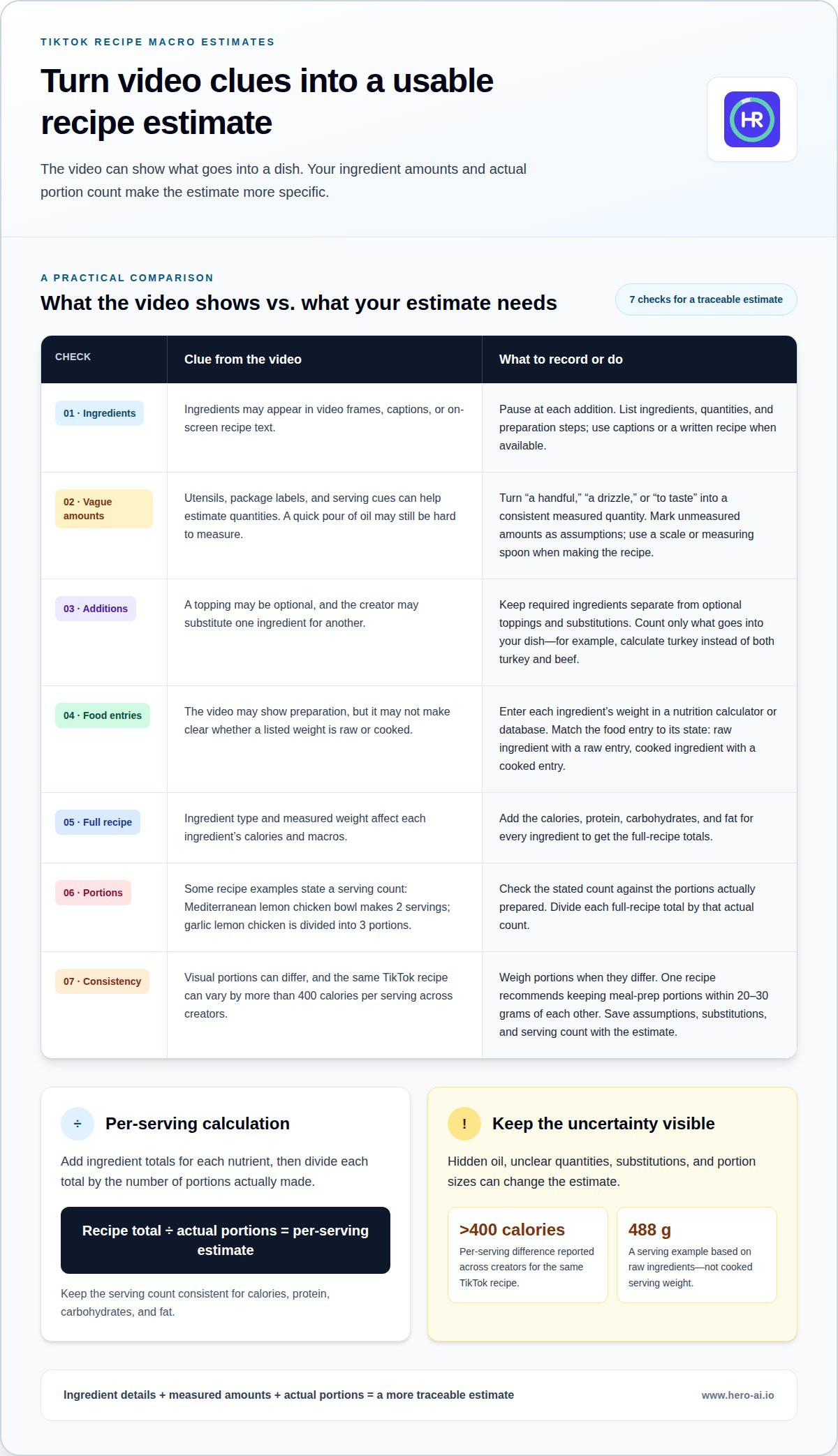
- Extract the ingredient list. Pause the video at each addition and note the ingredients, quantities, and preparation steps. Use captions or a written recipe too, if available. You may see a quick pour of oil without being able to measure it from the frame. Mark the quantity as an estimate rather than a measured amount.
- Assign a usable quantity to vague measures. Convert phrases such as “a handful,” “a drizzle,” or “to taste” into a consistent measured quantity. Use a scale or measuring spoon when you make the recipe. If the video gives no amount, record your assumption beside the ingredient. That keeps the estimate traceable and easy to update if you learn the actual quantity.
- Separate ingredients from optional additions. Make one list of required ingredients and another of optional toppings or substitutions. Count cheese only if you add it to the finished dish. If the creator substitutes turkey for beef, calculate the turkey, not both meats. The calories and macros for each ingredient depend on its type and measured weight.
- Calculate the full recipe before servings. Enter each ingredient and its weight in a nutrition calculator or database, then add the results. Use weights and food entries that match: choose a raw entry for a raw ingredient and a cooked entry for a cooked one. This avoids distorting the total with mismatched data.
- Set the serving count from the finished dish. Use the creator’s stated servings when clear, then compare that claim with the actual portions. The Mediterranean lemon chicken bowl makes 2 servings, while the garlic lemon chicken recipe is divided into 3 portions. Divide the recipe totals by the number of portions actually prepared, not an assumed serving size.
- Weigh portions when visual estimates differ. The creamy chipotle beef and corn pasta recipe recommends keeping meal-prep portions within 20-30 grams of each other. Weighing each container helps distribute the dish consistently. A 488 g serving example is based on raw ingredients, so distinguish that basis from cooked serving weight.
- Keep uncertainty visible in the record. The same TikTok recipe can differ by more than 400 calories per serving across creators when ingredients and portions change. Save the extracted ingredients, assumed amounts, substitutions, and serving count together. That record makes it easier to revise the macro estimate when a vague quantity is measured more accurately.
Can You Get Nutrition Info & Calories from a TikTok Recipe?
Recipe and food-tracking apps can estimate calories and macros from imported videos or entered ingredients. When the ingredient list and serving count are available, the result can include protein, carbohydrates, and fat.
Uploading a cooking video may reveal personal details, such as faces, voices, or your home. Review an app’s privacy settings before uploading, and follow safe food-handling instructions when preparing the recipe.
- Choose an input method. A recipe app may extract ingredients and instructions from social videos, while a food tracker calculates nutrition from ingredients you enter. An AI chatbot can also estimate calories from a recipe description. Since these methods use different inputs, compare the ingredients and quantities behind each result.
- Check what the output includes. A useful nutritional breakdown separates calories from protein, carbohydrates, and fat. For example, a garlic lemon chicken recipe lists 777 calories per serving, with 35 grams of protein, 61 grams of carbohydrates, and 44 grams of fat. These values describe that recipe’s stated serving, not every version of the dish.
- Interpret the estimate as an estimate. AI chatbot calorie estimates can vary by 20 to 40 percent from actual values. Interpretations of the same TikTok recipe can also differ by 80 to 120 percent. Ingredient choices, missing quantities, cooking fats, and serving sizes affect the calculation. A result is more useful when its inputs match the food prepared.
- Calculate per-serving nutrition. Add the calories and macros for all listed ingredients to obtain recipe totals. Divide each total by the number of servings actually made. If the recipe makes 3 servings, divide its total protein, carbohydrates, fat, and calories by 3. Keep the serving count consistent across all four values.
- Review available features and inputs. Apps vary in how they handle video import, recipe text, ingredient entry, and serving counts. Some extract a recipe; others require manual edits before calculating nutrition. Compare the displayed ingredients with the TikTok instructions, especially for optional toppings or cooking oil that may be omitted.
- Use a social-video import workflow when it fits. A tool that imports recipes from TikTok or Instagram can reduce repeated entry of ingredients and instructions. Social-video recipe import provides one way to turn a cooking video into a meal-tracking starting point.
Estimated calories and macronutrients
Calculate calories, protein, carbohydrates, and fat for each ingredient, then add each nutrient separately. Divide the recipe totals by the number of portions to estimate the amounts per serving.
- Use the exact ingredient version. Choose a nutrition entry that matches the food and preparation shown in the video. Ground beef, cooked rice, and added oil each affect the total differently. Avoid a generic entry describing a different form or preparation from the ingredient in your recipe.
- Record calories and macros for every ingredient. Enter the quantity used for each ingredient, then record its calories, protein, carbohydrates, and fat. Include sauces, cooking fats, and toppings that are part of the prepared dish. Keep each nutrient in a separate column or field so the recipe totals are easy to review.
- Add recipe totals by nutrient. Sum calories separately from protein, carbohydrates, and fat. For example, a creamy fire-roasted beef and rice meal is listed at 491 calories, 55 grams of protein, 43 grams of carbohydrates, and 12 grams of fat per meal. Those values show the distinct outputs to record.
- Divide by the prepared servings. If the complete recipe makes 7 portions, divide each recipe-wide nutrient total by 7. The creamy chipotle beef and corn pasta example makes 7 meals, with 650 calories, 71 grams of protein, 59 grams of carbohydrates, and 16 grams of fat per meal. Keep the same serving count for every nutrient.
- Track fiber as its own value. Fiber is part of carbohydrate information, but a nutrition display may report it separately. Record the fiber value when the ingredient database provides it. The frosted chocolate Oreo loaf lists 14 grams of net carbohydrates per slice, which is not the same display as total carbohydrates.
- Compare the estimated result with the recipe version. The Mediterranean lemon chicken bowl lists 769 calories per serving, alongside 58 grams of protein, 27 grams of fat, and 73 grams of carbohydrates. Use that as the estimate for its listed ingredients and serving, not for a version with changed amounts or substitutions.
- Review unusual totals before logging. Check whether a missing ingredient, serving count, or preparation choice explains a result that differs from the recipe. CookingGuru’s example is listed at 540 kcal per serving, while another example provides 562 kcal and 28 g of fat per serving. Treat each estimate as specific to its recipe inputs.
Frosted chocolate Oreo loaf: 138 calories, 14 grams of net carbohydrates, 2.5 grams of fat, and 15 grams of protein per slice. A 350-gram serving of mac and cheese provides 30 grams of protein. A high-protein meal-prep day provides over 200 grams of protein and 1620 calories.
Raw versus cooked food weight
Cooking changes food weight, mainly through water loss or absorption. The method can also change macro totals if fat drains away or ingredients such as oil are added.
Compare Raw and Cooked Food Weights
Match each ingredient’s weight to its nutrition entry before calculating the recipe. Raw and cooked entries describe different food states, so using a raw weight with a cooked entry can distort the estimate. In a bread example, raw dough weighs 882 g, while the baked loaf weighs 780 g. The difference reflects weight lost during baking, not automatically a loss of the same share of calories.
Account for Cooking Method Effects
Record the cooking method and any ingredients added during preparation. Boiling, baking, and frying can change moisture or leave fat behind, which affects the finished dish’s weight and sometimes its nutrient totals. In the bread example, a 74 g slice is listed as 165 kcal before baking and 186 kcal after baking. Creators may show only the final result, so note the recipe’s stated food state.
- Identify the food state shown in the recipe. Check whether the ingredient weights refer to raw or cooked food. A video may show raw chicken before cooking and cooked chicken in the final bowl. Match the input weight and nutrition entry to the same state. If the recipe lists both, record them separately to avoid counting the ingredient twice.
- Use the full batch weight for cooked recipes. Weigh the finished dish after cooking when the recipe gives raw ingredient weights and the final yield matters. For the bread example, the dough falls from 882 g to 780 g after baking. Divide the batch’s total calories by its finished portions, rather than treating water loss as removed calories.
- Account for liquids and drained fat. Water absorbed during cooking can increase a food’s weight without adding calories. Fat left in the pan can reduce how much you eat, while added oil increases the recipe total. Record what goes into the dish and what remains behind. This matters when the video shows frying, draining, or adding cooking liquid.
- Keep portion weights consistent. Divide the finished recipe by its actual serving count or weigh each portion. A 74 g baked bread slice is not directly interchangeable with 74 g of raw dough. Use the cooked-food entry for a cooked portion, and avoid applying raw-weight nutrition to a different cooked weight.
- Review the creator’s stated basis. Some recipes give nutrition per serving based on raw ingredient totals; others use finished portions. Check how the serving is defined and review the cooking instructions. If an app extracts the recipe, compare the ingredient state with the video. Correcting a raw-versus-cooked mismatch may matter more than adjusting a small seasoning quantity.
Video import compared with manual calculation and chatbots
Choose a method based on the recipe details available and the level of detail you need. Video import can extract recipe information, manual calculation gives you direct control over food entries, and chatbots estimate from a written description.
- Use video import when details are visible. An import tool can analyze a TikTok video and extract ingredients or instructions. This can cut down on typing when captions show ingredient names and quantities. Review the extracted recipe before using its macro estimate. Video frames may not show every quantity, such as oil poured quickly into a pan.
- Use manual calculation when you need control. Enter each ingredient into a nutrition database, then add its calories and macros. Manual note-taking to extract a recipe takes 15-30 minutes, while nutrition calculation takes 15 to 30 minutes per recipe. This method takes longer, but it lets you choose specific food entries and record substitutions clearly.
- Use captions as an intermediate source. YouTube captions can provide spoken ingredient names and directions. Extracting a recipe from captions takes 5-10 minutes. Captions may omit details that appear only on screen, such as an ingredient added without being named aloud. Compare the transcript with the tiktok video before treating it as a complete recipe.
- Use a chatbot for an initial estimate. Provide the recipe, ingredient quantities, preparation method, and serving count. Asking an AI chatbot for a recipe calorie estimate takes 1 to 3 minutes. The result depends on the information in your prompt. If quantities or ingredients are missing, the estimate may rely on assumptions that differ from the recipe you prepare.
- Compare methods using matching inputs. To convert cooking videos to macro counts, use the same ingredients, quantities, and servings with each method. Then compare calories, protein, carbohydrates, and fat. Video import can reduce data entry, while manual calculation lets you review each food entry. Chatbots are quick, but their estimates depend on how fully you describe the recipe.
- Choose the method that fits the recipe. For quick meal logging, imported details can provide a starting point. For unclear portions or substitutions, manual edits help make assumptions explicit. Before logging or exporting a result, confirm that its serving count matches the dish. A video-import workflow can help convert cooking videos to macro counts without re-entering every recipe detail. Import a cooking video for meal tracking to turn social recipes into a starting point for nutrition logging.
Hero AI
Hero AI helps turn social cooking recipes into meal-tracking entries. Its platform imports recipes from TikTok and Instagram, then supports calorie and macro tracking alongside photo-based meal logging. This can be useful when you want to track a video recipe without entering every ingredient from scratch. Review the recipe details and serving size so the estimate reflects the version you prepare. Access is offered through a 1 year subscription. Contact Hero AI to learn more about using social recipes for nutrition tracking.
Make Your Next Recipe Easier to Track
Test the process with a recipe you plan to cook. Keep a note of the video and the version you make. This creates a useful record for future meal planning, rather than relying on a number detached from your actual meal. Update the record when your ingredients or portions change.
When you convert cooking videos to macro counts, treat the result as a tool for consistent tracking, not a reason to make every meal exact. Choose a method that suits the available detail and the time you want to spend, then use the estimate to support your nutrition routine. Repeating the process can make social recipes easier to include in everyday meal planning.
For a next step, contact Hero AI for help with nutrition tracking from social recipes. Keep exploring recipes, and use the approach that works for your routine.
Frequently Asked Questions
Can I get a macro breakdown from a TikTok cooking video?
Yes. Recipe-import and nutrition-tracking tools can use TikTok content to estimate calories and macros. The result depends on what the video or accompanying recipe shows. A clearly visible packaged ingredient may be easier to identify than a sauce poured off-camera. If the clip has no written ingredient list, use its captions or description for context before relying on the breakdown.
How accurate are the results?
Accuracy depends on whether the estimate reflects the dish you actually make. Different brands, substitutions, or quantities of cooking fat can change the result. Treat it as a working estimate, especially if the video hides quantities or cuts between preparation steps. For a more useful comparison, keep your ingredients and portions consistent each time you make the recipe.
Why are some ingredient quantities missing?
Creators may omit quantities to keep a video brief, rely on visual cues, or use phrases such as “to taste.” Editing can skip the moment an ingredient is added, and a recipe caption may list only the main components. Look for more detail in the video description or on-screen text, then record assumptions separately from measured quantities.
How accurate are nutrition estimates generated from cooking videos?
Video-based estimates can vary because the system has to identify foods and interpret quantities from the available information. A clear label or written recipe may provide more detail than a close-up of the finished dish. Results may also depend on whether the database has a match for a specific ingredient. Treat the result as an estimate and update the logged meal if your version differs.
How to estimate ingredient amounts when a cooking video gives no measurements?
Pause the video when an ingredient appears and look for a measuring spoon, package label, or familiar container to gauge its amount. Check the captions for a quantity or serving description. If those clues are missing, measure the ingredient the next time you make the dish and save the quantity in your recipe notes. Clearly distinguish guessed amounts from measured ones.
How to calculate macros per serving from a cooking video recipe?
For an evenly mixed dish, allocate each recipe-wide macro total according to the serving’s share of the finished batch. If portions vary in weight, compare each portion’s weight with the total cooked weight for a more tailored estimate. For separate components, such as rice served beside chicken, calculate each one’s contribution before adding the meal totals.


