

A meal photo can make food logging faster, but it cannot make calorie estimates exact. An app that lets you snap a picture to count calories uses image recognition to identify foods and estimate their nutrition. Treat the result as a starting point, not a precise measurement.
Photo tracking can cut down the steps involved in recording a meal. Manual logging gives you more control over ingredients and serving details, but you have to enter them yourself. Neither method is automatically accurate: portions, sauces, cooking oils, and mixed ingredients can all affect the estimate.
This guide explains how photo calorie tracking works and when manual logging may be more useful. It also covers setting calorie and nutrient targets and interpreting estimates so your food log stays useful without treating every number as exact.
Key Takeaways
- Learn what image recognition can identify from a meal photo and why portion estimates affect the result.
- See when manual entries can add useful detail to photo-based meal tracking.
- Compare common tracking methods by how they record meals and support consistent logging.
- Use your goals and nutrition needs to guide daily calorie and nutrient targets.
What Is an AI Calorie Counter?
An AI calorie counter uses food-image recognition to identify meal components and estimate portions. A photo estimate is not a substitute for a nutrition label or professional dietary advice.
Food Image Recognition and Portion Estimation
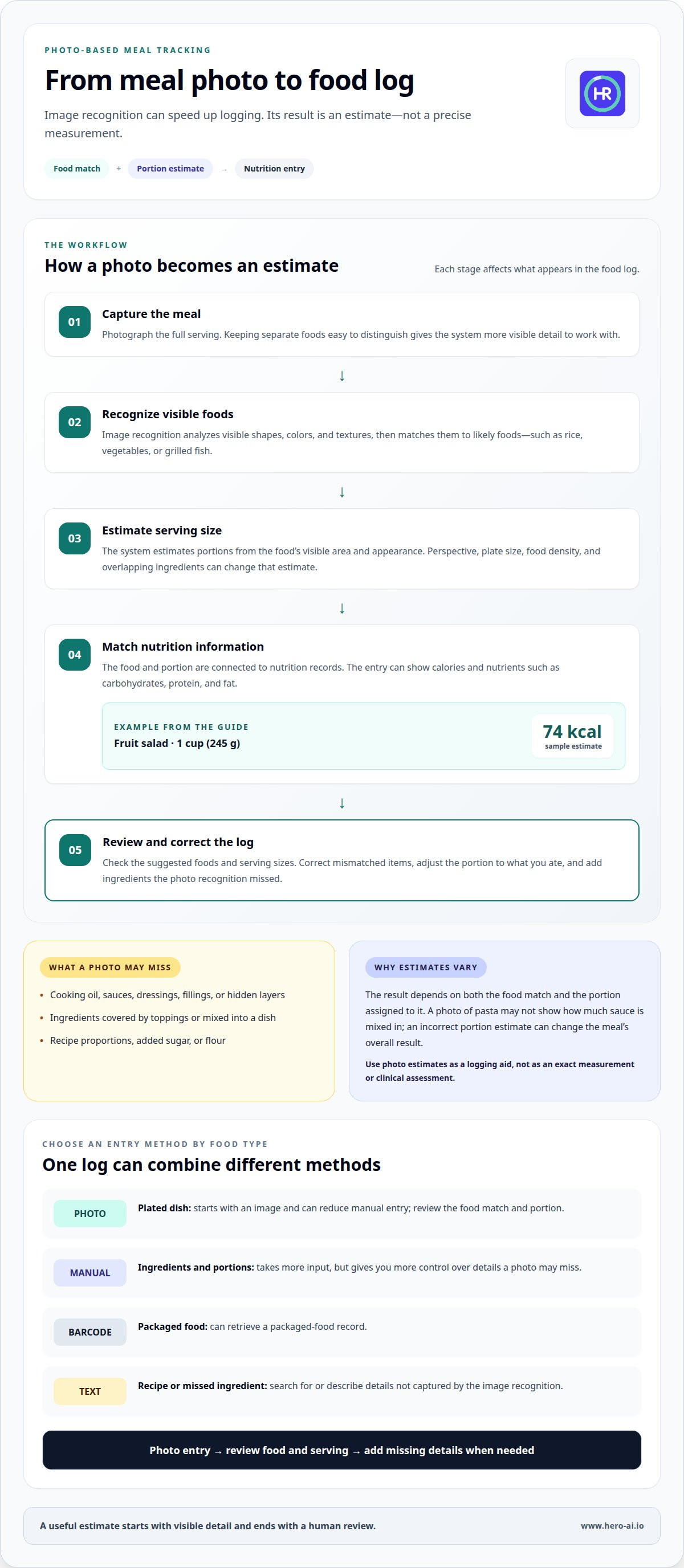
After you photograph a meal, image recognition analyzes visible shapes, colors, and textures. It matches those features to likely foods, such as rice, vegetables, or grilled fish. The system then estimates serving size from the food’s visible area and appearance. A single overhead photo may hide ingredients beneath a topping or inside a mixed dish.
For a clearer result, include the full plate and keep foods separate where possible. A photo can show what is visible, but may not reveal cooking oil, fillings, or hidden layers.
Calorie and Nutrition Estimates
Once foods and portions are estimated, the app connects them to nutrition information in a food database. The output can include calories and nutrients such as carbohydrates, protein, and fat. A sample fruit-salad result is 74 kcal per 1 cup (245 g). That example shows how an app can pair a food match with a serving and calorie estimate.
Ingredients can substantially change an estimate. A fruit salad with syrup or cream differs from one made only with fresh fruit. Review the suggested food and serving size before adding the entry to your log.
- Check the identified foods.
- Review the displayed portion.
- Correct visible ingredients the match missed.
Estimate Accuracy and Carb Research
Portion estimates are a major source of uncertainty. Perspective, plate size, food density, and overlapping ingredients can make a serving look larger or smaller. A photo of pasta, for example, may not show how much sauce is mixed in. The calorie estimate depends on both the food match and the portion assigned to it.
Research on carbohydrate estimation is most useful when it explains which foods, portion methods, and comparison standards were tested. Carbohydrate values can vary with ingredients and preparation. A photo may not reveal added sugar, flour, or a recipe’s proportions, all of which affect the estimate.
Limits of AI Dietary Estimates
AI estimates can help with routine meal tracking, but they do not replace package nutrition labels or professional dietary advice. A label relates to a packaged food and its stated serving, while a meal photo estimates what is visible in the image. For a mixed recipe, the photo may not reveal every ingredient or its quantity.
Use an estimate as a logging aid, not a clinical assessment. When dietary decisions depend on specific nutrition details, use relevant product information or professional guidance rather than relying on image recognition alone.
What is an AI calorie tracker and how does it work?
An AI tracker can turn a meal photo into a food entry and estimated nutrition values. Photos submitted to Food AI may be retained to improve food recognition, so review an app’s privacy information before uploading images.
Photo-Based Food Recognition
A snap-picture calorie-counting app analyzes visible features and matches them to likely food categories. A bowl showing noodles, vegetables, and tofu might produce separate food matches that the system combines into a meal entry. Review the suggested foods, especially when ingredients overlap or look similar.
An image shows only what the camera captures. A covered filling, dressing beneath salad leaves, or cooking oil may not be visible. Include the full serving in the frame and keep separate foods easy to distinguish. This gives the recognition system more visible detail to work with.
Calorie and Macro Estimation
After identifying foods, a tracker estimates serving sizes and matches them to nutrition records. It can then display calories and macronutrients, including carbohydrates, protein, and fat. The result depends on both the food match and the portion estimate. If a meal includes rice, chicken, and sauce, an incorrect estimate of the rice portion changes the overall result.
Check the foods and serving sizes in the generated entry. Correct any mismatched food, then adjust the portion if it differs from what you ate. Reviewing the entry makes it more representative, though a photo estimate is still not a direct measurement.
Meal Logging Methods
Photo logging starts with an image and can reduce manual entry. Manual logging asks you to select foods and enter portions. It takes more input, but lets you describe ingredients a photo may miss. Barcode scanning can retrieve a packaged food record, while text entry lets you search for or describe a meal.
Use a photo for a plated dish, a barcode for packaged food, and text when describing a recipe or an ingredient the image recognition missed. A snap-picture calorie counter can also combine methods: create a photo entry, review its items, and add missing details with text. This keeps the meal components together in one log.
Some trackers let you import recipes, which can help record meals made from shared recipes. Choose the entry method that suits the food and the details available. Combining meal photos, barcode scans, and recipe imports can help organize different types of meals.
Comparison with other calorie-tracking apps
The main differences between trackers are how they identify food, record portions, and build their nutrition databases. Alternatives to photo-based calorie counting include manual food logs, barcode entry, and meal-planning records. Free photo estimators are also available, but their features vary.
Comparing AI Calorie Tracking Apps
Compare entry methods first. One app may identify foods from images, while another relies on text search, barcode scans, or a combination. Then consider what the log displays, such as calories, macros, serving sizes, and saved meals. These features affect how well an app fits meals prepared at home or packaged foods.
Recognition systems also differ in how they match a food to a database entry. A photo of a lentil bowl, for example, could match a plain lentil dish or a recipe with added oil. Review the suggested match and serving before saving. Compare how easy it is to review and correct an entry, not just how quickly the initial scan works.
Some systems use image-recognition models to classify visible foods. Others combine image analysis with language models that interpret a written description. A prompt such as “lentils with rice and tomato sauce” provides context a photo alone might not show. The result still depends on the accuracy of the description and nutrition record.
Photo-Based App Alternatives
Manual logging is an alternative when you know the ingredients and portions. Search for each item, select a matching record, and enter the amount eaten. A paper food diary follows the same basic approach without automatic calculations. It can record meal details, but you must calculate or review totals separately.
Barcode entry works well for packaged foods with readable product codes. Text search suits ingredients or meals that are difficult to identify visually. For a home-cooked dish, a saved recipe or ingredient list may represent the meal more clearly than a single image. These methods rely on direct food selection or written details instead of photo recognition.
Meal templates are another option for menus you repeat. Save a breakfast combination, for example, and reuse its food entries when you have that meal again. This avoids repeated searches and keeps the record consistent. Choose the method that best fits the food: image capture, direct entry, or a reusable meal record.
Free Photo Calorie Estimators
Some photo calorie estimators offer free access, but features vary by app. A free option can help you test the photo-entry process. Check whether it supports the foods you record and displays the nutrition details you need. A scan that identifies food but omits useful serving information may not suit your routine.
Compare the whole logging process, not just the initial scan. Check whether you can edit an estimate, enter details by text, and save meals. These features affect how well an estimator handles a mixed dish or packaged snack. Avoid choosing based on one sample result alone.
For a practical comparison, log the same meal using photo recognition and direct entry. Review the identified foods, portion, and nutrition information in each result. This shows which method gives you a useful record for that meal without assuming one app or entry method suits every food.
Daily calorie and nutrient targets
A daily target turns meal entries into a tracking plan. Set calorie and nutrient targets around your goal, routine, and food preferences. Relevant factors include body size, age, activity, and whether you want to maintain, gain, or lose weight. A target copied from someone else does not account for those differences.
Start by defining why you are tracking. Someone monitoring meal patterns, for example, may focus on logging consistently, while someone following a nutrition plan may prioritize specific nutrients. Keep your target practical for the meals you usually eat. A plan that ignores work schedules, cooking habits, or restaurant meals can be hard to follow consistently.
Separate your calorie goal from your nutrient goals. Calories summarize the energy in food, while nutrients include components such as protein, carbohydrates, and fat. Some tracking plans also monitor fiber or sodium. Choose the measures relevant to your goal rather than treating every available number as equally important.
- Set the purpose: Identify the outcome your tracking should support.
- Choose priorities: Select the nutrients relevant to your plan.
- Log meals: Record foods and portions using a consistent method.
- Review patterns: Look at repeated meals and recurring gaps.
Meal composition helps put a daily total in context. A lunch with grains, vegetables, and a protein source contributes different nutrients than a pastry and sweetened drink. Your meal record can show those components together. Use that view to see whether your usual choices align with your priorities.
Restaurant meals need careful review. A menu description may identify the main ingredients, but sauces, cooking fats, and serving sizes can affect the entry. Record the meal using the clearest details available. If an estimate relies on a broad dish category, treat it as less specific than an entry based on known ingredients.
Daily totals can vary with appetite, activity, and meal timing. Review patterns across your usual routine instead of judging a single entry. For example, compare a typical workday with a weekend that includes restaurant dining. The difference may show which meals need more detailed logging or a better-fitting target.
Adjust targets deliberately. If your goal or routine changes, revisit your calorie and nutrient priorities rather than changing several measures at once. Keep your logging approach consistent while reviewing the change. This makes it easier to see whether shifts in meals, portions, or activity correspond with changes in your records.
Photo tracking versus manual food logging
Photo tracking reduces entry steps, while manual logging gives you more control over food descriptions and portions. The difference is who supplies the meal details: image recognition suggests them, or you select and enter them yourself. Choose according to the meal, the details you have, and how much editing you are willing to do.
For a plated meal, one photo can capture several visible items at once. The app identifies likely foods and creates a combined entry, which can simplify logging when a meal has distinct components such as roasted vegetables, grains, and fish. A photo may not show how the food was prepared, so you may still need to edit the record.
Manual logging starts with selecting each food and specifying its portion. It takes more input, but lets you add details an image may miss. For example, you can record dressing separately or describe a sandwich filling. The result depends on selecting a suitable food record and entering a portion that reflects what you ate.
Manual food logging can be off by 30-50%. This makes consistency and portion detail important, regardless of entry method. A photo estimate can also be affected by hidden ingredients or serving size. Neither approach removes the need to review what the meal record contains.
Combine methods when one entry type leaves gaps. Start with a meal photo, then add ingredients that are not visible. For a packaged side dish, barcode or text entry may provide a better-fitting record. For a homemade meal, enter a recipe or its ingredients when you have those details. Aim for a useful meal record, not just the shortest entry.
Compare methods using the same meal rather than judging one scan in isolation. Review the food names, serving descriptions, and nutrition fields. If the photo entry misses a topping, see whether it is easy to edit. If manual entry requires searching through several similar records, consider whether that process fits your routine.
- Choose photo entry for visible, separate meal components.
- Choose manual entry when ingredient or portion details are known.
- Combine methods when a photo misses ingredients or packaged items.
The strongest routine is the one that produces consistent, reviewable entries for your meals. Explore photo-based meal tracking as one way to combine meal photos with other logging options.
Hero AI
Hero AI combines photo recognition with meal logging to support calorie and macro tracking. You can snap a meal photo, scan a barcode, or import a recipe from TikTok or Instagram. Its food database contains over 3 million verified foods, giving the app food records to use when organizing entries.
This approach may suit readers who want photo logging alongside other entry methods. The 1 year subscription provides access to the platform for readers who want to use these tracking tools as part of their routine.
For details about using Hero AI for meal tracking, contact Hero AI.
Make Meal Tracking Part of Your Routine
Choose a logging approach you can use consistently. An app that counts calories from a snapped picture can make meal entries quicker, while manual details can help describe ingredients an image misses. Build a routine around how you eat, including meals prepared at home and meals ordered at restaurants.
Use your food log to understand your usual choices, not to judge a single meal in isolation. Start with a practical method, then refine the details you record as your needs change. A consistent process makes your entries easier to review and use.
Hero AI brings photo recognition, barcode scanning, and recipe importing into meal tracking. If you want to discuss whether its approach fits your routine, send Hero AI a meal-tracking inquiry.
Choose a workable first step, and build from there.
Frequently Asked Questions
Can AI track micronutrients?
Some nutrition apps record micronutrients, such as vitamins and minerals, when their food records include those details. A meal photo may not reveal every ingredient or quantity. A blended soup, for example, can contain vegetables that look alike once pureed. Review which nutrients the app displays, and use ingredient or product information when a specific micronutrient matters to your tracking.
What happens if AI completely misidentifies a food?
Correct the food entry before saving the meal. Remove the incorrect match, search for the food you actually ate, and select a suitable record. For a mixed meal, such as curry with rice, enter the main components separately if the app’s match is wrong. Then adjust each portion so the saved entry reflects the meal rather than the mistaken recognition.
What if I take a bad photo?
If the photo is unclear, take another before saving the meal entry. Fit the full serving in the frame, hold the camera steady, and use enough light to show the food’s color and texture. Separate items where practical, such as placing a side salad apart from a sandwich. If the image does not show a hidden filling or topping, add the detail through text or manual entry.
What apps can count calories from a photo of food?
Hero AI is one app that uses photo recognition for meal logging. A photo-based tracker identifies foods and estimates portions, then creates a nutrition entry. Other useful entry options include barcode scanning for packaged products and text search for foods that are difficult to distinguish in an image. Compare available methods with the meals you typically need to record.
How accurate are photo-based calorie counting apps?
No calorie-tracking method is 100% precise. Photo estimates depend on the food match and serving size, while hidden ingredients can change the nutrition calculation. A bowl of soup, for example, may conceal ingredients beneath its surface. Review detected foods and portions, then correct errors. For packaged foods, product nutrition information can provide a more specific record.
How do you take a picture to log food in a calorie tracking app?
Frame the entire serving so the app can analyze the meal. Keep the phone steady and use clear lighting. Arrange separate items so they do not cover one another, such as placing bread beside rather than beneath a salad. Capture the food before adding details through text or manual entry. Review the resulting food list and portion before saving the meal log.
Which calorie counting apps offer AI photo food recognition?
Hero AI offers photo-based food recognition for meal logging, along with barcode and nutrition-label scanning for packaged foods. Photo estimates include suggested foods and portions, which you can review and adjust. The app also lets you share supported recipe and workout content from Instagram, TikTok, and YouTube through its Discover feed.
How much do photo-based calorie counting apps cost?
Costs vary by app, subscription plan, and included features, so there is no single price for photo-based calorie tracking. Compare the plan terms and tracking functions before choosing. Consider whether the app supports the entry methods you use, such as photo recognition, barcode scanning, or manual logging. Review current subscription details directly within the app before making a decision.


