

A food photo can help estimate a meal’s calories, but it cannot measure the exact energy content. A picture meal analysis tool identifies visible foods, estimates portions, and uses nutrition data to calculate calories and macronutrients. Because portion size affects the result, treat it as an estimate, not a measurement.
Photo tracking can make logging meals easier, but an image may not show every ingredient, cooking fat, or serving amount. The estimate is most useful when you understand what the tool can identify and where its limits lie.
This article explains how photo analysis recognizes foods, estimates portions, and turns those estimates into calorie and macro totals. It also outlines what to assess when considering this type of tool for business use, including how to interpret its results and support consistent tracking.
Key Takeaways
- Separate food identification from nutrition calculation when assessing a meal-photo estimate.
- Review how the tool handles portion size and hidden ingredients, since these can affect the result.
- Compare calorie and macronutrient outputs with the level of precision your tracking needs.
- For business use, assess recognition performance, consistency, and how easily users can correct an entry.
- Use photo-based tracking to streamline meal logging, while treating its results as estimates.
How does the AI food photo analyzer work?
A meal photo analyzer identifies visible foods, estimates portions, and matches them with nutrition data. Its calorie and macronutrient estimates depend on image interpretation and details that a photo cannot reveal.
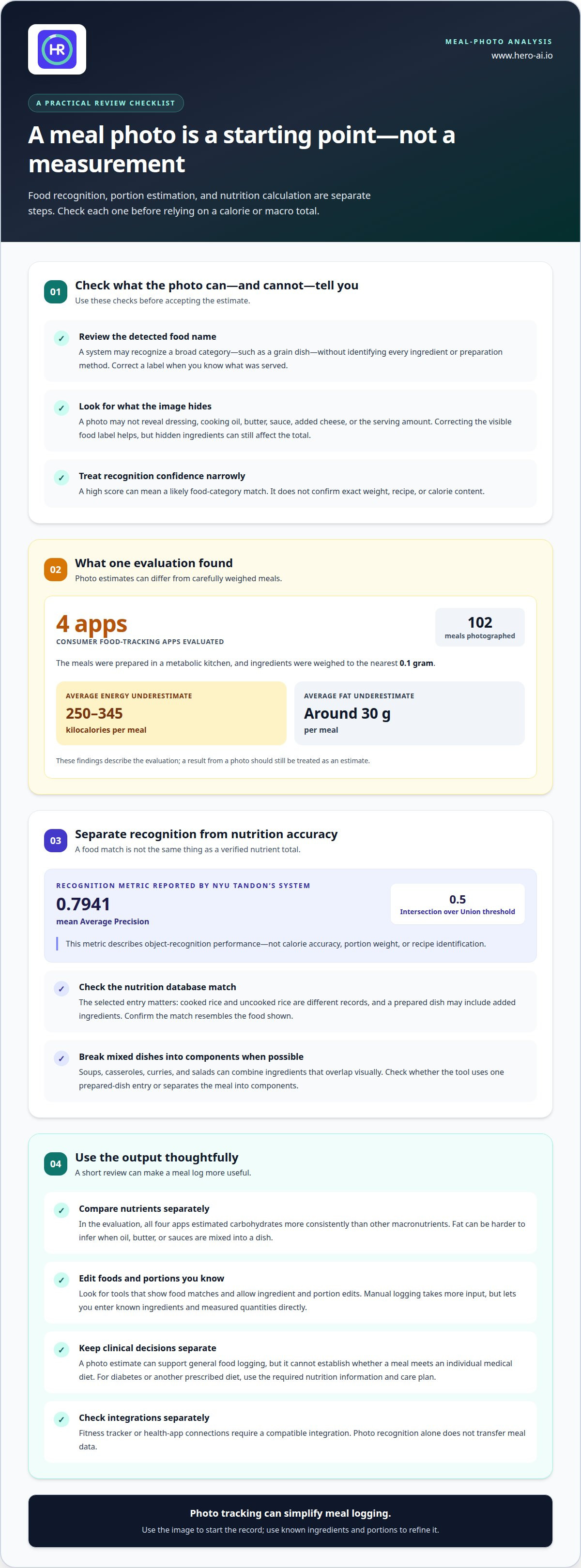
- Use the photo as a starting point, not a measurement. In an evaluation, four consumer food-tracking apps analyzed standardized photographs of 102 meals prepared in a metabolic kitchen. Ingredients were weighed to the nearest 0.1 gram. The apps underestimated energy by an average of 250 to 345 kilocalories per meal and fat by around 30 grams per meal on average. These findings show why a photo-based result can differ from a carefully weighed meal.
- Review the food labels before accepting the estimate. A picture meal analysis tool may recognize a bowl as a grain dish without identifying each ingredient or preparation method. A visible salad, for example, may not reveal its dressing, cooking oil, or added cheese. Correcting a food label can improve the nutrition match, but hidden ingredients still affect the total.
- Interpret confidence scores narrowly. A high recognition score can indicate that the system matched an image to a likely food category. It does not establish the exact weight, recipe, or calorie content. NYU Tandon’s food-recognition system reported a mean Average Precision score of 0.7941 at an Intersection over Union threshold of 0.5. That metric describes object-recognition performance, not calorie accuracy.
- Compare nutrients separately. The evaluation found that all four photo-based apps estimated carbohydrates more consistently than other macronutrients. Fat can be harder to infer from an image because oil, butter, and sauces may be mixed into a dish. For a ketogenic meal, inspect the carbohydrate entry and ingredients rather than assuming the photo confirms the meal’s macro totals.
- Choose an app based on how you will use it. The best apps for meal photos are those that show food matches, allow edits to ingredients and portions, and provide calorie and macro estimates. Manual logging takes more input but lets you enter known ingredients and measured quantities directly. Photo analysis can reduce entry steps; manual details can refine what the image misses.
- Separate tracking from clinical decisions. A meal-photo estimate can support general food logging, but it cannot establish whether a meal meets an individual medical diet. For diabetes or another prescribed diet, use the required nutrition information and care plan; do not rely on image recognition alone. Fitness tracker or health-app connections also require a compatible integration. Photo recognition itself does not transfer meal data.
What types of food can the AI recognize?
Food recognition and nutrition measurement are separate tasks. Use these steps to assess what an analyzer identifies and how it turns those matches into nutrition information.
- Check the food category it detects. Image recognition can match visible shapes, colors, and textures to likely food categories. A photo may show bread, fruit, or a cooked grain dish clearly enough for a category match. The result is a prediction based on the image, not a direct reading of the ingredients or nutrients. Review the displayed food name before using its nutrition estimate.
- Distinguish recognition from measurement. A system can identify a tomato without knowing its weight or ripeness. It can label a sandwich while missing the specific bread, spread, or filling. Nutrition calculations require more than a correct category. They also depend on the portion estimate and the database entry selected for that food.
- Inspect mixed dishes as ingredient combinations. Soups, casseroles, curries, and salads combine ingredients that may overlap visually. A bowl of soup might contain vegetables, beans, broth, and oil, but the photograph may reveal only its surface. Check whether the tool treats a dish as one prepared-food entry or separates it into components. That distinction changes which nutrition reference informs the result.
- Review the nutrition database match. After detecting a food, software looks up a corresponding database entry. Entries can describe a raw ingredient, a cooked ingredient, or a prepared dish. These records can differ because cooking and added ingredients affect the final composition. Confirm that the selected entry resembles the food shown, such as cooked rice rather than uncooked rice.
- Use reference information to resolve ambiguous matches. A nutrition reference connects a food label with recorded nutrient values. If a photo could represent plain yogurt or sweetened yogurt, compare the displayed entry with the package label or recipe details available to you. The image alone cannot reliably reveal added sugar, seasoning, or cooking fat. Correcting the match can make the resulting nutrition record more relevant.
- Correct foods the image cannot distinguish. Similar-looking foods may have different compositions. A plant-based patty and a meat patty can appear alike after cooking, while sauces can obscure ingredients beneath them. Edit the detected name when you know what was served. For a meal with several components, add or replace items individually rather than accepting one broad label.
Ingredient identification and portion estimation
Use these steps to refine the ingredient list, portion estimate, and record of what you actually ate.
-
Identify Ingredients in the Meal
Start by listing visible components, such as rice, vegetables, and grilled tofu. Separate mixed dishes into ingredients when you know what they contain. A stew may include beans, broth, vegetables, and oil, even if the photo shows only its surface. Check for toppings and sides, too. A broad label such as “stew” is not a complete ingredient record.
Add details that a photo cannot establish. A sauce may contain oil or sugar, and roasted vegetables may include cooking fat. Use a recipe or meal description to identify these ingredients when available. If details remain unclear, record visible components rather than presenting unseen ingredients as facts. This keeps the entry grounded in the image and what you know.
-
Estimate Portions and Quantities
Assess each component before estimating the whole plate. Compare a portion with a familiar object, such as a plate or spoon, only if you know that object’s size. Perspective changes apparent size: food near the camera can look larger than food farther away. A top-down view shows the arrangement, while a side angle can reveal height. Neither view establishes weight.
Review the estimated quantity for each item. A mound of rice and a thin layer can cover similar areas but represent different amounts. Dense foods also weigh more than airy foods of similar volume. If you know the amount from a recipe or package, use it to refine the estimate. Do not treat a visual estimate as a measured quantity: a scale provides weight, while an image provides visual evidence.
-
Account for Intake, Waste, and Estimation Errors
Record what you ate, not just what was served. Compare the plate before eating with the leftovers afterward. If you leave half a sandwich or several spoonfuls of soup, adjust the entry to reflect what you did not eat. Keep separate entries for shared dishes or food added during the meal. A photo taken before eating cannot show what remained.
Treat the resulting quantity as an estimate. Portion size is a major source of error in meal-photo calorie estimates, and no single error margin applies to every meal. Camera distance, plate angle, food density, and hidden ingredients all affect interpretation. A shallow layer of pasta, for example, may conceal ingredients underneath. When precision matters, use measured weights or recipe quantities. Otherwise, a photo estimate can serve as a practical record.
Evaluating food recognition technology for business
Assess the system against its intended workflow, not just a successful sample image. Use these steps to evaluate how it identifies meals and calculates nutrition.
- Define the business task. Identify who will use the results and what decision they support. A meal-delivery platform may need menu-item recognition, while a wellness service may need meal logs with calorie and macro estimates. These workflows require different outputs. Specify whether the system must classify foods, estimate portions, calculate nutrition, or support all three. This scope gives the evaluation a practical pass criterion.
- Test images that represent actual use. Assemble examples from the intended setting, such as cafeteria trays, packaged lunches, or mixed dishes photographed by users. Include clear images and difficult cases, such as a partly obscured entrée or several foods on one plate. Record whether the system detects each item and assigns a useful label. A test based only on isolated, well-lit foods may not reflect the deployed workflow.
- Compare outputs with reliable meal records. For each test image, retain the recipe, ingredient list, and measured serving information when available. Compare the system’s food labels and calculated nutrition with those records. Separate recognition errors from portion or database mismatches. For example, a correct label for lentil soup can still produce an unsuitable nutrition result if the selected entry describes a different recipe.
- Evaluate correction and review steps. Check how an operator handles a misidentified item, adjusts a portion, or replaces an incorrect nutrition entry. Use a case such as a grain bowl labeled as a salad. The reviewer should be able to locate the error and update the meal record without restarting the entire workflow. Document which changes are retained and how corrected entries appear in the final report.
- Review operational fit before deployment. Map where images enter the workflow, who reviews uncertain results, and where final records go. A restaurant ordering flow may need a different review process from a nutrition coaching dashboard. Examine data access, retention, and integration requirements against business policies. Then run a limited operational trial and track recurring failure types, such as missed toppings or incorrect prepared-food matches, before expanding use.
Calories and macronutrient breakdowns
Meal photo analysis can estimate calories, protein, carbohydrates, and fat by matching detected foods and portions with nutrition records. Treat each value as a calculated estimate, not a direct measurement.
-
Review Calorie Estimates
Start with the calorie total, then inspect the foods and serving sizes behind it. A plate of pasta may include noodles, sauce, cheese, and oil. If the entry includes noodles but omits added oil, the total reflects an incomplete meal description. Correct the components before using the total in a daily food record.
Distinguish a meal total from a per-serving value. A database may list a prepared dish by its standard serving, while the photographed portion may be larger or smaller. Check the serving basis and adjust the quantity if the tool allows it. A calorie total is only as relevant as the food match and portion estimate behind it.
-
Break Down Macronutrient Estimates
Review protein, carbohydrates, and fat as separate estimates. A lentil bowl may contribute protein and carbohydrates, while its dressing adds fat. The calorie total can look plausible even when an ingredient or macro estimate is wrong. Check whether the breakdown matches the identified ingredients instead of treating the total as proof that every value is correct.
Compare the components with the meal’s main sources of nutrients. In a sandwich, bread contributes carbohydrates, the filling may provide protein, and spreads can add fat. Preparation also matters: an item brushed with oil differs from one cooked without it. Use recipe details or known ingredient information to refine the entry when the photo does not reveal how the food was prepared.
-
Inspect Detectable Nutrition Details
Check which details come from image recognition and which come from a nutrition database. A photo can help identify visible food categories, while a matched record supplies associated nutrient values. The image does not directly measure protein, carbohydrates, or fat. Two similar-looking yogurt cups, for example, may differ because one contains added sugar.
Use package information or a recipe to correct details the image cannot reveal. The nutrition panel can clarify a packaged item; a recipe can identify ingredients in a homemade dish. Meal-photo estimates may help maintain a consistent food log, but use known meal details to improve entries when accuracy matters. Track meals using photo recognition as part of your nutrition logging workflow.
Hero AI
Hero AI turns meal photos into calorie and macronutrient logs using food recognition and nutrition data. Use it to record meals without entering every item manually. You can also scan barcodes or import recipes from social media. Treat photo-based results as estimates, especially when ingredients or serving amounts are difficult to identify visually.
A 1 year subscription provides access to the platform. It can suit people seeking a more consistent way to track meals alongside fitness planning. Contact Hero AI to discuss whether its tracking approach fits your needs.
Hero AI is an option for analyzing meal photos and turning them into calorie and macronutrient logs. Its photo-based results are estimates, particularly when ingredients or serving amounts are hard to identify.
Build a Practical Nutrition Tracking Routine
Set a clear purpose for tracking before making it part of your routine. You might want to notice eating patterns, plan meals, or assess how photo-based logging fits a business workflow. Your purpose helps determine what information to focus on and how often to review your records.
A picture meal analysis tool can support tracking, but useful results depend on consistent decisions. Set a repeatable approach for recording meals, correcting details you know, and reviewing entries. For business use, define who reviews records and how they inform the service. Focus on the decisions you need to make rather than collecting data without a clear purpose.
Hero AI provides photo-based meal tracking to support nutrition logging. Discuss your meal-tracking goals with Hero AI and consider how its approach fits your routine. A clear purpose gives you a practical starting point for using meal data with confidence.
Frequently Asked Questions
Can AI calculate calories from a food photo?
Yes. AI can estimate calories by identifying foods in an image, estimating serving amounts, and matching them with nutrition records. The result is a calculation based on those matches, not a direct measurement. A photo may show a baked potato, for example, without revealing butter added underneath. Add details you know, such as toppings or preparation, to make the entry better reflect the meal.
Is my food photo kept private?
Privacy practices vary by app and data settings. Before uploading a meal image, review how the service handles photos and account data, including retention and deletion. Check whether images are stored or used to improve features, and look for controls to remove saved data. Avoid including people, receipts, or identifying details in the frame when they are not needed to record the meal.
What should a business check before integrating this technology?
Define the intended workflow first. A workplace wellness program may need individual meal records, while a food service may need menu-item recognition. Test representative images and compare results with known recipes or product information. Assess correction steps, data access, retention, and how results transfer into existing systems. Assign someone to review uncertain matches so errors are handled consistently before they reach reports.
Why can photo-based calorie estimates be too low?
Estimates can be low if a photo misses calorie-dense additions or understates the serving. Oil mixed into roasted vegetables may not be visible, and a second serving may be outside the frame. A database match may also describe a plainer version of the dish. Review preparation details, added ingredients, and how much you actually ate before accepting the total.
What is a picture-based meal analysis tool?
A picture-based meal analysis tool processes a food image to suggest meal items and estimate nutrition information. It typically matches visible foods with database entries and calculates values from those records. Some tools also accept barcodes or recipe information for other types of logging. These tools can help organize a food record, but they do not physically measure ingredients or verify a recipe.
How accurate are AI food photo calorie and nutrition estimates?
Accuracy varies with image quality, food identification, portion estimates, and the selected nutrition record. A clear image of a single item is less visually ambiguous than a layered casserole, but a photo cannot establish exact weight or reveal hidden ingredients. Use known package or recipe details to refine an entry. If two visually similar meals may differ, review the selected record.
Are meal analysis tools from photos free, and what do paid plans cost?
Some tools offer free access, while others require a paid plan or include selected features in subscriptions. Costs and terms vary, so compare what each plan includes, its renewal conditions, and cancellation process before enrolling. Free trials are available with selected Hero AI plans. There is no universal price across meal analysis tools, and a trial may not include every feature.
How do I analyze a meal by taking or uploading a photo?
Open the food-tracking app and select photo logging. Take a clear picture or choose an existing meal photo, keeping foods visible and separate items easy to distinguish. Review the suggested foods, correct any mismatches, and add details such as toppings or preparation. Check serving amounts, then save the entry. For packaged food, barcode or nutrition-label scanning offers another way to log it.


