

A large food database alone doesn’t make an athletic performance nutrition logging app a good fit. Compare its food accuracy, connections to your training tools, support for your athletic goals, health metrics, features, and pricing. The right choice is the one that fits your routine and makes consistent, accurate logging practical.
Nutrition tracking is most useful when you can log food consistently and understand what your records show. Look for tools that help you review your intake and make informed adjustments, not just collect entries.
This guide explains how to assess database quality, integrations, and tools for endurance, strength, and body composition goals. It also covers health metrics, useful app features, and how to compare pricing so you can choose an option that matches your training needs.
Key Takeaways
- Assess food database accuracy and log meals consistently so your records can support useful nutrition decisions.
- Review how an app connects nutrition data with training platforms and fitness trackers before relying on it in your routine.
- Set goals around your training focus, such as endurance, strength, or body composition, and configure your profile to match.
- Compare health metrics and app features based on the information you’ll use to adjust your nutrition and training.
- Weigh subscription terms against the tracking tools you need, including photo logging, barcode scanning, and recipe import.
Food database accuracy
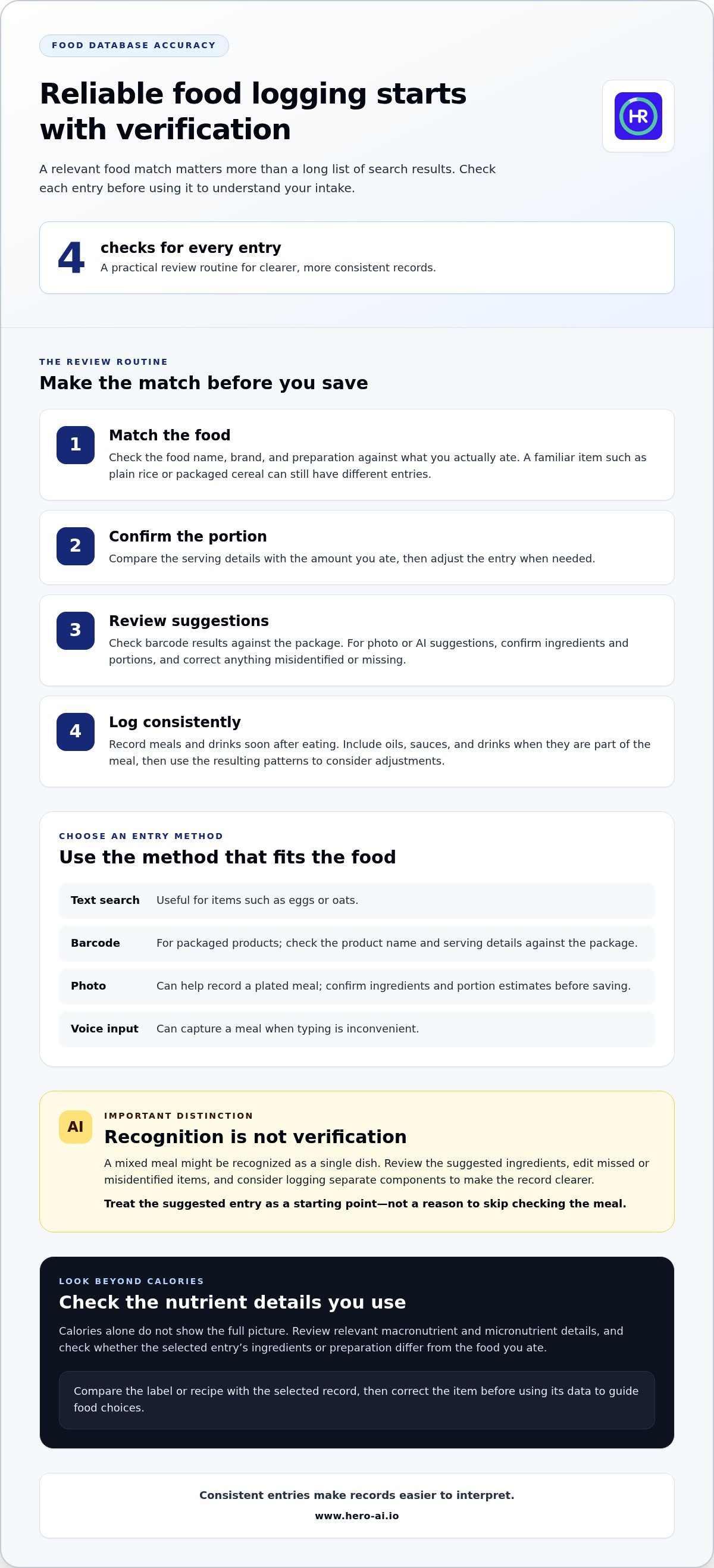
Food data affects the usefulness of every meal entry. To assess an athletic performance nutrition logging app, check how it identifies foods and records portions. Compare entries for familiar items, such as plain rice or packaged cereal, and check whether the product, preparation, and serving match what you ate. A relevant match matters more than a long list of search results.
Use the logging method that best matches the food. Text search works for items such as eggs or oats, while a barcode scanner can identify packaged products. A photo can help record a plated meal, and voice input can capture a meal when typing is inconvenient. Each method still needs review. For a barcode result, compare the product name and serving details with the package. For a photo, confirm ingredients and portion estimates before saving.
AI-powered food recognition can suggest foods from an image, but recognition is not the same as verification. A bowl containing pasta, sauce, and vegetables may be recognized as a single dish. Review the suggested ingredients and edit the entry if the image misses an ingredient or misidentifies a topping. For mixed meals, logging separate components can make the record clearer. Use the app’s suggested entry as a starting point, not as a reason to skip checking the meal.
Consistent logging makes records easier to interpret. Enter meals and drinks soon after eating, and use the same approach for recurring foods. For breakfast, you might log yogurt, fruit, and granola as separate components or save them together as a recipe. Include oils, sauces, and drinks when they’re part of the meal to avoid gaps in your daily record.
Check more than calories. Tracking only macronutrients while overlooking micronutrients is another common mistake. When an app displays nutrient details, review which values matter to your goals and whether the food entry includes them. A database entry with a similar name may have different ingredients or preparation. Compare the label or recipe with the selected record, then correct the item before using its data to guide food choices.
Use a simple review routine for each entry:
- Match the food name, brand, and preparation to what you ate.
- Confirm the portion and adjust the amount when needed.
- Review barcode or AI suggestions against the package or meal ingredients.
- Log consistently, then use the resulting patterns to consider diet and performance adjustments.
Training-platform and fitness-tracker integrations
Apps that combine meal planning with workout calendars can connect food choices to scheduled training. Look for plans that adjust meal timing or fueling guidance around sessions and competition demands.
Integration matters when you want to view nutrition records alongside training activity. Check which data syncs and whether entries appear automatically or need to be added manually. Hero AI logs food by photo, barcode, or nutrition label, and its Discover feed lets you share supported recipes and workouts from Instagram, TikTok, and YouTube to the app. Review the resulting entries and adjust them as needed.
Weight, sweat-rate, and fueling progress each describe different aspects of training. Weight entries can show a longer-term pattern, while sweat-rate estimates relate to fluid loss during a particular session. Record the conditions and duration of a comparable workout alongside fluid intake. For fueling progress, note what you ate before, during, and after a session, then compare it with how the session felt. These records help identify patterns without treating one workout as a complete picture.
Macro tracking can help organize carbohydrate, protein, and fat intake around energy needs and recovery. Nutrient tracking can also include vitamins and minerals, which calorie totals alone don’t show. Compare an easy training day with a demanding session. Review whether the app displays relevant nutrient details and lets you understand how meals contribute to your daily record. The science of sports nutrition involves more than calories, so choose a view that supports the questions you need to answer.
Meal planning and competition fueling features vary by app. Look for a meal planner that connects planned meals with training dates and offers fueling guidance for sessions or events. Before using shared records, review privacy settings, connected-device permissions, and data-sharing controls. A linked platform may receive information such as activity records or nutrition entries, depending on the permissions you grant.
Calorie-tracking apps focus on recording energy intake. Other tools may connect food logs with activity records, but combined data still needs careful interpretation. Compare an app’s capabilities using a typical training day:
- Confirm whether workout data syncs or requires manual entry.
- Review macro, micronutrient, hydration, and body-weight tracking options.
- Check whether meal plans account for scheduled sessions and competition fueling.
- Review privacy controls before connecting a device or platform.
If workout planning and food logging are part of one routine, explore nutrition logging and workout planning.
Goals for endurance, strength, and body composition
Set app goals to match your training focus, then review whether its targets reflect your routine. An endurance athlete, a strength athlete, and someone tracking body composition need different views of progress.
Nutrition and Weight Targets
Nutrition targets organize food choices around a stated goal. For endurance training, review whether the app helps you log meals around longer sessions. For strength work, look at how it displays protein and total intake. For body composition, assess whether weight tracking can be viewed alongside food records and exercise. Personalized targets are useful only when they reflect the training routine and the outcome being monitored.
Define the goal before entering targets. For example, choose whether the priority is supporting endurance sessions, building strength, or changing body composition. Then review the app’s profile settings and confirm that the selected goal appears in its daily summaries. A target that doesn’t match the current training focus can make progress charts harder to interpret.
Weight is one measure, not a complete account of training progress. Compare weight records with exercise patterns and nutrition logs over a consistent period. If a chart changes after a demanding training block, examine the context before changing targets. The app should let you distinguish a recorded measurement from an interpretation of what that measurement means.
Review targets when your routine changes. A shift from endurance sessions to strength-focused exercise changes the context for food records and progress measures. Update the goal settings to match the new emphasis, then check whether summaries and charts follow that change. This keeps the app’s outputs aligned with the choices you intend to assess.
Nutrient Goals and Charts
Nutrient goals show which parts of food intake the app tracks beyond calories. Check whether charts separate macronutrients, such as carbohydrate, protein, and fat, from vitamins and minerals. For example, a daily calorie chart cannot show whether a meal record contains useful detail about iron or calcium. Select views that connect to your stated training goal.
Use charts to identify patterns, not to treat a single day as a verdict. Compare logged meals across training and rest days, and note whether nutrient summaries change with the schedule. If the app displays a target line, confirm which nutrient it represents and whether the display uses totals or percentages. Clear labels make comparisons more useful.
Before acting on a chart, review the records behind it. A missing snack or an unlogged drink can change a daily summary. Use the app’s meal history to find gaps, then assess whether the chart reflects complete entries. This process helps you make informed nutrition choices toward endurance, strength, or body-composition goals.
Health metrics and device integrations
Health metrics add context to food records. A fitness tracker may record activity, while a nutrition app stores meals, protein, and macros. Compare the metrics each app displays, how devices transfer entries, and whether you can review the data together. For example, activity records beside meal times can help you examine how training days differ from rest days.
Start with the measures relevant to your routine. These may include body weight, sleep, heart rate, activity, or training duration. Check whether a device sends each measure automatically or requires manual entry. Then open a sample day and confirm that timestamps and values appear in the correct place. A daily summary is useful only when you can distinguish device data from information you entered yourself.
Integration quality involves more than whether two apps connect. Review which data fields are shared, whether updates flow in one or both directions, and how duplicate records are handled. For example, a workout recorded by a watch and entered into a training platform could appear twice if both services send activity data. Use one test session to trace the record from device to app, then remove duplicates if needed.
Food records can be reviewed alongside health metrics without treating either as a diagnosis. Compare a demanding training day with a lighter day. Look at meal timing, protein, and macros alongside the activity record. This can help identify questions for a qualified professional or trainer, such as whether meal records reflect the training schedule. Avoid drawing conclusions from one isolated entry or device reading.
Before linking a device, review app permissions and account settings. Identify whether access covers activity, health measurements, or profile details. Disable categories that aren’t needed for your tracking routine. If you share records with trainers, confirm which information they can view and whether sharing can be stopped in the app. These steps keep data access aligned with your intended use.
Use this review process when comparing integrations:
- List the metrics you want to monitor, such as sleep, activity, or weight.
- Check how each device sends data and where the records appear.
- Look for duplicate entries after syncing a sample workout.
- Review permissions before sharing nutrition or fitness records.
- Compare device summaries with the original entries when values seem inconsistent.
For trainers and athletes, the practical test is whether the combined view answers a clear question. For example, can you compare meal records with training activity without switching between several disconnected screens? Choose integrations that make relevant entries accessible and understandable. Keep the original records available, since summaries can hide missing meals, delayed syncs, or duplicate activity.
Nutrition-app features and pricing
The best choice depends on whether an app supports your training routine and provides useful nutrition records. Compare meal logging, activity tools, nutrient views, and billing terms before choosing.
For nutrition tracking, compare how each app records food and presents calories and macros. Hero AI lets you log meals by photo, barcode, or nutrition label and displays calorie and macro information alongside weight trends.
Athletic Nutrition App Features
Look for features that connect food records with workouts, such as meal scheduling, recipe entry, or workout planning. Review how the app handles recurring meals and whether summaries help you compare training days. For example, an athlete with morning sessions may value a clear view of breakfast and workout timing. Test the workflow with a typical day before committing.
Also assess how the app supports practical use. Check whether entries can be edited, whether saved meals are easy to reuse, and whether activity records fit your routine. A feature list matters less than the steps required to log a regular meal and review its details. An app that supports consistent use is easier to include in daily training.
Calorie and Nutrient Tracking
Calorie counting records energy intake, while macro tracking separates carbohydrate, protein, and fat. Micronutrient views add details such as vitamins and minerals. Confirm which values appear in daily summaries and whether you can inspect the foods behind each total. Compare apps by these functions, available activity tools, and the detail shown in nutrient reports.
Use a sample training day to test the records. Log meals, review calories and macros, then check whether the app displays micronutrients separately. Confirm that summaries distinguish logged food from activity data. This comparison shows whether the app gives enough detail for your questions, rather than presenting a single number without context.
Nutrition-App Pricing
Compare billing structure, subscription length, renewal terms, and the features included in each plan. Some apps use recurring subscriptions, while others may offer a one-time purchase. Check whether key tools, such as nutrient reports or meal planning, are included in the option you select. Evaluate the full term and included features, not just the payment label.
Before selecting a plan, list the functions you expect to use during a typical training week. Then compare those needs with each option’s billing terms and access conditions. For example, an athlete focused on calorie counting may prioritize reliable meal records, while someone planning workouts may value activity tools. Choose based on fit, not feature quantity alone.
Use this checklist to compare options:
- Test meal entry and review the resulting nutrient summary.
- Check how workouts and activity records appear alongside nutrition data.
- Compare calorie, macro, and micronutrient views.
- Review billing frequency, renewal terms, and features included.
Hero AI: 1 year subscription
Hero AI is an AI-powered health and fitness platform for food logging and workout planning. It can log meals from photos, scan barcodes, and import recipes from TikTok and Instagram. Its database includes over 3 million verified foods. Users can also schedule workouts from social media content.
Consider Hero AI if you want meal logging and workout planning in one platform. Photo recognition can help record a meal, while barcode scanning offers another way to enter food. Recipe imports can support meal records based on social content. Hero AI is available as a 1 year subscription. These tools can support a more organized routine, while your choice should still reflect the features you plan to use.
Visit www.hero-ai.io to learn more about Hero AI.
Turn Tracking Into a Practical Next Step
Choose one question to guide your next training block. For example, consider whether your nutrition routine fits your schedule and supports the demands you place on yourself. An athletic performance nutrition logging app can help you collect information for that review, but the value comes from using the records to make considered choices. Decide what you want to learn before changing your routine. That gives each entry a purpose and makes later reflection more focused.
Keep your next step manageable. Set a review point that fits your training schedule, note what seems workable, and identify where you want more clarity. Avoid changing several parts of your approach at once, since that can make it harder to understand what influenced your experience. If you want to discuss whether Hero AI fits your nutrition-tracking needs, contact Hero AI to discuss your needs. A clear question can help you move from collecting records to making purposeful decisions.
Frequently Asked Questions
Which nutrition apps integrate with Garmin, Apple Health, or training platforms?
Integration depends on the app and the device or platform connection it supports. Before choosing, review its integrations list and identify which information can sync, such as workouts or activity records. Check whether data transfers automatically and whether sharing works in both directions. A practical test is to connect one device, record a workout, and confirm that the resulting entry appears correctly in the nutrition app.
How accurate are food databases and barcode scanners in nutrition logging apps?
Accuracy depends on selecting a database entry that matches the food, brand, preparation, and portion. A barcode scan can identify a packaged item, but check the product details and serving size against its label. For a prepared meal, verify the ingredients and quantities instead of relying only on an automated suggestion. These checks help prevent a close-looking entry from distorting your food record.
What do popular athlete nutrition tracking apps cost?
Costs vary by app, plan term, and included features. Compare subscription options with one-time purchase models, and consider the total cost for the period you expect to use the app. Check whether functions you need, such as detailed nutrient reports or workout tools, are part of the selected plan. Review renewal terms before subscribing so the billing structure fits your intended use.
Can nutrition logging apps track hydration, supplements, and workout fuel?
Some apps support these records through dedicated fields or custom food entries. You can log water or sports drinks, record a supplement by product and serving, and note fuel consumed before, during, or after exercise. Check whether each entry contributes to daily summaries or remains a note. Consistent labels, such as “during workout,” can make records easier to review later.
How do athletes use nutrition apps to set calorie and macro targets?
Athletes can begin by entering their profile details, selecting a goal, and reviewing the app’s calorie and macro targets. Then compare those settings with the training schedule and the records the app displays. For example, an athlete can review food entries alongside training days and note whether the tracking setup answers their intended questions. Adjust settings when the goal or routine changes.
Which nutrition logging apps are best for endurance athletes versus strength athletes?
The right app makes it easier to record food and review nutrition information. Hero AI lets you log meals by photo, barcode, or nutrition label, then automatically calculates calories and macros. Its dashboard brings calorie rings, macro breakdowns, and long-range weight trends together. Choose the logging approach that fits your routine, and review entries before relying on their estimates.


