

Can an automated macro tracker for lean bulking reduce logging effort without making daily macro records harder to trust? Manual meal entry takes time, and uncertain portions or calorie-only summaries can make trends harder to review. Automation can streamline logging, but you still need to check entries that may not match what you ate.
A useful workflow makes food logging repeatable and keeps the resulting data clear enough to review. Compare tracking methods by their entry options, food database, macro reports, correction tools, and links to broader planning. Photo logging, barcode scanning, recipe import, and food search can each save effort in different situations. None replaces reviewing the recorded food and portion details.
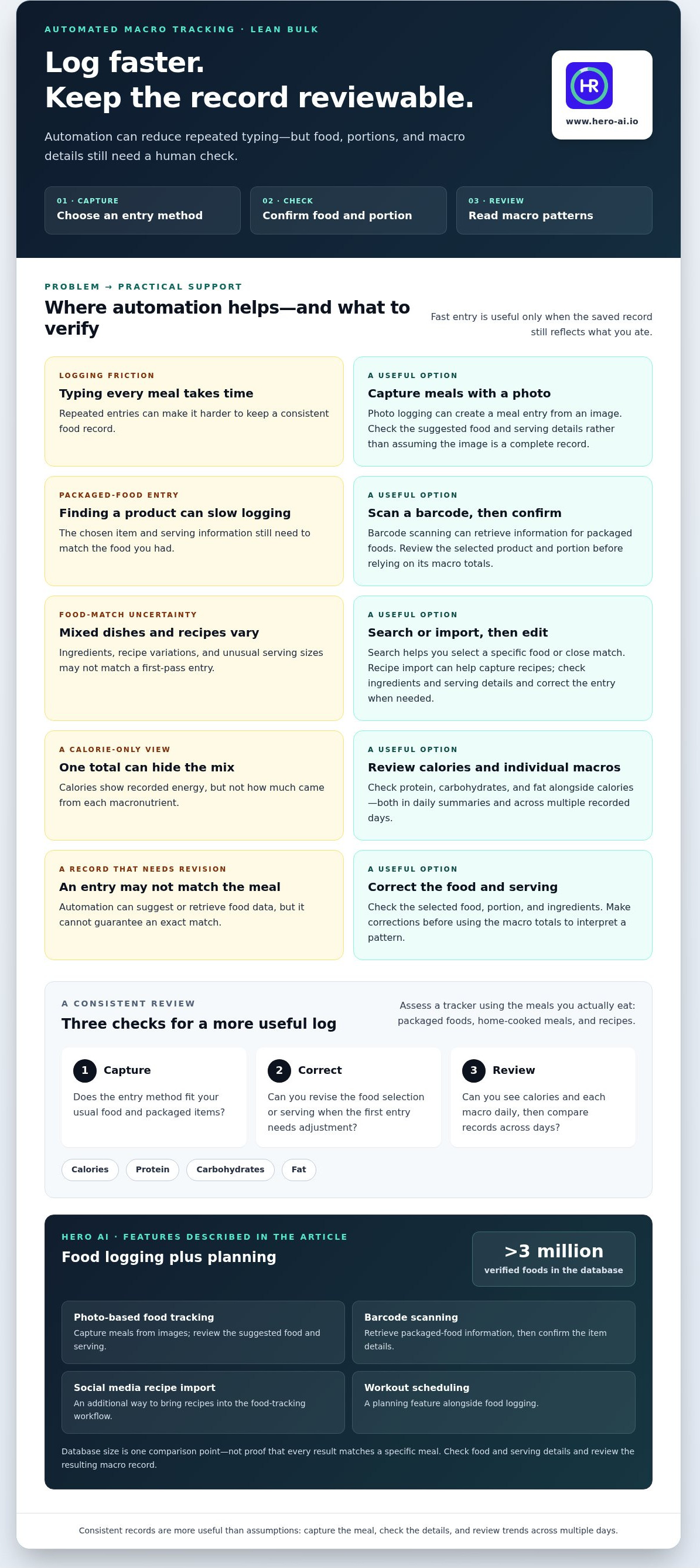
Hero AI combines photo-based food tracking, barcode scanning, a database of more than 3 million verified foods, and social media recipe import. Workout scheduling adds a planning feature alongside food logging. To compare trackers, consider how well their features fit your usual meals and whether you can review the resulting macro records consistently.
Key Takeaways
- Compare food capture options, macro reports, database search, and correction tools when choosing an automated macro tracker for lean bulking.
- Use photo, barcode, and search-based logging as different ways to record meals, not as guarantees that entries are exact.
- Assess a tracker using the meals you actually eat, including packaged foods, home-cooked meals, and recipes.
- Review recorded calorie and macronutrient trends before making adjustments. Consistent logs are more useful than promised body-composition outcomes.
- HERO AI combines photo and barcode logging, a database of more than 3 million verified foods, recipe import, and workout scheduling.
Automated Macro Tracker Needs for a Lean Bulk
An automated macro tracker records food and organizes calorie and macronutrient data for review. For a lean bulk, its practical value is helping you maintain a consistent record over time. No app can guarantee a particular change in body composition. The record is only as useful as the food details entered and the way you interpret them.
An automated macro tracker captures or retrieves food data, while you review entries and make nutrition decisions. Automation can reduce repeated typing, but it cannot make every portion estimate exact. Use the app to record meals, check the information it reports, and review patterns across multiple days rather than drawing conclusions from one entry.
Calories show the energy recorded for food. Macronutrients show how that energy is distributed among protein, carbohydrates, and fat. These nutrients have different roles in the body. Human nutrition basics provides an overview. During a bulk, looking only at calories can hide differences in the foods that make up the total.
What makes macro tracking different from calorie counting?
A calorie total answers, “How much energy did I log?” Separate macro totals answer, “Which nutrients contributed to that amount?” Protein supports the body’s tissue needs; carbohydrates are a source of energy, and fats provide energy and support other body functions. Reviewing each can help you notice patterns, such as meals that contribute little protein or a day’s intake being dominated by one macro. Appropriate targets vary by individual. For personal guidance, consult a qualified nutrition professional rather than treating an app’s default as a prescription.
Which parts of lean-bulk tracking can automation support?
Photo logging can create a meal entry from an image, barcode scanning can retrieve information for packaged foods, and food search can make repeat entries easier to find. These options can reduce manual work, especially when meals or products recur. They still need review. Check the selected food, portion, and ingredients. Mixed dishes, homemade recipes, and unusual serving sizes may need corrections before their macro totals are useful.
When assessing an automated macro tracker for lean bulking, compare how quickly it captures food with how easily it displays and corrects calories, protein, carbohydrates, and fat. A broader macro tracking app functional analysis can help frame that comparison. The key test is whether the entry process fits your meals and gives you records you can review consistently.
How to compare automated macro tracker features before choosing
Compare tools by how they capture food and how clearly they let you review the resulting record. A fast entry method is useful, but speed alone does not tell you whether the selected food, serving size, or macro details match your meal. Look for straightforward editing and clear totals for calories, protein, carbohydrates, and fat.
Choose a tracker that makes food easy to enter, macro records easy to review, and corrections straightforward. Check both daily summaries and views across multiple days. A daily total can help you spot a missing entry, while a longer-term view can reveal whether your records are consistent. For general performance nutrition context, consult Nutrition for athletic performance.
Photo logging, barcode scanning, and food search
Photo logging can simplify meal capture when foods are identifiable from an image. Barcode scanning can speed up entry for packaged items. Search is useful when you need to choose a specific food or find a close match. Each method calls for a different check: mixed dishes, portion sizes, and recipe variations may need editing before the entry reflects what you ate.
For photo-based logging, review the suggested food and serving details instead of assuming the image provides a complete record. HERO AI combines photo and barcode logging in its food-tracking workflow. Explore HERO AI’s food-tracking features.
Database coverage and macro-level reporting
A searchable database is useful when familiar foods are easy to locate and serving information is clear. HERO AI provides access to a database of more than 3 million verified foods. Database size is one comparison point, not proof that every result matches a particular meal. Check the selected item and serving details, then review its macro values.
Look beyond a single calorie number. A useful summary lets you inspect protein, carbohydrates, and fat for the day, then compare totals across recorded days. The right automated macro tracker for lean bulking should support that review without making routine entries hard to maintain.
- Capture: Which methods fit your usual meals and packaged foods?
- Review: Are calories and individual macros visible in daily and longer-term views?
- Correct: Can you change a food selection or serving when the initial entry needs revision?
- Search: Can you find foods and interpret serving details before logging?
Can automation keep lean-bulk tracking accurate enough to use?
Automation can reduce the effort of logging food, but it cannot guarantee that every entry matches the meal exactly. A photo may help identify visible foods, a barcode can retrieve a packaged product’s record, and search can locate a food entry. Each method depends on selecting the right item and serving information. Treat suggested data as a starting point, not as a complete record of every meal.
For an automated macro tracker for lean bulking to support useful decisions, its records need to be consistent enough to review. That does not mean assuming every entry is exact. Check details that could change the logged calories or macros, and apply the same careful process from day to day.
Where automated meal entries may need correction
Mixed meals can contain ingredients that are not clear from an image. Portion sizes may be difficult to judge, sauces can add ingredients that are easy to miss, and recipe substitutions can make a saved entry unsuitable. Before saving a suggested meal, compare the food and portion with what you actually ate. Correct the ingredients or serving details when needed. Editing is a normal part of a reliable logging workflow.
Barcode entries also need a quick check. Confirm that the selected product and serving match what you consumed. Search results may include similar foods, so choose the closest match and review its details instead of relying on the name alone.
How to use macro logs without overreacting to one day
A single unusual meal or incomplete log offers limited context. Review repeated records over time instead of changing a plan in response to one day’s totals. Look for patterns in calorie and individual macro entries, and note gaps that could affect the overall picture. A food log records intake; it is not a direct measure of body composition or proof of a particular outcome.
Use the data as context for review, not as a stand-alone prescription. If you need individualized nutrition targets or have health concerns, consult a qualified nutrition professional. An app can organize food records, while nutrition decisions need to account for individual needs and broader context.
How to assess whether a tracker fits your lean-bulk routine
Choose a tracker based on the foods you log and the review habits you can maintain. A long feature list matters less than a clear process for entering meals, correcting details, and reviewing macro totals. Use this sequence to compare the workflow with your routine.
- Define your logging needs. List the meals you record most often. Note whether your routine includes packaged foods, home-cooked meals, or recipes with changing ingredients.
- Inspect capture options. Check whether photo capture, barcode scanning, and searchable foods suit those meals. Consider how much correction each method may require.
- Review macro views. Confirm that daily summaries show calories and individual macros, and that you can review records across multiple days.
- Test routine fit. Consider how much time entry and review take, whether you can keep the process consistent, and whether summaries are easy to interpret.
Match logging methods to the foods you eat
Photo capture can support logging prepared meals, while barcode scanning can help record packaged items. Search is useful for finding foods and ingredients that do not suit those methods. For recipes shared on TikTok or Instagram, HERO AI includes social media recipe import. Review imported or captured entries against the meal you actually prepared, especially if you made substitutions. For related context, see the social media fitness integration systems article.
Check whether the app supports a repeatable review routine
A useful routine should take you from recorded meals to daily macro totals without losing track of corrections. Set a regular time within your existing schedule to review entries and note patterns. The record can support reflection and informed adjustments, but it cannot promise a particular rate of gain or body-composition result.
Use the same basic review sequence each time: confirm meals are recorded, correct unclear details, and review calorie and macro summaries. An automated macro tracker for lean bulking should make that sequence manageable, not add steps that are difficult to sustain. See how photo and barcode logging fit your routine by exploring HERO AI’s food-tracking workflow.
How HERO AI supports automated food logging and fitness planning
HERO AI brings food-recording methods together with fitness-planning features. For a lean-bulk routine, the practical question is whether these tools make it easier to keep a usable food record. The platform supports logging and organization, but it cannot guarantee muscle gain or determine individual nutrition needs.
Food capture and recipe logging in HERO AI
HERO AI supports meal logging by photo and barcode scan. Photo capture provides a way to record a meal from an image, while barcode scanning can help log packaged foods. Review suggested entries and serving details before relying on them in your record. A photo does not remove the need to check that the foods and portions match what you ate.
The platform also provides access to a database of more than 3 million verified foods. Search can help you find foods to log, but the selected entry still needs to match the item and serving. For an automated macro tracker for lean bulking, capture features and database access are most useful when they lead to records you can review and correct.
Recipe import provides another way to record meals. HERO AI supports importing recipes from TikTok and Instagram, bringing recipe content into the food-logging workflow. Check imported ingredients and portions against the version you prepare, especially if you make substitutions.
Connecting nutrition records with fitness planning
HERO AI also includes workout scheduling from social media content. This supports fitness planning alongside food logging, but serves a different purpose from checking food entries. Scheduling a workout does not verify a meal’s ingredients, serving size, calories, or macronutrients. Review food records separately so you can assess the nutrition data on its own terms.
Together, food capture, recipe import, and workout scheduling can help organize parts of a routine in one platform. Your records can inform reflection, but they do not establish a guaranteed body-composition result. Individual targets and nutrition decisions should account for personal needs.
Review HERO AI’s one-year subscription details to see how its food-logging and fitness-planning features fit your workflow.
Choose a Tracking Workflow You Can Maintain
An automated macro tracker for lean bulking should make food entry manageable and macro records easy to review. Photo, barcode, and search-based logging can reduce repeated entry, but checking portions and meal details remains part of keeping a useful record. Compare daily and longer-term views, then choose a workflow that fits the foods you eat and the time you can consistently give it.
HERO AI combines photo and barcode meal logging with a database of more than 3 million verified foods. Recipe import and workout scheduling from social media content add related planning features. Macro review remains essential for interpreting food records.
Explore HERO AI’s nutrition and fitness tracking subscription to review its one-year subscription and tracking workflow. Build a consistent logging routine, then use the records to support considered adjustments over time.
Frequently Asked Questions
Can an automated macro tracker help with lean bulking?
Yes. An automated macro tracker can organize food records and make calorie, protein, carbohydrate, and fat totals easier to review during a lean bulk. An automated macro tracker for lean bulking supports recordkeeping, but it cannot promise muscle gain. Outcomes depend on an individual’s overall plan, consistent use, and other factors. Check portions and meal details before relying on entries. For individualized nutrition needs, consult a qualified nutrition professional.
How accurate is macro tracking from a food photo?
Photo-based macro tracking can speed up meal entry, but an image may not reveal exact portions, hidden ingredients, sauces, or preparation methods. It can suggest which foods are present, but it does not confirm every detail. Compare suggested foods and serving amounts with the meal you ate. Correct ingredients or portions when needed. The usefulness of the entry depends partly on the information available and how carefully you review it.
What features should I look for in a macro tracker for lean bulking?
Look for clear calorie and individual macro summaries, practical food-entry methods, searchable food records, and options to correct portions or ingredients. Check whether the app makes it easy to review daily totals and records across multiple days. Compare those features with your typical meals and routine. Extra tools are useful only if they support logging and review you can maintain consistently.
Can I use barcode scanning and photo logging in the same tracker?
Some trackers provide multiple food-entry methods. HERO AI supports both photo-based meal logging and barcode scanning. A barcode can help record packaged foods, while a photo offers another way to enter a meal without scanning its packaging. Neither method removes the need to check the selected food and serving size. Review ingredients and portions before treating the entry as a useful record.
Do I need to track every meal while lean bulking?
No single tracking frequency is right for everyone. It depends on your goals, preferences, and any nutrition guidance you follow. A consistent food record can help reveal patterns, but daily logging is not a medical requirement or the only way to manage nutrition. Choose a method you can sustain. If tracking causes distress or conflicts with your health needs, seek support from a qualified professional.
Can a macro tracking app tell me how much to eat to gain lean mass?
A macro tracking app can record food and display nutrition information, but that does not automatically establish an appropriate personal target. Nutrition needs vary by individual and circumstance. Do not treat default app settings as individualized guidance. A qualified nutrition professional can help set targets that account for your needs, particularly if you have a health condition or other factors that affect nutrition.
Does HERO AI support recipe and workout planning?
Yes. HERO AI supports importing recipes from social media content, including TikTok and Instagram, and scheduling workouts from social media content. These features can help organize recipe and workout planning alongside food logging. Imported recipes may still need review for ingredients and portions, and scheduling workouts does not verify food data or provide individualized coaching. Review nutrition entries separately to keep your food record useful.


