

What if a useful fitness progress system tracked less, not more? Fitness goal tracking software can connect a measurable goal with everyday activity, but only when the information you record helps you make a clear decision. Vague targets make progress hard to define. Scattered workout and nutrition records make patterns harder to review. Logging every detail can add effort without clarifying what to do next.
A practical approach starts with a goal that fits your routine, then uses a small set of indicators to show whether your habits are moving in the right direction. Hero AI supports this routine with meal logging and workout scheduling to help organize nutrition records and planned activity.
This article explains how to define a measurable fitness goal, choose useful progress indicators, and review them at regular intervals. You’ll also learn how to adjust your routine thoughtfully without turning tracking into another demanding task. The aim is a repeatable system that connects your goals, everyday actions, and regular reviews.
Key Takeaways
- Separate the goal you want to reach from the measurable outcome and the actions that support it.
- Use fitness goal tracking software to focus on indicators that match your goal, rather than recording every available metric.
- Compare manual food entry, barcode scanning, and photo-based logging to find a capture method that fits your routine.
- Set a baseline, choose a small set of measures, and establish a regular time to review your records.
- Hero AI supports meal logging with photo recognition and barcode scanning, alongside a database of more than 3 million verified foods.
What Fitness Goal Tracking Software Does, and What Progress Actually Means
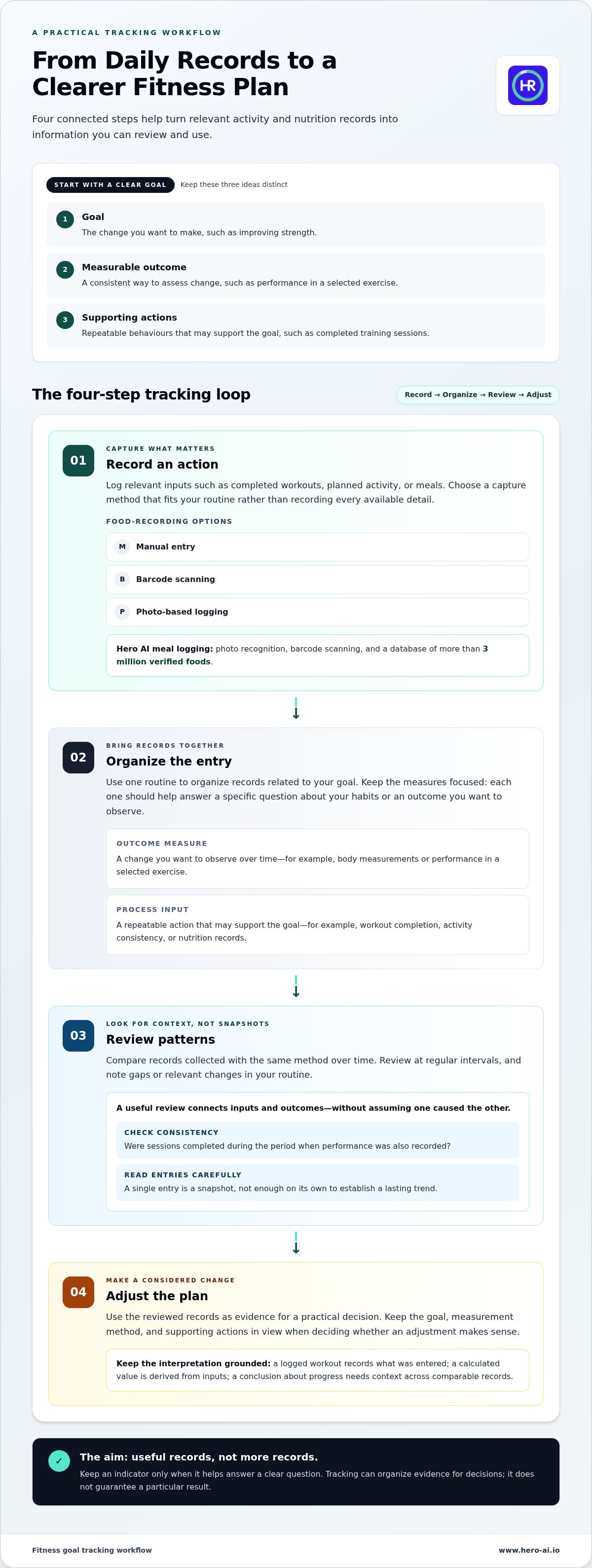
A goal describes the change you want. A measurable outcome shows how you’ll assess that change. Supporting actions are the repeatable behaviours that may contribute to it. For example, improving strength is a goal; tracking performance in a selected exercise is one way to measure an outcome; recording completed training sessions captures an action.
Fitness goal tracking software is a tool for recording and reviewing information related to a defined fitness goal. It can make records easier to examine over time, but those records are inputs for decisions, not proof that a goal has been achieved. Tracking is part of the broader practice of using technology to observe personal data, discussed in the Quantified Self movement.
How to turn a broad fitness goal into a measurable target
Make your target specific enough to assess, set a time frame, and choose a repeatable measurement method. For instance, an activity target could track completed walks during a chosen period. A strength target could record repetitions or resistance for a selected exercise. A nutrition target could monitor how often meals include a particular food group.
These examples describe ways to measure, not recommended outcomes. The right target depends on your routine, starting point, preferences, and available time. A target that doesn’t fit those conditions can be difficult to maintain or interpret. Decide what you’ll record and how often, so later comparisons use a consistent basis.
What software can, and cannot, tell you about progress
Recorded observations differ from estimates and interpretations. A logged workout records what was entered. A calculated total or device-generated estimate is derived from available inputs. A conclusion such as “this routine is working” is an interpretation that needs context, including the goal, measurement method, and pattern across multiple entries.
A single entry rarely establishes a lasting trend. A missed workout, an unusually demanding session, or a meal recorded differently can affect how a snapshot appears. Review comparable records over time before adjusting your plan. Keep the method consistent where possible, and note relevant routine changes that could help explain the record.
Used this way, fitness goal tracking software helps organize evidence for practical decisions. It can show what has been recorded and support a review of patterns. It can’t guarantee a particular result or determine what a measurement means for every person. Progress is easier to assess when the goal, outcome measure, and supporting actions are clearly separated.
Which Fitness Metrics Should You Track to Understand Change?
A useful metric helps answer a question about your goal. Separate the outcome you want to observe from the actions that may support it. Fitness goal tracking software can organize both, but a long list of measurements can make reviews harder without clarifying what to do next.
Outcome measures and daily inputs serve different purposes
Inputs provide context for interpreting an outcome. For example, a record of planned workouts can show whether sessions were completed during a period when performance was also recorded. It doesn’t prove that the workouts caused a change. Other factors may contribute, and the records describe only what was captured.
Choosing a manageable set of progress indicators
Start with your goal, then choose a few measures that help assess it. If you’re focused on establishing a regular routine, record planned activity and completed sessions. If you’re monitoring nutrition habits, keep meal records. If your goal relates to body measurements or exercise performance, use the same measurement method each time. Changes in tools, technique, or recording conditions can make comparisons less useful.
More data doesn’t automatically lead to better decisions. Each additional metric takes effort to capture and review. Keep an indicator only if it helps answer a specific question, such as whether you’re following a planned routine consistently or whether a chosen outcome is changing over time. The American Council on Exercise’s resource on fitness tracking success offers further context on tracking within goal-oriented fitness practice.
Trends are meaningful only when observations are collected consistently and compared using the same method over time. Review records at regular intervals, note gaps or changes in routine, and avoid treating a single entry as a pattern. This keeps your review focused on information that can support a reasonable adjustment.
For people organizing nutrition records alongside planned activity, Hero AI’s meal and workout planning features can support a broader personal tracking routine.
How Fitness Tracking Software Organizes Data Without Overloading You
A useful tracking workflow has four steps: record an action, organize the entry, review patterns, and adjust the plan. Fitness goal tracking software can bring records into one routine, but you still decide what information matters and how to interpret it. Recording fewer relevant details is often more practical than capturing every available data point.
Food records can be captured in several ways. Manual entry lets you add meal details directly. Barcode scanning can identify packaged food from its code. Photo-based logging uses an image to support meal recognition. Each method has different input requirements. Recognized or imported information may need review for serving size, preparation, or other context. This AI calorie counter guide explains food-data capture methods in more detail.
Connecting nutrition records with workout planning
Nutrition entries and activity records provide complementary context. Meal logs can show what was recorded around planned activity, while workout schedules show intended sessions. A scheduled workout doesn’t confirm that the session was completed, and completion alone doesn’t describe performance. Record those distinctions separately. For examples of turning online fitness content into planned activity, see social media fitness integration.
Connect your planning to a goal that fits your circumstances. Set activity targets around your routine and starting point, then record the actions that support them. Review completed activity separately from planned sessions, and use consistent records to assess patterns over time.
Keeping tracking useful, interpretable, and sustainable
Choose a logging routine that fits an existing part of your day, such as recording a meal after eating or noting a workout after the session. Keep the capture method consistent where possible. This makes entries easier to compare and reduces the need to reconstruct a week from memory.
Missed entries create gaps, but they don’t invalidate every other record. Mark unknown information as missing rather than filling it in with a guess. A partial record can still show some patterns, though it may not support firm conclusions about the unrecorded period.
Treat estimates as estimates. Photo recognition and other automated entries can help organize information, but don’t treat them as exact measurements without review. Tracking software supports personal recordkeeping and planning. It doesn’t replace professional advice when you need individualized guidance.
How to Set Up a Fitness Goal Tracking Routine You Can Review
A reliable routine connects one defined goal to a small set of records and a planned review. Fitness goal tracking software can help organize entries, but the process should stay simple enough to repeat. Use these steps to create a routine that fits your schedule.
A simple start-to-review process
- Define the intended outcome and time frame. State what you want to observe and when you’ll review it. Choose a time frame that reflects your starting point and routine.
- Select a few useful measures and record a baseline. Choose one outcome measure and, if useful, one or two supporting actions. Record your starting point using a consistent method. For example, note your current workout frequency or performance in a selected exercise.
- Set a capture routine. Decide when and how you’ll record the relevant actions. You might log a workout after completing it and record meals at a consistent point in your day. Keep scheduled activity separate from completed activity.
- Choose a review point. Set a regular interval that gives you enough records to examine. Compare entries with the baseline, and note missing data, routine changes, and patterns before deciding whether to adjust anything.
Illustrative example: A person wants to build a more consistent strength-training routine. They record their current completed sessions as a baseline, set a personal target for the next four weeks, and log completed sessions after each workout. At the planned review, they compare the record with the target. These values are hypothetical and demonstrate the process, not a recommended schedule or outcome.
How to respond when progress appears inconsistent
Check your records before changing the plan. Were entries captured in the same way? Are there gaps that make the comparison incomplete? Did travel, a schedule change, or another shift affect the routine? A short-term variation may reflect recording differences or context rather than a lasting pattern.
If a pattern persists across comparable records, adjust one element at a time. For example, change the timing of a planned session while keeping the measurement method consistent. Reviewing one adjustment at a time makes it easier to understand what changed. Avoid revising your goal in response to a single entry.
Use tracking to inform personal planning, not to diagnose a health concern. Seek qualified professional guidance for health concerns or advice tailored to individual needs. To organize meal records and planned workouts in one routine, explore HERO AI.
How HERO AI Fits Into a Fitness Goal Tracking Workflow
A tracking routine can combine personal records with tools that make everyday inputs easier to capture. HERO AI supports photo-based meal logging, barcode scanning, and access to a database of more than 3 million verified foods. These features can help organize nutrition information for a personal review routine. They don’t define a fitness goal or determine whether it has been achieved.
Using supported nutrition and workout functions as tracking inputs
Choose a meal capture method that fits the information you want to record. Photo-based logging captures a meal through an image, while barcode scanning can help identify packaged foods. The food database provides another source for meal entries. Review recognized or selected items for relevant context, such as preparation or serving details, before using them in a personal review. For more on nutrition information and macros, see this macro tracking app overview.
HERO AI also supports importing recipes from social platforms and scheduling workouts from social content. These functions can help turn content into planned inputs for a routine. A scheduled workout represents an intention, not proof of completion or a measure of performance. Keep completed activity and performance records distinct if they’re part of your personal tracking system.
What to consider when building a routine with HERO AI
Match the capture method to the question you want your records to answer. If you want a basic record of meals, choose a method you can use consistently. If a nutrition review depends on specific ingredients or portions, inspect the entry and add context where needed. Imported recipes and recognized food information can support recordkeeping, but may not reflect every detail of how a meal was prepared.
Fitness goal tracking software is most useful when its records connect to a defined goal and a repeatable review process. Keep only entries that inform that process. Use meal records as nutrition inputs and scheduled workouts as planning inputs. Compare them with your own observations at a regular review point, rather than expecting the software to assess progress automatically.
To put this approach into practice, choose one nutrition or workout input to record consistently, then decide when you’ll review it. HERO AI’s meal logging and workout scheduling features support these parts of a broader personal routine.
Build a Routine You Can Review and Refine
Useful fitness goal tracking software connects a defined goal with a small set of relevant measures and repeatable actions. Record a baseline, keep capture methods consistent, and review entries at planned intervals. Look for patterns across comparable records rather than treating one data point as a conclusion.
Use the information to guide reasonable adjustments, not to assume that logging guarantees a particular result. If a pattern persists, change one part of the routine at a time. Nutrition records and planned workouts can add context to a personal review, while still requiring your own interpretation.
HERO AI supports meal capture through photo recognition and barcode scanning, with a database of more than 3 million verified foods. It also supports recipe importing and workout scheduling from social media content. Review entries and distinguish planned activity from completed sessions as you build your tracking routine.
Explore HERO AI’s one-year subscription for nutrition and workout tracking and choose the meal and activity records that fit your routine.
Frequently Asked Questions
What is fitness goal tracking software?
Fitness goal tracking software helps people record and review information related to a fitness goal. Records may include completed workouts, activity patterns, nutrition entries, or selected outcome measures. The software organizes inputs, but users define what progress means and decide how to respond. It can support consistent reviews, but it can’t guarantee a specific result or determine whether a goal has been achieved.
How do I track fitness goals effectively?
Start with one specific goal, a realistic time frame, and a repeatable way to assess change. Record a baseline, then select a small number of relevant measures. For example, a person building an exercise routine could record planned and completed sessions separately. Log entries consistently and review them at set intervals. If records show a persistent pattern, adjust one part of the routine at a time.
What metrics should I track for fitness goals?
Choose metrics that relate directly to your goal. Outcome measures could include body measurements or performance in a selected exercise. Process measures could include workout completion, activity consistency, or nutrition records. You don’t need to track every available data point. Use consistent methods for comparisons, especially for measurements or performance records. A small, relevant set is easier to capture and review.
Can fitness goal tracking software help with weight loss or muscle gain?
Fitness goal tracking software can help organize records related to goals such as weight loss or muscle gain. A person might log workouts, nutrition information, or a chosen outcome measure, then review entries for patterns. Those records can inform planning, but they don’t guarantee a result or prove that a particular action caused a change. Individual needs and circumstances vary, so seek qualified professional guidance for personalized advice.
How often should I review my fitness progress?
Set a regular review interval that gives you enough comparable records to examine. The right timing depends on the goal, measurement, and logging routine. Review completed actions alongside outcome measures, and note gaps or changes in your routine. Avoid drawing conclusions from one entry. If the record is incomplete, treat it as partial information and continue using the same methods where possible.
Are fitness tracking app measurements always accurate?
No. A logged observation, automated estimate, and interpretation are different kinds of information. Photo recognition or a calculated value may need review for details such as preparation or serving size. Body measurements and exercise performance can also vary with collection method or conditions. Use consistent methods, check entries for context, and treat estimates as estimates rather than exact measurements.
Can one app track both nutrition and workouts?
Yes. HERO AI supports meal logging through photo recognition and barcode scanning, with a database of more than 3 million verified foods. It also supports importing recipes from social media content and scheduling workouts from that content. Meal entries can contribute nutrition information to a personal review, while scheduled workouts represent planned activity, not confirmed completion or measured performance.


