

What if a meal photo could start a useful food record without requiring you to type every ingredient? A photo meal logging app can identify visible foods and create a starting entry, making routine tracking easier. But an image can’t reliably show exact portions, hidden ingredients, or how a dish was prepared.
That doesn’t make photo logging less useful. It means the image is a starting point, not a complete record. Reviewing the estimate and adding context when needed can keep entries practical without turning every meal into a lengthy task.
This article explains how photo meal logging works, what an image can and can’t tell you, and when to review or adjust an entry. It also covers ways to log different meals consistently, including when a food database, barcode scan, or recipe import may be a better fit. Hero AI brings photo recognition together with a database of over 3 million verified foods, giving you more than one way to record a meal.
Key Takeaways
- Use a simple capture, review, add context, and save routine to turn meal photos into useful entries.
- Separate food recognition from portion estimates and nutrition data when deciding what to check in a generated record.
- Set a repeatable approach for snacks, shared plates, meals away from home, and missed photos without requiring perfect documentation.
- Choose a photo meal logging app based on its input methods, food database, and fit with your meals and habits.
- Use photo logging alongside options such as barcode scanning or recipe imports when they better suit the food being recorded.
What a Photo Meal Logging App Records from a Meal Image
A photo meal logging app uses an image to create a food entry. Instead of typing a description and selecting each food from a list, you start with a picture. The app may identify visible items and use them to build a draft record. You can then review the entry and adjust details the image can’t establish.
What information can a meal photo provide?
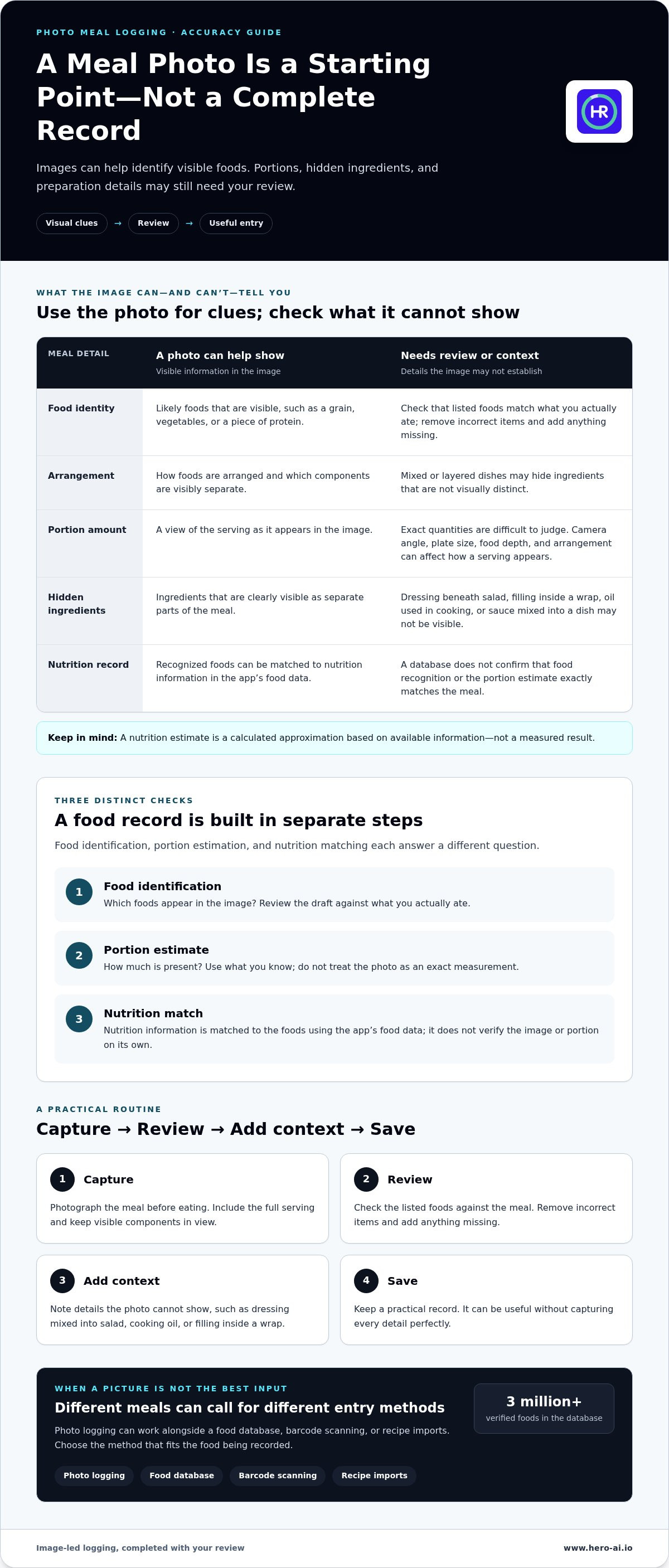
A clear image can show which foods are present, how they’re arranged, and which components are visibly separate. For example, a plate may show a grain, vegetables, and a piece of protein. These visual clues can help identify likely foods and make the entry easier to review.
Photo meal logging uses an image to create a food record that the user can review and complete.
A photograph is still only one view of the meal. It may not reveal exact quantities, ingredients mixed into a dish, or preparation details. Oil used in cooking, dressing beneath a salad, filling inside a wrap, or sauce blended into a recipe may not be visible. Even if the food is recognized correctly, the portion and matching nutrition information may need review.
How is photo logging different from a regular food diary?
A typed diary starts with your description. You name the food, search for a match, and enter or select relevant details. An image-led entry starts with visual information instead. This can reduce typing, but it doesn’t remove the need to check what was recognized or add context the image leaves out.
The image can also serve as a visual reference when you review the food record later. It provides context a short text label may miss, such as the combination and arrangement of foods. This fits within the broader practice of tracking personal information for self-knowledge, sometimes associated with the Quantified Self movement.
Photo recognition can work alongside other input methods to create a more complete entry. HERO AI supports photo meal logging, barcode scanning, and social recipe imports, with a database of over 3 million verified foods. The image provides a starting point, while the available food information helps connect visible items to a record of the meal.
How to Create a Useful Meal Entry with Photo Logging
A photo entry works best as a short routine, not a demand for perfect documentation. Capture the meal before eating, check the draft record, add details the image can’t show, then save. This approach is especially useful for mixed meals, where sauces, fillings, or cooking methods may affect what belongs in the entry.
How should you photograph a meal for logging?
Take the photo before eating. Include the full serving and keep the view clear. When practical, separate visually distinct components, such as a side dish and a main dish. Move items that block the food and reduce background clutter so the meal is easier to review.
A clear image supports identification and later review, but it doesn’t prove exact quantities. A photo of a bowl, for example, may show the visible ingredients but not the depth of food beneath them. Treat the image as a record of what was served, not a precise measurement of every portion.
What should you review before saving the entry?
Use this simple sequence:
- Capture: Photograph the meal before eating, with the serving and its visible components in view.
- Review: Check that the listed foods match what you actually ate. Remove incorrect items and add anything missing.
- Add context: Describe details the image can’t show, such as dressing mixed into a salad, oil used in cooking, or filling inside a wrap. For an uncertain portion, use what you know rather than treating the image as an exact measurement.
- Save: Keep the completed entry as a practical record. It can be useful without capturing every detail perfectly.
For a mixed dish, add a brief note if an ingredient or preparation detail changes how you’d describe the meal. Keep the note specific. “Pasta with creamy sauce” provides more context than “pasta” when the sauce isn’t separately visible. Harvard Health Publishing discusses the benefits of a food diary, including how recording meals can support awareness of eating habits.
A photo meal logging app can make the initial entry easier, while your review adds personal context. HERO AI combines photo logging with other food-entry methods, so you can choose an option that fits the meal. For a broader meal-tracking workflow, explore HERO AI food logging.
Photo Meal Logging Accuracy: What Images Show and What They Miss
A photo-generated food record involves several separate steps. First, the app identifies foods in the image. Next, it estimates how much is present. Then, nutrition information is matched to those foods using the app’s food data. Each step serves a different purpose. A verified food database can support the nutrition record, but it can’t confirm that the image recognition or portion estimate exactly matches the meal.
Which meal details are difficult to judge from a photo?
Layered and mixed dishes can hide ingredients and quantities. A photo of soup may not show what is beneath the surface. A casserole can combine ingredients that aren’t visually distinct. Fillings inside a wrap, oil used during cooking, and sauce mixed through a dish may also be hidden. Recipe variations can change what a meal contains, even when two dishes look similar.
Perspective adds another limitation. Camera angle, plate size, food depth, and arrangement can make a serving appear larger or smaller than it is. A nutrition estimate is a calculated approximation based on available information, not a measured result. Review the entry and add details you know rather than treating the image as proof of exact quantities or ingredients.
When is a barcode or typed entry more useful?
Different entry methods provide different context. A barcode can help identify packaged food when its product information is available. Typed notes can clarify customized recipes, restaurant meals, or ingredients that aren’t apparent in a photo. Choose the method that best captures the information you have.
| Entry method | Useful context | What to check |
|---|---|---|
| Photo | Visible foods, arrangement, and separate components | Hidden ingredients and uncertain portions |
| Barcode | Packaged food with accessible product information | That the identified product matches the item |
| Typed entry | Recipe details, preparation notes, or foods that are hard to identify visually | That the description reflects what was eaten |
A photo meal logging app is most useful when you understand what its estimate can and can’t tell you. HERO AI combines photo recognition and barcode scanning with social recipe imports and a database of over 3 million verified foods. You can choose an entry method based on the meal, while keeping the distinction clear between identifying a food and establishing its exact contents.
For broader criteria on choosing digital food-tracking tools, consult a smart food logging app buyer’s guide. Compare the available input methods and consider which ones fit your usual meals and the details you want to record.
How to Build a Consistent Photo Meal Logging Routine
A useful routine should fit into your day. Choose a regular moment to record meals, such as before eating or shortly afterward. A photo meal logging app makes capture a convenient starting point, but consistency doesn’t require a perfect image or a complete breakdown of every ingredient. Aim for a record that’s clear enough to review later.
How can users keep meal logging manageable?
Log the meal promptly when practical. If that isn’t possible, add a short note later while the details are easy to recall. Include information that affects the entry, such as a sauce, a shared dish, or a change to a familiar recipe. Avoid repeated retakes or lengthy descriptions when they don’t add useful context.
- Snacks: Record the item or take a quick photo. Add a note if the portion or ingredients aren’t clear.
- Shared plates: Log the foods you ate, not the full serving intended for everyone. Add a brief description if your portion is difficult to distinguish.
- Meals away from home: Photograph the meal if practical. If not, write down the main foods and any details you can recall.
- Missed photos: Continue with a typed description or another available entry method. Missing an image doesn’t mean you have to skip the record.
Flexible options can make tracking manageable across different situations. For another perspective on selecting a tracking approach, a comparison of meal logging apps for weight loss can help you consider how app features fit your habits.
How should users interpret incomplete or estimated entries?
Mark uncertain portions or ingredients as estimates. Don’t present an unclear quantity as exact. The goal is to keep a useful record, not to make every entry look precise. Reviewing entries over time may help you notice personal patterns, such as recurring snacks or meals that are often logged with missing details.
Use those observations as information about your own routine. They aren’t a medical assessment or a substitute for professional care. If you need guidance about a health concern or nutrition needs, consult an appropriate professional.
HERO AI supports photo logging alongside barcode scanning and social recipe imports, so you can use different entry methods for different meals. Explore HERO AI meal logging as one way to keep food records in a consistent workflow.
What to Look for in a Photo Meal Logging App
A photo feature is only one part of a food-tracking workflow. Before choosing an app, consider whether its other functions match the meals you record and how much detail you want to enter. Useful criteria include available input methods, the ability to review entries, food database coverage, and clear handling of estimates.
Which app features support a practical photo logging workflow?
Review options matter because a photo may not show every ingredient or portion detail. Look for a workflow that lets you correct an identified food and add context, such as a sauce, preparation method, or customized recipe. The app should make it clear when information is an estimate, rather than presenting uncertain details as measured facts.
Multiple input methods can support different kinds of meals. A photo may suit a plated meal with visible components. A barcode can help identify packaged food when product information is available. A typed entry or recipe import can provide context for homemade dishes and meals with ingredients that aren’t visible. A food database also matters because the selected food information contributes to the resulting record.
HERO AI combines photo meal logging with barcode scanning and social recipe imports. Its food database includes over 3 million verified foods. These options provide different ways to create a meal entry, depending on the food and the information available.
How can you decide whether photo logging fits your routine?
Consider your usual meals and preferred logging effort. If you often eat meals with clearly visible components, photos may provide a useful starting point. If you regularly log packaged foods, barcode scanning may suit those entries. For mixed meals or customized recipes, typed details or a recipe import can add context. Review the resulting record and adjust details that don’t match what you ate.
A photo meal logging app is a record-keeping tool, not a guarantee of exact nutrition information or a particular outcome. Its usefulness depends on how well the workflow fits your meals and whether you can maintain a practical routine. The best match supports the level of detail you want without adding unnecessary steps.
Explore HERO AI’s meal logging tools to see how photo logging, barcode scanning, recipe imports, and food database information fit into one nutrition and fitness platform.
Make Meal Logging Fit Your Routine
A meal photo can make food tracking easier to start, but it’s a starting point rather than a complete record. Review the suggested foods, add context the image can’t show, and treat uncertain portions as estimates. A consistent, practical routine is more useful than trying to document every meal perfectly.
Choose the entry method that suits the food. Photo logging can work alongside barcode scanning and recipe imports, while an editable entry lets you add details. HERO AI brings these tools together with a database of over 3 million verified foods.
Explore HERO AI’s meal logging tools to find an approach that fits your meals and tracking habits. Start with a simple record and build a routine you can maintain.
Frequently Asked Questions
How does a photo meal logging app work?
A photo meal logging app uses an image to create a food entry for review. It identifies visible foods, estimates portions, and connects items to nutrition information in its database. You can then correct mismatched foods or add details the photo doesn’t show. HERO AI also supports barcode scanning and social recipe imports, giving you additional ways to record meals when an image isn’t the best fit.
Can an app accurately calculate calories from a food photo?
A food photo can support a calorie estimate, but it can’t establish an exact result. The app must identify the foods, estimate their quantities, and match them with nutrition data. Hidden ingredients, preparation methods, and portion size can affect the entry. Review the result and add details you know. Treat the calorie figure as an estimate, not a measured value.
What should I do if an app identifies the wrong food in my photo?
Correct the food entry before saving it. Select the closest accurate item available, remove foods you didn’t eat, and add anything missing. If the image doesn’t show enough detail, enter a short description instead. For example, note a sauce or filling that isn’t visible. Reviewing the entry helps it reflect what you ate, not only what the app detected.
Can I use a photo meal logging app for homemade recipes?
Yes. A photo can provide a starting point for a homemade meal, especially when its visible components are distinct. Add recipe details the image can’t reveal, such as ingredients mixed into a dish or changes you made to a familiar recipe. Recipe imports may also help when the recipe is available in a supported format. Review the resulting entry before saving it.
Is photo meal logging better than manually entering food?
Neither method is best for every meal. A photo meal logging app can reduce typing when foods are visible and easy to distinguish. Manual entry can provide more control when a meal has customized ingredients or details that aren’t apparent in an image. Use the approach that fits the food and the amount of context you want to record. You can combine methods across different meals.
Do I need to photograph every meal to keep a food log?
No. A useful food log can include entries made in different ways. Take a photo when it’s practical, use a barcode for packaged food when product information is available, or write a description when a picture isn’t possible. If you miss a photo, record what you remember. A consistent routine can include occasional gaps without requiring you to recreate every meal in detail.
Can a meal photo show exact portion sizes and hidden ingredients?
No. A photo can show visible foods and how they’re arranged, but it doesn’t reliably reveal exact quantities or every ingredient. Camera angle, serving depth, and plate size can make portions difficult to judge. Oil, sauces, fillings, and ingredients mixed into soups or casseroles may be hidden. Add those details when you know them, and label uncertain quantities as estimates.


