

What if a meal photo saves time but leaves you unsure whether the ingredients or portion are right? A smart food logging app should make recording easier while keeping entries clear and editable. Manual logging can take enough effort to disrupt a consistent routine, while automated recognition may need review when a meal combines several ingredients or its portion is unclear.
Choosing an app means looking beyond the number of features. This guide compares capture methods, nutrition data, editing controls, and everyday fit so you can assess how each part of the logging process works together. It also considers Hero AI, which combines photo meal recognition and barcode scanning with recipe importing from social media and a database of over 3 million verified foods. You’ll learn what to check when comparing photo, barcode, and search-based logging, how to review estimated entries, and how to find a process you can maintain in daily use.
Key Takeaways
- Compare a smart food logging app by how well its capture, editing, and nutrition-data features work together, not by feature count alone.
- Use familiar meals to assess how clearly you can review and correct entries as part of your usual logging routine.
- Set essential requirements around your tracking habits and priorities before weighing optional features.
- Consider how HERO AI’s one-year subscription brings nutrition logging, recipe importing, and workout scheduling into one platform.
What makes a food logging app smart, and useful for daily tracking?
A smart food logging app helps you capture, organize, and review meal information. Its value depends on more than how quickly you can enter a meal. A quick entry is useful only if the resulting record is clear enough to check and correct.
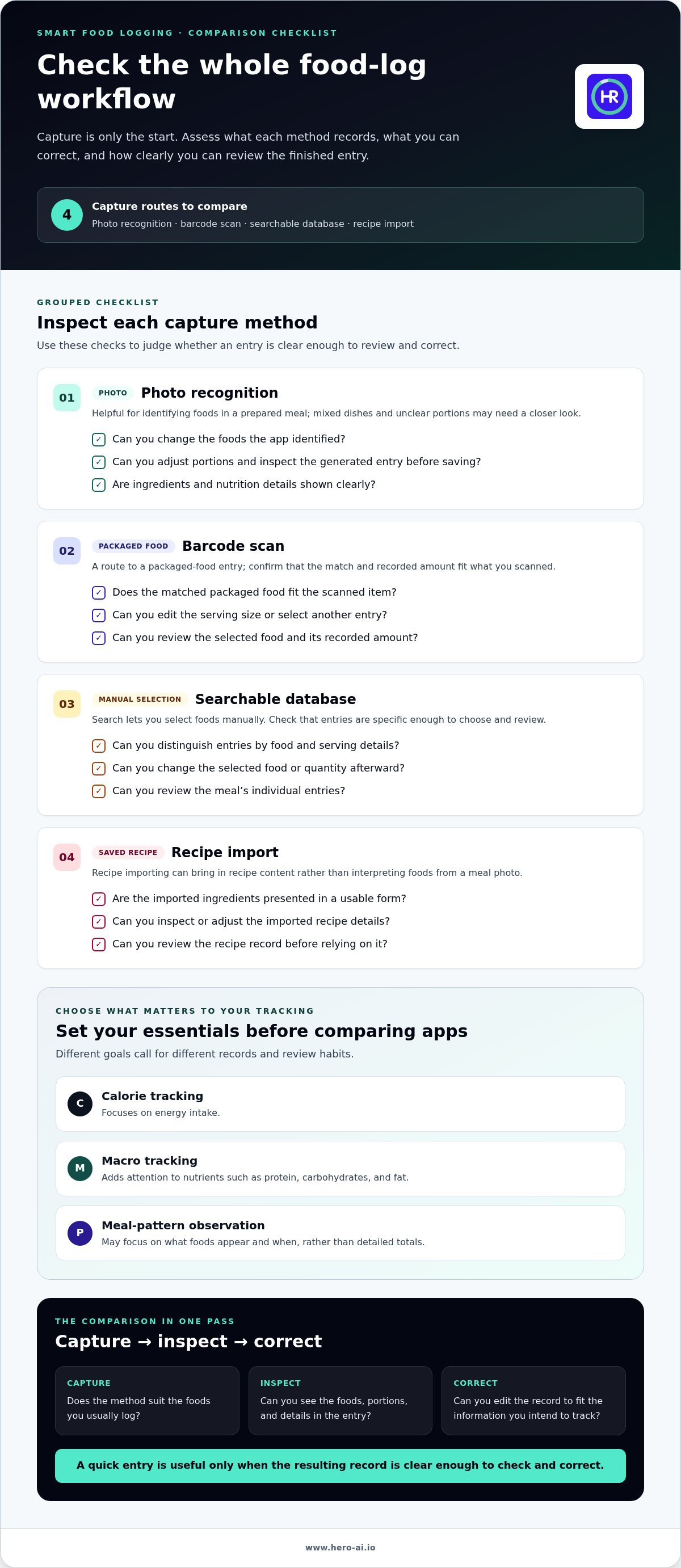
Food logging apps can offer several capture methods. A photo can help identify foods in a prepared meal. A barcode can retrieve an entry for a packaged food. A searchable database lets you select foods manually, while recipe importing can help record ingredients from a saved recipe. Apps differ in which methods they offer and how much of the process they automate.
Each method creates a structured record for later review. Automation can speed up entry, but it doesn’t confirm every ingredient or portion. A mixed dish, an unclear serving size, or a photo that hides ingredients can leave details to check. A useful workflow pairs convenient capture with clear review and editing controls.
How does smart food logging differ from a basic food diary?
A basic food diary records what someone ate, often through written notes. App-based logging can add structured entries through text search, images, barcodes, or imported recipes. This can make recorded foods and nutrition details easier to scan, compare, and edit. It doesn’t mean every app recognizes meals automatically or that every generated entry is complete.
Consider a meal with several ingredients. A photo may speed up the initial entry, but you may still need to identify ingredients or adjust portions. Searching for individual foods may take longer, but can make it easier to select a specific match. Compare the whole sequence: capture, organize, inspect, and correct.
Which tracking goals should shape an app comparison?
Start with the information you plan to use consistently. Calorie tracking focuses on energy intake. Macro tracking adds attention to nutrients such as protein, carbohydrates, and fat. Broader meal-pattern observation may focus on what foods appear and when, rather than detailed totals. These goals call for different records and review habits.
Decide which information is essential and which is optional before comparing tools. If you mainly want a record of meals, detailed nutrient views may add steps without serving your purpose. If you intend to review nutrition totals, check whether entries show the information you need and can be corrected. A digital food journal with AI may offer automated capture, but its usefulness still depends on whether you can review and maintain the record.
Compare food capture, correction, and nutrition data, not just AI features
A useful comparison looks at the full record each method produces. The capture method affects what gets entered, while editing controls determine whether you can correct mistakes. Nutrition data and review options help you decide whether the finished entry serves your tracking purpose. Assess a smart food logging app across all four areas, not by its AI label alone.
| Capture method | Editing controls to assess | Food data to assess | Review options to assess |
|---|---|---|---|
| Photo recognition | Can you change identified foods and adjust portions? | Are ingredients and nutrition details shown clearly? | Can you inspect the generated entry before saving? |
| Barcode scan | Can you edit serving size or select another entry? | Does the matched packaged food fit the item you scanned? | Can you review the selected food and its recorded amount? |
| Searchable database | Can you change the food or quantity after selection? | Are entries distinguishable by food and serving details? | Can you review the meal’s individual entries? |
| Recipe import | Can you inspect or adjust the imported recipe details? | Are the ingredients presented in a usable form? | Can you review the recipe record before relying on it? |
What should a photo logging feature let users review?
Check whether the app displays recognizable foods and editable meal details. A photograph may not show hidden ingredients, separate components, or portion size clearly, so mixed dishes can require inspection and correction. Treat a generated result as an entry to review, not as verified simply because it was created automatically. Harvard Health Publishing discusses keeping a food diary as useful for daily tracking.
How do databases, barcode scanning, and recipe imports compare?
Search lets you select foods from a database. Barcode scanning offers a different route for packaged foods, but the selected entry and portion still need review. Recipe importing brings in recipe content rather than interpreting what appears in an image. HERO AI combines barcode scanning and social recipe importing with a database of over 3 million verified foods. That figure describes HERO AI, not a category-wide standard.
If a photo isn’t suitable, search or barcode capture may provide an alternative, depending on the food and the app’s functions. The phrase photo food tracker subscription describes one automated logging approach. Compare how the underlying records can be inspected and edited, as well as how meals are captured.
Which smart food logging app fits your routine and tracking priorities?
The right fit depends on what you record, how you prefer to enter it, and which information you plan to review. A feature list can look comprehensive yet add unnecessary steps to your routine. Separate essential requirements from optional extras first. Essentials might include a capture method suited to your usual meals, editable entries, or the nutrition details you intend to track. Optional features should address a real need, not simply increase the feature count.
Consider the foods you log most often. Repeat meals may be easier to track if you can find and adjust previous entries. Packaged foods can make barcode scanning useful. If you often cook from recipes saved on social media, recipe importing may suit your routine. Check that the app works on your device and count the steps required for your common entries.
Which features matter for quick, repeatable meal logging?
Test the usual sequence, not just the first capture. How many actions does it take to log a regular meal or snack? Can you review and adjust the entry later? If the app recognizes a meal from a photo, check whether you can correct its foods or portions. A method that seems fast at first may require extra review, so include those steps in your comparison.
Prioritize capture methods that match the meals you eat. Search may suit foods you select individually. Barcode scanning may fit packaged items. Photo logging may help with prepared meals, while recipe imports can fit meals based on saved recipes. A weight loss meal logging app should still be assessed by its capture, editing, and review workflow. The phrase describes a tracking use case, not a promised outcome.
When is an all-in-one nutrition and fitness workflow relevant?
An integrated workflow may be useful if you want nutrition logging alongside workout planning. If you only need a meal record, fitness features may be optional. HERO AI combines photo meal recognition and barcode scanning with recipe importing from social media. Its platform also supports scheduling workouts from social content. These features are relevant if nutrition and workout organization are both part of your routine.
Compare those functions with your essential requirements and the entry steps you tested. HERO AI’s one-year subscription provides access to its nutrition features and workout scheduling. Review the HERO AI subscription features as part of your comparison.
How can you evaluate data quality, usability, and consistency before choosing?
Test each app with foods and routines you already use. A consistent comparison can show where a logging method saves effort and where it requires extra review. Focus on the full sequence: capture the meal, inspect the entry, correct details, and understand the saved record. Don’t treat an automated result as error-free just because it appears complete.
What should you test with your own meals?
Choose a packaged food, a mixed meal, and a saved recipe. Use the capture method you would normally choose for each one. For every entry, check whether the food and amount are understandable, whether you can correct details, and whether the saved record shows information relevant to your goal.
- Packaged food: Try barcode scanning, then inspect the matched entry and serving details.
- Mixed meal: Try photo capture or search. Check how clearly you can review separate foods and portions.
- Saved recipe: Test recipe import and inspect how the resulting record is organized.
Note every extra step. You may need to search for an ingredient, change a portion, or replace a food that wasn’t identified as expected. Repeat the test with other available capture options. This helps you compare workflows consistently without assuming photo, barcode, search, and imported-recipe entries are equally easy to review.
A simple record of your observations makes the comparison more practical. Note how the process feels, which corrections are possible, and whether the final entry is clear. The aim isn’t to prove that one method is always more accurate. It’s to see how each method handles the foods you actually log.
How can you judge whether an app is sustainable to use?
Consider how the app handles ordinary interruptions. If you miss an entry, can you return to logging without making the record confusing? Check whether summaries make sense for your tracking goal, whether that’s calories, macros, or broader meal patterns. A useful automated food diary routine should fit your normal habits and make records understandable, without requiring perfect entry every time.
Prioritize usability and review over promises about outcomes. Logging can organize information, but app use alone doesn’t establish a particular health result. Choose a workflow you can maintain and records you can interpret. To compare those criteria with HERO AI’s nutrition features, review the HERO AI subscription features.
How HERO AI’s food logging features fit the comparison criteria
HERO AI combines several meal-capture methods in one nutrition and fitness platform. For anyone comparing a smart food logging app, its features can be assessed against a regular routine: photo meal recognition, barcode scanning, food data, and recipe importing from social media. HERO AI’s food database contains over 3 million verified foods. That figure describes HERO AI, not a general benchmark for food logging apps.
What food logging methods does HERO AI provide?
Photo tracking, barcode scanning, and recipe importing serve different entry needs. Photo recognition can support logging a prepared meal. Barcode scanning provides a method for packaged foods. Recipe imports bring in recipe content from social media rather than identifying a plated dish. Compare these capture options by how well they match the foods you regularly record.
As with any automated capture method, treat a generated entry as a record to review, not a definitive account of every ingredient or portion. Check what information is presented and whether it suits your tracking purpose. For readers comparing an AI calorie counter, the important distinction is not only how data is captured, but whether the resulting information is understandable and useful to review.
Who may value its combined nutrition and fitness tools?
HERO AI may suit people who want meal logging and workout scheduling within one platform. Its one-year subscription provides access to the described nutrition features and workout scheduling from social content. Recipe importing and workout scheduling address separate tasks: one brings recipe information into a food workflow, while the other supports organizing workouts based on social content.
Compare those functions with your essential needs. If you mainly record meals, consider whether the capture options and food data fit your routine. If you also plan workouts from social content, the combined workflow may be relevant. These tools support logging and planning; they don’t promise weight loss, muscle gain, or another health outcome. Assess the records and features against the way you intend to use them.
HERO AI’s one-year subscription brings its nutrition and fitness features together. Explore HERO AI’s subscription features.
Choose a logging workflow you can maintain
The right smart food logging app fits your regular meals and makes its records easy to review. Compare capture options, editing controls, and nutrition information together. Then test them with familiar foods and note where you need to correct entries or add steps. This gives you a practical basis for choosing beyond a list of features.
HERO AI brings photo tracking, barcode scanning, and social-media recipe importing together in a one-year subscription. Its food database contains over 3 million verified foods. These tools support meal logging and planning, while generated entries still need review when details are unclear. Consider whether this combination fits your routine and whether its nutrition and fitness features match what you want to organize.
Explore HERO AI’s food logging and fitness features to learn more about its subscription. Choose a process that feels clear and manageable, then build a tracking routine that works for you.
Frequently Asked Questions
What is a smart food logging app?
A smart food logging app helps you record and organize meals through features such as photo recognition, barcode scanning, food search, or recipe importing. It can then present nutrition information for review over time. Capabilities vary, so check which capture methods are available and how entries can be edited. Automated suggestions may need correction, especially for mixed meals or photos that don’t show portions clearly.
Is a photo food logging app accurate?
Photo logging accuracy depends on the image, the food, and the information available to the app. A picture may not reveal every ingredient or show portion size clearly. Treat the recognized meal as a draft. Review the suggested foods and amounts, then correct them if needed. Rather than relying on an unsupported accuracy percentage, compare whether apps let you inspect and edit the information they generate.
Can a food logging app scan barcodes?
Some food logging apps include barcode scanning for packaged foods. This can offer an alternative to searching for an item manually, but it doesn’t identify a prepared meal from a photograph. Check how barcode entry fits the foods you usually track and whether you can review the resulting record. HERO AI includes barcode scanning alongside photo tracking and a database of over 3 million verified foods.
How do I choose a smart food logging app?
Start with the information you want to track, such as calories, macros, or broader meal patterns. Then compare the available capture methods, the nutrition data shown, and how easily you can inspect or edit entries. Test each workflow with meals you regularly eat. A suitable smart food logging app should fit your logging habits and make its records useful for your goal, not simply offer the most features.
What happens if an app logs a meal incorrectly?
Review the entry and correct its details if the app allows editing. Photo-based tools may miss ingredients or leave portions unclear, so inspect the record before relying on it. During an app comparison, note how many steps corrections take. If a particular entry type regularly requires extra work, consider whether the time saved by other capture methods makes the overall workflow practical for you.
Can I import recipes from social media into a food logging app?
Some apps support importing recipes from social media. This differs from scanning a barcode or identifying a plated meal in a photo. Review the imported recipe so its ingredients and resulting record match what you plan to prepare. HERO AI includes recipe importing from platforms such as TikTok and Instagram, alongside photo tracking and barcode scanning.
Is a food logging app useful if I also plan workouts?
A food logging app may suit you if you want to organize nutrition records and workout planning in one routine. Compare whether it supports both tasks and whether each feature fits your needs. HERO AI includes nutrition tools and scheduling workouts from social media content. These functions can support logging and planning, but using an app doesn’t guarantee a particular fitness or health result.


