

The app with the most logging features may not be the one you can use consistently. A weight loss meal logging app is useful only if its entry process fits your routine and its food records are clear enough to review.
Manual food entry can become repetitive. Photo or barcode logging may be faster, but you still need to check the result. Nutrition details can vary, and feature lists do not always show which differences matter in practice. Compare logging methods, food records, ease of use, and the progress information each app provides.
This guide explains how to assess those factors before choosing an app. It also covers which records may be useful over time, from meals and nutrients to changes in weight or other tracked measures. The aim is to help you find a workflow you can maintain and interpret your records as information, not as a guarantee of weight-loss results.
Key Takeaways
- Compare manual entry, barcode scans, photo logging, and recipe imports by the steps they require and how easily you can correct results.
- Assess a weight loss meal logging app by checking its food records, portion controls, and nutrition details rather than relying on feature lists alone.
- Test the same sample meals across available workflows to see which method fits your routine and produces records you can review.
- Choose progress summaries that help you compare records over time, while treating them as information rather than guaranteed weight-loss results.
- Review Hero AI’s photo logging, barcode scanning, food database, recipe imports, workout scheduling, and one-year subscription details to see whether they fit your needs.
What a Weight Loss Meal Logging App Tracks, and What It Cannot Promise
A weight loss meal logging app records food entries and presents available nutrition information for you to review over time. Comparing entries from different days may help you notice patterns in what you have logged. The app cannot confirm that a particular eating pattern caused a change in weight or guarantee that weight loss will occur.
A food log is a record of reported intake, not a measurement of health outcomes. Meal records can support awareness, but they are not individualized medical or nutrition advice. Public discussion of calorie count laws provides background on displaying nutrition information. Menu information, however, is not the same as a personal food record, and neither alone establishes an individual health outcome.
What information does a meal log usually contain?
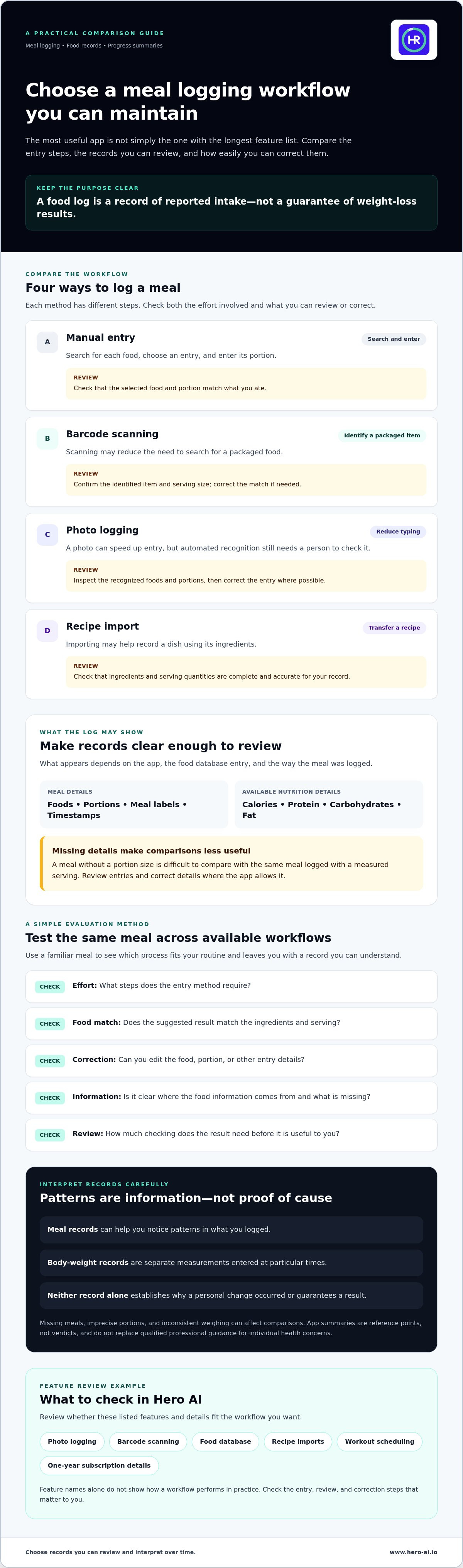
Depending on the app and how you enter a meal, a log may include foods, portions, meal labels, timestamps, and available nutrition details. These details may include calories or nutrients such as protein, carbohydrates, and fat. What appears in the log varies by app, food database entry, and logging method.
Portions or ingredients may be missing or estimated, which can make later comparisons less useful. For example, a meal recorded without a portion size is difficult to compare with the same meal logged with a measured serving. Review the entry and correct its details where the app allows it.
Can an app determine whether weight loss is working?
An app can display patterns in its records, such as logged meals or estimated nutrient totals. It cannot establish a guaranteed cause-and-effect relationship between those records and a personal outcome. A food log and a body-weight measurement are separate types of information. Weight records reflect measurements taken at particular times when you enter them, but do not prove why a change occurred.
Use summaries as reference points, not verdicts. Missing meals, imprecise portions, or inconsistent weighing can affect comparisons. If you have individual health concerns or need guidance suited to your circumstances, consult a qualified health professional. An app can organize records, but it does not replace that professional input.
Which Weight Loss Meal Logging App Features Matter Most?
Compare how each input method works, not just its name. Manual entry lets you search for a food and enter its portion. Barcode scanning can identify a packaged item, but you may need to confirm the match and serving size. Photo logging can reduce typing, while recipe import may help record a dish from its ingredients. Each method has different review steps.
A useful feature lets you inspect the food name, portion, and nutrition fields, then correct them if needed. Check how the app signals missing information or uncertain matches. Automated recognition can speed up logging, but users still need to review and correct entries.
How should you assess food-data quality?
Look for clear food names, editable portions, and nutrition details that suit what you want to review. Try a familiar meal and inspect the suggested result. Does it match the ingredients and serving you entered? Can you change it if it does not? A database label alone does not show whether a specific result is suitable for your record.
For more background on automated entries and review, see this AI food journal workflow guide. A Duke University study discusses food tracking with a smartphone app. That research does not establish the accuracy of every app or guarantee a particular result.
Which logging method fits your routine?
Convenience is about how well a method fits your routine, not proof of better outcomes. A weight loss meal logging app should offer an input process you can use and review consistently. Compare the same meal through available methods, such as a manually searched entry, a barcode scan, a photo, or an imported recipe.
Manual entry: Search for each food and enter its details. Review the selected item and portion.
Barcode scanning: Reduce searching for packaged foods. Check that the identified item and serving match.
Photo logging: Reduce typing. Inspect the recognized foods and portions, then correct the entry.
Recipe import: Transfer a recipe into a log. Review ingredients and serving quantities for completeness.
For each method, note the effort required, available correction options, where the food information comes from, and how much review it needs. A photo food tracker technical analysis offers further context on image-based logging. Choose the workflow whose records you can check and maintain.
Manual Entry vs Automated Logging: Compare the Trade-Offs
Logging methods differ in the work they shift to the user. Manual entry requires searching for and selecting foods. Barcode scanning, photo recognition, and recipe import can reduce some input steps, but each still needs review. Convenience and data completeness are separate criteria: a faster entry is not necessarily a more complete or suitable record.
Use this comparison to identify what to test in a weight loss meal logging app. The steps and correction options can vary by app.
| Method | Steps required | Correction options to check | User review needed |
|---|---|---|---|
| Manual entry | Search for each food, select a match, and enter a portion. | Can you change the food or portion before saving? | Review the selected food, serving, and nutrition details. |
| Barcode scanning | Scan a packaged item and confirm the result. | Can you select a different match or serving size? | Check the product identity and portion shown. |
| Photo logging | Capture a meal and inspect recognized items. | Can you add, remove, or edit foods and portions? | Confirm that visible ingredients and serving estimates are represented. |
| Recipe import | Import or add a recipe and review its components. | Can you edit ingredients and the number of servings? | Check that ingredients, amounts, and servings are complete. |
When can manual logging be a suitable option?
Manual entry gives you direct control over the food and portion selected. It can work well when you know the ingredients or need to record a meal that is not easily matched by a scan or photo. Repeated searches and typing may add friction, especially for meals with several components. Compare it with your actual routine rather than assuming one approach suits everyone.
What should you check in automated meal logging?
Treat barcode scans and photo recognition as input aids, not independent verification. Before accepting a result, review the suggested food, serving size, and nutrition fields. For an imported recipe, check that ingredients and quantities are included and that the serving count reflects what you ate. If an entry cannot be corrected, note that limitation during your comparison.
Try logging a familiar meal through more than one method, where available. Compare the time and effort, but also check whether the saved record contains the detail you need. A automated food diary setup guide can help you plan a repeatable logging process.
How to Choose and Evaluate a Weight Loss Meal Logging App
When access allows, compare the same sample meals across candidate apps. Testing your own routine makes it easier to assess entry effort, correction options, summaries, and subscription terms than relying on feature lists alone.
What should you test before committing to an app?
Use this checklist to evaluate a weight loss meal logging app before choosing a workflow:
- Define your needs. Decide which records matter to you, such as meal timing, portions, or selected nutrition details. Do not prioritize features you do not expect to use.
- Inspect the inputs. Try recording a familiar everyday meal. Check whether the process fits your routine and whether mixed-ingredient meals can be represented clearly.
- Test corrections. Edit a portion, replace a suggested food, and add a missed entry. Note whether changes are straightforward and whether the updated information appears in summaries.
- Review summaries. Check what the app groups or compares over time. Confirm that you can distinguish recorded nutrition data from separately measured personal outcomes.
- Check terms and data handling. Read current product materials for subscription duration, included features, account conditions, and how your information is handled. Confirm details before purchase, since terms and features can change.
If you are considering Hero AI, compare its photo food tracking, barcode scanning, recipe import, and workout scheduling with the workflow you want. Review the current product and one-year subscription details before deciding. Check Hero AI’s current product details.
How can you review progress without overinterpreting logs?
Look for patterns across consistent entries, not conclusions based on an isolated meal or day. Missing logs and changes in detail can affect comparisons. A summary describes what was recorded; it does not prove why a personal outcome changed. Keep app-recorded food and nutrition data separate from body-weight measurements or other outcomes you track independently.
Choose summaries you can understand and review without treating them as predictions. For guidance on building a repeatable process, see this food logging routine guide.
How Hero AI Fits a Weight Loss Meal Logging Workflow
Apply the same criteria you would use for any weight loss meal logging app: entry effort, food-record detail, correction options, and whether the workflow fits your routine. Hero AI offers AI-assisted meal logging, including photo food tracking and barcode scanning. Review how these features work and whether the available controls meet your needs.
Which described Hero AI features relate to meal logging?
Hero AI’s photo logging can reduce typing when recording prepared meals, while barcode scanning can help identify packaged foods. In either case, check whether you can inspect suggested foods and portions and edit the saved record. Automated input is a starting point, not confirmation that a meal was recorded correctly.
Hero AI also offers access to a database of over 3 million verified foods. Check how food matches are presented and whether the suggested item and portion fit your meal. Database size alone does not establish that a selected item or portion is correct. Recipe imports from social media platforms such as TikTok and Instagram can help bring a dish into your logging process. Review ingredients and quantities, and check how servings are handled. The platform also lets users schedule workouts from social media content, a feature to consider if you want to include workout planning alongside meal logging.
Is the Hero AI subscription a fit for your needs?
Compare Hero AI’s features with the logging methods you prefer. If you want to use photos or scans, check how entries are reviewed and corrected. If your meals often include several ingredients, consider whether importing recipes fits your routine and whether you can review the ingredients and serving details. Check that summaries provide the information you intend to review over time.
Hero AI offers a one-year subscription for access to its nutrition and workout tracking tools. Before subscribing, review the current terms and the features included. Consider whether the logging options and workout scheduling match what you plan to use. These details help you assess whether the subscription suits your needs.
Review Hero AI’s subscription information to compare its meal logging and fitness-planning features with the workflow you want.
Choose a Logging Workflow You Can Review and Maintain
The right weight loss meal logging app is one that fits your routine and gives you records you can inspect. Compare entry methods by the effort they require, how easily you can correct portions or food matches, and whether summaries show the details you want to track. Consistent, complete entries make comparisons more useful, but app records do not prove why personal outcomes change or guarantee weight loss.
Hero AI offers photo logging, barcode scanning, access to a database of over 3 million verified foods, recipe imports, and workout scheduling from social media content. Its one-year subscription provides access to its nutrition and workout tracking tools. Compare those features and the current subscription terms with your needs before deciding.
If Hero AI’s logging and planning features match your needs, review the Hero AI meal-logging features and check the current subscription details. Testing the workflow can help you decide whether it feels practical to maintain and useful to review over time.
Frequently Asked Questions
Is a weight loss meal logging app useful without automatic photo tracking?
Yes. A weight loss meal logging app can be useful without photo tracking if its other entry methods fit your routine. Manual search, barcode scanning, or other supported options may be enough to create records you can review. Compare the time each method takes, whether you can correct entries, and which details it saves. Photo recognition is one workflow option, not a requirement for keeping a food log.
Can a meal logging app accurately track every food and portion?
No app should be assumed to identify every food or portion perfectly. A result may depend on the image, database match, serving estimate, and details you provide. Review suggested foods and quantities before saving them, then correct the entry if needed. Treat logged values as estimates unless the app explains a verified measurement method for that specific item. Check how the app handles uncertain or incomplete information.
How much detail should I enter in a weight loss food log?
Record enough detail to answer the questions you want to review. Depending on the app, that may include foods, portions, and meal timing. More detail can take more time, so choose a level you can maintain during ordinary days. A consistent log with understandable portions is generally more useful for comparison than sporadic entries with unclear details. Review your needs and adjust the level of detail over time.
What happens if I miss a meal in my food log?
A missed meal leaves the record for that period incomplete. Do not enter a guess as exact information. If the app allows it, you can add an estimate and label it clearly, or leave the meal unrecorded. The best choice depends on what you want to review later. Focus on a practical routine; one incomplete day does not establish that tracking is unsuitable or that your overall approach has failed.
Is automated meal logging better than manual food entry?
Neither method is universally better. Automated logging can reduce some entry steps, while manual entry gives you direct control over food selection and portions. Compare the correction options, clarity of the saved information, and effort required for meals you commonly eat. A suitable workflow should be understandable and let you review entries. Do not assume an automated result is correct simply because it was generated quickly.
Can a meal logging app guarantee weight loss?
No. An app can organize food records and display logged information, but it cannot guarantee an individual outcome. Entries may include estimates or omissions, and personal outcomes can depend on factors beyond the app. Use tracking as an information tool, not as a promise or a replacement for individualized medical or nutrition advice. For personal health concerns or guidance suited to your needs, consult a qualified professional.
What should I compare before subscribing to a meal logging app?
Compare the logging methods, food-data details, correction controls, progress views, and subscription inclusions. Check how the app identifies uncertain or incomplete entries, and whether you can edit them. Read the current subscription and account terms directly before paying, since features and access conditions may change. Choose based on the workflow and information you will use, not the number of features listed.


