

What if logging a meal took less time than searching for each ingredient, but still included a quick human check? A digital food journal with ai can identify foods in a meal photo and suggest entries for your record. It can reduce manual input, but a photo may not show portion size, preparation details, or hidden ingredients clearly.
That uncertainty matters. A system may recognize what’s on a plate but estimate how much was served less reliably. Treating every result as exact can make a journal harder to trust. Reviewing entries helps keep the record useful without turning each meal into a lengthy data-entry task.
This article explains how AI-assisted meal logging works, from capturing a meal to saving it in a food record. It covers when to review or correct an estimate, what can affect accuracy, and how to choose a consistent workflow for your goals. Use the journal as a practical record, not as a substitute for precise measurement or professional guidance.
Key Takeaways
- Separate food recognition, nutrition estimation, and the saved journal entry when checking what an AI tool has recorded.
- Review suggested entries for details a photo may not show, such as preparation methods, ingredients, and serving size.
- Use a digital food journal with ai as a record to review, not as a source of exact measurements or medical advice.
- Build a repeatable routine around logging, reviewing, and checking patterns. A missed entry doesn’t make the rest of the record unusable.
- Before relying on a platform’s features, confirm what it offers and review how it handles food and account data.
What Is a Digital Food Journal with AI, and What Does It Record?
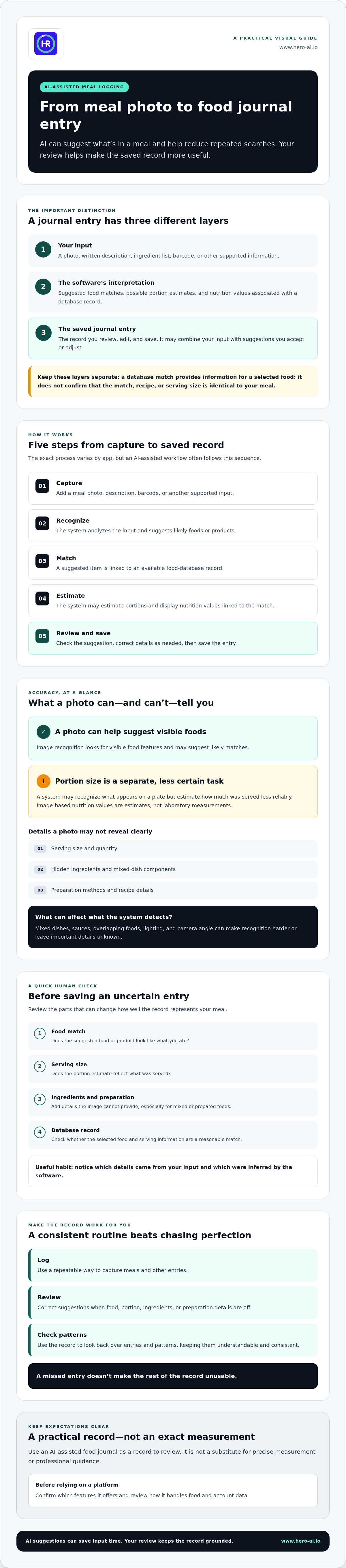
A digital food journal with ai is a digital record that uses automated tools to capture meal information and organize it into entries. Depending on the app, a journal may store meals, snacks, ingredients, portions, and nutrition values. Meal capture is how information enters the system. Nutrition estimation is the software’s interpretation of that information. The journal is the ongoing record, which you can review and update.
These steps are related but distinct. A photo or description provides input. A recognition system may suggest foods, and a nutrition database may supply values for a matched item. The saved entry combines the input with any suggestions you accept or edit. Food composition databases provide reference information about energy and nutrients; food composition data explains how such information is organized. Don’t treat the recorded information and the software’s interpretation as interchangeable.
How Does an AI Food Journal Differ from a Manual Food Diary?
A manual diary typically requires you to search for foods, select matching entries, and enter details. An AI-assisted journal may use a photo or other input to suggest a meal entry, reducing repeated searches. It doesn’t remove your role. You may still need to confirm the food, adjust the portion, or add ingredients and preparation details.
Digital records can group entries by date or meal, making them easier to scan and compare over time. Their usefulness depends on entries being consistent and understandable, not on automation alone.
What Information Can a Digital Food Journal Capture?
Available inputs vary by app and its features. A journal may accept:
- A written meal description or ingredient list.
- A meal image for food recognition.
- Barcode information to help identify a packaged food.
- Nutrition records matched to a food or entered by the user.
Some details are logged directly, such as a description, image, or selected food. Others may be generated by software, such as a suggested food match, portion estimate, or nutrient value. Check which details came from your input and which were inferred. A meal photo may show visible foods, but it may not reveal ingredients or preparation methods. For mixed or prepared foods, add missing details to make the entry more representative.
How AI Turns Meal Photos and Food Entries into a Journal Record
A digital food journal with ai typically turns an input into a saved entry through several steps. The exact process varies by app, but the workflow often includes:
- Capture: Add a meal photo, description, barcode, or other supported input.
- Recognition: The system analyzes the input and suggests likely foods or products.
- Matching: It links a suggested item to an available food-database record.
- Estimate: The system may estimate portions and display nutrition values associated with the match.
- Review and save: Check the suggestion, edit details as needed, and save the entry.
Each step can affect the final record. A database match provides nutrition information for a selected food. It doesn’t confirm that the item is identical to the meal or that its recipe and serving size match what you ate.
From Meal Image to Suggested Food Entry
Image-recognition software looks for visible food features and may suggest likely matches. As New York University explains in its overview of how AI analyzes meal photos, food recognition and portion estimation are distinct technical tasks. Even a clear image can leave important details unknown.
Mixed dishes may contain ingredients that aren’t visible. Sauces can obscure food, while lighting, overlapping items, and camera angle can affect what the system detects. A photo can suggest what appears on a plate, but it can’t reliably reveal exact ingredients, preparation methods, or quantities on its own.
Portion Estimates, Databases, and User Review
Portion size affects the amount of each food represented in an entry. The selected database record also matters because its nutrition values apply to that specific match and serving information. If an entry doesn’t reflect the portion or preparation, its nutrition record may not closely represent the meal.
Image-based nutrition values are estimates, not laboratory measurements. Before saving an uncertain entry, check the food match, serving size, ingredients, and preparation details. Add information the image can’t provide, or choose a closer database match if one is available. For more on automated nutrition capture and analysis, see this AI calorie counter overview.
Can You Trust an AI Food Journal? Accuracy, Limits, and Privacy
An AI-generated entry can be useful without being exact. Trust depends on what the system recognizes, how it estimates portions, and whether the matched nutrition record fits the meal. These are separate parts of the process. A likely food match doesn’t confirm the amount eaten, and a complete-looking nutrition panel doesn’t prove that every ingredient was identified.
For a digital food journal with ai, treat suggestions as draft entries. Review them when a meal includes mixed ingredients, restaurant preparation, or an unclear serving size. If an entry is close but not exact, correcting the details can make it more representative. The record is most useful when you know which parts were observed, entered, or estimated.
Which Foods and Meal Details Are Harder to Estimate?
Meals with several components can be difficult to identify from an image. A stew, layered dish, or salad with dressing may contain ingredients that are hidden or visually indistinct. Oils, sauces, toppings, and cooking methods can affect nutrition information without being apparent in a photo.
Similar-looking foods can produce competing matches. Check the suggested item rather than assuming it is correct. Add known ingredients or preparation details when they affect the entry, and adjust the portion if the displayed serving doesn’t reflect what you ate. No single input method works equally well for every meal.
What Should You Check Before Using an AI Food Journal?
Review the app’s privacy information before adding meal photos or account details. Look for explanations of what information is collected, how it is used, whether it may be shared, and how you can manage or delete it. The FTC’s consumer guidance on privacy concerns with health apps can help frame the questions to ask. Don’t assume a health-related app handles data in the same way as a medical provider.
Check how the app presents food matches and nutrition sources. Can you edit entries? Are serving sizes visible? Can you distinguish details you entered from software-generated estimates? Clear answers make uncertain records easier to identify and correct.
Use the journal to support personal tracking, not as a substitute for medical guidance. If you have medical nutrition needs or are following a care plan, consult a qualified health professional about how to track food and interpret nutrition information.
How to Build a Consistent AI-Assisted Food Journaling Routine
A useful routine should be simple enough to repeat and structured enough to review. Choose a capture method that fits the meal and the app’s features. Then follow the same basic steps: record, review, correct, and save. A digital food journal with ai can help organize entries, but the value of the record still depends on using it consistently.
A Practical Meal-Logging Workflow
Use a photo, barcode, or manual description, depending on what the app supports and what best represents the food. Review the suggested match before saving. Check the portion and add known ingredients or preparation details if they’re missing. If the suggestion doesn’t fit, edit it or enter the meal manually.
Keep the process consistent across meals. For example, record a meal using an available method, check the entry, then save the corrected details. You don’t need to make every entry elaborate. Focus on information that helps you recognize the meal later and interpret the record. For more detail about photo-assisted tracking, see this photo-based nutrition tracker analysis.
Consistency doesn’t require a perfect log. If you miss an entry, resume with the next meal rather than treating the whole record as unusable. A partial record can still support reflection, as long as you recognize where information is missing.
How to Review Food-Journal Patterns Without Overinterpreting Them
Review entries over time instead of drawing a conclusion from a single meal. Look for recurring details that matter to your personal goals, such as meal timing, ingredients, or how often certain foods appear. If context is important, add a brief note alongside the entry. This can help explain what a list of foods alone may not show.
Patterns describe what was recorded. They don’t prove that one food or routine caused a particular result, and incomplete or estimated entries can affect what you see. Use observations to decide what you may want to explore or discuss with a qualified professional, rather than treating them as a prescribed diet or guaranteed outcome. Keep the process neutral: notice, record, and review without judging individual meals.
Where Hero AI Fits in a Digital Food Journal with AI
Hero AI combines food logging features with broader nutrition and fitness tools. Its platform includes photo food tracking, barcode scanning, and access to a database of over 3 million verified foods. Users can also import recipes from social media platforms such as TikTok and Instagram. These options provide different ways to add meal information to a journal, though you should still review suggested foods, portions, and ingredients before saving them.
When evaluating Hero AI or another digital food journal with ai, consider how its features fit your routine. Check which input methods you’ll use, whether you can edit suggested entries, and how nutrition information is presented. Also consider whether the data practices and subscription terms align with your expectations. A feature list alone doesn’t show how well a tool fits your review habits or privacy requirements.
Connecting Meal Logging with Broader Fitness Planning
Hero AI also lets users schedule workouts from social content. This can connect workout planning with a platform that also supports food logging. The two features serve different purposes: one records meal information, while the other organizes exercise activities. Neither replaces the other, and a scheduled workout doesn’t validate a nutrition estimate.
For additional context on how social content may connect with fitness systems, see this social media fitness integration overview.
Questions to Ask Before Choosing an AI Food-Journaling App
Before creating an account or purchasing access, check the practical details. Does the app support the capture methods you expect to use? Can you correct food matches and serving sizes? Are nutrition values and their sources clear? Read the privacy disclosures to understand how image and account data are handled, and review the subscription terms before committing.
Hero AI offers an annual subscription that includes access to its food-tracking and fitness-planning features. Before subscribing, make sure its available tools and terms fit your needs. In particular, check whether its photo logging, barcode scanning, recipe import, and workout scheduling features support the way you plan to use the platform.
Make Your Food Journal Useful Over Time
A digital food journal with ai can reduce manual entry, but its records still need review. Food recognition, portion estimates, and nutrition data are separate parts of a suggested entry. Check uncertain details before saving, and use a consistent logging process so entries are easier to review.
Look for patterns across multiple entries rather than drawing conclusions from one meal. Treat the record as a reflection tool, not proof that a particular food caused an outcome. If you have medical nutrition needs, seek guidance from a qualified professional.
Hero AI brings together photo meal logging, barcode scanning, access to a large food database, social recipe import, and workout scheduling from social content. Its annual subscription provides access to these nutrition and fitness tools. Explore Hero AI’s subscription and features to see whether its workflow suits your needs.
Start with a routine you can maintain. Consistent, carefully reviewed entries can provide a clearer record of your food habits over time.
Frequently Asked Questions
What is a digital food journal with AI?
A digital food journal with AI is an app or software tool that helps record meals using automated features. Depending on its functions, you may enter a description, scan a barcode, or submit a meal photo. The system can suggest food matches and related nutrition information. Review those suggestions before saving, since the identified food, serving size, or ingredients may not fully match what you ate.
How does AI identify food from a picture?
An AI system analyzes visual features in a meal image and may suggest likely food items. It can then match those suggestions with available food records. A picture may not show hidden ingredients, cooking oils, or an accurate serving size. Mixed dishes and similar-looking foods can also be difficult to distinguish. Check the suggested items and edit the entry if the food or portion is unclear.
Can an AI food journal calculate calories accurately from a photo?
A photo can help an app suggest a meal and associated nutrition information, but it can’t guarantee an exact calorie count. Results depend on food identification, portion estimates, recipe details, and the nutrition data available to the app. Review or correct the entry when possible, especially if the meal is mixed or the serving size is uncertain. Treat photo-based values as estimates, not precise measurements.
Is an AI food diary better than a manual food log?
Neither method is best for every user. AI-assisted logging may reduce repeated searches or typing, while a manual log gives you direct control over each entry. Both approaches depend on consistent recording and accurate meal details. Compare the app’s input methods, editing options, and privacy information. Choose a workflow you can maintain and that lets you review or correct entries as needed.
Can an AI food journal track macros as well as calories?
Some food-journaling apps display macronutrients when their food records include that information. Coverage and detail vary by app and entry. Check serving sizes and ingredients, particularly for mixed meals or recipes, because they affect the nutrition record. If a nutrition target relates to a health condition or care plan, consult a qualified health professional instead of relying only on app-generated estimates.
Are meal photos and food-journal entries private?
Privacy practices vary between apps. Before uploading meal images or creating an account, read the service’s privacy information. Check how it describes data collection, storage, use, sharing, and available account controls. Don’t assume an image is processed or retained in a particular way without confirmation. Choose a service whose disclosures and controls meet your requirements, and avoid sharing information you’re not comfortable providing.
How often should you use a digital food journal?
The useful frequency depends on why you’re keeping the journal and what routine you can maintain. Consistent entries can make a record easier to review, but a missed meal doesn’t make every other entry unusable. Resume with the next entry and use the same basic process where practical. Treat a short or incomplete record as a partial view of eating habits, not a complete account.


