

A calorie meter app estimates energy and nutrient intake from the foods you record. Its totals can vary with portion sizes, database entries, and how a meal is logged. A precise-looking number doesn’t guarantee a precise result, so it’s more useful to treat the total as a guide than as an exact measurement.
If you’re wondering what details to enter for a meal, focus on what you can reasonably identify: the food, its preparation, and an approximate portion. Consistent records can help you notice habits and compare days without requiring you to capture every detail perfectly.
This article explains what calorie meter apps track and where estimates can fall short. You’ll find practical ways to log packaged foods, homemade meals, and mixed dishes, and learn when photo or barcode logging may help. It also covers how to build a manageable routine, compare app features, and use your records to spot patterns without making tracking rigid or burdensome.
Key Takeaways
- A calorie meter app estimates intake from selected foods, portion details, and available nutrition data. Treat its totals as records, not exact measurements.
- Check whether a food entry matches the brand, recipe, and preparation method you logged.
- Use a consistent routine: choose the closest food entry, estimate the portion, and review your record.
- Compare logging methods by how much detail they provide, and check suggested entries when using automated capture.
- Review an app’s entry methods, record tools, privacy information, and subscription terms to decide whether it fits your needs.
What Is a Calorie Meter App, and What Does It Actually Track?
A calorie meter app is a digital tool for recording food and estimating the energy and nutrients in it. You select or enter foods, provide portion information, and the app uses available nutrition data to calculate a running total. That total reflects the foods you logged. It is not a direct measurement of what your body absorbs or uses.
This is one form of personal data tracking, sometimes associated with the broader Quantified Self movement. A food record can help you review eating patterns over time, but it does not, by itself, measure total energy expenditure, establish a health condition, or provide a diagnosis. Some apps include activity or workout features, but food intake and energy burned are separate estimates. Use app records for awareness and record-keeping, not as a substitute for qualified health guidance.
What information does a calorie meter app record?
A food entry commonly includes a meal, food name, portion, and calorie estimate. Some trackers also display macronutrients, such as carbohydrates, protein, and fat, when the selected entry includes that information. The available detail can differ between foods and apps.
It helps to separate the information you provide from the information the app supplies. You might search for “cooked rice” and select a portion. The app then uses the nutrition values associated with that entry. If the selected food or portion doesn’t match what you ate, the result may not represent the meal closely. For a mixed dish, a saved recipe or an entry for a similar preparation may be more useful than a generic item, if the app supports those options.
How is a calorie meter different from a calorie counter?
The terms “calorie meter” and “calorie counter” often refer to overlapping food-tracking functions. Both may let users log meals and view a daily calorie estimate. Some apps also show nutrition summaries, save meals, scan packaged-food barcodes, or provide other tracking tools. These features are not universal, and the labels alone don’t confirm what an app can do.
Check the app’s current feature description to see which foods and nutrients it records, how portions are entered, and whether it includes activity tracking. A calorie total describes the foods logged in the app. It shouldn’t be read as a complete measure of daily energy balance or as medical advice.
How a Calorie Meter App Turns Meals into Daily Nutrition Estimates
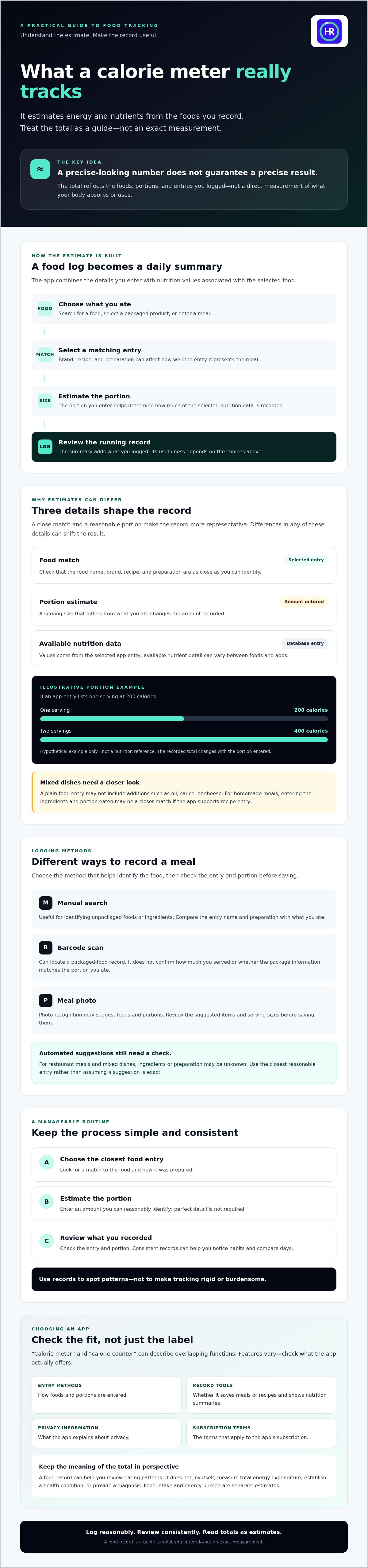
A calorie meter app turns a food log into a daily summary through a series of choices. You enter a meal, select a matching food or product, specify a portion, and the app applies nutrition values from its database. It adds the entry to the day’s record. The summary reflects what was logged, not a direct measurement of the meal.
Daily totals depend on both the selected entry and the portion estimate. A close food match and a reasonable portion estimate make the record more representative. A generic entry, a different preparation, or an incorrect serving size can shift the result.
Manual search, barcode scans, and meal photos
Manual search can help identify unpackaged foods or ingredients. Compare the entry name and preparation with what you ate. Barcode scanning can locate a packaged-food record, but it doesn’t confirm how much you served or whether the package information matches the portion you consumed. Photo recognition can suggest foods and portions from an image. Review the suggested items and serving sizes before saving them. For more on packaged-food logging, see this barcode scanning guide.
Why portions and food matching change the result
Hypothetical example: An app entry lists one serving of a food at 200 calories. Logging one serving records 200 calories; logging two records 400. These are illustrative numbers, not a nutrition reference. The app’s calculation changes because the portion entered changes.
Food matching matters too. A database entry for plain cooked pasta may not represent pasta served with oil, sauce, or added cheese. Restaurant meals and mixed dishes can be harder to match because their ingredients and preparation may be unknown. For a homemade recipe, entering its ingredients and the portion eaten may provide a closer match than choosing a broadly similar dish, if the app supports recipe entry.
Consistent records can help reveal eating patterns, even when individual entries are estimates. Harvard Health Publishing discusses food diaries as a way to support awareness of eating habits and notes research on their role in weight-management efforts. Read its explanation of why keeping a food diary may help. To review Hero AI’s tracking features, see Hero AI tracking information.
How Accurate Is a Calorie Meter App? Read Estimates in Context
A calorie meter app doesn’t directly measure what you ate. It estimates intake from the foods recorded. Its output depends on the information entered, how closely a database item matches the food, and how accurately the portion is estimated. Even a well-matched entry may be off if the amount or preparation differs.
Some entries are easier to match than others. A packaged item with clear product information may be simpler to identify than a mixed meal with unknown ingredients. But no logging method guarantees a precise total. Use the record to understand what you logged, not as proof of an exact intake or a particular health outcome.
Which food entries are easier or harder to estimate?
Entries are generally easier to assess when the food and serving information are clearly identified. A database match for a packaged item may be more specific than a broad entry such as “sandwich.” Even then, the amount eaten matters, and the selected item may not match the product variant or portion.
Uncertainty tends to increase when a meal has several ingredients or unclear preparation. A recipe’s ingredients, cooking method, and additions such as sauces or oils can change which entry is appropriate. If you can’t identify every detail, choose the closest reasonable match and interpret the result as an estimate. Photo recognition and manual search can help with food selection, but neither removes uncertainty about ingredients or portions.
What a calorie estimate can and cannot tell you
Use the following comparison to decide how much confidence to place in a log entry:
| Recorded estimate | Likely uncertainty | Sensible interpretation |
|---|---|---|
| Packaged food with a matching product entry and recorded serving | Lower if the product and amount are correctly identified | A useful estimate for that logged item |
| Single food selected by a general database search | Moderate if variety, preparation, or portion is unclear | A practical approximation; check the match and serving |
| Restaurant meal or mixed dish with unknown ingredients | Higher because recipe and preparation details may be missing | A broad estimate, not a precise account of the meal |
A single day’s total can be affected by missed entries or portion estimates that don’t reflect what was served. Records reviewed over time are more useful for identifying recurring patterns than treating one daily total as definitive. A calorie log alone can’t establish an individual health outcome or explain its cause.
For a broader look at app types and tracking developments, see this calorie tracker apps overview.
How to Use a Calorie Meter App Consistently Without Overcomplicating It
A useful routine prioritizes repeatable entries over perfect detail. Use the same basic approach for similar meals and record what you reasonably know. This makes it easier to review patterns without treating each calorie total as exact.
A simple daily food-logging routine
- Choose a meal. Start with a meal or snack you want to record. Pick a method that suits the food and the information available, such as a database search, barcode scan, or photo-assisted entry.
- Find the closest entry. Check the food name and description. For a packaged product, make sure the selected item appears to match. For a mixed meal, choose a reasonable match or use a recipe option if the app provides one.
- Estimate the portion. Select a serving that best reflects what you ate. Use a consistent approach for similar portions instead of repeatedly adjusting entries to pursue false precision.
- Review the record. Confirm that the food and portion are sensible, then save the entry. Correct clear mistakes, but don’t spend time refining details you can’t reliably know.
Consistent entries make a food log easier to interpret than isolated totals. Review records at an interval that suits your purpose and routine. A periodic review, for example, can help you notice recurring meal patterns or gaps in logging. There’s no single review schedule or calorie target that applies to everyone.
Reminders and saved meals can reduce repeated work if they suit your habits. Use them only when they make logging easier. A feature that adds steps or makes you feel pressured to record every detail may not support a sustainable routine. For additional workflow ideas, read this calorie tracking guide for busy people.
When to adjust or pause tracking
Change your method if entries repeatedly feel confusing, take too much effort, or become a source of pressure. You might record fewer details, use a simpler method, or pause tracking. A log is a tool, not a requirement. It should support awareness without making meals feel governed by numbers.
For questions about health or individualized nutrition needs, seek guidance from a qualified professional. A tracking app can organize food records, but it can’t assess your personal circumstances or replace professional advice. If you’re considering Hero AI, check its current tracking information and confirm that the service and subscription are available before relying on its features.
Choosing a Calorie Meter App: Features, Fit, and Next Steps
The right calorie meter app is one whose logging process and review tools fit your needs. A longer feature list isn’t automatically more useful. Compare how each app handles the foods you record, how much checking its entries require, and what it explains about privacy and subscription terms.
- Entry methods: Check whether you can search foods manually, scan packaged items, or use photo-assisted logging.
- Food records: Look for useful portion details and entries that match the foods you typically eat.
- Review tools: Check how the app organizes meal records and displays daily or longer-term summaries.
- Privacy information: Read how personal and food-log data may be stored, used, or shared.
- Practical fit: Confirm supported devices, current app descriptions, terms, and subscription details before choosing.
Which app features matter for different tracking habits?
Manual search may suit people who want to select and check each entry themselves. Barcode tools can help locate packaged-food records, while photo tools offer another way to capture meal information. Automated suggestions may reduce typing, but users should still review the selected foods and portions. Recipe and workout tools are optional features. They serve purposes separate from estimating calories in logged meals.
Where Hero AI may fit into a tracking workflow
Hero AI offers photo-based meal logging, barcode scanning, a database of verified foods, recipe importing, and workout scheduling. Its annual subscription provides access to these tracking tools. Photo recognition and automated suggestions can reduce manual entry, but you should still check food matches and portions before saving a meal. Review current service availability, features, and subscription terms before signing up.
Use the checklist to compare tools based on the records you need and the effort you’re willing to spend reviewing entries. To check Hero AI’s current service information, visit its website and confirm the details before making a decision.
Build a Tracking Routine That Works for You
A calorie meter app is most useful when its records help you notice patterns, not when you treat every total as exact. Food matches and portion estimates affect the numbers, so log meals in a consistent way and review entries over time. Choose a method that fits your routine, and adjust or pause tracking if it becomes confusing or burdensome.
Before choosing an app, check its logging options, review tools, privacy information, and current subscription details. Hero AI offers photo meal logging, barcode scanning, recipe importing, a food database, and workout scheduling through an annual subscription. Check current availability and terms before relying on those features.
Visit Hero AI’s website to review its current features and subscription details. Start with a manageable approach, then use your records as a guide to make informed choices.
Frequently Asked Questions
What is a calorie meter app?
A calorie meter app is a digital food log that estimates energy intake from recorded meals and snacks. You select or enter foods, add portion information, and review the app’s running summary. The total is an estimate, not a direct measurement of what your body absorbs or uses. Features vary between apps, so check the current description to confirm which foods, nutrients, and logging methods it supports.
How does a calorie meter app calculate calories?
A calorie meter app matches a recorded food to nutrition information, then uses the portion entered to estimate its contribution to your daily total. You might search a food database, scan a packaged item’s barcode, or review a food suggestion generated from a photo. The result depends on the match and details provided. Check suggested foods and serving sizes, especially for mixed dishes or meals with uncertain ingredients.
Are calorie meter apps accurate?
Calorie meter apps provide estimates, not exact measurements. The result depends on the food entry, portion size, recipe, and preparation details available. A clearly identified packaged food may be easier to match than a restaurant meal with unknown ingredients, but no entry method guarantees precision. Consistent records can help you identify patterns over time. A calorie log alone cannot determine an individual health outcome or explain its cause.
Can a calorie meter app track meals from photos?
Some apps use photo recognition to suggest foods and portions for a meal entry. An image may help identify visible items, but it may not show ingredients inside a dish, exact serving weight, or preparation method. Treat the suggestion as a starting estimate. Review the proposed foods and portion before saving the log. Photo features and workflows differ, so check the app’s current description to see what it offers.
Do I need to log every meal in a calorie meter app?
No. The right logging routine depends on why you’re tracking and what you can maintain. Some people record each meal, while others log selected foods to notice patterns. Choose an approach you can use consistently, and avoid adding detail you can’t reasonably verify. Sporadic, highly detailed entries may be harder to interpret than a repeatable routine. For individualized nutrition needs, ask a qualified professional what approach may be appropriate.
What is the difference between a calorie meter and a macro tracking app?
A calorie meter focuses on estimated energy intake. A macro tracker records macronutrients such as protein, carbohydrates, and fat when that information is available. Many apps combine both functions, but features and terminology vary. Before choosing, decide which records are relevant to your needs. Then check the app’s current description to confirm that it tracks those values and provides the review tools you expect.
Can a calorie meter app tell me how many calories I should eat?
An app may display a calorie target if it includes goal-setting, but a generic target isn’t automatically appropriate for every person. Individual needs can depend on health, activity, and other factors. Treat an in-app target as a tool setting, not medical advice. For a target suited to your circumstances, especially if you’re managing a health condition, discuss your needs with a qualified health professional.


