

A barcode scan can identify a product, but it can’t confirm what’s in the package. A barcode scanner for nutrition uses the code to find a matching entry in an app’s food database. If that entry is outdated or for a different product version, the nutrition details may not match your food.
It’s reasonable to expect a scan to save time and provide information you can log. To use it accurately, check the entry against the package, especially the product name and serving size. Review the relevant nutrients before adding the food to your log.
This guide explains how barcode scanning works, what to check in a nutrition entry, and what to do when a scan fails or returns a mismatch. You’ll also learn how to log the food another way when the database doesn’t have an accurate match.
Key Takeaways
- A barcode scanner for nutrition uses a product code to find a database entry. The scan identifies a possible match, not what you ate.
- Before logging, confirm the product variant, serving size, and nutrition details against the package.
- If a scan fails or returns incomplete information, pause and find a suitable entry or use another logging method.
- For foods without a barcode, consider photo-based meal tracking or recipe importing as alternatives.
- Build scanning into a routine that includes identifying the food and recording the portion you consumed.
How a barcode scanner for nutrition turns a food package into a log entry
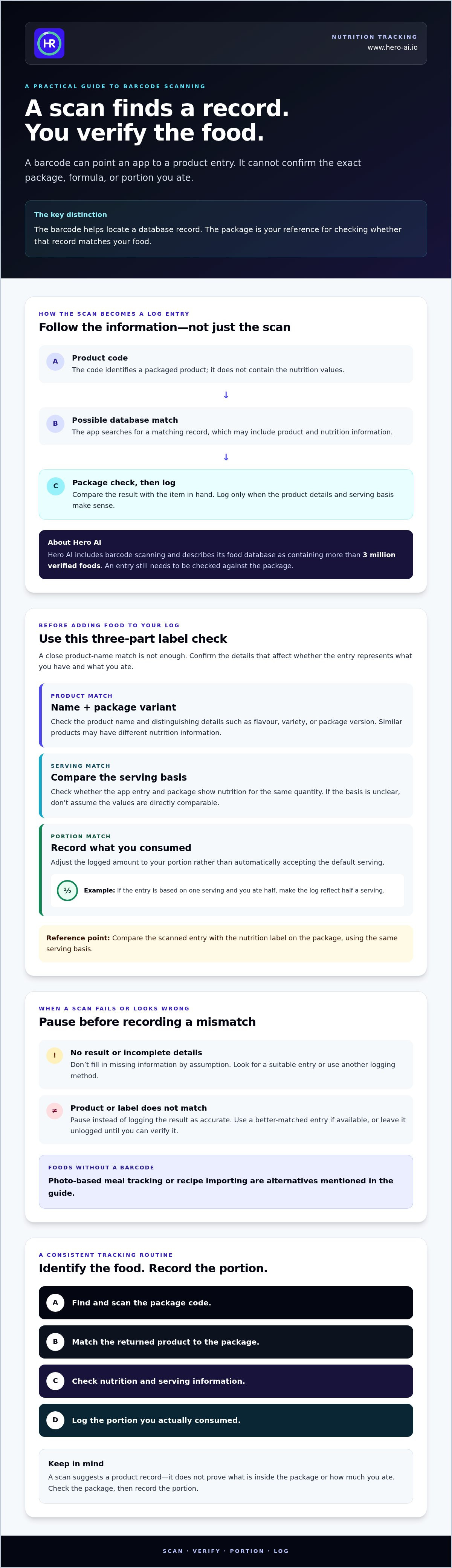
A barcode scan links a packaged food’s product identifier to a record in an app’s food database. The barcode itself doesn’t contain nutrition values. The app uses the code to search for a product record, which may include nutrition information and serving details. The package remains the reference for checking whether that record matches the food you have.
This distinction matters. A scan can return a likely product match, but it can’t confirm the package variant, current formula, or portion you ate. Hero AI includes barcode scanning and describes its database as containing more than 3 million verified foods. A database entry still needs to be checked against the package before you log it.
What information can a nutrition barcode scan return?
A nutrition barcode scan may connect the code to a product name and available nutrition data. The product identification and the nutrient values are separate parts of the result: the code helps locate a record, while the record supplies the information the app has associated with it. Serving information may also be available, but entries and displayed fields vary by app and product.
Don’t assume every result includes the details you need. Check the package’s nutrition label and serving information. For background on the information labels can present, see this overview of the nutrition facts label. Hero AI’s specific displayed fields should be confirmed in the app before they’re described as features.
How to scan packaged food and review the result
Use this general sequence. Exact controls and interface steps depend on the app, so confirm Hero AI’s current workflow before publishing app-specific instructions.
- Locate the barcode. Find the product code on the package. Make sure it’s visible and unobstructed.
- Scan it in the app. Open the app’s barcode scanning function and follow its on-screen prompts. Don’t assume particular button names or permission settings.
- Review the returned product. Check the product name and package variant against the item in hand.
- Compare before logging. Check the available nutrition and serving information against the package. If the entry doesn’t match, pause instead of logging it as accurate.
For example, two versions of a product may have similar names but different ingredients, serving details, or nutrition values. A close name match isn’t enough. Confirm the package context first, then use the matching entry if the information is consistent.
How to check a scanned nutrition entry against the food label
A scan is a starting point, not an accuracy check. Before logging the result, compare it with the physical package. The barcode can lead to a product record, but it doesn’t confirm that the record matches the exact item, formulation, or serving you have.
Match the scanned product to the package in your hand
Check the product name and visible details that distinguish it, such as flavour, variety, or package version. Similar products can have separate database entries and different nutrition information. A close name match alone isn’t enough to accept a result.
Look for a clear mismatch between the app and package. If the package identifies a different variety, or the listed product details don’t align, pause. Don’t treat the barcode as proof of what’s inside or whether an entry reflects a current formulation. Use a better-matched entry if available, or leave the result unlogged until you can verify it.
Check serving size before logging nutrition
Nutrition values depend on their stated basis. An entry may show information for a serving, while the package presents it for a different quantity. Compare the basis first, then select or adjust the portion to reflect what you actually ate. Logging a larger or smaller portion than the entry assumes changes the recorded totals.
For example, if an entry is based on one serving but you ate half, make sure the log reflects half a serving rather than accepting the default amount. If the app’s serving basis is unclear or doesn’t correspond to the package, don’t assume the totals are directly comparable.
- Match the product: Confirm the name and package variant.
- Match the basis: Compare the app’s serving information with the package.
- Match the portion: Log the amount you consumed, not automatically the package’s full serving.
Use the nutrition label on the package as the reference for checking the scanned entry. Compare the listed values using the same serving basis, and check that the product details match the item you have. If the package and app entry differ or key information is unclear, pause and verify the product before logging it.
What to do if a barcode scan fails or is incorrect
A scan can return no result, a product that doesn’t match, or an entry with incomplete information. Treat each outcome as a reason to check before logging. A barcode scanner for nutrition can help locate a database record, but it can’t guarantee that every food is listed or that every result reflects the package in hand.
If the barcode is not recognized
First, check that the barcode is visible and that the package is positioned so the code can be scanned. If the app still returns no match, use its product search if that option is available. Compare any possible result with the package rather than choosing an entry based only on a similar name.
If no suitable record appears, use another logging method. Manual food entry may be an option in some apps, but confirm that the app supports it before relying on that workflow. Hero AI’s supplied feature information includes photo-based meal tracking and recipe importing. Photo tracking may be a useful alternative for a meal, while recipe importing may suit a dish made from a recipe. Confirm the available in-app steps before describing them as specific workflows.
If the scan returns a different product
Don’t log a mismatched result. Compare the package’s product name, variety, and other identifying details with the entry. Check that its available nutrition and serving information correspond to the item. If they don’t, stop and look for a better-matched record. Select an alternative only when its details fit the package.
Use this stop-and-check sequence:
- Unrecognized code: Check visibility and scan position, then search within the app if that function is available.
- Incorrect match: Don’t accept the result. Check for a matching product record or use another logging method.
- Incomplete information: Don’t assume missing details. Compare the entry with the package and choose a method that lets you record the food accurately.
Use the nutrition label on the package to check whether an entry’s product details and available values match the food in hand. Compare values on the same serving basis. If the information differs or remains unclear, pause and verify the product before logging it.
Some foods have no barcode, including homemade meals, unpackaged items, and dishes prepared from several ingredients. A product scan can’t identify those foods or confirm what portion you ate. Choose the method suited to the food, and leave a doubtful scan out of the log until you can verify it.
How to use barcode scanning in a consistent nutrition-tracking routine
A barcode scan works best as one step in a repeatable logging process. It can help identify a packaged product, but it doesn’t capture every part of a meal. Added ingredients, preparation methods, and portion sizes may need separate attention. For broader ideas on fitting food logging into a full day, see this calorie counter for busy people guide.
Build a simple scan, check, and log routine
Use the same sequence each time you log a packaged food:
- Scan: Use the barcode scanner for nutrition to look up the packaged product.
- Confirm: Check that the product and package variant match the item you have.
- Check the portion: Compare the entry’s serving basis with the amount you plan to eat.
- Log: Record the food and portion that reflect what you consumed.
When practical, log close to the time you eat. This gives you an opportunity to check the package and portion while they’re available. Keep the serving basis consistent when comparing the same food over time. For example, compare entries using the same stated serving or the same measured quantity, rather than switching between package servings and portions you estimate differently.
A food log records selected entries and portions. It remains an estimate of what was eaten, not a complete measure of every preparation detail or a medical assessment. A scan also won’t account for additions such as a sauce or topping unless you log them separately.
Choose a logging method for foods without barcodes
Unpackaged foods and mixed dishes need a different approach. A barcode can’t identify a homemade meal or show how its ingredients were prepared. Hero AI’s supplied information lists photo-based meal tracking and recipe importing as additional logging methods. A photo may suit a meal that has no product code, while recipe importing may help record a dish based on its ingredients.
Choose the method that best represents the food, and check the recorded portion where possible. These options can complement scanning in one routine. For an overview of photo-based nutrition tracking, see the AI calorie counter overview.
When a barcode scanner for nutrition is useful, and what it cannot confirm
A barcode scanner for nutrition is most useful when you’re logging a packaged product with a visible code and a matching database entry. It can help identify a product record. It can’t confirm that you ate that food, how much you ate, or whether the record reflects every detail of the package and its current contents.
Which foods are easiest to log with a barcode?
Packaged foods with a visible, scannable product code are the clearest fit. A scan may connect the code to a product entry, but check the package details before using it. The scan doesn’t account for how you prepared or portioned the food.
Unpackaged items, homemade meals, and mixed dishes are different. A bowl made with several ingredients, for example, can’t be represented fully by scanning one packaged component. Log the other ingredients or choose a method suited to the whole meal. For any scanned product, compare the entry with the label and the portion you consumed.
- Packaged product: Scan, check the product details, then log the portion eaten.
- Mixed dish: Record the dish using information that represents its ingredients and preparation.
- Food without a barcode: Use another available logging method instead of assigning an unrelated product entry.
A food log supports record keeping. It isn’t a substitute for professional dietary advice, and a scan alone can’t establish whether a food is appropriate for an individual’s needs.
How Hero AI fits into barcode-based food logging
Hero AI is described in the supplied information as a nutrition and fitness tracking platform with barcode scanning, photo-based meal tracking, and recipe importing. Its food database is listed as containing more than 3 million verified foods. The supplied summary states that these features are included in a one-year subscription. These different methods can support logging packaged items, meals, and recipes, but each entry still depends on selecting information that matches the food being recorded.
Review the Hero AI nutrition-tracking features to assess whether its listed logging methods fit your routine.
Make every food entry count
A barcode scan is a starting point for logging, not confirmation that the database entry matches the food you ate. Check the product and package details, compare the serving basis with your portion, and pause if the result is incomplete or incorrect. For unpackaged foods and mixed meals, use another suitable logging method instead of forcing a barcode match.
Using a barcode scanner for nutrition as part of a consistent routine can make packaged-food logging more straightforward. The accuracy of each entry still depends on reviewing it against the package and recording the portion you consumed.
HERO AI’s supplied information lists barcode scanning, photo-based food tracking, recipe importing, and a database of more than 3 million verified foods. These features are included in a one-year subscription. Review HERO AI nutrition-tracking features to see whether its listed options suit your food-logging routine.
Choose the method that fits the food, check the details, and build a log that reflects what you actually eat.
Frequently Asked Questions
How do you scan a barcode to check nutrition?
Open the food-logging app’s barcode scanning function and scan the code on the packaged product. Review the product record returned by the app, then compare its name, variant, and serving information with the package. The barcode identifies a product record; it doesn’t contain nutrition data or confirm that the entry matches the item. App controls differ, so follow the instructions shown in the app you use.
Is a barcode scanner for nutrition accurate?
A barcode scanner for nutrition can identify a matching database entry, but the result isn’t automatically accurate for the package in your hand. Accuracy depends on the entry matching the product and its available details being current. Compare the product name, package variant, nutrition information, and serving basis with the label. If anything differs or is missing, pause and find a better-matched entry before logging.
Can I scan food without a barcode?
No, a barcode scanner needs a scannable product code to look up an entry. For unpackaged food or a mixed meal, use another method supported by your tracking app. Options may include searching for a food entry or recording a recipe. HERO AI’s supplied information lists photo-based food tracking and recipe importing. Check the app’s available workflow and confirm that the selected entry reflects the food and portion.
What should I do if a barcode scan shows the wrong food?
Don’t log the result until you’ve checked it. Compare the returned product with the package, including the name, variety, and serving information. If the details don’t match, search for the correct entry if the app provides that option. If you can’t confirm a suitable match, use another available logging method or leave the doubtful result out rather than recording it as accurate.
Does scanning a food barcode show the nutrition for the amount I ate?
Not necessarily. A scan may return nutrition information tied to a stated serving or another quantity. It doesn’t know how much you ate. Check the entry’s serving basis, then select or adjust the logged portion to represent what you consumed. For example, if you ate half of the serving shown in the entry, the log should reflect half a serving, if the app allows that adjustment.
Can a nutrition barcode scanner calculate calories for a homemade meal?
No. A barcode scan can look up a product record, but it can’t identify a homemade meal with no barcode or determine its ingredients and portions. Use an app-supported method suited to the meal, such as searching for its components, recording a recipe, or using photo-based tracking if available. The result depends on the information entered or recognized, so check that it reflects the meal you prepared.
Does HERO AI include barcode scanning?
Yes. The supplied HERO AI information lists barcode scanning as a feature included in a one-year subscription. It also describes a database of more than 3 million verified foods, photo-based food tracking, and recipe importing. A scan may still need to be checked against the package, since a result isn’t guaranteed to match every product. Confirm current feature details before relying on a specific in-app workflow.


