

The fastest calorie log isn’t always the most accurate. A calorie counter for busy people should cut down the time spent searching for foods and entering portions, while making it easy to review entries that may be uncertain. Quick estimates can miss ingredients or serving sizes, so convenience matters most when you understand what each logging method can and can’t tell you.
If manual logging feels too slow, keeping up with every meal can be a challenge. Forgotten entries leave gaps, while photo-based logging may estimate a meal differently from its actual contents. The best routine is one you can follow consistently and check when accuracy matters.
This guide compares practical workflows, including manual search, barcode scans, meal photos, and recipe imports. You’ll learn how they differ in speed, completeness, and portion detail, and how to build a low-friction routine for meals that are easy to forget or difficult to estimate.
Key Takeaways
- Choose a calorie counter for busy people by matching its logging methods to your schedule and typical meals.
- Compare manual search, photo recognition, barcode scanning, and recipe import by the effort each requires and the details you need to review.
- Use faster logging to reduce entry steps, but check portions and ingredients when accuracy matters.
- Test your preferred workflow with a typical day, including meals that are easy to forget or difficult to estimate.
- Review a platform’s current features and subscription terms before relying on it as part of your routine.
What makes a calorie counter practical for busy people?
Time is often the main constraint. A meal might happen between tasks, at an irregular hour, or without a clear pause to search for foods and enter portions. If logging takes too many steps, records can become incomplete. A practical calorie counter for busy people makes meal recording manageable within an existing routine, rather than adding a separate, elaborate task.
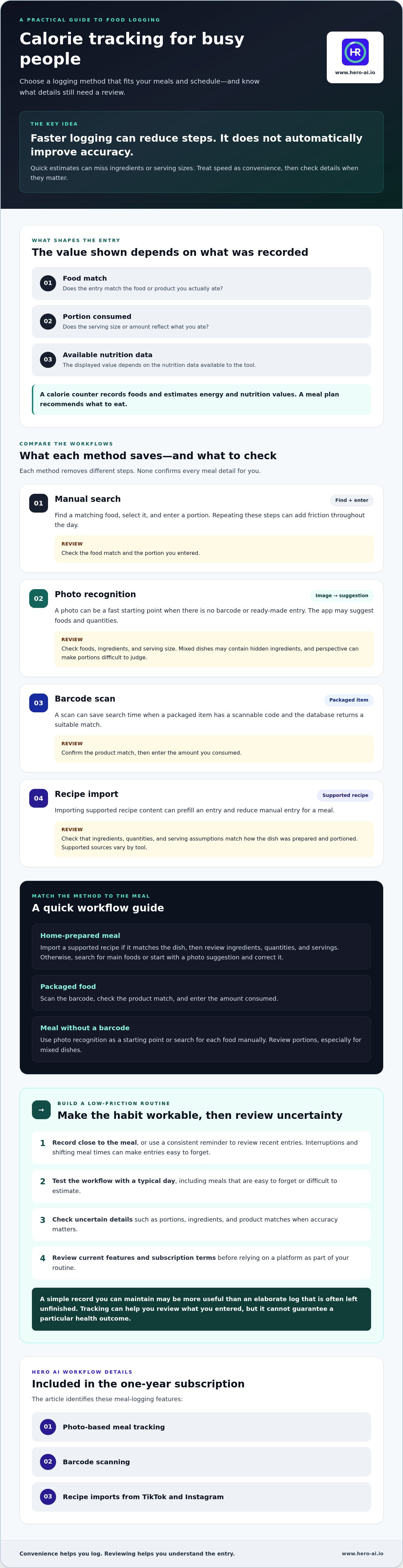
Low-effort logging and precise measurement are not the same thing. A quick photo or saved food entry may reduce typing, but it doesn’t automatically confirm ingredients or serving size. The value shown depends on what was recorded and the nutrition data available. Treat speed as a measure of convenience, not proof of accuracy.
Why does meal logging become difficult when schedules are full?
Interruptions can break the link between eating and recording. Meal times may shift, snacks may be unplanned, and a busy stretch can make it easy to forget what you ate. Repeatedly searching for a food, selecting a match, and entering a portion adds friction, especially when you have to repeat those steps throughout the day.
A small, repeatable habit can be easier to maintain than a detailed routine. For example, record a meal when you eat or use a consistent reminder to review recent entries. The goal is a workable record, not a perfect process that competes with daily tasks.
What should a busy person expect from a calorie counter?
A calorie counter records foods and estimates their energy and nutrition values; a meal plan recommends what to eat. A counter may also provide nutrition summaries, while reminders, recipe imports, and photo recognition are optional features that vary by tool. A calorie is a unit of energy, but the value shown for a meal still depends on the food and portion entered.
Review entries when details are uncertain. A packaged-food scan may identify a product, but you still need to enter the portion you consumed. A photo suggestion may need corrections to the ingredients or serving size. For a mixed dish, an imported recipe is useful only if its ingredients and serving details match the meal.
Use tracking as a record-keeping aid. It can help you review what you entered, but it can’t guarantee a particular health outcome. Choose a workflow that fits your schedule and the level of detail you can maintain. A simple record with clear limitations may be more useful than an elaborate log that is often left unfinished.
How do photo, barcode, and recipe logging workflows save time?
Each logging method removes different steps. Manual search requires you to find a matching food and enter a portion. Photo recognition can suggest foods from an image, while barcode scanning can identify a packaged item. Recipe import can prefill an entry from supported recipe content. When choosing a calorie counter for busy people, consider which steps a method removes and which details you’ll still need to review.
Automation can reduce typing, but it can’t confirm that a suggested serving matches what you ate. Food choices, portion sizes, and ingredient details still affect the record. For a broader explanation of automated nutrition capture, see this AI calorie counter guide.
When is photo-based meal logging useful?
A photo can be a fast starting point when a meal has no barcode or ready-made entry. An app may suggest foods and quantities, but a picture isn’t proof of exact nutritional values. Mixed dishes can contain hidden ingredients, and perspective can make portions difficult to judge. Review the suggested food and serving size before relying on the entry, and correct anything that doesn’t match the meal.
When are barcode scans and recipe imports more practical?
Barcode scanning can save search time when a packaged item has a scannable code and the database returns a suitable match. Recipe import may reduce manual entry for a meal based on supported recipe content. Check that the imported ingredients, quantities, and serving assumptions match how the dish was prepared and portioned. Before building a routine around imports, check which sources the tool supports.
Consider these routine examples:
- Home-prepared meal: Import a supported recipe if it matches the dish, then review ingredients, quantities, and servings. Otherwise, search for the main foods or use a photo suggestion and correct it.
- Packaged food: Scan its barcode, check the product match, and enter the amount consumed.
- Meal without a barcode: Use photo recognition as a starting point or search for each food manually. Review portions, especially for mixed dishes.
Hero AI’s one-year subscription includes photo-based meal tracking, barcode scanning, and recipe imports from TikTok and Instagram. The platform also includes workout scheduling from social-media content. Check current access and supported import sources before relying on these features. If you’re setting a daily calorie target rather than recording meals, Harvard Health Publishing explains how to determine how many calories you should consume. You can also review Hero AI’s current access and feature details.
Can a fast calorie counter still provide useful information?
Yes. Faster logging can make it easier to keep a record, but convenience doesn’t make every estimate exact. A calorie counter for busy people can support useful review when entries are consistent and their limitations are clear. No logging method independently confirms everything that was eaten.
Entry reliability depends on the details provided. A food match can be correct while its serving quantity is wrong. Recipe substitutions, cooking methods, added oils, sauces, and incomplete food descriptions can also change what an entry represents.
What can make a calorie entry less reliable?
Portion estimates are a common source of uncertainty. A database entry for a particular food may not match the amount on your plate. A photo may not show ingredients beneath a topping, and an imported recipe may omit a substitution or preparation detail. Treat photos and database matches as input aids, not independent verification.
Logging method | Effort | Review focus | Potential uncertainty
Manual entry | Search for a food and enter a portion. | Confirm the selected food and quantity. | Search terms or portion estimates may not match the meal.
Barcode | Scan a packaged item when a code is available. | Check the product match and amount eaten. | The scanned item may not reflect the portion consumed.
Photo suggestion | Capture an image and review suggested foods. | Check meal name, portion, and visible ingredients. | Mixed dishes and hidden ingredients may be difficult to identify.
Imported recipe | Start from a supported recipe. | Confirm ingredients, quantities, substitutions, and servings. | The prepared dish may differ from the source recipe.
How can users review entries without adding much effort?
Use a brief check after an automated entry: confirm the meal name, portion, and main ingredients. Correct details that materially differ from what you ate. If the app supports reusable meals or saved entries, update a repeated meal once and reuse the corrected version. Check that the feature is available before relying on it as a shortcut.
Consistency can make a record more useful for reviewing patterns than false precision in individual estimates. Aim to capture meals in a repeatable way, and add detail where uncertainty matters. The photo food tracker analysis provides more context on how photo-based systems handle meal data.
How can you choose a calorie counter that fits your routine?
Choose a calorie counter based on how well it fits your schedule and tracking needs, not the length of its feature list. Consider how much time you have to log, the nutrition details you want to review, and how easy it is to edit entries. The calorie tracker apps overview provides additional context for comparing app features.
Which logging method matches different daily routines?
Start with the meals you record most often and the moments when logging is easiest to forget. Choose input options that suit those circumstances. An app may offer several methods, letting you choose a different one when your meal or schedule changes. Check that the methods you intend to use are currently supported.
- Map your schedule. Identify when you can usually enter meals and when a reminder or later review may help.
- List your common meal types. Consider how often your meals are prepared from scratch, packaged, or based on saved recipes.
- Assess the review process. Check how clearly you can edit entries and correct details that don’t reflect what you ate.
- Set your tracking detail. Decide which nutrition information you need to review, then check whether the app provides it without adding unnecessary steps.
- Check essential policies. Review privacy information, data export options, accessibility, and subscription terms. Verify each app’s current policies and features.
What should you test before choosing a subscription?
Try the app during a representative period that includes ordinary days and a day when your routine changes. Check how easily you can complete records, correct an entry, and return to the app after missing a log. Judge the workflow by how well it fits your actual use, not by a smooth demonstration or an unusually simple day.
Before paying, confirm which functions are included and review the current terms. HERO AI offers a one-year subscription for access to its nutrition and workout tracking features. Review the annual subscription details and confirm the current terms with the provider.
Review HERO AI’s current service and subscription details before deciding whether it meets your requirements.
How does Hero AI fit a lower-effort calorie-tracking workflow?
After choosing the logging methods and review steps that suit your routine, compare them with HERO AI’s features. Its one-year subscription brings together nutrition and fitness tools, including photo-based meal logging, barcode scanning, a food database, recipe import, and workout scheduling. These features may suit people who want to manage meal tracking and fitness planning in one platform. As with any tracker, the entry still depends on the food and portion details recorded.
Which HERO AI functions may reduce logging steps?
HERO AI’s meal-entry options include photos, packaged-food barcodes, and recipes imported from social media. The platform also includes workout scheduling from social content. These features may be useful if they match the meals and planning tasks you want to manage. Check current access and feature details before making them part of your routine.
The platform’s food database contains more than 3 million verified foods. A database’s size alone doesn’t show whether a specific entry matches your meal, so review the food and portion details before relying on a result.
What should readers confirm before getting started?
Before choosing HERO AI, review the current service destination and subscription details. Check the following directly with the provider:
- Whether the platform and subscription access are available.
- Whether the meal-logging and workout-scheduling functions you need are available.
- Which devices are supported and how user data are handled.
- Current subscription terms and the features they include.
- The database size and what the platform means by “verified foods.”
Then compare the details with your feature checklist and decide whether the platform suits your needs. As with any calorie counter, review automated entries and correct portions or ingredients that don’t match what you ate.
Build a tracking routine you can maintain
The right calorie counter for busy people fits your real schedule and makes meal records manageable. Choose logging methods based on the foods you eat, then check portions and ingredients when automated entries need review. Faster input can reduce effort, but it doesn’t guarantee exact values.
HERO AI’s one-year subscription includes photo logging, barcode scanning, and recipe imports, along with workout scheduling from social-media content. Review current access, features, and subscription details before relying on them.
Compare the platform’s features with your routine, then start with a simple workflow and adjust it as you learn what you can record consistently. Review HERO AI’s current features and subscription details to decide whether it fits your needs.
Frequently Asked Questions
What is the best calorie counter for busy people?
There isn’t one best option for every schedule. A calorie counter for busy people should make your usual meals straightforward to record and portions easy to review. Compare the input methods you’ll actually use, such as scanning packaged foods or searching for custom meals. Test the app with an ordinary day, including meals that take more effort to enter. Check current features and subscription terms before committing.
Can a calorie counter track meals from photos?
Some calorie counters use photo recognition to suggest foods and quantities from a meal image. Treat the suggestion as a starting point, not a measurement. A photo may not show hidden ingredients, recipe changes, or portion size clearly, especially for mixed dishes. Review the food and quantity, then correct the entry if needed. Check that photo logging is currently available in the app before building your routine around it.
Is barcode scanning faster than searching for foods manually?
It can be faster for packaged food when the item has a readable barcode and the app returns a matching entry. Check that the product is correct and select the amount you actually ate. Scanning is less useful for unpackaged foods, restaurant meals, or recipes without a code. Manual search, a photo suggestion, or recipe import may suit those meals better. The best method depends on your usual food choices.
How much time does calorie tracking take each day?
There’s no single time estimate that applies to everyone. Logging time depends on how many meals you record, whether you reuse entries, and which input methods the app supports. Try your normal routine and note where searches, portion edits, or forgotten entries slow you down. Fewer steps may make a workflow easier to maintain, but leave enough time to check that foods and serving amounts reflect what you ate.
What happens if I forget to log a meal?
Record what you remember as soon as practical. Add the foods and an approximate portion, and mark the entry as uncertain rather than treating a guess as exact. Some apps allow later entries or saved meals, but check whether the specific app supports those functions. One missed meal doesn’t make the rest of your record unusable. Focus on building a repeatable habit instead of expecting perfect recall.
Are AI calorie counters accurate enough to use?
AI-generated entries can help identify foods or suggest nutrition information, but their usefulness depends on the food match, portion, ingredients, and underlying data. Review suggestions, especially for mixed dishes or recipes with substitutions. A photo estimate isn’t a direct measurement of a meal’s contents. If you’re tracking for a medical or specific dietary need, ask a qualified health professional what approach is appropriate for you.


