

What if logging a meal took a photo instead of a search through food databases? Calorie tracker apps are moving from manual entries toward AI-assisted systems that aim to reduce the effort of recording meals. Manual tracking can be especially cumbersome when portions are difficult to estimate or a recipe comes from a social media post.
Automated recognition can make logging easier, but it also raises practical questions: How does an app generate a meal estimate, and how easy is it to review and correct? This article explains how calorie tracking has evolved and what to assess when comparing app features.
It covers photo recognition, food database coverage, social recipe importing, and fitness planning. It also looks at the limitations of visual estimates and why user review matters. Hero AI combines photo recognition with a database of 3 million verified foods, recipe importing from TikTok and Instagram, barcode scanning, and workout scheduling. These features show how nutrition apps can connect meal logging with other parts of a fitness routine.
Key Takeaways
- Learn how calorie tracker apps have moved from manual food diaries toward automated nutrition tools, and what that means for everyday logging.
- Understand how image recognition and food database coverage affect the estimates generated from meal photos.
- Know what to check when importing social media recipes, especially how an app handles incomplete ingredient and quantity details.
- Compare barcode scanning and photo recognition, which help with different types of food logging.
- Review what Hero AI’s 1-year subscription includes: photo recognition, barcode scanning, a verified database of 3 million foods, recipe importing, and workout scheduling.
The Evolution of Calorie Tracker Apps: From Manual Logs to AI
Calorie tracker apps have developed from digital food diaries into systems that collect, organize, and interpret nutrition data. A calorie is a unit of energy used to describe the energy food provides. Paper journals required people to record meals and calculate totals manually. Digital food databases made searching and adding totals easier, but users still had to identify each ingredient and enter its portion.
Newer tracking tools can reduce those steps with photo recognition, barcode scanning, and recipe importing. Users may still need to check the suggested food and serving size. Automation does not mean every meal is logged accurately without review. A useful app should make entry easier while keeping estimates visible and adjustable.
The Limitations of Legacy Manual Entry
Manual logging adds small tasks throughout the day. A user may search for each ingredient, choose a matching database item, and estimate its quantity. Mixed dishes can take more work because the ingredients or amounts may be unclear. The time required depends on the meal and the app’s search and entry process.
Portion estimation is another source of variation. Even a detailed database record is only useful if the selected food and serving size match what was eaten. Repeating these steps can make logging feel burdensome. When that happens, users may skip entries or stop tracking consistently. Rather than assuming an automated app will solve this problem, compare how much effort its workflow actually removes.
Defining Automated Nutritional Data Capture
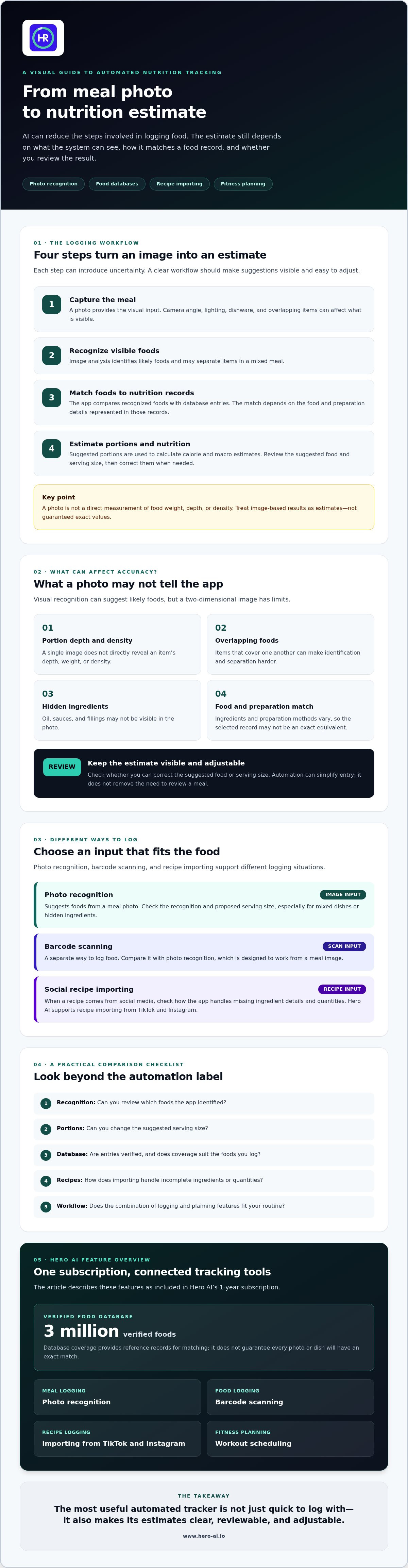
Computer vision uses image analysis to recognize patterns in a meal photo. A nutrition app can use those patterns to suggest likely foods and match them to food records. Estimating volume or density from a two-dimensional image is more difficult. Camera angle, overlapping items, dishware, and hidden ingredients all limit what a photo can show. Treat image-based portion results as estimates, not direct measurements.
A verified database gives an app structured food and nutrition records to match against. That can provide more consistent reference data, but it cannot confirm that a suggested food or portion matches a particular meal. Hero AI combines photo recognition with a verified database of 3 million foods. When comparing apps, check how you can review and correct suggestions and whether the logging process suits your routine.
Technical Infrastructure of AI Visual Food Recognition
Turning a meal photo into calorie and macro estimates involves several steps. A recognition model identifies visible foods, estimates portions, matches those foods to nutrition records, and calculates totals. Uncertainty can enter at each step. A streamlined interface may make logging faster, but the result still depends on image interpretation and database matching.
Computational Food Analysis Protocols
Image processing can locate food in a photo and separate overlapping items using object detection and segmentation. A plate with rice, vegetables, and protein, for example, contains different shapes and textures that a system must distinguish. It can compare those visual features with learned food categories and suggest likely matches. Research such as the AI system developed by NYU illustrates how deep learning can connect food-image recognition with nutritional analysis.
Portion estimation is harder than identifying food categories. A single 2D image does not directly reveal an item’s depth, weight, or density. Camera angle, lighting, overlapping foods, and serving containers can affect the estimate. Hidden ingredients such as oil, sauces, and fillings may not be visible. A useful app should present results as suggestions to review, rather than as direct measurements.
After recognition, the system needs to match foods to nutrition records and use those records to estimate energy and macros for the proposed portions. There is no single interchangeable dataset for all foods. Ingredients and preparation methods vary across cuisines, so the reference data and quality of the match matter. Check whether an app lets you correct a food or serving when the suggested match looks wrong.
Database Integrity and Verification
Database size and database quality are different things. User-submitted entries can increase coverage, but they may include duplicates, inconsistent serving units, or incomplete nutrient fields. Verified entries can offer more consistent reference data. Hero AI identifies its database as containing 3 million verified foods. That coverage may support a wider range of matches, but it does not guarantee that every photo will be recognized correctly or that every dish has an exact equivalent.
Some systems may use testing and user corrections to improve their tools, but do not assume that feedback trains a model unless the app explains how it is collected and reviewed. Also compare the practical experience: how quickly results appear, whether a connection is required, and how easily you can correct a match. On-device analysis and cloud processing can have different connectivity and processing requirements, so check the app’s own details.
For a practical example of photo-based nutrition tracking, review Hero AI’s automated tracking approach and consider whether its recognition and database features fit your logging needs.
Integration Protocols: Social Media and External Data
Recipes and exercise ideas often appear as short videos, captions, and posts. That can create a gap between finding a meal online and logging its nutrition. A useful recipe import workflow should turn the content into editable food details, not simply save a link. Hero AI supports importing recipes from TikTok and Instagram, connecting social media content with nutrition tracking.
Importing a recipe does not mean every detail can be identified without review. Ingredient amounts may be spoken, appear briefly on screen, or be left out altogether. Preparation choices can also change the nutrition of the finished dish. Before relying on an imported total, check that the app shows the extracted details clearly and lets you correct them.
Algorithmic Recipe Importing
A video-based workflow may need to read captions or on-screen text, interpret spoken instructions, and organize ingredients and quantities into a recipe. It then needs to standardize units and serving counts before matching ingredients to food records. If a post says “a handful” or gives no amount, the import cannot determine an exact quantity from that wording alone.
Macro totals depend on the ingredients and amounts recorded. Nutrition claims in a social post can offer a point of comparison, but they may use different serving sizes or leave out details such as cooking oil. Review the imported ingredient list, quantities, and number of servings. If important details are missing from the source, treat the result as an estimate.
Unified Fitness and Nutrition Planning
Workout content presents a related challenge. A post may describe an exercise, but creating a useful schedule requires details such as activity type, timing, and duration. Scheduling a workout is different from recording a completed session or syncing physiological measurements. Check which actions an app supports instead of assuming that a social post creates a complete fitness record.
Nutrition and activity records can be easier to review when they fit into one workflow. A planned session may help with organizing a routine, while a completed workout log can be considered alongside food records. This does not mean activity automatically changes calorie targets. Apps handle exercise data differently, so check what they record and what controls they provide.
Hero AI includes workout scheduling alongside social recipe importing. These features address two distinct tasks: bringing social media recipes into meal tracking and organizing planned exercise. Before choosing an app, confirm that its importing and scheduling workflows suit your habits and identify which details you will still need to enter or review.
Selection Criteria for Automated Nutrition Systems
Compare nutrition apps using the same meals and a consistent reference, rather than relying on feature lists alone. Barcode scanning and photo recognition solve different problems. A barcode can identify a packaged product if the record matches the item. Photo recognition can suggest foods in a prepared meal, but portion size and hidden ingredients make the estimate less certain. Neither method guarantees an accurate result.
Test apps with both straightforward and challenging entries. Include a packaged food, a mixed dish, and a meal with an uncertain serving size. Note what the app suggests, what you need to correct, and how much work the process takes. This shows where automation helps and where your review is still important.
Efficiency and Accuracy Metrics
Use a consistent test. Time each entry from opening the food log to saving the meal. Compare manual search, barcode scanning, and photo logging using equivalent foods. Repeat the process with different meal types, then compare the time and corrections required for each method. A feature description alone cannot show how much time it will save in your own routine.
To compare nutrition estimates, use the same reference for calories and each macro across the meals you test. Note the difference between the app’s estimate and the reference, along with how often you need to correct the suggested food or portion. There is no universal benchmark that applies to every app and meal. Treat performance claims carefully unless the provider explains how its testing was done.
Database quality matters alongside recognition. Check whether entries are verified, whether serving units are clear, and whether the provider explains its update and correction process. Hero AI states that it uses a verified database of 3 million foods. Database size may support broader matching, but it does not prove that a particular meal estimate is accurate.
User Interface and System Logistics
Try the app under ordinary conditions. Check whether you can save entries without a connection, whether changes sync across devices, and whether records can be exported in a usable format. Review what data the app collects, how it describes storage and sharing, and what controls are available for permissions and deletion. These details affect privacy as well as day-to-day use.
Subscription value depends on fit, not simply the number of features. Compare the billing term, included capabilities, and cancellation conditions before subscribing. Hero AI offers a 1-year subscription. Consider whether photo recognition, barcode scanning, recipe importing, and workout scheduling align with the way you plan to track.
Use these criteria to assess your workflow, then review Hero AI’s 1-year subscription to see whether its tracking features suit your needs.
Hero AI: Implementing Automated Tracking Protocols
Hero AI brings together photo recognition, barcode scanning, a verified database of 3 million foods, social media recipe importing, and workout scheduling. Its primary offering is a 1-year subscription. These features can reduce some manual tracking steps, but meal estimates and imported recipe details still need to be checked against what you ate or prepared.
For a photo entry, take a clear picture and treat the recognition result as a starting point. Compare the suggested foods and portions with the meal. A photo cannot reliably show hidden ingredients or exact serving weight, so adjust the estimate when needed. Reviewing a suggested match is more useful than accepting it automatically.
Optimizing Nutrition with Visual Recognition
Once a meal is logged, use the nutrition information available in the app to review your records over time. Patterns are only as useful as the meal details behind them, so correct obvious mismatches and serving sizes. Hero AI’s stated features include photo recognition, barcode scanning, and a verified food database. Check the platform for details about its reports and other tracking functions before relying on them.
Recipe importing can reduce repeated entry for meals found on TikTok or Instagram. Select a recipe to import, then review the recognized ingredients, quantities, and servings before using the nutrition estimate. Social posts may omit amounts or show substitutions. Treat unclear details as estimates rather than confirmed information.
Consolidating Fitness Data
Hero AI includes workout scheduling, which can help organize planned exercise alongside nutrition tracking. The platform supports importing recipes from TikTok and Instagram, but that does not establish that workouts can be imported directly from those platforms or that physiological data can be synced. Check the workflow before expecting a social video to create a scheduled session automatically. Do not assume that a dashboard or progress metrics are included unless the platform confirms them.
Calorie tracker apps differ in how they handle imported content, nutrition summaries, and exercise records. Assess each function separately. For details about the subscription, consult the Hero AI 1-Year Subscription: Functional Service Overview. Use that information to compare the stated features with your tracking needs.
Choose a Tracking Workflow You Can Sustain
Calorie tracker apps are moving from manual searches toward photo recognition and imported recipe data. These tools can reduce repetitive entry, but estimates still depend on food matching, portion details, and user review. Compare the complete workflow: how meals are logged, how errors are corrected, and how food records fit alongside planned activity.
Hero AI combines AI-powered photo recognition, barcode scanning, a verified database of 3 million foods, social media recipe importing, and workout scheduling. Its 1-year subscription offers these tools as an alternative to manual-first tracking. As with any automated system, review imported meals and correct details that do not match what you ate.
Frequently Asked Questions
How do AI calorie tracker apps identify ingredients in complex meals?
AI calorie tracker apps analyze a meal image to identify visible food items, then match likely ingredients to nutrition records. A mixed plate might be separated into rice, vegetables, and protein. The app estimates nutrition based on those matches and their serving sizes. Overlapping foods, sauces, and hidden ingredients can make identification uncertain, so review the suggested foods and quantities before accepting the result.
Are photo-based calorie counters more accurate than manual entry?
Not in every case. Photo recognition can reduce searching and typing, but estimates depend on image quality, food identification, and portion size. Manual entry may be more precise when you know the ingredients and serving amount, though choosing the wrong database item can also introduce error. Compare both methods against the same reference meal. Treat visual results as estimates and correct mismatches where the app allows.
Can I import recipes from TikTok and Instagram into a calorie tracker?
Some nutrition platforms support social media recipe importing, but availability and the process vary by app. Hero AI supports importing recipes from TikTok and Instagram. After importing, review the ingredients, amounts, and serving count. Videos may omit quantities or show substitutions that affect nutrition estimates. Check the details against the recipe you plan to prepare rather than assuming the post includes everything needed.
What is the difference between a verified and a user-generated food database?
A verified database contains food records that have undergone a verification process. User-generated entries are submitted by app users and may vary in detail or consistency. Check how an app defines verification and whether serving units and nutrient fields are clear. Hero AI states that it uses a verified database of 3 million foods. Database size alone does not confirm that a particular meal match or portion estimate is correct.
How does automated workout scheduling work with social media?
Automated scheduling can turn workout content into planned activity records, but the process depends on the platform. A system may need to interpret exercise details and scheduling information before creating an entry. Hero AI supports workout scheduling from social media content. Check whether you can review the activity type, timing, and other details, and distinguish a planned workout from a record of completed exercise.
Is an annual subscription necessary for full AI tracking features?
Subscription requirements vary by app, so check which features are included in each plan and whether any require a paid subscription. Hero AI offers a 1-year subscription that provides access to its AI nutrition and workout tracking tools. This does not establish the subscription terms for other apps. Before choosing a service, review its term, included features, renewal conditions, and cancellation details.
How do AI apps handle portion size estimation from a 2D photo?
An AI model estimates portions by interpreting visible food area and appearance, then matching the result to food records. A 2D image cannot directly show an item’s weight, depth, or hidden ingredients. Camera angle, overlapping foods, and containers can affect the estimate. Use a clear image and check the suggested serving size. If you know the measured amount, enter or adjust it where the app allows.
What security measures protect my nutritional and fitness data?
Security measures differ by provider, so do not assume specific protections without documentation. Before creating an account, review the app’s privacy and security information. Check how it describes data storage, sharing, access controls, retention, deletion, and account permissions. Also review whether connected services receive nutrition or fitness records. Hero AI’s security measures are not specified here, so consult its current documentation before entering personal data.
To explore Hero AI’s photo recognition, barcode scanning, recipe importing, and workout scheduling, review the 1-year subscription and decide whether it fits your tracking routine.


