

A calorie log can show what you eat, but your energy needs also depend on how active you are. An automatic daily calorie intake monitor records intake, while activity-adjusted total daily energy expenditure (TDEE) estimates energy use by multiplying basal metabolic rate by an activity factor. According to NASM, those factors range from 1.2 for sedentary activity to 1.9 for super active activity.
An automatic daily calorie intake monitor can make it easier to record what you eat, but its daily target is still an estimate, not an exact measurement. Food logs and activity estimates each have limitations, so understanding how they work helps you interpret the numbers.
This article explains how activity-adjusted TDEE works and how it relates to calorie tracking. It also covers the practical factors that shape an app’s usefulness, including ease of use, acceptability, battery life, and data storage. You’ll see how automatic tracking can reduce manual logging, what it can and can’t tell you, and how to assess whether a tool supports your routine.
Key Takeaways
- Activity-adjusted energy estimates combine basal metabolic rate with an activity level, so daily needs can change with movement.
- Automatic food logging can reduce manual entry, but clear records still depend on accurate meal details and portion information.
- App acceptability and usability depend on practical factors such as privacy, ease of use, and how well the process fits a daily routine.
- Battery life and data storage affect whether tracking remains convenient and how consistently records are available.
- Hero AI’s photo recognition, barcode scanning, and recipe importing can support streamlined calorie and macro tracking through a 1 year subscription.
Activity-adjusted total daily energy expenditure
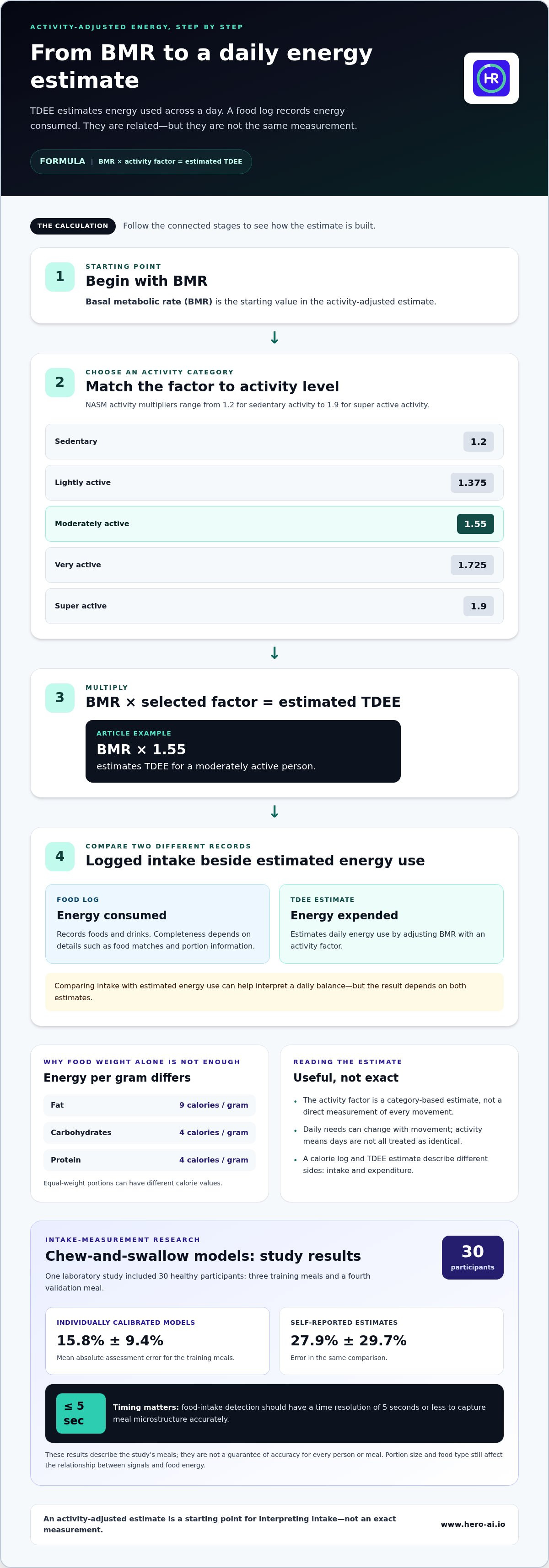
An automatic daily calorie intake monitor records food intake, while total daily energy expenditure estimates energy used across a day. The estimate starts with basal metabolic rate, or BMR, then adjusts it for activity. According to NASM, the activity multipliers are 1.2 for sedentary people, 1.375 for lightly active people, 1.55 for moderately active people, 1.725 for very active people, and 1.9 for super active people. Multiply BMR by the factor that best reflects the person’s activity level to estimate TDEE.
These factors make activity part of the calculation, rather than treating every day as identical. For example, applying 1.55 to a BMR estimates TDEE for a moderately active person. The multiplier is a category-based estimate, not a direct measurement of every movement. A routine that includes regular training may fit a different category from one with mostly seated activity. The estimate is most useful as a starting point for comparing logged intake with estimated energy use.
Researchers have also tested whether chewing and swallowing can help estimate food intake. In one laboratory study, 30 healthy participants ate three training meals and a fourth validation meal. For the training meals, individually calibrated chew-count and swallow models had a mean absolute assessment error of 15.8% ± 9.4%. Self-reported estimates had an error of 27.9% ± 29.7% in the same comparison. These results describe that study’s training meals, not a guarantee of accuracy for every person or meal.
Timing matters for this type of sensor measurement. Food-intake detection should have a time resolution of 5 seconds or less to capture meal microstructure accurately. A model can use patterns in chewing and swallowing to estimate intake, but it still needs a relationship between those signals and food energy. Portion size and food type affect that relationship. A small portion of a calorie-dense food can provide different energy from a larger portion of a less energy-dense food.
A calorie is a unit of energy. In food calculations, fat provides 9 calories per gram, while carbohydrates and protein each provide 4 calories per gram. That difference explains why equal-weight portions can have different calorie values. For example, comparing foods by weight alone does not establish equal energy intake. An intake record and a TDEE estimate measure related but distinct quantities: one describes energy consumed, and the other estimates energy expended. Their comparison can help interpret a daily balance, but the result depends on both estimates.
Automatic calorie intake tracking
A daily record of foods and drinks gives a running view of calorie intake. Apps can organize entries, set goals, and make comparisons across days easier.
App-Based Daily Tracking
App-based daily tracking means recording meals and drinks in a digital log as you go. A complete record helps show how food choices and portions contribute to your intake. You might log breakfast after eating, then add lunch and snacks later. Consistent entries are more useful than a daily total estimated from memory.
A review covered 68 papers on calorie-counting apps. Among the 46 apps assessed for features, 45, or 98%, included calorie counting, while 24, or 52%, included goal setting. These features serve different purposes. Calorie counting records estimated intake; a goal provides a reference for comparing that total with a chosen target.
A daily log is only as complete as its entries. Include drinks, snacks, sauces, and small additions, since they contribute to the total. Choose the closest food match and adjust its portion to reflect what you ate. For a meal with several ingredients, logging them separately can be more specific than selecting a broad dish description.
Accuracy of Photo and AI Tools
Photo-based calorie tracking tools identify foods and estimate portions from an image, then use that information to calculate intake. Results depend on visible details, including how food is arranged and the portion size. Ingredients hidden in a mixed dish may not be identifiable from one photo. Review the suggested foods and quantities, and correct them if they don’t match your meal.
Photos can speed up logging, but they can’t make every estimate exact. A clear image of one item gives different visual information from a crowded plate or layered dish. Check whether the tool identified the main ingredients and estimated the serving sensibly. Automatic recognition can simplify logging, but recording an accurate portion remains a separate step.
Food photos and nutrition logs can reveal meal patterns and health-related interests. Images may also capture incidental details in the background. In AIM studies, reported concern about wearable-camera privacy fell from 5 out of 7 to 1.9 after the camera was designed to capture images only when food intake was detected. This illustrates how capture design can affect privacy concerns.
For people with eating disorders, calorie tracking may intensify restrictive or compulsive attention to food and weight. Whether it is appropriate depends on its effect on symptoms and care goals, not just on how convenient logging is.
For a photo-based logging workflow, explore automatic meal tracking as one way to reduce manual food entry.
Recording everything eaten and drunk in a daily log can help people keep track of calorie intake, with foods and drinks accounted for together.
App acceptability
Acceptability is whether a tracking method feels suitable for regular use. For food monitoring, that can depend on privacy, effort, and fit with eating routines. You might be comfortable taking a meal photo at home but not in a shared dining space. The same feature can feel convenient in one setting and intrusive in another.
Camera use is a clear example of how design can affect privacy concerns. In AIM studies, reported concern about wearable-camera privacy decreased from 5 out of 7 to 1.9 after the camera was designed to capture images only when food intake was detected. This finding connects acceptability to the timing of image capture. A system that limits capture to relevant moments may feel different from one that records continuously.
Control matters, too. Before using a camera-based tool, consider when images are captured, what may appear in the frame, and whether tracking can be paused. A meal in a public setting, for example, may include other people or background details. A clear capture process helps you understand what the tool records.
Daily effort can affect whether tracking feels manageable. If you eat a packed lunch, taking a photo may be straightforward; if you share dishes, you may need to identify ingredients and portions yourself. That extra work can make tracking harder to maintain. Try logging a typical breakfast, lunch, and snack to see where effort adds up.
Social context matters as well. Photographing a meal with colleagues or family may draw attention, even if you find the technology useful elsewhere. An app that supports more than one way to log food gives you options in these situations. The important question is whether the process fits your actual meals, not just whether it works in private.
Your preferences may change with your routine. You might prefer photos on busy mornings and manual entries during shared meals. Consider these situations over several days to identify what feels manageable and what creates friction. The AIM privacy result illustrates how a design adjustment can affect reported concern, though individual preferences still shape everyday use.
To assess an app in practice, consider an ordinary day: breakfast at home, lunch in a shared space, and an evening meal. Note when taking a photo feels appropriate, when another input method would be more comfortable, and whether logging interrupts eating. These examples help you judge whether the app suits your routine and privacy expectations.
App usability and feasibility
Usability is how easily you can complete routine tasks; feasibility is whether those tasks fit everyday life. In a nutrition app, tasks may include opening a food log, finding an item, entering a portion, and reviewing the day’s record. A clear process matters because repeated steps can make tracking harder to maintain. Try logging a familiar meal to see where the process slows down or becomes confusing.
App features vary. A review of 46 calorie-tracking apps reported that 16, or 35%, included a login function. Login requirements affect how users access their records across sessions. In the same feature assessment, 34 apps, or 74%, offered other functions, and 13, or 28%, offered premium subscriptions. More functions can expand an app’s role, but they can also add screens and choices to navigate.
Try a simple test: log a typical breakfast, find the saved entry, and correct one item. If those actions are easy to find, routine logging may take less effort. If you have to navigate unrelated screens, the same task can feel burdensome. This is more than a cosmetic issue: a calorie estimate is useful only if you can enter and review the relevant information.
Research coverage also shows variation in how apps are designed and explained. Of 68 reviewed papers, 19, or 27.9%, described the theoretical or conceptual foundations of calorie-counting apps in detail or briefly. Social cognitive theory appeared in 8 of those studies, or 11.8%. Self-management education frameworks appeared in 4, or 5.9%. These figures describe the reviewed literature, not the quality of any individual app.
Ask whether an app’s features serve a clear purpose. If you’re monitoring food intake, you may need a straightforward log and a way to compare meals. If you also plan exercise, workout tools may be useful. Extra features matter when they support your routine; otherwise, they can add steps without helping with the main task.
Feasibility also depends on access and consistency. A login can help preserve continuity between sessions, but you need a practical way to retrieve your records. Test a short sequence: log a meal, edit an entry, and review the daily summary. Notice which screens you need and whether the labels are clear. This shows whether the app fits your everyday nutrition tracking.
Battery life and data storage
Battery life affects whether a sensor-based food log can collect information throughout ordinary activities. It depends on device design and how often sensors capture or transmit data. AIM uses low-power, low-voltage 3-volt electronics. That detail describes AIM’s electronics, not a guaranteed runtime. A wearable that samples continuously may use energy differently from one that activates around eating events.
Measurement frequency creates a practical trade-off. Food-intake detection should have a time resolution of 5 seconds or less to capture meal microstructure accurately. Short intervals can provide more detail about chewing and swallowing, while sensor processing and transmission also draw power. Designers balance data resolution against energy use. For a user, the relevant question is whether the device can support its intended monitoring period between charges.
Other features can affect power use. A device may use sensors, wireless connections, or a display, each of which can draw energy. For example, a wearable that sends frequent updates may use power differently from one that stores readings for later transfer. These are general design considerations, not specifications for a particular tracker. Battery capacity and usage patterns determine how charging fits into your routine.
Data storage determines where meal records and sensor readings are available. A system may keep information on the device, transfer it to an app, or use remote storage. This affects how you access records and what happens when a device is offline. Locally stored entries, for example, may stay on the device until they synchronize, while account-based records may require access to the associated service.
Before relying on a monitoring setup, trace how information moves from capture to review. Check which device records it, where the app displays it, and whether entries remain accessible after a connection interruption. This helps you understand how a missed transfer affects the daily record. Storage design also matters for privacy because food logs can reveal routines and personal habits.
For everyday use, consider charging a device alongside an existing routine, such as while preparing for the next day. After it reconnects, check whether the app shows recent records. These simple checks clarify how battery use and data transfer affect a complete intake record, without assuming every device works the same way.
To streamline meal logging alongside nutrition records, explore automatic food and macro tracking.
Hero AI: 1 year subscription
Hero AI supports calorie and macro tracking through photo recognition, barcode scanning, and recipe importing. Its food database includes over 3 million verified foods. These tools can suit people who want to reduce manual meal entry and keep nutrition records alongside workout planning. Hero AI also lets users schedule workouts from social media content. A 1 year subscription is available for people who want to use the platform as part of their ongoing tracking routine.
To explore the platform and its tracking features, visit Hero AI.
Make Your Tracking Routine Work for You
Start by deciding what you want your records to clarify. An automatic daily calorie intake monitor can support that process, but its value depends on how you use the information. Look for patterns that help you make informed choices, rather than treating a daily estimate as a complete picture of health or progress.
Choose a tracking routine that fits your meals, activity, and comfort with data capture. Then use the resulting records as one input when reviewing your habits. If you want a tool for logging meals and macros, Hero AI offers a 1 year subscription. For details about calorie tracking, contact Hero AI about calorie tracking. A consistent, practical approach can make your records easier to use over time.
Frequently Asked Questions
What is an automatic daily calorie intake monitor?
An automatic daily calorie intake monitor is a digital tool that records or estimates calories in food and drinks. It may use meal photos, barcode scans, or nutrition information entered in an app. For example, you can scan a packaged snack and review it in your daily log. Intake monitoring estimates energy consumed; it does not directly measure energy burned.
How do automatic calorie tracking apps estimate calories from meals?
Apps can identify food from a photo or barcode and match it with nutrition data to estimate calories and macros. A photo may not reveal all the ingredients in a home-cooked bowl of soup, so review the suggested foods and quantities before saving the entry. For packaged products, scan the barcode or nutrition label. Adjust the serving size to reflect what you ate.
What devices and apps automatically track daily calorie intake?
Phone apps can log meals through a camera, barcode scanner, or recipe import. Hero AI supports these methods and uses a database of more than 3 million verified foods. Wearable sensors can detect eating-related signals, but they use a different method from food databases. Choose the format that suits the meal: a photo for a plated dish, or a barcode for packaged food.
How much do automatic calorie tracking apps and subscriptions cost?
Subscription options and prices vary by app and selected plan. Hero AI offers a 1 year subscription, and free trials are available with selected plans. Shorter subscription options are also available for people who prefer to start without a trial. Review the terms for the plan you select. Hero AI subscriptions can be cancelled anytime.
How to set up automatic daily calorie tracking and calorie goals?
Choose an app and decide how you’ll use its daily calorie goal. Enter relevant profile details if requested, then select a way to log meals. For example, use photos for home-cooked dishes and scan barcodes for packaged foods. Review the daily log for missing entries and adjust suggested portions. Use a consistent goal and logging approach to make comparisons between days more meaningful.
Can wearable devices automatically measure calories eaten?
Some wearable sensors detect eating-related activity, but they estimate intake from signals rather than measuring food energy directly. A sensor may register chewing or swallowing, while calorie content depends on the food and amount eaten. Similar chewing patterns can correspond to different foods. Wearable readings therefore rely on a model that links detected activity with food intake, unlike direct food logging.


