

What if logging a meal didn’t require typing every ingredient? For busy professionals, manual entry can interrupt a workday, while a photo estimate still needs a quick review. A quick meal scanner for busy professionals should make it easier to capture different kinds of meals and check the results before saving them.
Hero AI supports photo-based food logging, barcode and nutrition-label scanning, and restaurant menu lookup for chains such as McDonald’s and Starbucks. Its database contains 3M+ foods from trusted nutrition sources, with AI estimates used when a reliable match isn’t available. This guide shows how to log home-cooked meals, packaged foods, and chain restaurant meals, then review calories and macros, adjust quantities, and follow weight trends over time.
Key Takeaways
- A quick meal scanner for busy professionals can reduce manual entry when you match the capture method to the meal.
- Use photo logging for homemade dishes, and barcode or nutrition-label scans for packaged foods.
- For chain restaurant meals, use menu lookup, then review the entry and adjust the quantity if needed.
- A repeatable routine helps you log meals throughout the workday and check your daily nutrition summary.
- Hero AI brings meal logging together with calorie and macro views, plus charts for following weight trends.
Why a Quick Meal Scanner Matters When Your Workday Is Full
Logging a meal can compete with the next meeting, a short break, or the transition from work to home. Searching for every ingredient and entering items one by one can turn a quick meal into another task to postpone. Missed entries make it harder to review the calories and macros recorded for the day.
A quick meal scanner for busy professionals reduces manual entry while keeping the result reviewable. The best input depends on the meal: photograph a homemade plate, scan a packaged product, or use menu lookup for a chain restaurant order. One method doesn’t need to do every job.
Speed should support consistency, not replace review. Photo-based portions are estimates, so check the identified foods and adjust the quantity if needed. For packaged food, use the barcode or nutrition label. Restaurant menu lookup offers another way to record a chain meal.
What makes meal logging feel slow during a workday?
Repeated searches create friction. A homemade lunch may involve several ingredients, a packaged snack has product information on its label, and a restaurant order needs a menu match. Treating all three as the same data-entry task can make logging cumbersome. A simple routine lets you choose the input that fits the food.
The aim isn’t to record every detail perfectly in the moment. Capture the meal, then review and refine the entry when practical. For example, you can log lunch during a break and adjust the quantity later if the estimate doesn’t reflect what you ate. A routine you can maintain is more useful than a detailed entry you repeatedly put off.
What should a quick meal scanner help you capture?
A meal scanner should reduce manual entry and organize calories, protein, carbohydrates, and fat in a record you can review. Photo logging identifies foods and estimates portions. Barcode and nutrition-label scans capture packaged food through a different input. Each method starts with the information available for that meal.
With a photo, review the identified foods and estimated portion, then adjust the quantity when needed. A camera can help record a meal, but it isn’t a food scale. For packaged products, check that the product and serving amount in the entry match what you consumed. This review keeps speed and useful nutrition information in balance.
Hero AI brings these capture options together with calorie and macro tracking. Its database contains 3M+ foods from trusted nutrition sources, and photo logging uses AI estimates when a reliable database match isn’t available. Choose the input that fits the meal, then review the entry.
How Photo, Barcode, and Label Scanning Turn Meals into Nutrition Data
Meal information comes in different forms. You can photograph a plated meal, scan a packaged product’s barcode or nutrition label, or look up a chain restaurant menu item. HERO AI supports these capture methods and connects food entries with calorie and macro information. Matching the input to the meal gives you a useful starting point, and reviewing the result helps you refine it.
When does photo-based meal logging fit?
Photo logging is useful for home-cooked or plated food, such as a bowl made with several ingredients. Take a photo, then review the foods identified and the estimated portion. HERO AI matches foods to database entries where possible. If a reliable match isn’t available, it uses an AI estimate. Food identification and portion size are estimates, so check that the result reflects what’s on the plate.
A camera isn’t a food scale. If the estimated serving differs from what you ate, adjust the quantity in the app. Calories and macros recalculate when you change it. This is especially useful for mixed dishes, ingredients beneath a topping, or servings that are noticeably larger or smaller than the estimate. Photo capture reduces searching, but you still need to assess the entry.
When should you scan a barcode or nutrition label?
For packaged products, barcode and nutrition-label scans provide alternatives to identifying food from a photo. Scan the barcode when available, or use the label to capture the product’s nutrition information. Then review the product and serving quantity in the entry so the recorded values correspond to the amount you consumed.
HERO AI’s database contains 3M+ foods from trusted nutrition sources. A database match can provide a useful starting point, but the capture method still matters: packaged snacks and home-cooked meals don’t present the same information. Choose the input that best represents the food, then check the quantity and nutrition values.
A quick meal scanner for busy professionals works best as a capture-and-review process, not as an assumption that every scan is final. For a plated meal, assess the identified foods and portion estimate. For a packaged item, use its barcode or label and check the serving. Adjust quantities when needed so calories and macros reflect the revised entry.
HERO AI brings these meal-capture options into one nutrition-tracking workflow. Explore HERO AI meal tracking to see how photo, barcode, and label scanning can fit into a repeatable logging routine.
Which Meal-Scanning Method Fits Homemade Food, Packaged Meals, or Dining Out?
The right capture method depends on the information available. A photo represents a plated dish, a barcode or label captures a packaged product, and restaurant menu lookup helps log a chain order. Use the comparison below to choose where to start, then review the entry for differences in portion or serving size.
| Meal situation | Capture method | Available nutrition input | Review step |
|---|---|---|---|
| Homemade or plated food | Photo logging | Foods identified and portion estimates | Check the foods and adjust the quantity |
| Packaged product | Barcode scan | Product information matched from the scan | Check the product and serving amount |
| Packaged product | Nutrition-label scan | Nutrition information from the label | Review the values and logged quantity |
| Chain restaurant meal | Menu lookup | Available menu information for the selected item | Confirm the item and adjust the amount if needed |
How do you log homemade meals and shared recipes?
For a prepared meal, use photo logging as a starting point, not as proof that the image reveals every ingredient or the exact portion. Review the identified foods and estimated serving, then adjust the quantity if it doesn’t reflect what you ate. HERO AI’s Discover feed features low-calorie recipes from Instagram, TikTok, and YouTube. You can share supported social content to the app for automatic calorie estimation.
How do you log packaged foods and chain restaurant meals?
Choose a barcode scan or nutrition-label scan for packaged products. For chain restaurant meals, use menu lookup for items from chains such as McDonald’s or Starbucks. Review the item and serving details before relying on the nutrition entry, since the information comes from the selected menu item.
A quick meal scanner for busy professionals should adapt to the meal rather than treat every entry as a photo. A homemade grain bowl calls for photo capture and portion review. A sealed snack can be logged from its barcode or label. A chain restaurant order can be matched through menu lookup. Choosing the right input makes logging more direct while recognizing that different meals provide different information.
Keep the review focused on the details that matter. For a photo, check whether the identified foods and estimated portions resemble the plate. For packaged products, check the product and serving quantity. For a restaurant item, confirm the menu entry corresponds to your order. If the amount differs from the estimated or selected serving, adjust the quantity. That keeps capture efficient while leaving room to refine the record.
Use one flexible routine: select the input that fits the food, inspect the nutrition information, and correct the quantity when needed. HERO AI brings photo logging, packaged-food scans, restaurant menu lookup, and recipe sharing into its meal-tracking app.
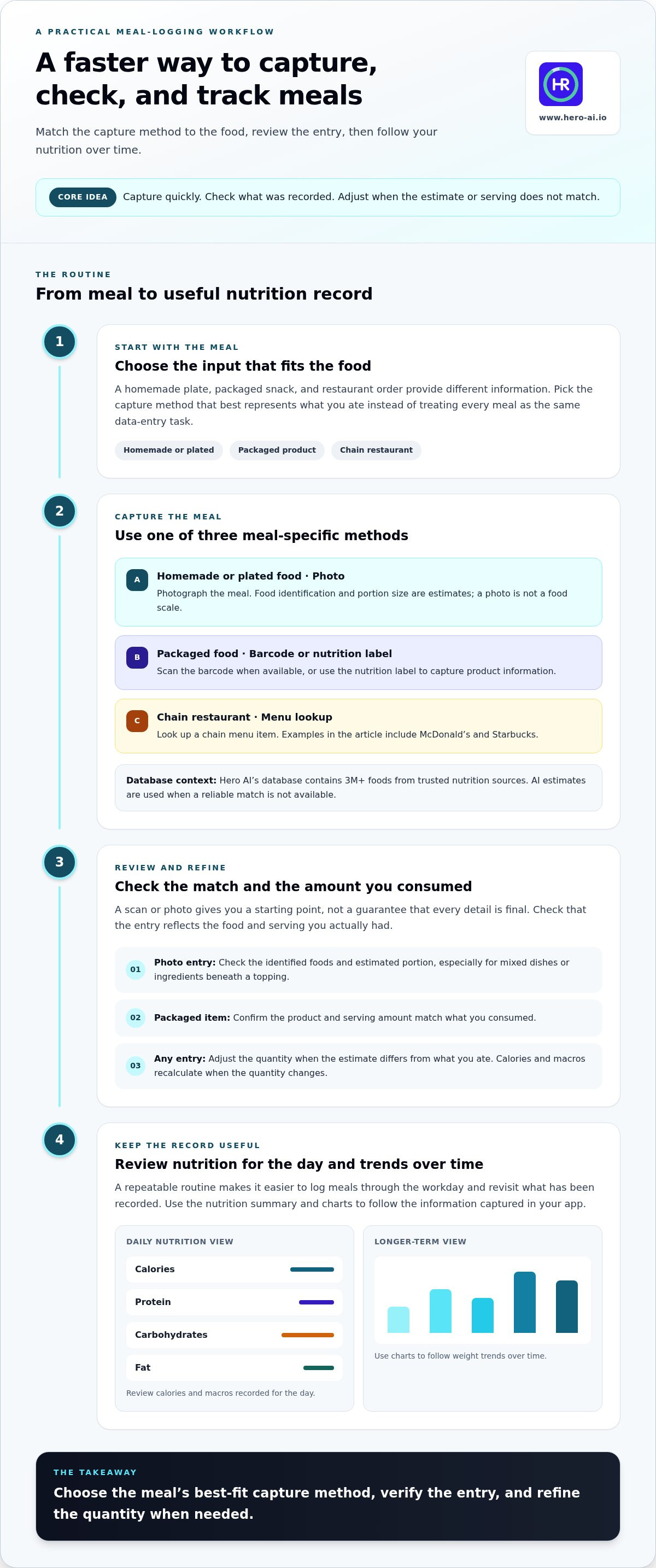
A Repeatable Quick Meal-Logging Routine for Busy Professionals
A repeatable routine makes meal capture easier to fit around changing work demands. Use the input that suits each food, review the entry, and correct the quantity if needed. A quick meal scanner for busy professionals should support this flexible sequence rather than require every item to be logged in the same way.
How can you keep meal entry consistent across a changing schedule?
Keep each meal as a separate entry. If one detail is missing, you don’t need to restart the whole day. Capture what you can, return to review the entry when practical, and choose the method that matches the food instead of defaulting to photo capture.
For example, log breakfast from a photo, scan the barcode on a packaged snack, photograph a homemade lunch, and use restaurant menu lookup for a chain meal. The sequence can change with your schedule. The process stays consistent: choose an input, review the entry, and check the day’s summary.
- Choose the available capture method. Use a photo for a plated meal, a barcode or label scan for a packaged product, or menu lookup for a chain restaurant order.
- Review the entry. Check that the food or menu item matches what you ate. For photo logging, look at both the identified foods and estimated portion.
- Adjust the quantity. Change the serving amount if the estimate or selected portion doesn’t reflect your meal. Calories and macros recalculate when the quantity changes.
- Check the daily summary. Review the calorie rings and macro breakdown to see how recorded meals contribute to the day’s nutrition totals.
How should you review estimates and nutrition trends?
Review at two levels. For each meal, check the logged food and portion, then adjust the estimate or quantity when needed. For the day, use calorie rings and macro breakdowns to review recorded intake. These summaries organize the information, but they don’t verify each entry, so correct the meal itself when you spot a difference.
Consider a workday with a photographed breakfast, a scanned packaged snack, a homemade lunch, and a chain restaurant meal. Check the relevant detail after each capture instead of reconstructing the whole day in the evening. If lunch was larger than the photo estimate, update its quantity. If the packaged snack entry reflects a different serving than you ate, correct that amount. This keeps each adjustment attached to the meal it describes.
Daily review and weight-trend review answer different questions. A daily summary shows the nutrition information recorded for that day. HERO AI’s longer-term weight-trend charts help you view patterns across readings instead of treating one day’s change as the full picture. Review the broader trend separately from meal-level corrections.
Use HERO AI to track meals and nutrition with a routine built around the foods and schedule you have.
Use HERO AI to Scan Meals and Review Your Nutrition in One App
A useful meal-tracking routine needs to handle more than one type of food. HERO AI combines photo-based logging, packaged-food scans, and chain restaurant menu lookup with nutrition views for reviewing recorded meals. These options let busy professionals choose a capture method to suit different meals throughout the day.
What does HERO AI combine for meal tracking?
Photo logging identifies foods and estimates portions, using database matches where possible. Packaged foods can be captured by barcode or nutrition-label scan, while chain restaurant menu lookup supports entries from restaurant menus. The database contains 3M+ foods from trusted nutrition sources.
After capturing an entry, you can adjust its quantity. Calories and macros recalculate to reflect the change. Review a photo-based portion estimate or correct a serving amount instead of treating the first result as final. The right input depends on the meal, so review remains part of the process.
HERO AI connects meal entries with calorie rings and macro breakdowns. These views organize recorded calories, protein, carbohydrates, and fat for daily review. They summarize the entries in the app, so check that the foods and quantities are correct. A quick meal scanner for busy professionals is most useful when capture and review work together.
How can you start using the meal scanner?
Start with the food in front of you. Use photo logging for a plated meal, a barcode or label scan for a packaged product, or restaurant menu lookup for a chain order. Review the entry and adjust the quantity if needed. Repeating these decisions makes it easier to apply the process across different meals.
Daily nutrition views and longer-term weight-trend charts serve different purposes. Calorie rings and macro breakdowns summarize logged intake for the day. Weight-trend charts help you review patterns across readings over time, rather than focusing on a single reading. Reviewing both views provides context, while meal-level corrections keep the underlying entries useful.
To begin using HERO AI, scan the QR code on the app page with your phone camera to download the app for iOS or Android. Then choose the capture method that matches your next meal and review the resulting entry.
See how HERO AI automates meal logging and use its capture options to record meals and review nutrition in one app.
Make Your Next Meal the Start of a Consistent Routine
Choose one meal you regularly find difficult to log and decide how you’ll record it before your next busy day. A simple default can reduce the need to rethink your process each time. Keep the review focused: check whether the entry reflects what you ate, and correct it if needed.
A quick meal scanner for busy professionals is most useful when it fits the way you already eat. Build a routine around your schedule, then use your records to notice patterns and make informed adjustments over time. Consistency comes from having a process you can return to, not from making every entry perfect.
HERO AI brings meal logging and nutrition review together in one app. Download HERO AI and scan your meals to start a flexible tracking routine. Choose the capture method that fits your next meal and review the entry.
Frequently Asked Questions
How accurate is a quick meal scanner for calorie tracking?
A quick meal scanner for busy professionals can simplify logging, but photo-based results aren’t guaranteed to be exact. HERO AI matches identified foods against its database of 3M+ foods from trusted nutrition sources. If it can’t find a reliable match, it uses an AI estimate. For a mixed meal, review each identified food and estimated serving, then adjust the quantity to better reflect what you ate. A camera isn’t a food scale.
Can I scan packaged foods without taking a photo?
Yes. HERO AI supports barcode and nutrition-label scanning for packaged products, so you can log a snack or ready-made meal without photographing it. Use the barcode when it’s available, or scan the nutrition label to capture product information. Review the entry and check that the serving quantity matches what you consumed. Photo logging remains an option for prepared meals.
Can a meal scanner track food from McDonald’s or Starbucks?
Yes. HERO AI includes restaurant menu lookup for chains such as McDonald’s and Starbucks. Use it to find a menu item that corresponds to your order, rather than trying to identify the meal from a photo alone. Review the match and select the item that best fits your meal.
Can I change the portion after scanning a meal?
Yes. You can adjust the logged quantity, and HERO AI recalculates calories and macros automatically. This is useful if a photo estimate shows a serving that’s smaller than what you ate, or if a packaged-food entry reflects a different amount. Check the identified foods as well as the quantity before relying on the entry. A camera estimates portions from an image; it doesn’t provide a weighed measurement.
Where does HERO AI get nutrition information for scanned meals?
HERO AI uses a database of 3M+ foods from trusted nutrition sources. For a photo entry, it identifies foods and attempts to match them with database items. If a reliable match isn’t available, the app uses an AI estimate. The database and AI estimates provide different kinds of input, so review entries rather than assuming every result is a verified match.
Can I log a recipe I found on TikTok or Instagram?
Yes. HERO AI’s Discover feed surfaces recipes and workouts from Instagram, TikTok, and YouTube, and you can share supported content to the app for automatic calorie estimation. For example, you can share a supported recipe before preparing it, then review its estimate as part of your meal record. Treat calorie estimates as estimates.
Can I try HERO AI before subscribing, and can I cancel?
Free trials are available with selected plans. HERO AI also offers shorter subscription options for people who prefer to start without a trial. You can cancel anytime. Review the plan details during sign-up for the terms that apply to your selection.


