

What if logging a meal took less time than searching for each ingredient? Manual searches and repeated data entry can make daily tracking feel like work. Photo estimates reduce typing, but you still need to review the food match and portion. Effortless food logging software should offer more than one way to capture a meal and keep its nutrition details visible.
A practical workflow matches the method to the food. Hero AI combines photo logging with barcode and nutrition-label scanning for packaged foods, restaurant menu lookup, and supported social-media recipe sharing. Its database contains 3M+ foods from trusted nutrition sources. When a photo estimate is used, you can adjust the quantity and see the macros recalculate. This guide explains how to choose a capture method, understand database matches and AI estimates, and review calories, macros, and weight trends as tracking information rather than exact measurements.
Key Takeaways
- Choose a capture method that suits the meal, then review the food match and portion before saving.
- Know whether an entry comes from a database match or an AI estimate, and interpret its nutrition information accordingly.
- Use an effortless food logging software workflow to reduce repeated entry while keeping calories and macros available for review.
- Build a simple routine around capturing, checking, adjusting, and saving entries to make daily tracking easier to maintain.
- Use calorie rings, macro breakdowns, and weight trends as summaries to review, not exact measurements.
What Makes Food Logging Software Effortless in Daily Use?
Food logging software gives you a digital record of meals and their nutrition information. Instead of keeping a paper diary, you can search and review recorded foods, portions, calories, and macronutrients in an app. A general overview of what a food diary is explains the basic idea: recording food intake for later reference.
Effortless food logging software reduces repeated work without removing the need to review an entry. The goal is to make routine logging easier while keeping the important details visible. That can help people tracking weight loss, muscle gain, or body-composition goals maintain a more consistent record. A food log supports review, but it doesn’t guarantee a particular result.
Which parts of food logging create the most friction?
Logging a meal can involve searching for a food, choosing a matching entry, adding ingredients, and selecting a portion. The steps vary with the meal, so a single capture method may not be the most practical choice every time.
- For a home-cooked meal, searching for each ingredient and entering quantities can add steps.
- For packaged food, you need to match the product and check the serving information.
- For dining out, you need to find the menu item that best represents what you ordered.
When logging takes too long, entries can be delayed or missed, leaving gaps in your daily record. A simpler workflow reduces repeated searches and makes it clear which details still need your attention. For example, scan a packaged product rather than searching for it by name, then check that the serving size matches what you ate.
What should effortless food logging still let users review?
Automation should make key details accessible, not hide how an entry was created. Review the food match, estimated portion, calories, and macronutrients. If the match or quantity doesn’t reflect the meal, adjust the entry before relying on it in your daily record.
Automated capture can reduce typing, but it doesn’t guarantee exact nutrition measurements. A photo can help identify visible foods and estimate portions, but a camera isn’t a food scale. Ingredients, preparation, and serving size can affect the nutrition information. Treat photo-based results as useful tracking estimates, and adjust the quantity when needed. A good workflow balances fewer entry steps with a quick check of the details relevant to your goal.
How AI Food Logging Turns a Meal into Nutrition Data
AI food logging turns a meal into a nutrition entry through capture, identification, matching, portion estimation, and logging. Each step has a different role: the app processes the information you provide, uses a database record or an estimate, then creates an entry you can review.
Photo logging identifies foods and estimates portions to create a nutrition entry for review.
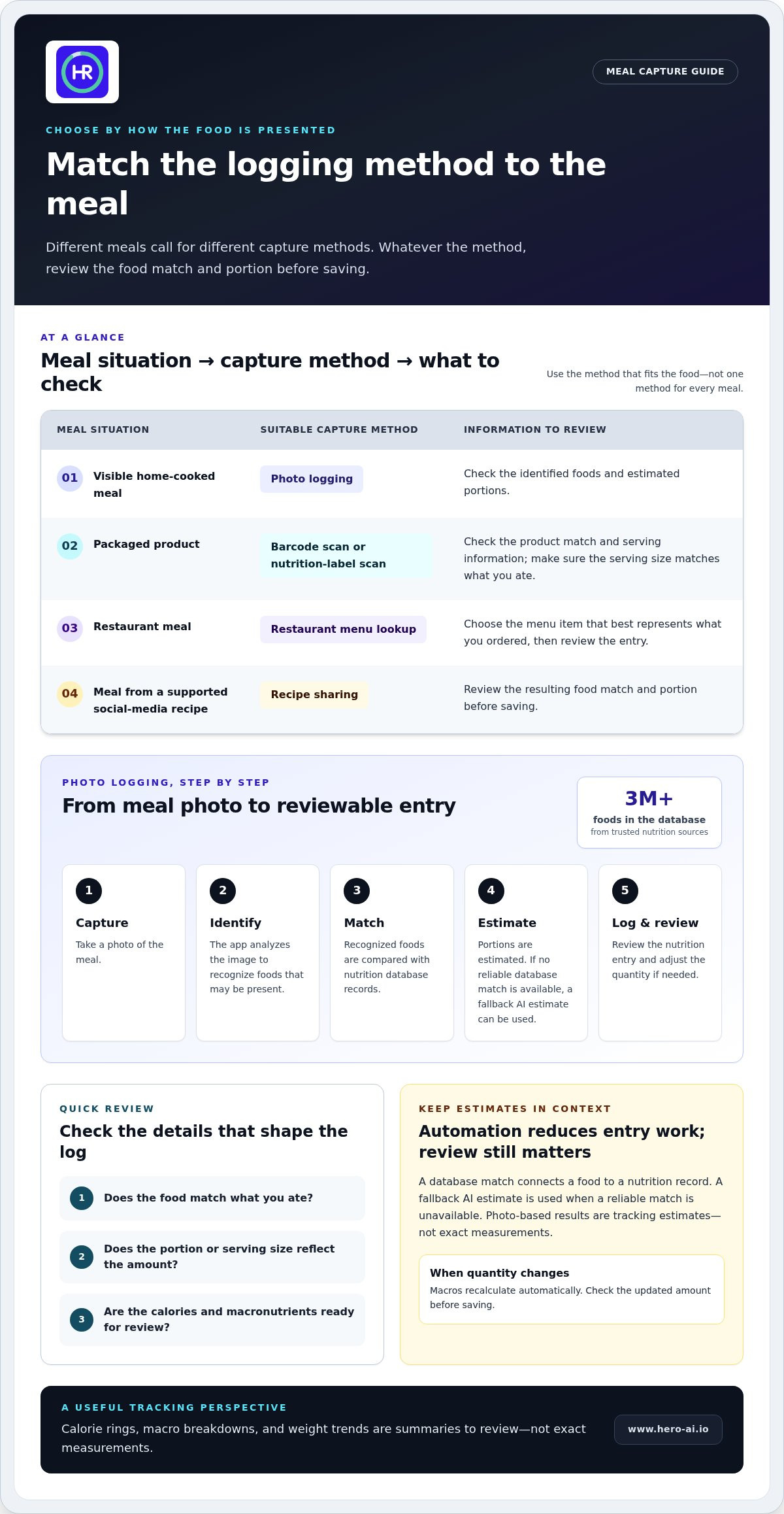
- Capture: Take a photo of the meal.
- Identify: The app analyzes the image to recognize foods that may be present.
- Match: Recognized foods are compared with records in Hero AI’s nutrition database of 3M+ foods from trusted nutrition sources.
- Estimate: The app estimates portions. If a reliable database match isn’t available, it can use a fallback AI estimate.
- Log: Nutrition information is added to an entry that you can review and adjust.
Identifying a food and assigning nutrition information are related but distinct steps. A database match connects an item to a nutrition record. A fallback estimate is used when a reliable match isn’t available. Neither makes every entry exact, so reviewing the result remains useful.
How does photo-based food recognition work?
Take a meal photo, and the app identifies visible foods and estimates their portions. It then checks recognized items against its nutrition database. When there isn’t a reliable match, Hero AI uses a fallback AI estimate. A database match draws on a food record; a fallback estimate fills in when a reliable record isn’t available.
How do portion edits and nutrition data affect the log?
After reviewing an entry, adjust the food quantity if needed. Hero AI recalculates macros automatically when the quantity changes, so you can correct a portion without starting the logging process again. Check that the updated amount reflects what you ate before saving the entry.
The database provides nutrition information for matched foods, while a fallback estimate is used when a reliable match isn’t available. Both approaches reduce manual entry, but neither should be treated as infallible. Review the food and portion to catch a mismatch before using the entry to track daily intake.
For an effortless food logging software workflow, automation and user review work together: the app handles recognition and calculation, while you check the match and quantity. Explore Hero AI food logging to see how photo capture and portion adjustments fit into the process.
Which Food Logging Method Fits Each Meal?
Choose a capture method based on how the food is presented. A photo suits a visible plated meal. A barcode or nutrition-label scan is a direct option for packaged food. Restaurant menu lookup and supported recipe sharing are useful when the meal information comes from a menu or recipe rather than a product label.
Matching the method to the food avoids forcing every meal through the same process. Whatever you choose, review the resulting entry before saving.
| Meal situation | Suitable capture method | Information to review |
|---|---|---|
| Visible home-cooked meal | Photo logging | Identified foods and estimated portions |
| Packaged product | Barcode scan or nutrition-label scan | Product match, serving information, and nutrition details |
| Restaurant dish | Restaurant menu lookup | Menu-item match and portion represented by the entry |
| Recipe found on social media | Share supported recipe content to the app | Recipe match and estimated calories before cooking |
Home-cooked meals, packaged foods, and restaurant dishes
For a home-cooked plate, a photo gives the app a view of the foods served together. Check the identified items and portions, particularly when the dish combines ingredients or includes a sauce that may be difficult to distinguish. A photo supports logging, but it doesn’t measure an exact serving.
For packaged products, scan the barcode or nutrition label. Then check that the product match is correct and that the serving details fit the amount you ate. Scanning is especially useful when the package provides nutrition information that a meal photo can’t show.
For a restaurant meal, use menu lookup to find chain items such as those from McDonald’s or Starbucks. Compare the menu entry with what you ordered. If you changed the dish or added ingredients, the listed item may not represent the whole meal, so review the entry before saving.
Recipes discovered on social media
Hero AI’s Discover feed surfaces recipes and workouts from Instagram, TikTok, and YouTube. Share supported recipe content to the app to generate an automatic calorie estimate before cooking. This can help you review a recipe while planning, without entering each ingredient manually.
Recipe sharing works with supported content. Review the resulting recipe and estimate before using it in your food record: ingredients, substitutions, and serving quantities can change the meal you prepare.
An effortless food logging software routine can use different methods throughout the day: a photo for a plated meal, a scan for a packaged item, and menu lookup or recipe sharing when those better fit the source of the food information.
How to Build a Simple Food Logging Routine and Review Progress
A repeatable routine makes entries easier to complete and gives you a consistent record to review. Keep the process focused: choose a capture method that suits the meal, check the food match and portion, adjust the quantity if needed, then save. This keeps user review in the workflow without turning every meal into a manual search.
A repeatable four-step meal logging workflow
- Choose a capture method. Use a photo for a visible plated meal, a barcode or label scan for packaged food, menu lookup for a restaurant item, or supported recipe sharing for a recipe.
- Review the match. Check that the identified food or menu item corresponds to what you ate. Look over the estimated portion before saving.
- Adjust the quantity. If the portion shown doesn’t reflect what you ate, edit it. In Hero AI, macros recalculate automatically when the quantity changes.
- Save the entry. Add the reviewed record to your daily log so its nutrition information is included in your intake summary.
Use the same sequence for different meal types. The capture method can change, but checking the match and quantity remains useful. If an entry is uncertain, treat it as an estimate in your record rather than assuming it is exact.
Reviewing calories, macros, and weight trends
Hero AI’s daily calorie rings and macro breakdowns summarize the food entries recorded for the day. The calorie view gives a snapshot of logged energy intake, while the macro view shows recorded macronutrients. These summaries are only as useful as the information entered and how closely it reflects your meals.
Weight-trend charts provide a longer-range view of weight records, rather than focusing on one day’s number. A daily food log reflects recorded intake; a trend chart displays weight patterns over time. Keeping these views distinct helps you avoid treating a single meal entry or weight reading as a complete picture of progress.
A food log records intake; it doesn’t guarantee a particular outcome. It can support review against personal goals, including weight loss, muscle gain, or body-composition goals, but the record itself doesn’t determine results. Use calorie and macro summaries as tracking information, and review longer-range charts for patterns rather than guaranteed change.
An effortless food logging software routine makes logging manageable while keeping saved information available for review. Follow the four steps consistently, then use daily summaries and longer-term charts for their separate purposes. Start tracking meals with Hero AI to bring capture, portion adjustment, and progress views together in one app.
How Hero AI Combines Automated Logging with Nutrition Tracking
Hero AI brings food capture, nutrition records, and progress views together in one mobile app. Log a plated meal with a photo, scan a packaged product’s barcode or nutrition label, look up restaurant menu items, or share supported social-media recipes. These options reduce repeated entry while keeping food information visible for review.
What Hero AI brings together in one app
Photo-based logging identifies visible foods and estimates portions. Hero AI can match recognized foods against its database of 3M+ foods from trusted nutrition sources. If a reliable database match isn’t available, it uses a fallback AI estimate. You can adjust quantities, and macros recalculate automatically, so you can review and change an entry before it becomes part of your record.
Different capture methods suit different situations. Barcode and nutrition-label scans support packaged food entries. Restaurant lookup helps find menu items, including chain options such as McDonald’s and Starbucks. Supported recipe sharing turns recipe content into a calorie estimate. The Discover feed also surfaces recipes and workouts from Instagram, TikTok, and YouTube.
After logging food, review calorie and macro information alongside progress views. Daily calorie rings summarize logged energy intake, macro breakdowns show recorded macronutrients, and weight-trend charts display longer-range patterns. The daily dashboard reflects entries for a day, while a trend chart helps you review weight records over time. These views support tracking but don’t guarantee a specific result.
This combination makes the logging process easier to review. Check the food match, estimated portion, and quantity, then adjust the entry if needed. Automated logging reduces some manual steps, but your review helps ensure the record reflects the meal.
How to explore Hero AI
Hero AI is available for iOS and Android. Scan the QR code on the page with your phone camera to download the app. You can review saved food entries alongside calorie, macro, and weight-trend views.
Hero AI offers subscription options, including shorter plans for people who prefer to start without a trial. Free trials are available with selected plans, and you can cancel anytime. Review the terms for the plan you choose.
To explore the app’s logging and tracking workflow, Explore Hero AI food logging. Its capture options, quantity adjustments, and nutrition summaries can support an effortless food logging software routine while keeping logged information visible for review.
Make Your Next Meal Easier to Track
Choose a meal you eat regularly as a starting point. Build a logging habit around that familiar entry, then adapt the method when your meals or schedule change. The aim is a useful record that fits ordinary days, not a process that creates more work. An effortless food logging software routine should make that flexibility possible.
Small, repeatable steps can make tracking easier to continue. As user Stella Jie put it, “Logging used to be the first thing I gave up on. Now it takes less time than making the coffee.” Find a rhythm that works for you, and treat each entry as information for reflection rather than a measure of success or failure.
When you’re ready to put that approach into practice, explore Hero AI food logging. Start with a manageable routine and build from there.
Frequently Asked Questions
How does effortless food logging software record a meal?
It uses a capture method to identify or match food, then adds nutrition information to a log. With Hero AI, photograph a plated meal or scan a packaged product’s barcode or nutrition label. Review the entry and adjust its quantity if needed before saving. This gives you a chance to correct a portion that doesn’t reflect what you ate, rather than treating the first result as final.
Is photo-based food logging accurate enough for everyday tracking?
Photo logging provides an estimate for everyday tracking, but it doesn’t guarantee exact measurements. Hero AI checks recognized foods against its database of 3M+ foods and uses an AI estimate when a reliable match isn’t available. Portion sizes are estimated from the photo, and you can adjust the quantity to recalculate macros. Use the result as a practical record, not as an exact measurement.
Can food logging software track packaged foods by barcode?
Yes. Hero AI can log packaged foods from a barcode or nutrition-label scan. Scanning is the most accurate tracking option for packaged foods. After scanning, check the product entry and quantity against the package you have. This is useful for a snack or ingredient with printed nutrition information, where a photo alone may not show the product details.
Can I log restaurant meals with Hero AI?
Yes. Hero AI includes restaurant menu lookup for chains such as McDonald’s and Starbucks. Search for the menu item and compare the result with the dish you ordered. If you changed the dish or added ingredients, review the entry to account for what was served.
Can I try Hero AI before subscribing?
Free trials are available with selected plans. Shorter subscription options are also available for people who prefer to start without a trial. Review the plan details before choosing. You can cancel anytime.
How do I download the Hero AI app?
Scan the QR code on the Hero AI page with your phone’s camera to download the app. Hero AI is available for iOS and Android. After installing it, choose a logging method that suits the food, then review saved entries alongside calorie, macro, and weight-trend views.


