

A large food database alone doesn’t make a tracker useful for a clean bulk. If logging takes too long or food records are hard to compare, consistency can slip. Which clean bulking meal tracking software can help you record meals without turning food entry into a daily chore?
A muscle-gain routine involves reviewing calorie and macro intake alongside the foods you choose. The right tool should make logging practical and provide records you can use to notice patterns over time. It should support your tracking habits, not set your nutrition targets for you.
This guide compares meal-tracking options by entry method, nutrition data, and fit with a repeatable routine. It also covers Hero AI, whose subscription includes photo and barcode logging, a database of more than 3 million verified foods, and social recipe imports. You’ll learn what to compare and how to choose software that works for your routine.
Key Takeaways
- Assess clean bulking meal tracking software by how easily it supports consistent logging and useful nutrition records.
- Compare photo, barcode, database-search, and recipe-import options against the meals you log most often.
- Review detected foods and imported recipes, including serving sizes and ingredients, before relying on their nutrition records.
- Separate essential tracking functions from additional tools, such as workout scheduling, when comparing software.
- Use a simple evaluation sequence: identify logging friction, test entry methods, review records, and assess how well the routine fits your needs.
Why clean bulking meal tracking software can make progress easier to assess
Clean bulking is a muscle-gain approach that monitors food intake while considering food choices. Rather than treating calorie totals as the only measure of a meal, it involves reviewing eating patterns in relation to personal goals. Clean bulking meal tracking software can organize food records so you can look back at what you logged over time.
A consistent record makes it easier to compare logged calories and macronutrients with goals you’ve chosen or discussed with a qualified professional. It can also reveal recurring patterns, such as breakfasts that regularly contribute protein or snacks that add to daily intake. A food log supports review; it doesn’t establish whether you’re gaining muscle or determine health outcomes.
Meal tracking records what you eat; meal planning organizes what you intend to eat, and coaching provides guidance on decisions and adjustments. A tracker organizes dietary intake, calorie, and macronutrient records for later review. It doesn’t guarantee muscle gain or replace advice from a qualified health or nutrition professional.
What meal tracking can show during a clean bulk
Food records can reveal patterns across meals and days. You might notice, for example, that weekday lunches are logged consistently while weekend meals are often missing. You can then review calorie and macro totals alongside the foods and portions entered. This adds context when assessing whether your routine appears aligned with the intake goals you’ve chosen.
Comparisons are most useful when entries are reasonably consistent. Logging a cooked portion one day and an uncooked amount another can make records harder to interpret. The same is true if serving sizes are estimated differently or ingredients are omitted. Use consistent units and serving details where practical, and treat totals as records of the information entered, not precise measurements of progress.
When tracking helps, and when it can become too demanding
Tracking can help you get a clearer view of regular meals and how your choices relate to selected calorie or macro goals. It can be especially useful when the same meals appear often, because repeatable entries make patterns easier to review. A brief, consistent logging routine may provide more useful information than occasional detailed entries followed by gaps.
Manual entry can take time, particularly for meals with several ingredients or changing portions. If logging starts to disrupt your routine, simplify it. Record the main components, use a consistent serving estimate, and review the log at a practical interval. Not every entry needs to be exact to support reflection. The aim is a repeatable record that informs decisions, not a perfect account of every bite.
How meal-tracking software captures food and nutrition data
Food-tracking tools can offer several ways to create a meal record. The entry method affects how much information you enter yourself, but every method still depends on selecting the right food and portion. When comparing clean bulking meal tracking software, consider whether the available options suit the meals you log most often.
Photo, barcode, and database entry methods
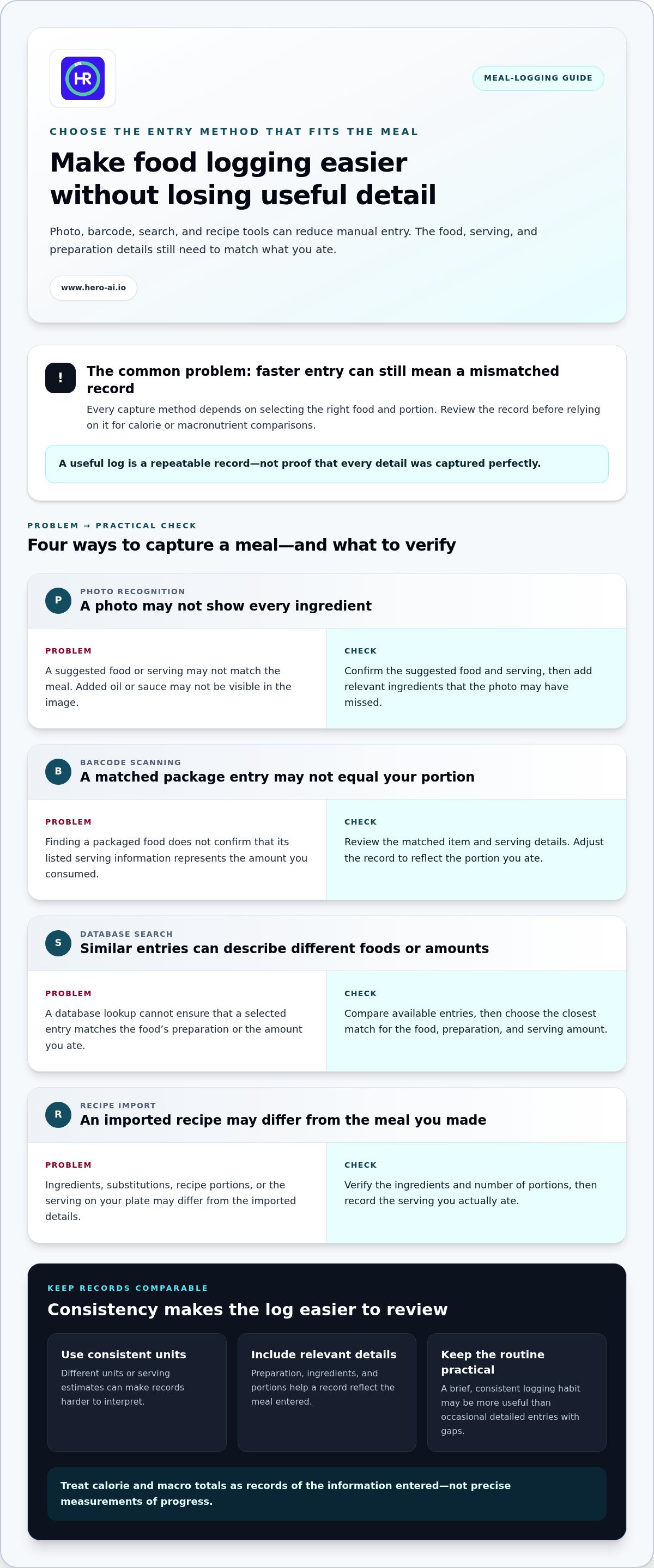
Photo recognition can suggest foods for a meal record, reducing the need to enter each item from scratch. Check the suggestion and correct it if the food or serving doesn’t match what you ate. A photo may not capture details such as added oil or sauce, so include relevant ingredients where possible.
Barcode scanning offers a direct lookup for packaged foods. Review the matched item and serving information rather than assuming it represents the portion you consumed. Database search gives you another option: look up a food by name, compare the available entries, and select the one that best matches its preparation and amount.
A food database supports nutrition lookup, but it can’t ensure every entry matches the meal you ate. The record is useful only if the selected food, serving, and relevant preparation details reflect your meal. For more detail on automated capture and data review, see this AI calorie counter guide.
Recipe imports and meal records
Recipe import can reduce repeated ingredient entry when the source is supported. For meals made from a saved recipe, it may bring the ingredient list into the logging process instead of requiring you to type it again. Review the imported details: check that the recipe reflects the ingredients you used, then verify the number of portions and the serving you ate.
For example, a recipe record may describe several servings, while your plate contains one portion or a different amount. Added ingredients or substitutions can also change the meal’s nutrition record. Correct these details before comparing its calories or macros with other meals. Recipe capture is a shortcut for creating a record, not proof that the record is complete.
Each entry method suits different needs. A barcode works for packaged items, search helps with individual ingredients, and recipe import can reduce setup for repeated dishes. Photo recognition offers another way to start logging. Compare the options with your regular meals, then choose the method that keeps entries manageable without losing useful detail. The macro tracking app overview provides broader context on reviewing calorie and macro records. To explore a platform with multiple logging options, visit Hero AI nutrition tracking.
Which clean-bulking tracking features are worth comparing?
Compare software by the work it helps you complete consistently, not by the length of its feature list. For clean bulking meal tracking software, start with core food-logging functions: entry options, access to nutrition data, recipe handling, and the ability to review records. Consider extras, such as workout scheduling, separately as part of the wider workflow.
| Feature area | What to compare | Practical check |
|---|---|---|
| Entry options | Photo recognition, barcode scanning, and food search | Can you choose a method that fits the meal you’re logging? |
| Food-data access | Database coverage and the clarity of food and serving details | Can you find a relevant item and select an appropriate portion? |
| Recipe handling | Recipe import and editing of ingredients or servings | Can you adapt a saved recipe to the version you prepared? |
| Record review | Visibility of foods, servings, calories, and macros in past entries | Can you review a meal and correct details when needed? |
Assess each entry method using the same criteria: how well it fits your usual meals, whether serving information is clear, and whether you can inspect or edit the resulting record. Photo recognition may be convenient for a mixed meal, while barcode scanning can suit a packaged item. Search can help with individual ingredients. No method guarantees exact nutrition values, so the ability to review an entry matters.
Food-data access affects how easily you can find and compare items. A broad database may offer more choices, while verified records can support structured lookup. HERO AI provides access to a database of more than 3 million verified foods. Consider whether the available results include foods and portions that match what you routinely eat.
Separate essential tracking from optional planning tools. The essentials are practical food entry, useful nutrition information, and records you can review. Recipe importing can reduce repeated ingredient entry for meals you make often, but you still need to check the ingredients and serving details. Workout scheduling supports another part of the routine. HERO AI includes workout scheduling from social media content, which may suit users who want food and exercise organization in a broader workflow. It doesn’t replace food tracking. See the social media fitness integration guide for related workflow details.
Also distinguish tracking tools from meal plans or coaching. A tracker records food and nutrition information for later review. A meal plan sets out intended meals, while coaching provides guidance or recommendations. Software can include more than one type of feature, but each has a different purpose. Compare them against your needs rather than assuming a tracker sets clean-bulking targets or provides individualized advice.
Make your comparison reflect your logging habits. If you rely on repeat recipes, assess recipe handling. If you often eat packaged foods, consider barcode entry. Prioritize functions that remove friction from your routine, then weigh additional features by whether they serve a clear purpose for you.
How to evaluate a meal tracker before using it for a clean bulk
Evaluate a tracker against your actual meal routine, not an idealized one. The aim is to find clean bulking meal tracking software that makes useful records practical to create and review. Use this short process before settling on a tool:
- Define what you need to record. Decide whether you want to review foods, serving details, calorie and macro records, or a combination. Focus on tracking information against goals you’ve already chosen.
- Test the entry methods. Log a few typical meals using the available options. Notice which method fits each meal and whether you can correct a mismatched food or portion.
- Review the records. Check whether you can revisit meals and understand what was recorded. Look for missing ingredients, unclear servings, or entries that are difficult to interpret.
- Assess routine fit. Consider whether logging works with your usual schedule. A method that feels manageable for repeated meals is more useful than a long feature list you rarely use.
Match software features to your meal routine
Start with what you actually eat. Barcode entry may be useful for packaged foods. Meals prepared at home may call for database search or photo logging, while recipes adapted from online sources may benefit from import options. Match these patterns to the software’s entry methods, then consider how easily you can review and correct each record.
Notice which meals repeat and where logging slows down. If you make the same recipe often, see whether importing it reduces repeated entry while still letting you adjust ingredients or servings. Prioritize a repeatable process and understandable records. More features don’t automatically make a tracker a better fit.
Review records without treating estimates as guarantees
Choose a tool that lets you return to earlier meal entries and understand the nutrition information recorded. This makes it easier to compare patterns over time, provided your entries use reasonably consistent food and serving details. Use the records to reflect on your routine, not as proof of exact intake or a measurement of body-composition change.
Food logs capture the information entered. On their own, they can’t establish muscle gain or explain changes in body composition. Don’t treat an estimated total as a guarantee or use it to make unsupported adjustments. For individualized nutrition questions, seek guidance from a qualified professional.
Apply the same process to each tracker you’re considering: identify your regular meals, test relevant entry methods, review the resulting records, and decide whether the workflow is manageable. To assess how HERO AI’s logging options fit these criteria, review HERO AI’s tracking features.
How HERO AI fits a clean-bulking meal-tracking workflow
HERO AI brings several food-entry options together in a nutrition and fitness platform. For anyone comparing clean bulking meal tracking software, these options can support routines that include different meal types. Photo logging and barcode scanning provide two ways to record food, while a verified-food database supports nutrition lookup. The platform also includes social recipe imports and workout scheduling.
Food logging through multiple entry options
Use photo recognition to log a meal or barcode scanning to record packaged foods. You can also look up foods in HERO AI’s database of more than 3 million verified foods. These options accommodate different routines, such as scanning a packaged item and using photo logging for a meal with several components.
Whichever route you use, review the entry against the food and portion you consumed. Check that the recorded item represents the meal, including ingredients or serving details that may affect its nutrition information. The database provides a source for looking up foods, but the selected item and portion still need to match your meal. Consistent review makes records more useful for later comparison.
Connect meal records with recipe and workout workflows
HERO AI supports recipe imports from TikTok and Instagram. This can connect recipe discovery with meal logging, particularly when you prepare meals based on content from those platforms. Review the imported recipe against the version you made. Ingredients, substitutions, and serving amounts may differ from the original, so make sure the record reflects your meal.
Workout scheduling is included alongside nutrition-tracking features. It can help bring exercise planning into the same broader fitness workflow as food logging. Scheduling workouts is distinct from recording meals or reviewing calorie and macro data. Consider whether having both supports your routine rather than assuming they automatically coordinate nutrition and training.
HERO AI organizes food and workout information. It doesn’t guarantee muscle gain, set automatic clean-bulking targets, provide a prescribed meal plan, or replace individualized nutrition advice. For personal questions about food choices or nutrition goals, consult a qualified professional. The platform’s value for a clean-bulking routine depends on how well its logging and planning options fit your habits.
Explore the HERO AI subscription to review its tracking and fitness-planning features.
Build a tracking routine you can sustain
Choose a starting routine that fits your meals and schedule. Decide what you want to record, then use the same approach consistently enough to make later reviews meaningful. The best clean bulking meal tracking software for your needs is one you can use without turning every meal into a separate task.
As you build the habit, use your records to notice patterns and identify what you may want to change in your logging process. Keep nutrition goals and professional guidance separate from the software itself. A tracker organizes information; your review and decisions give that information context.
To explore food logging and broader fitness-planning features, explore HERO AI’s meal-tracking features. Choose a routine that feels manageable, then refine it as you learn what works for you. Consistent, useful records can support a more informed approach to your muscle-gain goals.
Frequently Asked Questions
What is clean bulking meal tracking software?
Clean bulking meal tracking software records meals and organizes nutrition information for review during a muscle-gain routine. If you log consistently, it can help you compare how you eat on different days, such as training days and rest days. The tool doesn’t decide whether your food choices suit your needs. Its usefulness depends on the information you enter and the goals you bring to each review.
Can meal-tracking software create a clean-bulking meal plan?
Meal tracking alone doesn’t create a clean-bulking meal plan. A tracker records food you’ve eaten, while a planning feature may help organize meals you intend to eat. These functions differ, and tracking records don’t establish which foods or portions are appropriate for you. Treat any plan as a separate tool, and seek qualified nutrition advice for guidance suited to your health and circumstances.
How accurate is photo-based meal tracking?
Photo-based tracking can provide a starting point, but the result may not match every ingredient or portion in a meal. Foods layered together, mixed dishes, or ingredients that aren’t visible can affect what gets recorded. Review the suggested items and edit the entry where possible. For meals where detail matters to your comparison, use reliable portion information and add relevant ingredients rather than treating the photo result as exact.
Do I need to track every meal while clean bulking?
No single logging frequency suits everyone. Tracking selected meals may help you notice patterns, but incomplete records can’t represent a full day’s intake. If you log only certain meals, be consistent about which ones and avoid drawing conclusions about totals from partial data. You can also adjust the level of detail if recording everything feels burdensome. The routine should provide useful context without becoming difficult to maintain.
Can a macro tracker tell me how much to eat for muscle gain?
A macro tracker can total the nutrition information entered, but those totals don’t determine how much you personally need to eat for muscle gain. Your target depends on individual factors that a food log alone can’t assess. Use a target set for your circumstances rather than treating an app’s displayed totals as personalized advice. A qualified nutrition professional can help with individualized questions about intake and training goals.
Is a food database better than logging meals by photo?
Neither method is better for every meal. A database can be useful when you know the food and want to choose a matching entry. Photo logging may be a convenient starting point when a meal contains several visible items. The best option depends on the meal and how much review it needs. Compare whether the resulting entry is understandable and editable, then choose the method that fits the situation.
Can I use meal-tracking software without becoming overly focused on food?
It may be possible to use a tracker in a practical way, but pay attention to how logging affects your thoughts and routine. Keep its purpose limited, such as reviewing broad eating patterns, and reduce or stop tracking if it causes distress or interferes with daily life. You don’t need to treat every entry as a judgment. If food tracking feels difficult to manage, consult a qualified health professional.


