

A restaurant meal can be estimated, but rarely measured precisely from a menu. Portions vary, and descriptions may leave out cooking oils, dressings, sauces, or substitutions. A dining out calorie calculator tool can help you organize a practical estimate, as long as you treat the result as an estimate rather than an exact value.
It can be difficult to identify every ingredient or judge how much was served. Searching for each component while eating can also interrupt the meal. A consistent approach is more useful than trying to account for every detail with false precision.
This guide explains how to break a restaurant meal into components, adjust for portion size and customizations, and record the assumptions behind your estimate. It also covers how to keep tracking after an uncertain meal without letting it disrupt your routine. Hero AI supports photo-based meal tracking and food-database logging, so you can record restaurant meals alongside other daily food logs. These tools support meal capture, but the resulting estimate is not a verified nutrition value.
Key Takeaways
- Use a dining out calorie calculator tool to build a practical estimate, not to claim an exact nutrition value.
- Follow a five-step process, starting with published nutrition data for the matching meal and serving when available.
- Compare published data, database matches, and component-based estimates by noting what each source can and cannot tell you.
- Record the meal soon after eating, while portion details and modifications are easier to recall.
- Use Hero AI’s meal-tracking options to capture restaurant meals alongside your other daily food logs.
What a Dining Out Calorie Calculator Can, and Cannot, Tell You
A dining out calorie calculator tool estimates the energy in a restaurant meal using the details available. It can help you compare menu choices or create a food log entry when published nutrition information isn't available. It can't confirm the exact calories in a dish unless reliable information matches both the meal and the serving you received.
An estimate is only as reliable as the meal and portion details used to produce it. Restaurant recipes can vary, and menu descriptions may not identify every ingredient or preparation detail. A dish described as grilled, for example, may also include oil, sauce, or toppings that affect its total. Even published nutrition information may describe a standard serving rather than your customized order.
Calories and macronutrients are related, but they are separate estimates. Calories indicate the energy in a meal. Macronutrients describe its protein, carbohydrates, and fat. Estimating either requires useful information about ingredients and amounts. If you don't know how much dressing or cooking oil was used, its calorie contribution and nutrient breakdown are uncertain.
Nutrition labels provide structured information about a food’s energy and nutrients. The Nutrition Facts Label offers background on their purpose and history. Restaurant data can be useful when it matches your order, but a label or database entry for a similar meal doesn't verify what was served on your plate.
When an online restaurant calorie calculator is useful
Use an estimate to compare menu options or record a meal that has no published nutrition information. The value is consistency, not laboratory measurement. Applying the same method to similar meals makes your log easier to interpret over time. Note whether you used restaurant data, a comparable meal, or an ingredient-based estimate.
Why restaurant meal estimates vary
Preparation details can change a meal’s energy and nutrient totals. Cooking oil, dressings, sauces, toppings, and cooking methods may be difficult to identify or quantify from a menu description. Portion size matters too. Two meals with the same menu name can differ in the amount of protein, grains, dressing, or sides served. Record visible modifications and make a reasonable portion estimate. If an ingredient or amount is unclear, note that uncertainty rather than treating the result as exact.
How to Estimate Restaurant Calories in Five Practical Steps
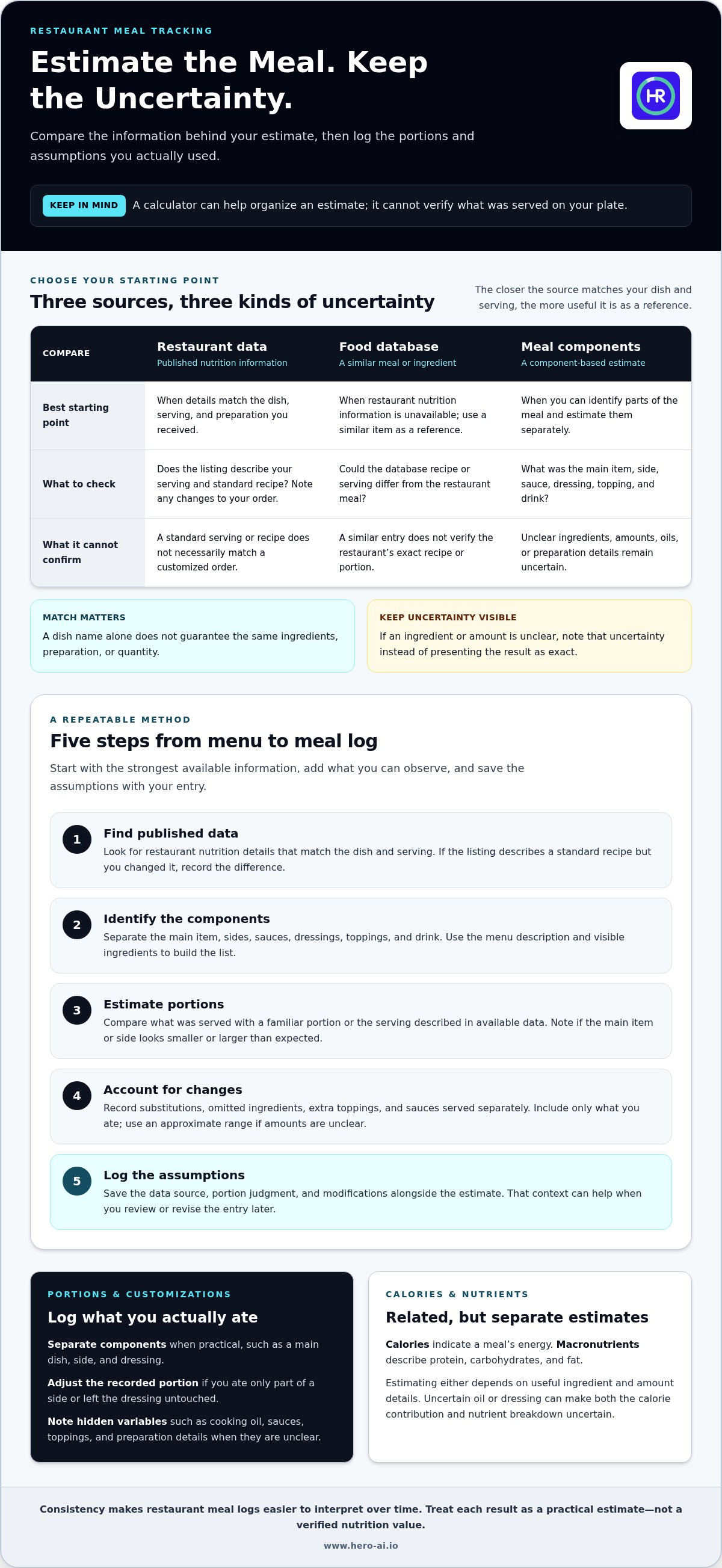
A repeatable process helps you estimate a customized meal without forcing every detail into a single precise number. Start with the strongest available information, add what you can observe, then save the assumptions with your entry.
Start with the menu and available nutrition information
Check the restaurant’s nutrition information for the exact dish, serving, and preparation when available. Compare the ingredient list and menu description with what you ordered. A similar item in a food database can offer a reference, but its recipe or serving may differ. Nutrition information can be presented in different formats, so focus on whether the details match your meal.
- Find published data. Look for nutrition details from the restaurant that match the dish and serving. If the listing covers a standard recipe but you changed it, note the difference.
- Identify the components. Break the meal into its main item, sides, sauces, dressings, toppings, and drink. Use the menu description and visible ingredients to build the list. Keep identifiable components separate instead of combining everything into one guess.
- Estimate portions. Compare what was served with a familiar portion or the serving described in the available data. Note whether the main item or side looks smaller or larger than expected. A matching dish name doesn't guarantee a matching quantity.
- Account for changes. Record substitutions, omitted ingredients, extra toppings, and sauces served separately. Include only what you ate. If an ingredient’s amount is unclear, use an approximate range rather than implying an exact total.
- Log the assumptions. Record the data source, portion judgment, and modifications alongside the estimate. This gives you useful context if you review or revise the entry later.
Build an estimate from portions and customizations
Use separate entries for components when practical. For example, log a main dish, side, and dressing individually if information is available. If you ate only part of a side or left the dressing untouched, reflect that in the recorded portion. A database match can help with an ingredient, but it shouldn't be presented as the exact restaurant recipe.
Recording your assumptions makes an estimate easier to review later. If a portion or preparation detail remains uncertain, preserve that uncertainty in a note or range. A dining out calorie calculator tool can support this process, but the quality of the result still depends on the details you enter. Hero AI can record a restaurant meal alongside your other food logs. Explore Hero AI meal tracking as part of a consistent logging routine.
How to Compare Restaurant Meals Without False Precision
Comparisons are more useful when each estimate uses the same assumptions. Keep serving size, included sides, sauces, and customizations consistent. Then compare options against your tracking goal, such as estimated calories or the meal’s main components. No single source makes every choice universally best.
Published nutrition data versus estimated meal totals
Restaurant nutrition data is the strongest starting point when it matches the dish, serving, and preparation you ordered. If it describes a different portion or standard recipe, treat it as a reference rather than a precise total for your customized meal. A close database match can help fill a gap, but it doesn't prove the restaurant used the same ingredients or amounts.
Component-based estimates take more input, but they make visible additions and substitutions easier to represent. Whichever source you use, note it with the estimate. That context lets you compare entries on a like-for-like basis and understand why two totals may differ.
| Data source | Best use | Uncertainty | What the diner should record |
|---|---|---|---|
| Published restaurant nutrition data | A listed dish and serving that match the order | May not reflect a different portion, preparation, or customization | Dish, serving, and any changes made |
| Close database match | A reference when the exact restaurant item is unavailable | Ingredients, recipe, and portion may differ | Matched food and why it was selected |
| Component-based estimate | A meal with identifiable parts or customizations | Amounts and preparation may be approximate | Components, estimated portions, and uncertain details |
How to handle uncertain portions, sauces, and substitutions
Flag an uncertain item instead of assigning it a precise value without support. For example, note that a dressing amount is unknown or that a side portion was estimated. If your tracker accepts a range, use one when the portion or recipe could vary. If it requires a single entry, choose a reasonable estimate and preserve the uncertainty in a note, if available.
Apply the same method to each meal you compare. If one estimate includes a side and another doesn't, the totals don't represent equivalent orders. Record what was served and what you ate, particularly when a substitution or omitted ingredient changes the meal. This keeps the comparison aligned with your tracking purpose without overstating confidence.
A dining out calorie calculator tool can organize these comparisons, but its output still depends on the source and assumptions entered. For broader context on automated meal logging, see this overview of AI calorie counting and nutritional data capture.
A Simple Dining-Out Calorie Tracking Workflow
A practical routine separates quick observation from later logging. Check the menu before ordering, note meaningful changes, then enter the meal soon after eating. This reduces the need to search during the meal and helps you retain details for a consistent record. The aim is to capture useful context, not to reconstruct every ingredient perfectly.
Before ordering: identify the information that matters
Note the dish name, listed ingredients, serving description, and any nutrition information for the meal. Decide whether a side, sauce, dressing, drink, or substitution should be tracked separately. Keep this check brief. A few relevant details are more useful than interrupting the meal to research every possible ingredient or serving variation.
- Check the menu. Save or note the dish description and available nutrition details. Keep track of the serving those details refer to.
- Mark meaningful changes. Note a substituted side, omitted ingredient, extra topping, or sauce served separately. Focus on changes that affect what you actually eat.
- Capture the meal. Use a photo or written description as a tracking input if your chosen app supports that workflow. A photo can preserve a visual reference, but it doesn't establish the exact ingredients or amounts.
- Log soon after eating. Record the meal while the portion, preparation, and modifications are easier to recall. Separate known details from estimates.
After the meal: log the estimate and its assumptions
Enter the dish and its components using the information available. Add a short note for details that could affect the estimate, such as an uncertain sauce amount or a side you only partly ate. If your tracking app accepts a photo or description, use the supported input to help capture the meal. For more context on this approach, review this analysis of photo-based food tracking.
Apply the same basic routine to future restaurant meals. Consistent notes make entries easier to compare, even when some details remain uncertain. Review patterns across repeated logs rather than drawing conclusions from one meal with incomplete information. If a single entry is difficult to estimate, record a reasonable value with context and continue your usual tracking routine. This keeps one uncertain meal from dominating your wider food log.
A dining out calorie calculator tool can support this process by organizing the information you enter, but it can't replace details that weren't available or observed. HERO AI offers photo-based meal tracking alongside food-database logging, so you can record restaurant meals with other daily entries. Explore HERO AI meal tracking as part of your ongoing food log.
How Hero AI Fits Into Restaurant Meal Tracking
After estimating a restaurant meal and noting what is known or uncertain, the next task is adding it to your regular food record. Hero AI supports meal tracking through photo recognition and food-database logging. Its database contains over three million verified foods. These options help you capture meals alongside other daily entries, but they don't verify a restaurant’s recipe or the portion served.
Using meal-tracking features as part of a consistent log
A meal photo can provide a visual reference for a restaurant entry. Use it as a tracking input, then retain relevant details about ingredients, portions, and customizations where available. Photo-based tracking can support meal capture, but using a photo doesn't make the estimate an exact nutrition value.
Barcode scanning serves a different purpose. It can help log a packaged drink, snack, or other item with a barcode when one is part of the meal. It isn't a method for identifying the nutrition of a prepared restaurant dish. For a meal without an exact database match, record the best available description and keep your assumptions clear.
Hero AI supports restaurant meal logging through its nutrition and fitness platform. It can place restaurant meal entries within a broader daily log. That distinction matters: the tracking method can organize information, while the quality of a restaurant estimate still depends on what is known about the dish and serving.
Continue tracking beyond a single restaurant meal
A consistent food record includes meals with different levels of detail. Some entries may use a close database match; others may rely on a photo or meal description and include an estimated portion. Keeping the source and relevant modifications with the entry helps distinguish stronger information from assumptions. Review the full record over time rather than allowing one uncertain restaurant meal to define it.
The Hero AI subscription includes recipe imports from social media and workout scheduling, alongside nutrition and fitness tracking. These functions provide context beyond restaurant logging, but they don't make a meal estimate more exact. Use the tracking options that fit your routine and keep restaurant entries proportionate to the information available.
Explore the Hero AI subscription overview to learn about the broader tracking workflow.
Make Your Next Meal Easier to Track
Use your next restaurant visit to establish a tracking routine that fits your needs. A dining out calorie calculator tool can be one part of that routine, but the lasting value comes from keeping entries useful to you. Decide what context will help you interpret a meal later, then apply that approach consistently. Your records can become a practical reference for recurring choices, while still allowing for differences in preparation and portions.
Keep the goal manageable. A useful log doesn't need to remove every uncertainty or turn a meal into a data-collection task. It should help you continue tracking in a way you can maintain. If you want to include restaurant meals in a wider food-tracking workflow, explore the HERO AI subscription.
Explore the HERO AI subscription and choose a simple tracking approach you can use consistently.
Frequently Asked Questions
How do I calculate calories in a restaurant meal without nutrition information?
Estimate the meal by listing its main parts and assigning each a reasonable portion. For a sandwich meal, consider the bread, filling, spread, side, and drink separately. Use a close food reference for familiar ingredients, then adjust for what you actually received. A dining out calorie calculator tool can help organize the entry. Add a note about uncertain portions or ingredients so the number remains understandable later.
Are restaurant calorie counts accurate?
Published nutrition information can be a useful guide when it matches the dish, serving, and preparation you ordered. It may not reflect a larger serving, an ingredient swap, or a different cooking method. An estimate based on a similar food is less specific because recipes differ. Treat each figure according to its source, and don't assume a listed value represents every version of a menu item.
Can I use a photo to estimate calories when dining out?
A meal photo can serve as an input or visual reference in a food-tracking app that supports photo logging. It may help you recall visible items, such as a side or topping. It can't show every ingredient or reveal how much oil is beneath a dish. Perspective can also make portion depth difficult to judge. Use the image alongside your notes, not as proof of an exact calorie value.
How do I estimate calories in a meal with sauces and sides?
Record sauces and sides as separate components where possible, especially if you ate only part of one. Note whether a dressing was served on the side, a topping was added, or an ingredient was omitted. For instance, distinguish a full serving of sauce from a small amount used. This keeps the entry aligned with the meal you ate instead of the unmodified menu description.
What should I do if a restaurant meal has no exact match in a food database?
Choose a similar entry only as a reference, then compare its ingredients and serving with your meal. If the match differs, adjust the components you can identify rather than accepting the database total unchanged. Record the match you used and mark uncertain items, such as an unknown sauce quantity. This leaves a useful estimate in your log without presenting the reference as the restaurant’s exact recipe.
Is it useful to track calories when eating out?
It can be useful if estimates help you maintain a food record that fits your personal tracking goal. A consistent method lets you compare similar meals over time, even when an exact value is unavailable. Keep the entry proportionate to the information you have. One uncertain restaurant meal doesn't need to determine how you interpret the rest of your food log or whether you continue tracking.
Can HERO AI help me log restaurant meals?
HERO AI supports photo-based meal tracking and food-database logging, which can help record restaurant meals alongside other daily entries. You can use a meal photo as a tracking input where the app workflow supports it, then retain relevant details about the order. These options don't make an unknown recipe or serving exact. HERO AI provides meal-tracking tools to help you maintain a broader food log.


