

A macro estimate can look exact while the meal behind it is anything but. Portions, substitutions, sauces, and preparation methods vary, so fast food macro estimation software relies on the meal details and food records used to create the result.
Software can reduce manual entry, but it does not turn an estimate into a precise measurement. Results depend on the selected food record, portion, and ingredients. Missing customizations or uncertain serving sizes can affect the entry. A consistent process helps: record the item, note changes, estimate portions in the same way, and mark uncertain details as estimates.
This guide explains how macro estimates are produced, which meal details affect their usefulness, and how to log meals consistently. It also compares software functions that can reduce manual work, including food lookup, photo logging, and barcode scanning. Hero AI supports photo-based meal logging and barcode scanning, alongside a database of more than 3 million verified foods. These tools can make food entry easier, while a quick review of the selected food and portion helps keep the record aligned with the meal you ate.
Key Takeaways
- Fast food macro estimation software calculates or records protein, carbohydrates, and fat, but its output is not the same as published nutrition data or a laboratory measurement.
- Compare menu information, manual entry, barcode scans, and meal photos by the effort and uncertainty each involves.
- Use a repeatable logging routine to capture meal components and customizations before saving an entry.
- Review the selected food match and portion instead of treating a precise-looking estimate as exact.
- HERO AI offers photo-based meal logging, barcode scanning, and a food database as part of a nutrition tracking workflow.
What Fast Food Macro Estimation Software Actually Estimates
Fast food macro estimation software is a digital method for recording or calculating the amount of protein, carbohydrates, and fat in a meal. It uses a food match and portion information to produce values for the meal entered. The result describes that entry, not every serving sold under the same menu name.
A macro estimate is a calculated or recorded value for protein, carbohydrates, and fat that depends on the food and portion details entered. Those details may include the menu item, serving size, preparation, toppings, sauces, and substitutions. If information is missing or approximate, the result reflects that uncertainty, even if the software displays precise-looking numbers.
Restaurant-published nutrition data is information provided for a specified menu item or serving. It can be a useful reference, but the meal served may differ from that description. A laboratory measurement comes from testing a food sample. It describes the tested sample, not necessarily the individual meal being logged. Both are distinct from a software estimate, which may rely on an available food record and the details selected by the user. Background on how food records are organized appears in Food composition data.
Which nutrients does a macro estimate cover?
Protein is a nutrient used by the body to build and maintain tissues. Carbohydrates include sugars and starches that the body can use for energy. Fat is another energy-providing nutrient and is present in foods such as oils, dressings, and some meats. A macro estimate records these three amounts, often in grams.
Calories represent energy, while macros describe quantities of specific nutrients. They are related because protein, carbohydrates, and fat contribute energy, but calories and macro amounts are not interchangeable measurements. A calorie value alone does not show how much of each macro a meal contains. Tracking choices and targets depend on the individual, so no single macro balance applies to everyone.
Why can the same fast food item produce different estimates?
A named menu item is a description, not a guarantee that every serving has identical ingredients or portions. One order may include extra sauce, a substituted topping, or a larger side. Preparation choices can also affect the ingredients and amounts in the finished meal. A database entry based on a standard serving may not represent those differences.
Consider a hypothetical sandwich ordered with a topping removed and an additional sauce. Selecting the standard sandwich record may not reflect either change. Choosing a larger side would also alter the meal total, even if the main item stayed the same. The estimate changes as the recorded components and serving sizes change.
Make the entry more useful by recording the meal as its actual components rather than relying on its menu name alone. Note modifications and portions when entering the food. If a detail is unknown, treat the displayed result as an estimate, not a measurement of the exact meal served.
How Software Builds a Fast Food Macro Estimate
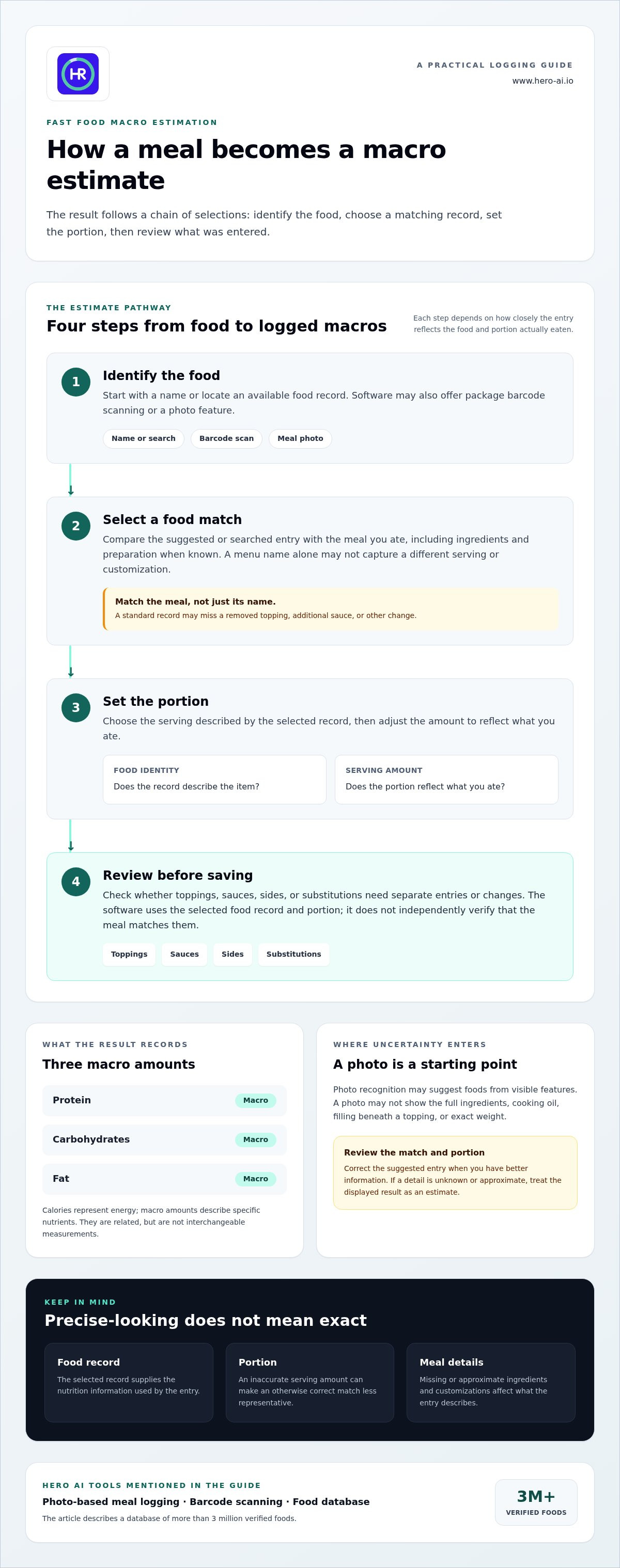
A macro estimate depends on a chain of selections. The software or user identifies a food, matches it to an available record, sets a portion, then uses that record to calculate or display protein, carbohydrates, and fat. Fast food macro estimation software can reduce time spent searching and entering foods, but the match and details still determine how useful the result is.
The more accurately an entry describes the food and portion actually eaten, the more useful its macro estimate is. A mismatch at any step can carry through to the final result. A familiar item name is not enough if the selected record describes a different serving or leaves out customizations.
- Identify the food. Enter a name, search for a food record, scan a package barcode, or use a photo feature.
- Select a match. Compare the suggested or searched entry with the actual food, including its ingredients and preparation where known.
- Set the portion. Choose the serving described by the record, then adjust the amount to reflect what you ate.
- Review the result. Check whether toppings, sauces, sides, or substitutions need separate entries or changes before saving.
Photo recognition, food lookup, and serving size
Photo recognition can suggest possible food entries based on visible features, such as the shape or appearance of a meal. Treat the result as a starting point, not verification. A photograph may not reveal the full ingredient list, cooking oil, filling beneath a topping, or the food’s exact weight. Review the suggested match and correct the portion or components when you have better information.
Serving size is separate from food identity. A correct match with an inaccurate portion can still produce an estimate that poorly represents the meal. If you cannot weigh the serving, choose the closest available portion description and keep the entry consistent with what you ate.
Where food databases fit into macro calculations
A food database supplies nutrition records that software can associate with a selected food and serving. The calculation uses the chosen record and portion; it does not independently verify that the meal matches them. Records may describe a general food or packaged item. A database entry should not be assumed to cover every restaurant dish or connect directly to restaurant menu data.
Barcode scanning can help identify a packaged component when its barcode leads to a suitable record. It does not necessarily identify a prepared restaurant meal, which may contain several ingredients and have no single package barcode. For a meal with separate components, record them individually when practical, or use another entry method and review the result.
HERO AI supports photo-based meal logging and barcode scanning as alternative entry methods, with a database of more than 3 million verified foods. To include these options in a nutrition tracking routine, explore HERO AI meal logging.
Fast Food Macro Estimation Methods Compared: Convenience and Limits
Different logging methods reduce different kinds of work. Published nutrition information can provide a useful reference for a matching item. Manual entry gives you more control over custom components. Barcode and photo tools can speed up food entry, but they cannot supply meal details that were not captured. Choose the input that best represents the food, then review the portion and any changes.
| Method | Effort | Useful inputs | Likely uncertainty |
|---|---|---|---|
| Published nutrition information | Low when a matching item and serving are available | Item name, listed serving, and any published customization details | The served portion, preparation, or modifications may differ from the listed reference |
| Manual entry | Moderate to high, depending on meal complexity | Food components, portion estimates, toppings, sauces, and substitutions | Ingredient choices or serving sizes may be incomplete or estimated |
| Barcode scan | Low for a packaged component with a readable barcode | Package barcode and the amount eaten | The scan may not represent a prepared meal or account for added ingredients |
| Meal photo | Low to capture, with review still needed | Image of the meal and portion information when available | The image may not show hidden ingredients, exact weight, or preparation details |
The trade-off is straightforward: automation can reduce entry work, but it cannot remove uncertainty caused by missing meal details. Fast food macro estimation software can help record or retrieve an entry, yet the result still depends on the selected food and portion. If a method saves time but leaves out a sauce or substitution, add that detail separately when the tool allows it.
When published nutrition information is available
A published value can provide a practical reference when it describes the same item and serving you ordered. Compare the listed description with the food served. A customized item, a different portion, or a change in preparation can make the published entry an imperfect match. Use the reference as a starting point, not an automatic description of every version.
When a photo, barcode, or manual entry is more useful
Use a barcode scan for a packaged food component when its code is readable, then match the recorded serving to the amount eaten. A photo can help capture a meal for logging, but it does not verify exact macros. Manual entry can work well for meals with several identifiable parts. For any method, include portion and customization details where the app permits. A broader macro tracking app guide can help frame how meal logging tools fit into a nutrition routine.
For a meal with a main item, side, and drink, record each component separately if possible. This makes it easier to adjust one part without replacing the whole entry. If details are uncertain, use a consistent estimate and note what you estimated, so later comparisons are based on similar logging choices.
A Repeatable Workflow for Logging Fast Food Macros
A consistent routine makes meal entries easier to compare over time. Record what you ordered and ate, rather than relying on a menu name alone. Fast food macro estimation software can streamline entry, but useful logging still depends on capturing identifiable meal details and marking what remains uncertain.
Use the same sequence for each meal:
- Identify the item. Record the main food using its clearest available name or description.
- Capture customizations. Note known substitutions, removed ingredients, extra toppings, sauces, or other add-ons.
- Record the rest of the meal. Add sides and drinks separately where possible. Include the portion or drink size if you know it.
- Choose an input method. Use a suitable food record, manual entry, barcode scan for a packaged component, or a meal photo as a logging input.
- Review and save. Check the selected entry and serving against what you ate. Save the record with uncertain details clearly treated as estimates.
Capture meal details before estimating
Start with components you can identify. Record the main item, side, and drink separately where practical, then add known toppings, sauces, substitutions, and removed ingredients. If a side was shared or only partly eaten, describe the portion you consumed as accurately as you can. Do not infer exact weights or hidden ingredients from appearance alone. Mark details you cannot reasonably identify as uncertain.
Review, correct, and interpret the result
Before saving, confirm that the selected entry resembles the meal served, not just the item name. Check portion and ingredient fields, and edit them if the app allows. If a detail is unknown, leave it unspecified or label it as estimated rather than recording a guess as fact. Repeating the same process supports consistent tracking, but the log remains an estimate, not a clinical measurement.
For example, if a meal includes a customized main item, a side, and a drink, save the identifiable components separately. This makes it clearer which part of the entry may need revision if you later remember a topping or portion detail. Consistent labels also help distinguish known information from assumptions when reviewing older logs.
An AI calorie counter overview can provide broader context on automated meal logging alongside this meal-specific routine. To use photo logging and barcode scanning as entry options in a nutrition tracking workflow, explore HERO AI meal logging.
How HERO AI Fits into a Fast Food Macro-Tracking Workflow
HERO AI supports meal logging as part of a broader nutrition and fitness platform. Its photo-based meal logging, barcode scanning, and database of more than 3 million verified foods provide different ways to enter food. These tools can reduce manual entry. Review the selected food and portion so the record reflects the details you know about the meal.
Using HERO AI’s available meal-entry methods
Photo-based logging offers a way to capture a meal in the app. Use the image as an entry input, then review the suggested food and portion details. A photo may not show every ingredient or preparation detail. Barcode scanning can help log packaged foods that have a barcode, while a prepared meal with multiple components is better represented by reviewing and recording its identifiable parts.
A practical workflow keeps you in control of the entry:
- Use a photo to begin logging a visible meal, then review the food selected.
- Scan a barcode for a packaged component with a readable code.
- Check portions and add meal details that the entry method may not capture.
- Save the log with uncertain components treated as estimates, not verified facts.
The platform’s food database can support food lookup. Use the closest identifiable components when a single entry does not describe the meal well, and keep the record consistent with the details you know.
Choosing a consistent tracking routine
Choose a level of detail you can apply to comparable meals. For example, record the main item, side, and drink separately each time, and note customizations whenever you know them. Consistency makes your personal records easier to interpret because similar meals are logged using similar inputs. It does not make estimates exact or predict weight or performance outcomes.
Use your chosen nutrition goals to decide which details matter for your tracking routine. The app records the information you provide; entries remain estimates when portions or ingredients are uncertain. A photo food tracker subscription guide can offer broader context on automated nutrition systems, while the workflow here focuses on capturing and reviewing fast food records.
HERO AI offers a one-year subscription for its nutrition and fitness platform, including meal logging, recipe importing from social media, and workout scheduling from social media content. Explore HERO AI’s nutrition tracking workflow to see how its meal-entry methods can fit into a consistent logging routine.
Build a Tracking Routine You Can Maintain
Use your next meal as a starting point for a personal logging routine. Choose a level of detail that fits your needs and apply it in a similar way across meals. The aim is to create records you can interpret, not to make every entry appear exact. Fast food macro estimation software can support that routine by organizing estimates based on the information available.
As you build the habit, notice which details are practical to record consistently. Focus on meal components you can identify and mark uncertain information rather than filling gaps with assumptions. A consistent approach can make your own records easier to review alongside your chosen nutrition goals. Keep the process useful and realistic for your day-to-day choices.
HERO AI offers a one-year subscription to its nutrition and fitness platform, with photo-based meal logging, barcode scanning, recipe importing from social media, and workout scheduling from social media content. Explore the HERO AI nutrition tracking subscription and start building a repeatable meal-logging routine.
Frequently Asked Questions
How accurate is fast food macro estimation software?
Accuracy varies with the meal information and food record selected. Check whether the entry describes the same type of item and serving you ate, then note any details that do not fit. For example, a meal with an unrecorded topping should not be treated as identical to a plain version. Use estimates to support consistent personal tracking, not as exact measurements.
Can software estimate macros from a photo of fast food?
Some nutrition apps use a meal photo to suggest an entry, but an image alone cannot establish the meal’s full composition. A covered filling or sauce may not be visible, and the camera does not provide a reliable serving weight. Review the suggested entry and add information you know. If the photo is unclear or shows several foods together, log identifiable components separately where practical.
What information improves a fast food macro estimate?
Provide details that distinguish your order from a standard version, such as the portion you ate or an ingredient you asked to leave out. If you do not know a component, mark it as uncertain rather than filling the gap with a confident guess. For a shared meal, record your own portion instead of logging the full order. This keeps the record tied to what you consumed.
Is a barcode scanner useful for fast food macro tracking?
It can help with packaged parts of a meal, such as a bottled drink or wrapped snack, if the package has a readable barcode. Check that the scanned record corresponds to the package in hand, especially if similar products have different sizes or versions. Then log the amount consumed. A barcode identifies a packaged product record; it does not describe an unlabelled prepared meal.
Can fast food macro estimates account for custom orders?
They can reflect customizations if the entry process lets you record the changes. If there is no matching customized option, select a suitable base entry as a reference and note the difference. For example, if you removed a topping, make sure it is not still included in your meal description. This helps prevent a future review from mistaking the standard item for your actual order.
Is macro estimation software a substitute for professional nutrition advice?
No. Tracking software can organize food records, but it cannot assess an individual’s health needs or provide a clinical evaluation. Someone following a treatment plan or managing a health condition should rely on guidance from an appropriately qualified professional. Keep app entries within their role as tracking information. A recorded estimate does not determine whether a food choice is suitable for a particular medical need.
Does HERO AI identify every fast food menu item?
HERO AI provides photo-based meal logging and barcode scanning as food-entry options. Review the selected food and portion before saving, and use identifiable meal details to clarify the record. This keeps the entry tied to what you know about the food rather than treating an automated suggestion as confirmation.


