

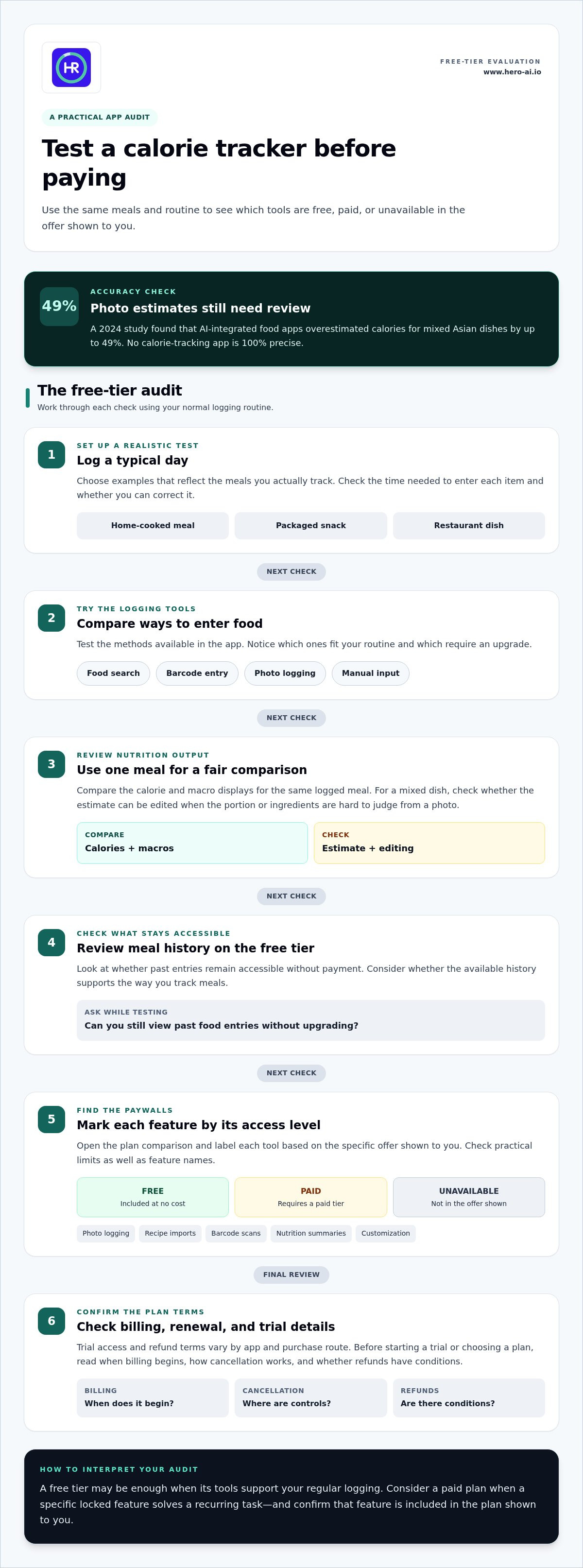
No calorie-tracking app, with or without AI, is 100 percent precise. A 2024 study found that AI-integrated food apps overestimated calories for mixed Asian dishes by up to 49%. An annual subscription to an AI calorie tracker can add features, but it can't remove the need to assess how well the app records the foods you eat.
When comparing an ai calorie tracker annual subscription, look beyond the price and free features. Consider how the app handles mixed meals and portions that are hard to estimate from a photo. This comparison covers annual plan costs, free-tier features, and how different tracking methods affect food and nutrition logs. It also outlines several types of trackers, from AI-powered apps to conventional calorie counters. Use these criteria to find an app and plan that suit your routine, rather than assuming a subscription or automated estimate guarantees accuracy.
Key Takeaways
- Compare annual plans by the features they unlock, not just the billing period.
- Check which logging tools are included for free and which require a paid tier.
- Assess how each app handles photos, barcodes, recipes, and mixed meals before relying on its estimates.
- Use the decision guide to match an app’s tracking method and subscription structure to your routine.
- See how Hero AI’s one-year subscription fits if you want photo-based meal logging alongside other tracking methods.
Annual subscription prices for calorie-tracking apps
Compare an app’s annual plan with its monthly option before choosing. An annual subscription covers a longer billing period, while a monthly plan divides payment into shorter periods. Total cost and included features depend on the app, purchase route, and offer shown for your account. Compare the full annual charge with the cost of twelve monthly payments using the amounts displayed at checkout. This helps you assess whether the annual option fits your budget and expected use.
Regional pricing can vary by currency, taxes, platform, and promotion. A price displayed in one country may not match the amount shown in another. App Store and Google Play listings can also differ from an app’s website. Personalized offers may depend on account or promotion eligibility. Compare the price shown for your account, then note the billing period, renewal terms, and included features before confirming.
Discounts for students, families, and first-time subscribers depend on each app’s current offer and eligibility terms. Compare the displayed discount with the standard plan, and check whether it applies to the annual option or only another billing period.
Automatic renewal depends on the subscription terms and purchase route. To turn off renewal, open the subscription settings for the platform or website where you subscribed, select the relevant plan, and follow its cancellation controls.
Privacy policies explain how an app handles food photos, health data, and account information. Read the sections on collection, processing, storage, sharing, retention, and deletion. For example, check whether meal photos are retained after logging and how to remove account data. Review app permissions before enabling camera or photo-library access.
| Option | Billing period | Price comparison | What to review |
|---|---|---|---|
| Annual plan | One year | Compare the displayed total with twelve monthly payments | Renewal date and premium features |
| Monthly plan | One month | Compare the displayed monthly amount across a year | Monthly renewal and cancellation controls |
| App Store purchase | Shown at checkout | Compare the account’s displayed offer | Platform subscription settings |
| Google Play purchase | Shown at checkout | Compare the account’s displayed offer | Platform subscription settings |
| Website purchase | Shown at checkout | Compare the direct offer with app listings | Website account and renewal terms |
Use the table to compare the billing period, displayed price, renewal controls, and features for each option. Choose an annual plan when its total cost and included tools suit your expected use. A monthly plan may be a better fit when you prefer a shorter billing period.
Free tiers and paywalled features
A free tier can show whether an app fits your logging routine before you pay. Test a typical day that includes a home-cooked meal, a packaged snack, and a restaurant dish. Note how quickly each item can be entered and corrected. A useful free version lets you assess the basic workflow, not just displays a subscription prompt.
Free access may cover food searches and manual entries, while paid plans may add other tools. Compare these features rather than assuming they come with every annual subscription. Check whether photo logging, barcode scanning, recipe imports, macro totals, and meal history are available without payment. Then test the same meal using each available method and note which steps require an upgrade.
Which AI calorie tracking apps offer free trials or money-back guarantees? Trial access and refund terms vary by app and purchase route. Read the offer before starting, including when billing begins, how cancellation works, and whether refunds have conditions.
What features are included in annual plans, such as photo logging and personalized nutrition insights? Annual plans can differ in their included tools, so review the feature list for the specific app. Look for photo logging, nutrition summaries, recipe imports, barcode scans, and customization, then compare them with the free tier.
Use a short feature audit before choosing a plan. Open the app’s plan comparison and mark each item as free, paid, or unavailable in the offer shown to you. Check practical limits as well as feature names. For example, a plan might advertise recipe tools, but what matters is whether importing recipes fits the way you save them.
- Logging: Test search, barcode entry, photos, and manual input.
- Nutrition: Compare calorie and macro displays for one logged meal.
- History: Review whether past entries remain accessible on the free tier.
- Personalization: Identify which settings or insights require payment.
For a fair comparison, repeat the audit with the same meal and routine. A packaged snack tests barcode entry; a mixed dish tests photo estimates and editing. If a free tier blocks a method you need, note that limitation rather than assuming an annual plan automatically unlocks it. Confirm the plan details displayed before subscribing.
Choose a free tier if its available tools support your regular logging. Consider a paid plan only when a specific locked feature solves a recurring task. For example, a person who often logs meals from pictures can compare apps offering that workflow, including photo-based meal logging.
Annual pricing compared with other calorie trackers
An annual plan is comparable only when its included features match your needs. Compare AI photo logging with database search, barcode entry, and manual logging. Each method affects how much work a typical meal requires. A lower total may offer less value if essential tools require another tier. Start by listing the logging methods you use most.
Separate your comparison into billing, features, and routine fit. For billing, compare the full annual charge with the cost of twelve monthly payments. For features, note whether meal history, macro tracking, and recipe tools are included. For routine fit, test a familiar meal in each app. This keeps the comparison grounded in your actual use, not just a feature list.
| Tracker type | Common logging approach | Annual plan comparison | Best fit to assess |
|---|---|---|---|
| AI photo tracker | Meal image recognition | Check photo access and correction tools | Meals often logged from pictures |
| Food database tracker | Search and select entries | Review database access and saved meals | Users who prefer searching foods |
| Barcode-led tracker | Scan packaged products | Check scanning access and nutrition details | Packaged foods used regularly |
| Manual tracker | Enter foods and portions | Review entry limits and tracking history | Users who prefer direct control |
| Hybrid tracker | Combines multiple entry methods | Compare which methods require payment | Routines involving varied meals |
The table describes comparison categories, not features guaranteed in every app. Open each plan screen and record the billing period, included tools, and renewal terms. Test the same meal in each tracker. For example, compare a packaged item using barcode entry and search, then note whether either method needs edits. Try a home-prepared meal with the method you would use daily.
Annual plans can differ from monthly plans in access as well as billing cadence. Some apps show different features or promotions by platform, account, or region. Compare the offer shown to you, including the renewal amount and cancellation route. Don’t judge a plan by a promotional label alone. Record the regular renewal terms alongside the first payment details.
Use a simple decision rule: choose the plan whose included tools support your routine with the fewest unwanted steps. If you log varied meals, compare a hybrid tracker with an app that relies on one method. If you mainly record packaged food, prioritize an efficient barcode workflow and clear correction options. An annual subscription to an AI calorie tracker is most useful when its paid features solve a regular logging task.
Calorie and nutrition tracking accuracy
Accuracy depends on the food entry and details provided. A photo may show a bowl, but not its ingredients, cooking oil, or portion depth. A database entry can match a food name but miss its preparation method. Barcode scans identify packaged products, while manual entries depend on the amounts selected. Each method has different potential sources of error.
A University of Sydney study found that AI-integrated food apps overestimated calories for mixed Asian dishes. Ingredients in mixed meals can look similar in a photo while differing in composition. A photo estimate may not reveal every hidden ingredient or the exact portion. Treat photo-based logging as a starting estimate, not a measured nutrient analysis.
Calories and individual nutrients also need separate consideration. Two meals with similar calorie estimates may have different protein, carbohydrate, or fat totals. Check whether the app displays each nutrient and lets you edit ingredients or serving amounts. For a homemade curry, for example, review the selected recipe and portion rather than accepting the first image result.
- Photo entry: Compare the detected dish with its visible ingredients and portion.
- Database search: Match the food name, preparation, and serving size.
- Barcode scan: Review the product entry and serving amount.
- Manual logging: Check each ingredient and quantity before saving.
Use the same meal to compare methods. Log a packaged snack by barcode and search, then compare the selected food and serving. For a mixed dish, enter ingredients separately if the app supports it. Note which fields need correcting. This practical test shows whether an app makes useful details clear or hides assumptions behind a single total.
Portion size is a key source of variation. Recording a slightly different amount changes the calculated total, even when the food match is correct. Use a consistent serving description, such as one slice or one bowl, across entries. If a photo result offers portion options, choose the closest visible match and review its components.
For ongoing use, compare trends rather than treating one entry as definitive. Keep meal descriptions consistent, correct obvious mismatches, and review recurring foods in your log. An AI calorie tracker can reduce entry steps, but accuracy still depends on suitable food matches, portion details, and user corrections. Choose an app that makes those corrections clear and straightforward.
What AI calorie tracking apps offer annual subscriptions?
Annual plans are available across different types of calorie-tracking apps, but availability, billing terms, and included tools can vary by platform and region. Compare the plan shown for your account rather than relying on a price or feature list from another market. App names alone don’t establish that two subscriptions provide equivalent access.
Start by identifying the logging approach that suits your routine. Photo-based trackers use meal images as an input. Database-led apps rely on food searches and saved entries. Barcode-focused tools support packaged-product logging. Hybrid apps combine several methods, although access to each may depend on the selected plan.
Compare subscriptions using a meal you commonly record. For a packaged item, assess how the app handles a barcode scan and search result. For a homemade meal, see how the app presents its ingredients. Note any edits needed and whether the relevant tool is included in the plan you’re comparing.
| App category | Plan details to compare | Practical test |
|---|---|---|
| Photo-based tracker | Photo entry and editing access | Log a meal image and review its result |
| Database tracker | Search, saved entries, and history | Find a familiar dish and inspect the entry |
| Barcode-focused tracker | Scanning access and product information | Scan a packaged item and review the match |
| Hybrid tracker | Which methods the plan includes | Record one meal using different methods |
Plan details may differ by account, platform, or location. Compare the billing period, renewal terms, cancellation route, and included features displayed during purchase. If the offers differ between an app store and a website, note the purchase route for each. This helps avoid comparing plans with different subscription conditions.
Use the same criteria for each app: logging method, editing controls, and plan access. A photo feature may not suit someone who prefers searching. Barcode scanning may matter more to someone who often records packaged foods. Compare your recurring tasks, then choose an option whose available tools fit them.
For photo-based meal logging, explore AI meal tracking as one option to compare with your preferred tracking methods.
Treat that figure as a broad comparison point, not a quote for the plan shown to you. The amount alone cannot tell you whether a subscription includes the logging methods and editing controls you need, or the purchase conditions that apply to your account. Check the offer at checkout and compare its annual term with the tools listed for that same plan.
A useful comparison separates the tools you need from those that are merely advertised. Note the meal types you regularly log, then check whether the plan makes those entries easy to create and correct. Review how the app handles an image, search result, or barcode match that needs adjustment. If the plan description does not clearly explain a tool’s availability, verify the details before deciding. Weigh the annual cost against the functions you expect to use, rather than treating an average as a substitute for checking the offer.
Hero AI: 1 year subscription
Hero AI supports calorie and macro tracking through photo recognition, barcode scanning, and recipe imports from TikTok and Instagram. Its food database contains over 3 million verified foods. Users can also schedule workouts from social media content, connecting meal logging with fitness planning in one platform.
Its 1 year subscription may suit people who want these tracking and planning tools over an annual billing period. Consider it when photo-based logging or importing social recipes matches your routine. Compare those features with the entry methods and nutrition details you rely on before choosing an annual plan.
Visit Hero AI’s website to learn more about its subscription.
Make your next tracking choice practical
Choose a tracking routine you can maintain across everyday meals, busy days, and changes in schedule. Before committing to an app, decide which entry method you expect to use most. Consider whether you want to log meals with photos, search for food entries, scan products, or combine approaches. A clear preference makes it easier to judge whether an app’s workflow fits your habits.
Set a review point for yourself. After using an app for a while, consider whether logging remains manageable and whether you regularly correct entries. This helps you decide if the tools support your routine or create extra steps. The best ai calorie tracker annual subscription for you is one that fits your logging preferences and gives you a process you can use consistently.
For information about Hero AI and its subscription options, contact Hero AI about your options. Take the next step with a tracking approach that works for you.
Frequently Asked Questions
How much does each AI calorie tracker annual subscription cost?
Each app sets its own annual rate, so there is no single price for every tracker. Compare the amount shown for the specific plan and account you’re considering. Record the plan name, billing currency, and whether the displayed amount applies at renewal. Then compare apps that offer the same logging method. This avoids treating different plan levels as equivalent based on the headline amount alone.
How do annual subscription prices compare with monthly plans?
Compare the annual total with the cost of twelve monthly payments to see how the costs differ over a full year. You can also divide the annual total by the monthly rate to estimate how many months of use would make the annual option less costly. Use this calculation only for plans with comparable features, since different tiers can change the value of the comparison.
How do I cancel an annual AI calorie tracker subscription and request a refund?
Open the subscription settings for the platform or website where you subscribed, select the plan, and follow its cancellation controls. Check the offer’s refund terms and conditions before requesting a refund.


