

A camera can make meal logging faster, but it doesn’t determine whether a meal fits your keto targets. A keto macro tracking tool with a camera uses photo recognition to estimate food and macros, while some apps also support barcode scanning. The best fit depends on how well the app supports your broader tracking needs.
Choosing a keto app involves more than recording meals. Consider how it displays your calorie and macro totals, what nutrition details it includes, and whether its features suit your meal-planning and weight-tracking routine.
This comparison explains what camera logging can and can’t do, how to assess macro and micronutrient features, and what to consider when planning meals or tracking weight loss. Use these criteria to identify the tool that matches your routine and the level of detail you want from your food log.
Key Takeaways
- Camera logging can speed up meal entry by recognizing food from a photo, but reviewing the identified foods and portions helps keep your log useful.
- Compare apps by how they display fat, protein, and carbohydrates, and whether they let you track total or net carbohydrates.
- Check whether micronutrient details and meal-planning features support the level of tracking you want.
- Use macro logs to review eating patterns over time and adjust your approach to weight-loss goals.
- Hero AI combines photo-based meal logging with barcode scanning and recipe importing for users who want several ways to record food.
Will Macro Tracking Apps Give Me My Macros?
Yes. A food-tracking app can total calories, fat, protein, and carbohydrates from the meals you log. Camera recognition can make entry quicker, but you should review the food match and estimated portion before saving.
Camera-Based Meal Logging
Camera logging uses image recognition to suggest foods from a meal photo. Take a picture, review the suggested foods, and adjust ingredients or portions before saving. Unlike barcode scanning, which identifies packaged products, photo logging starts with the prepared meal. A photo of eggs and avocado, for example, may need correcting if the app misses an ingredient.
Barcode Scanning and Food Databases
Barcode scanning matches a packaged product to an entry in the app’s food database. This can make branded foods easier to log than a mixed plate. Compare the database entry with the package label and confirm the serving size. A barcode identifies the product, but not how much you ate.
Food Journals for Macro Tracking
A food journal records meals as entries you can review throughout the day. FatSecret is one example of a diary-style food-tracking app. Search for a food, select the closest match, and enter the portion to record its calories and macros. Unlike a meal photo, a journal entry shows each selected food for later review and editing.
Photo Privacy and Net Carb Recognition
Meal photos can capture more than food, such as faces, receipts, or details of the surrounding room. Crop the image to the plate before uploading, and review the app’s settings for photo access, storage, and deletion. Can photo-based keto trackers distinguish net carbs from total carbohydrates? A photo cannot establish which calculation method an app uses, so check its carbohydrate setting and the food entry.
Some tools let you switch between total and net carbohydrate tracking. The selected mode affects how carbohydrates appear in your log, so confirm the setting before comparing meals. Image recognition suggests likely foods; it does not choose your preferred carbohydrate view.
| Logging option | Entry method | Best use | Review point |
|---|---|---|---|
| Camera recognition | Meal photo | Prepared dishes | Food and portion match |
| Barcode scan | Packaged item code | Branded foods | Serving size and label |
| Food journal | Search and manual entry | Editable meal records | Selected item and portion |
Choose the logging method that suits the meal, then review the food match, portion, and carbohydrate setting before saving.
Keto macro and micronutrient tracking
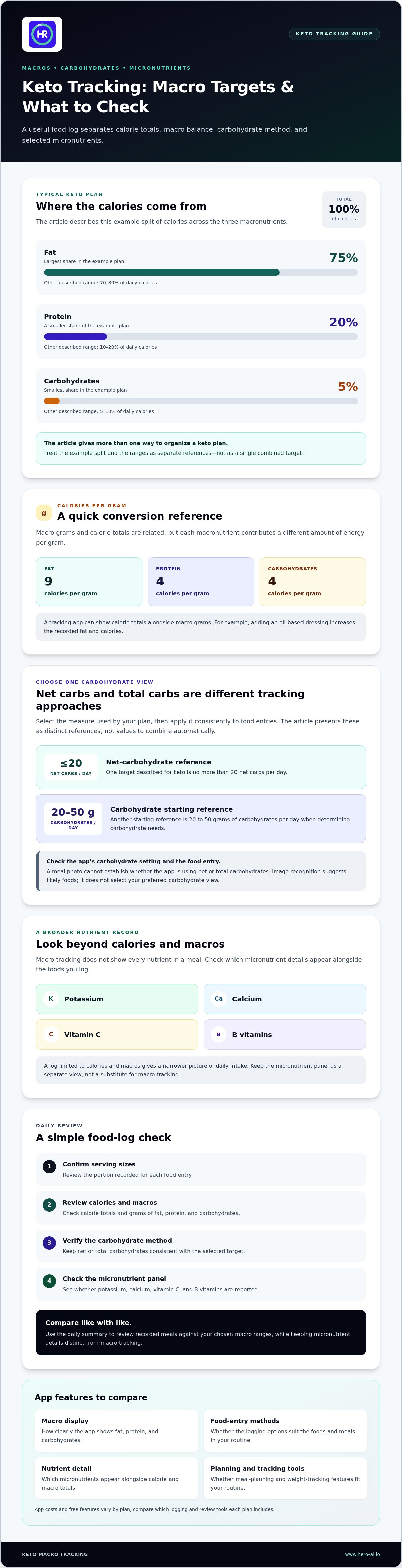
A keto tracker should separate three macronutrients: fat, protein, and carbohydrates. A typical keto plan provides roughly 75% of calories from fat, 20% from protein, and 5% from carbohydrates. Other target ranges describe fat as 70 to 80% of daily calories, protein as 10 to 20%, and carbohydrates as 5 to 10%. These ranges give users different ways to organize a ketogenic diet.
Calories can also be converted into grams: fat supplies nine calories per gram, while carbohydrates and protein each supply four calories per gram, according to the U.S. Department of Agriculture. A tracking app can show calorie totals and macro grams, helping you see how a meal affects your daily balance. For example, adding an oil-based dressing increases the recorded fat and calories.
Set a carbohydrate tracking method
Some keto plans focus on net carbohydrates, while others display total carbohydrates. One target described for keto is no more than 20 net carbs per day. Another starting reference is 20 to 50 grams of carbohydrates per day when determining carbohydrate needs. These are distinct tracking approaches, not values to combine automatically. Select the carbohydrate measure your plan uses, then apply it consistently to each food entry.
Macro tracking does not show every nutrient in a meal. A food log may also display micronutrients such as potassium, calcium, vitamin C, and B vitamins, which are identified as essential for optimal health. Check which nutrient details the app shows alongside the foods you enter. A log limited to calories and macros gives a narrower picture of daily intake.
Review macro and micronutrient entries
Use the same review process each day so your summary reflects the foods you recorded. Confirm serving sizes, review fat, protein, and carbohydrate totals, then check whether the app reports potassium, calcium, vitamin C, and B vitamins. This helps distinguish macro tracking from a broader nutrient record.
- Macro view: Review calorie totals and grams of fat, protein, and carbohydrates.
- Carbohydrate view: Keep net or total carbohydrates consistent with the selected target.
- Micronutrient view: Check whether potassium, calcium, vitamin C, and B vitamins appear.
For a ketogenic eating pattern, use the daily summary to compare recorded meals with your chosen macro ranges. Treat the micronutrient panel as a separate view, not a substitute for macro tracking. This keeps calories, macronutrients, and selected micronutrients distinct in your food journal.
Keep potassium, calcium, vitamin C, and B vitamins in view alongside your macro tracking. These micronutrients are identified as essential for optimal health.
Comparing keto tracking apps
The best keto app depends on your tracking routine, preferred food-entry methods, and macro display. App costs and free features vary by plan, so compare which logging and review tools each plan includes.
Camera-Enabled Keto Tracking Apps
Camera-enabled trackers use meal photos to suggest foods and estimate portions. Look for an app that lets you review and correct suggestions. If a photographed dish contains several ingredients, check whether you can edit the meal before saving. Reviewable entries make camera logging more useful than an estimate you cannot adjust.
Check whether the app displays calories, protein, fat, and carbohydrates together, how it handles mixed meals, and how easily you can revisit earlier entries. A camera records visible food; it does not measure energy use or ketones. Assess those as separate tracking needs rather than treating photo recognition as a complete nutrition record.
Photo Scanning Costs and Free Features
Apps differ in their plans and included features. Compare access to photo logging, food search, macro summaries, history, and meal planning. Some plans may include certain tools while reserving others for a subscription. List the features you need before comparing plans, rather than relying on a “free” label alone.
Review each app’s subscription period and renewal terms, then compare the features included at that level. If you rely on photo entries and saved meal history, for example, check that both are included in the same plan. This gives you a clearer comparison than focusing on one feature or a headline price.
| App type | Logging approach | Comparison criteria |
|---|---|---|
| Camera-enabled | Meal photo and suggested entries | Food and portion editing |
| Database-focused | Food search or packaged-food entry | Macro details and record history |
| Manual journal | Food and portion entry | Editing and meal review |
Compare options using the same criteria: logging effort, editing controls, macro visibility, nutrition detail, and plan access. If an app shows both net and total carbohydrates, confirm which view you use before comparing meal records. Check protein and fat displays in the same way so the comparison reflects your preferences.
For a practical comparison, log a mixed meal and a packaged item in each app you are considering. Check whether you can edit the result, understand the daily summary, and find the entry again later. Choose the app whose features fit your routine and provide the review detail you need.
Planning and logging meals
A meal plan lays out what you intend to eat; your food record shows what you actually ate. List the meals you expect to have, then log them when consumed. For a planned lunch, you might note the main protein, vegetables, and added fats. Reviewing the record against the plan can reveal whether the meal matched and which entries need correction.
Follow the same steps for each meal: select or enter the foods, check portions, and save the meal in the right part of the day. If a recipe changes, update its ingredients instead of relying on an earlier entry. This makes it easier to compare planned meals with actual intake, even when work or fitness schedules change your meal timing.
- Plan: Choose meals and recipes before the day begins.
- Log: Record the foods and portions after eating.
- Review: Compare the daily record with the original plan.
- Adjust: Update future meal choices based on the recorded pattern.
Planning tools vary in how they support review. Keeto version 1.5 added day-, week-, and month-level tracking of daily carbohydrate intake, including intake logged through an AI estimate, on 18 Mar. Those views can help users compare a single day with longer records. A daily view shows the current entry total; a weekly or monthly view can reveal repeated patterns.
Review AI estimates before including them in your meal plan or food record. If an estimate does not match the dish, correct the entry. For recipes with several ingredients, logging components separately can make changes easier to track. You can reuse a planned meal as a reference, then adjust it when ingredients or portions differ.
Leave room for changes in your meal plan. If a scheduled meal is unavailable, log what you actually ate rather than leaving the planned meal as your final entry. Check that the meal is recorded, the ingredients match the plate, and any AI-estimated foods are represented in the daily carbohydrate total. This keeps the plan connected to actual intake.
Use day, week, and month views to answer different questions. Review the day for incomplete entries, compare weeks to see whether meal choices repeat, and use a month view to spot recurring gaps, such as meals missed on busy days. These checks make your journal more useful for managing a ketogenic routine. A planned menu, however, is not a record of what you ate.
Macro tracking for weight loss
Macro tracking can show how your recorded meals relate to a weight-loss plan, but it does not make weight loss automatic. A useful log helps you review patterns in calories, carbohydrates, protein, and fat. Consider the entries alongside weight trends rather than treating one meal or scale reading as the whole picture.
Use a consistent method to record meals, portions, and snacks, then review the daily summary. Correct photo estimates or saved recipes that do not match what you ate. Missing ingredients and inaccurate portions can make calorie and macro totals less representative of your intake.
For keto, carbohydrate tracking is one part of the process. One suggested starting range for determining individual needs is 20 to 30 grams of carbohydrates per day. Treat that as a point to assess against your chosen keto approach, not as a weight-loss result. Keep the app set to the same carbohydrate measure throughout your review.
Use this routine to make the food record actionable:
- Log consistently: Include meals, snacks, drinks, and additions such as cooking fats.
- Review totals: Compare calories and macros with the targets you are following.
- Find patterns: Look for repeated choices that shift daily totals, such as unlogged snacks.
- Adjust deliberately: Change one meal choice or portion pattern, then observe the following records.
Look for patterns across several days instead of reacting to a single entry. Your log might show that you record planned meals but often miss snacks or cooking ingredients. That gives you a specific habit to address. Pair food entries with regular weight records, using the same measurement routine to make comparisons more consistent.
Macro totals show how the day’s choices fit together. A higher-fat meal uses more of your planned fat, while a protein-rich option changes your protein total. Review the full day before making changes, so you do not adjust one meal without considering the rest of your record.
Use photo-based meal tracking to record food and review macro patterns. A camera-supported log can help streamline entry, while reviewing and correcting each record keeps the data relevant to your weight-loss tracking.
Hero AI: 1 year subscription
Hero AI supports food and fitness tracking with photo-based meal recognition, barcode scanning, and recipe importing from TikTok and Instagram. Its database includes over 3 million verified foods. Users can also schedule workouts from social media content, connecting meal records with fitness planning in one platform.
Consider Hero AI if you want to log meals in several ways and keep workout planning alongside nutrition tracking. Photo recognition, barcode and nutrition-label scanning, and recipe imports offer different ways to record food. Review your entries and macro totals as part of your regular routine.
Hero AI is available with a 1 year subscription. Visit Hero AI’s tracking platform to learn more.
Choose a tracking routine you can maintain
Before choosing a keto macro tracking tool with a camera, decide how you want to review food records and how much editing suits your routine. Consider whether you prefer to log meals as you eat or enter foods later. The right tool should fit your process rather than make you reorganize it around the app.
Set a clear purpose for your tracking, such as recording meals consistently, reviewing macro patterns, or connecting food records with fitness planning. Use that purpose to assess whether the app supports your routine. Keep expectations focused on what it records, and base decisions on entries you have reviewed.
If you want to explore Hero AI as a food and fitness tracking option, contact Hero AI about keto tracking. Choose a tracking approach that supports steady, informed decisions.
Frequently Asked Questions
The Best Keto App?
There is no single keto app that suits every tracking routine. Compare how each handles food entry, carbohydrate settings, meal history, and macro displays. Someone who photographs mixed meals may prioritize image logging, while someone eating packaged foods may prefer barcode and label scanning. Try the workflow with a familiar meal, then choose the app whose records are easiest to review.
Which keto macro tracking apps use a camera to scan meals or identify food from photos?
Hero AI uses photo-based food logging to identify foods and estimate portions from meal images. You can review the result and adjust quantities. When comparing camera features, check what the image process records and what you can edit. For a mixed meal, review the suggested foods and correct the entry before saving.
How accurate are camera-based food recognition and macro estimates in keto tracking apps?
Photo-based estimates depend on recognizing the foods and estimating portions from the image. A sauce, cooking fat, or ingredient beneath another food can be difficult to identify visually. Hero AI prioritizes matching foods to its nutrition database and uses AI estimates when a reliable match is unavailable. Review the suggested foods and adjust quantities to make the saved record better reflect the meal.
Which keto macro tracking tools offer barcode scanning and nutrition label scanning?
Hero AI supports barcode and nutrition-label scanning for packaged foods. These tools use the product and package nutrition information to help record what you eat. They can be useful for a packaged snack or an ingredient with a clear label. Confirm the product and serving amount in the app, since the amount you eat affects the nutrition recorded.
How do camera-enabled keto tracking apps compare on net carbs, protein, and fat tracking?
Compare whether each app displays protein and fat alongside carbohydrates, and whether it supports total or net carbohydrate tracking. Keto AI lets users switch between total and net carbohydrate tracking. A camera identifies likely foods, but the carbohydrate view depends on the app’s settings. Use the same mode across entries before comparing meals or daily records.
Do camera-based food tracking apps calculate personalized keto macro targets?
Photo recognition and target setting are separate functions. A camera can identify foods and estimate portions, while personalized targets depend on the app’s target-setting features and the information entered. Before relying on a target, distinguish a preset keto split from one calculated using personal inputs. Check whether the app asks for relevant profile details or displays a general macro distribution.
How to track meals with a camera in a keto macro tracking app?
Open Hero AI’s meal-logging feature and photograph the food in clear view. Review the suggested entries and portion estimate, then adjust ingredients or quantities that do not match the plate. Save the entry and review its macro breakdown. For packaged foods, scan the barcode or nutrition label. Remember to include hidden ingredients, such as cooking oil, in your log.


