

The app with the most tracking features may not be the one you use consistently. A fat loss food logger app needs to fit your meal-recording routine. Manual entry can take time, while incomplete logs or rough portion estimates can make calorie and macro totals harder to interpret. The goal is to find a workflow you can maintain and review.
When comparing apps, focus on how each handles everyday food entry, what nutrition information it provides, and whether you can review or correct logged meals. These details matter more than a long feature list. Consistent tracking can support informed decisions, but an app alone doesn’t cause fat loss.
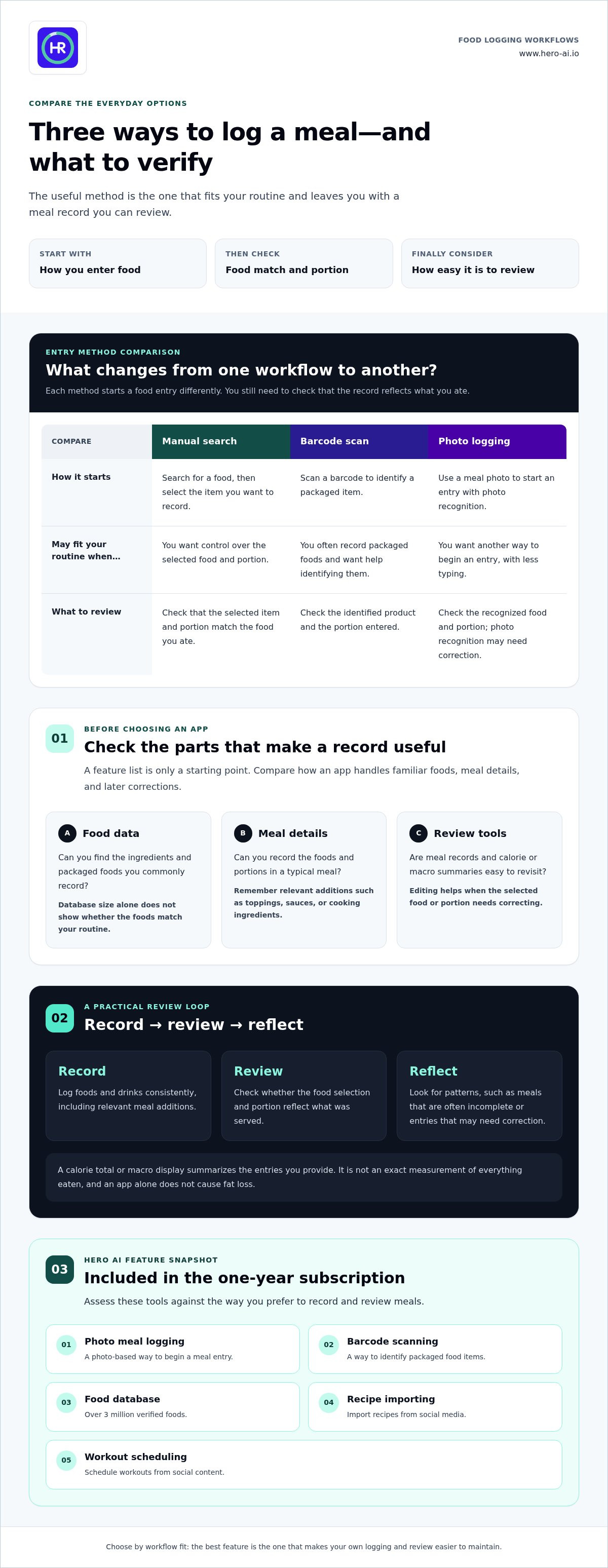
This guide compares the features and daily workflows to consider, including manual entry, photo logging, barcode scanning, and food databases. It also explains how Hero AI supports these needs. Its one-year subscription includes photo meal logging, barcode scanning, a database of over 3 million verified foods, recipe importing from social media, and workout scheduling from social content. Use these criteria to assess whether those tools suit your routine and tracking preferences.
Key Takeaways
- Understand what food logging can help you review, and why it can’t guarantee fat loss.
- Compare core logging functions with convenience features to identify what fits your routine.
- Weigh photo logging, barcode scanning, and manual entry, including the need to review recognized foods and portions.
- Use a simple record, review, and reflect routine to build a consistent fat loss food logger app habit.
- Assess whether Hero AI’s subscription features align with your preferred way to track meals.
Fat loss food logger apps: what they track and what they cannot do
A food logger app helps you record meals and review the nutrition information associated with those entries. It organizes the foods and details you choose to log. It doesn’t prescribe treatment or cause weight loss. A fat loss food logger app is a tracking tool, not a weight-loss treatment.
Most apps let you select foods from a database or enter them manually. Depending on the app, an entry may include a meal, a portion estimate, calories, and macronutrients. The available detail varies. Some records show energy and basic nutrition information, while others display more nutrients. An app’s feature list tells you what it can display, not how accurately every meal has been recorded.
Calories and macros describe different aspects of food. Calories estimate the energy in a food or meal. Macronutrients are carbohydrates, protein, and fat, commonly shown as amounts or proportions. A calorie total and a macro breakdown can help answer different review questions. Neither automatically determines what you should eat.
For example, a meal entry might include a grain, a protein food, vegetables, and a sauce. Leaving out the sauce or choosing a portion that differs from what was served changes the recorded information. This doesn’t make logging useless. It means totals are best understood as summaries of the entries you provide, rather than exact measurements of everything eaten.
Targets also require context. Calorie or macro goals shown in an app aren’t automatically appropriate for every reader. Treat them as settings or reference points, not universal instructions. If a goal feels unsuitable or raises concerns, don’t assume the app can assess your individual needs.
What does a food logger record?
Entries commonly group foods by meal or time of day. You select a food, indicate a portion, and review the nutrition data attached to that record. Some apps allow edits, which can help correct a mistaken selection or portion. For a useful daily picture, record foods and drinks consistently, including relevant additions such as toppings, sauces, or cooking ingredients.
How does logging fit into a fat loss plan?
Logging gives you information to review patterns, such as meal timing, food variety, or which entries are often incomplete. It doesn’t explain every reason behind a pattern or account for all factors that affect an individual’s outcomes. App use is one part of a broader approach. A record is most useful when it supports reflection without turning each meal into a judgment.
Use the data to ask practical questions: Are you recording meals regularly? Are portions entered consistently? Which entries may need correction? These checks make the record more useful without requiring perfect tracking. Fat loss outcomes depend on more than app use alone, so don’t treat a calorie total or macro display as a guarantee of progress.
Which fat loss food logger app features are worth comparing?
Compare apps by the steps involved in recording a meal, the food information available, and how easily you can review entries afterward. Core functions include adding foods, recording portions, and viewing nutrition data. Convenience features matter when they remove a step you might otherwise skip. A longer feature list isn’t automatically a better fit.
Meal entry: Manual search lets you find and select a food. Barcode scanning can identify packaged items. Photo recognition offers another way to start an entry, but you may need to check the identified food and portion.
Food data: Check whether the database includes the ingredients and packaged foods you commonly record. Searchable entries can save you from typing each item from scratch. A database’s size alone doesn’t show whether it matches the foods you eat.
Review tools: Look for clear meal records and calorie or macro summaries that are easy to revisit. Editing entries is useful when you selected the wrong item or portion.
Workflow fit: Consider how the app handles a typical meal in your routine. A feature helps only if it makes logging or review easier for you.
These categories help separate essentials from extras. A searchable food list and clear records support basic tracking. Photo entry, barcode scanning, recipe importing, and workout scheduling may add convenience, but they’re useful only if they fit the way you plan to use the app. For instance, someone who often records packaged foods may value barcode scanning, while someone who prepares meals from recipes may prioritize a different workflow.
Entry methods also involve trade-offs. Photo recognition can reduce typing, but the result still needs a quick accuracy check. Barcode scanning may make packaged products easier to identify, while manual search gives you control over the selected item and portion. The best method depends on the foods you record and how much review you’re willing to do. This overview of AI calorie tracking explains how automated data capture can fit into a logging process.
Food data deserves a closer look. A database should make relevant foods easy to find, but you still need to choose an appropriate match and portion. Compare how quickly you can locate a familiar meal and whether the information shown is clear enough to review. Don’t judge an app by its database count alone.
Subscription fit comes down to which features are included and whether you expect to use them. Hero AI’s one-year subscription includes photo meal logging, barcode scanning, a database of over 3 million verified foods, recipe importing from social media, and workout scheduling from social content. Explore Hero AI’s food logging features if photo or barcode entry suits your routine.
Photo logging, barcode scanning, and manual entry: which workflow fits?
Each entry method handles a different part of the logging process. Photo logging starts with an image. Barcode scanning uses a product code to find packaged food information. Manual entry lets you search for a food and select its details. The right choice depends on the meals you record and how much time you want to spend checking each entry.
Entry speed and record quality are separate considerations. A quick entry can still contain the wrong food or portion. A slower entry may give you more control, but it can take more effort to keep up with. Look for a method that makes recording manageable and leaves room to review what the app saved.
When is photo meal logging useful?
Photo logging can give you a starting point for recording a meal without searching for every item first. It may suit meals with several visible components, such as a plate with grains, vegetables, and a protein. An image may not show ingredients, preparation details, or portion sizes clearly. Treat recognized foods and estimated portions as suggestions to review, not exact nutrition results. The technical analysis of photo food tracking explores this type of automated entry.
After an app identifies a meal, check whether the listed foods match what you ate. Review the portion estimate and adjust it if needed. This is especially important when ingredients are hidden, dishes are combined, or the image shows only part of the serving. Photo recognition can reduce initial typing, but it doesn’t remove the need for your judgment.
When should users scan or enter food manually?
Barcode scanning can be a practical shortcut for packaged products with a readable code and a matching database entry. It won’t apply to every food. Fresh ingredients, restaurant meals, or products without a usable match may require a search or manual entry instead. Before saving a scanned result, compare the serving size and food details with the package.
Manual search is useful when scanning isn’t available or recognition doesn’t return the right item. It also gives you a way to correct an automated suggestion. Search results can include similar foods or different serving formats, so select the closest match and check the amount recorded. For a meal made from separate ingredients, entering each component may provide a clearer record than choosing a broad description.
A flexible routine can use all three methods. Scan a packaged ingredient when a match is available, use a photo to begin a meal entry, or search manually when the other options don’t fit. Then review food names and portions before relying on the saved log. HERO AI’s one-year subscription includes photo meal logging and barcode scanning, offering alternative ways to begin an entry. Explore HERO AI’s meal logging options if those methods align with how you prefer to record food.
How to use a fat loss food logger app consistently
A workable routine should fit into your day without requiring perfect records. Use the log to collect information, then review it with a neutral perspective. The aim is to make entries consistent enough to notice patterns, not to judge individual meals or treat app data as a diagnosis.
- Record meals. Add meals and snacks at a repeatable time that suits your schedule. Log items as you remember them, and use the entry method that fits the food and information available.
- Review entries. Check food names, portions, and meal details. Correct clear mistakes, and leave uncertain details as estimates rather than presenting them as exact measurements.
- Note patterns. Look across multiple entries for recurring details, such as meals that are often missed or foods that are difficult to record. Use these observations as context for decisions, not as a diagnosis or a verdict on one day.
Set up a manageable logging routine
Choose a regular point in your day to add or review meals. You might prefer to record after eating, or find a later review easier to maintain. Select a pattern that works with your usual schedule, then adjust it if it creates unnecessary effort. A routine that allows for missed details is more practical than one that depends on flawless recall.
Match the entry method to the meal. Scan a packaged item when it has a suitable code, take a photo when an image helps start the entry, or use manual search when you need to select a specific food. For a homemade dish with uncertain ingredients or portions, record what you know and leave the rest as an estimate. Avoid spending excessive time trying to reconstruct details that aren’t available.
Review entries without treating estimates as exact
Before interpreting a day’s record, check for obvious mismatches. A similar food name, a different serving size, or a missing ingredient can change the information shown. Correct what you can, then consider patterns across several entries rather than reacting to a single meal or incomplete day.
App summaries can help organize information about recorded meals, but they don’t explain every factor that may affect personal outcomes. Treat calorie and macro data as context for reflection. Don’t assume that a displayed target is suitable for everyone, or that following an app’s numbers guarantees a particular rate of fat loss. If tracking becomes stressful or encourages self-criticism, consider changing your routine or taking a break.
Consistency doesn’t require recording every detail perfectly. A straightforward record, a brief accuracy check, and a periodic look at patterns can make the process more manageable. Review HERO AI’s food tracking workflow to see whether its photo logging and barcode scanning fit the way you prefer to record meals.
When Hero AI may fit your food logging workflow
Hero AI is for readers who want alternatives to searching for every meal manually. Its one-year subscription includes photo meal logging, barcode scanning, a database of over 3 million verified foods, recipe importing from social media, and workout scheduling from social content. These functions support different parts of a routine. They don’t guarantee fat loss or replace reviewing the information recorded.
Match Hero AI features to your priorities
Photo meal logging can help start an entry from an image. Barcode scanning offers another route for packaged foods. Both can reduce manual entry, while still leaving you responsible for reviewing food selections and portions. Hero AI’s food database contains over 3 million verified foods, giving you a searchable collection of food records.
Recipe importing provides a workflow for people who save cooking ideas from TikTok or Instagram. Workout scheduling from social content is also included in the subscription. These features help organize food and fitness information; they aren’t evidence that a particular meal or workout will produce a specific result. A broader guide to AI food journaling explains how automated logging can fit into a tracking routine.
Consider how each function relates to your actual habits. If you usually photograph meals, photo entry may be relevant. If packaged foods are a regular part of your logs, barcode scanning may offer a useful option. If you rarely save social recipes or schedule workouts from social content, those functions may matter less to your decision.
Decide whether the subscription fits your routine
Compare the included functions with the tasks you want one app to support. If you’re looking for meal-entry options and searchable food information, you may value the combination of photo logging, scanning, and the food database. If you also want to bring social recipes into your planning or schedule workouts from social content, consider those functions as part of the same workflow.
Before choosing, identify which steps currently take the most effort. Then consider whether the subscription’s features address those steps in a practical way. The number of functions matters less than whether you’ll use them and review the resulting records. Hero AI brings photo logging, barcode scanning, recipe importing, and workout scheduling together for readers who want less manual meal entry and related workflow tools.
Review the Hero AI one-year subscription details to assess how its features align with your tracking priorities.
Choose a tracking routine you can maintain
Your next step is to define what a useful tracking routine looks like in your day. Decide when you’re most likely to record meals, how much review feels manageable, and what information you want to use when reflecting on your habits. These priorities give you a practical way to assess whether a fat loss food logger app fits, beyond comparing feature lists.
Judge fit by how the workflow feels during ordinary days, not only when your schedule is predictable. A useful app should make it possible to keep records in a way that feels clear and sustainable. The entries can inform your decisions, but they don’t need to be perfect to help you reflect.
If HERO AI’s tracking tools align with your priorities, review the HERO AI one-year subscription and its food logging features to decide whether it suits your routine. Choose a process you can use consistently, and adjust it as your needs change.
Frequently Asked Questions
Can a food logger app guarantee fat loss?
No. A food logger records information, but it can’t guarantee a change in body weight. Results are influenced by factors beyond app use, and a log may not capture every detail of a person’s routine. Use the record to support reflection, not as a prediction. If you’re making health-related changes and need individual guidance, speak with a qualified health professional.
Is photo food logging accurate enough to track meals?
Photo logging can help create a meal entry, but an image may not show hidden ingredients or the amount served. For example, a dressing mixed into a dish may be difficult to identify visually. Review the suggested foods and portions, and edit the entry if you know more about the meal. Treat image-based nutrition information as an estimate rather than a precise measurement.
Can I use a food logger app without counting every calorie?
Yes. You can use an app to record meals or observe habits without making calorie totals your main focus. For example, you might note meal timing or how often you prepare food at home. Check which information the app displays and choose what you want to review. Tracking can be adjusted to your priorities; it doesn’t have to mean monitoring every number.
How much time does food logging take each day?
There isn’t one reliable time estimate for everyone. Logging time depends on the number of entries, the detail recorded, and how familiar you are with the app. A meal with saved ingredients may take less effort to enter than an unfamiliar mixed dish. Try the routine you expect to maintain, then simplify steps that take time without adding information you find useful.
Does a fat loss food logger app track macros as well as calories?
Some apps display both calories and macronutrients, while others provide different levels of nutrition detail. Check the app’s entry screen and daily summaries to see what information it presents. If you want to review protein, carbohydrate, or fat, confirm that those values appear for the foods you commonly log. A fat loss food logger app can organize these figures, but they depend on the entries selected.
Can I log packaged food with a barcode scanner?
Often, if the package has a readable barcode and the app can match it to a food record. A scan may not work for every product, and the serving information in the entry may differ from the amount you ate. Compare the listed serving size with the package, then adjust the portion in your log if needed. Use manual search when there’s no suitable match.
Should I stop using a food logger app if tracking feels stressful?
You don’t have to continue with a routine that increases stress. Consider pausing, reducing how much detail you record, or focusing on non-numeric notes instead. If tracking affects your wellbeing or contributes to difficult feelings about food, discuss it with a qualified health professional. The purpose of a log is to provide information, not to create pressure or self-criticism.


