

What if the most useful high protein diet tracker app isn’t the one with the longest feature list, but the one that makes everyday logging manageable? Protein can be difficult to estimate in mixed meals, and entering every ingredient by hand can become repetitive. A tracker’s value depends on how easily its tools fit into your routine.
Look beyond whether an app displays a daily protein total. Consider how it handles different meals, how clearly it shows protein alongside other macros, and how easily you can review your food record. A packaged snack, a homemade lunch, and a recipe from social media may each call for a different way to log.
This guide compares the protein-focused features and everyday workflows that matter. It also explains how Hero AI supports meal logging through photos, barcode scans, and imported social-media recipes, with access to a database of over 3 million verified foods. Use the criteria below to assess meal entry, protein totals, and macro tracking, then choose an approach you can maintain.
Key Takeaways
- Choose a high protein diet tracker app by checking how clearly it displays protein and how easily you can record meals.
- Compare photo logging, barcode scanning, searchable food records, and recipe imports against the meals you log most often.
- Review food selections and portions so your record reflects what you ate as closely as possible.
- Build a repeatable routine around consistent entries and regular reviews, without treating tracking as a prescribed diet.
- HERO AI combines several meal-entry options with calorie and macro tracking in a one-year subscription.
What a High-Protein Diet Tracker App Should Help You Do
A high protein diet tracker app records the foods you log and estimates their protein content as part of your nutrition record. It helps you review what you’ve eaten. It doesn’t automatically create a meal plan or determine what you should eat.
That distinction matters. Tracking documents meals and their estimated nutrition; meal planning organizes food choices for future meals. Some apps include both, but a protein tracker’s core task is to make food entries and their nutrition information easy to review. A general overview of the High-protein diet can provide background on the term, but a tracker is a record-keeping tool, not nutrition guidance.
How protein tracking fits into a food diary
Each logged food adds an estimated protein amount to a running total. The app may also show calories and other macronutrients, such as carbohydrates and fat. These measures describe different parts of the record: protein is one nutrient, while calories represent food energy. Reviewing them together gives you a broader view of your logged meals than a protein total alone.
Totals depend on the food entry and portion size. For a mixed meal, leaving out an ingredient or selecting a different serving amount can change the estimate. A tracker organizes the information you enter, but the record is only as useful as the foods and portions it contains.
Who may benefit from a protein-focused logging workflow
This workflow can suit people who want a clearer record of everyday food choices or want to compare meals using the same tracked measures. For example, log two lunches and review the protein, calories, and other macros recorded for each. The comparison makes the entries easier to see side by side; it doesn’t prescribe one meal over the other.
Individual nutrition needs differ, so don’t treat a tracker’s totals as a universal target or personalized recommendation. Its practical value is in maintaining a consistent record for your own review. Choose a workflow that lets you enter foods and portions in a repeatable way, and interpret the totals as estimates rather than exact measurements.
Which Features Make Protein Tracking Easier to Maintain?
The most useful logging features reduce the effort between eating a meal and recording it. A high protein diet tracker app should offer entry methods that suit different foods and make the resulting protein and macro information straightforward to review. Convenience matters, but the entry still needs to reflect what you ate.
Food logging methods for different meals
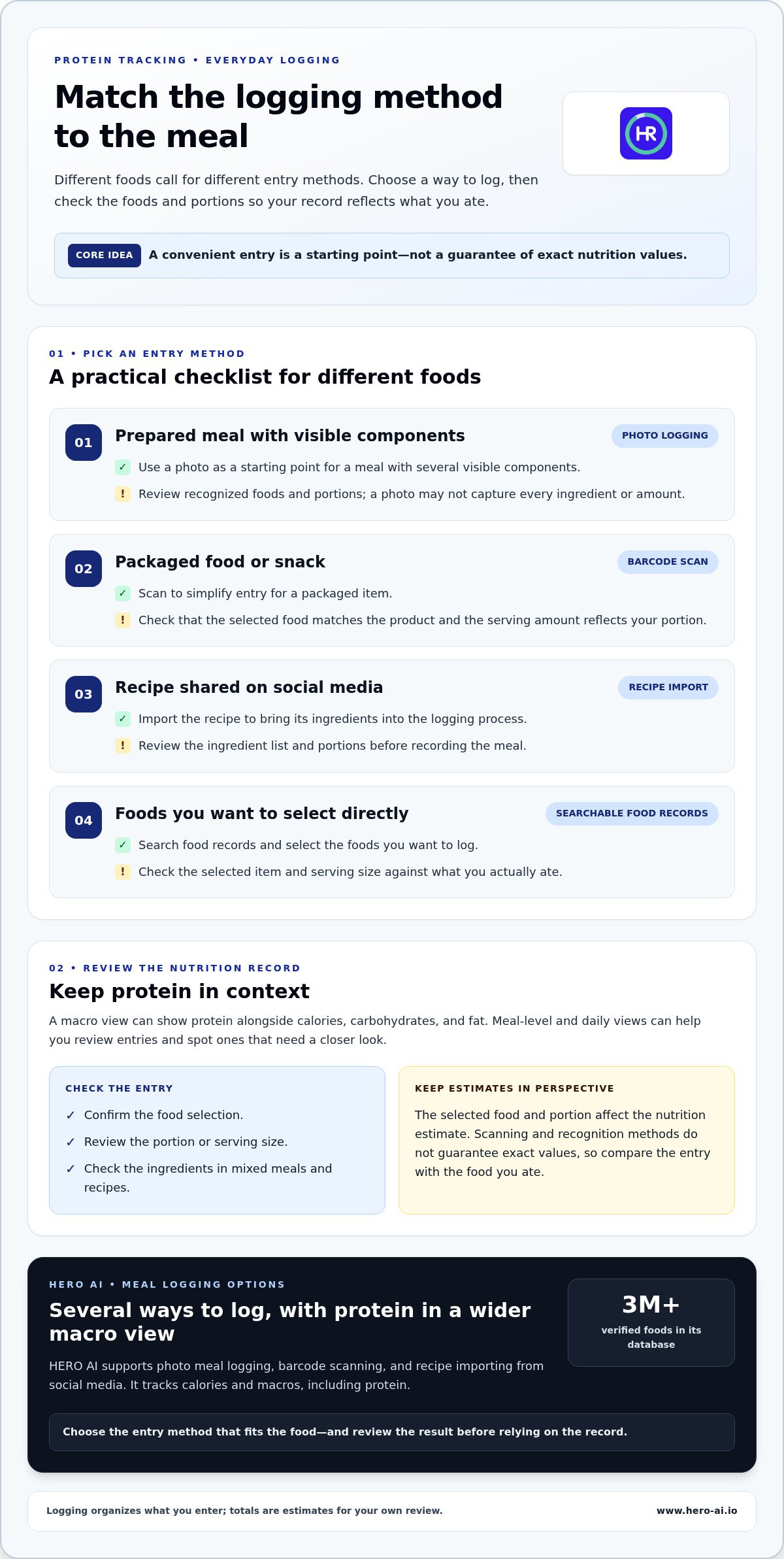
Photo logging can be a practical starting point for a prepared meal with several visible components. Review the recognized foods and portions, since a photo may not capture every ingredient or amount. Treat the result as an entry to check, not a guaranteed nutrition calculation.
Barcode scanning can speed up logging for packaged items. Check that the selected food matches the product and that the serving amount reflects your portion. A similar product or a different serving size can change the nutrition record.
For a meal based on a recipe shared on social media, recipe import can bring its ingredients into the logging process. Review the ingredient list and portions before saving or recording the meal. Searchable food records offer another option when you want to find and select foods directly.
HERO AI supports photo meal logging, barcode scanning, and recipe importing from social media. Its food database contains over 3 million verified foods, providing a broad set of food records to draw on while logging. Each method suits a different situation, so choose based on the foods you record and the routine you can maintain.
Protein totals, macro views, and food data
A macro view places protein alongside other tracked measures, such as calories, carbohydrates, and fat. This makes it easier to review protein as part of your broader food record rather than as an isolated figure. Meal-level and daily views can also help you spot entries that need a closer look.
Review recognized foods and portions because the selected item and serving size affect the nutrition estimate. Check the ingredients in mixed meals and recipes, too. Scanning and recognition methods don’t guarantee exact nutrition values, so compare entries with the food you actually ate.
HERO AI tracks calories and macros, placing protein within that wider nutrition view. Learn more about its HERO AI nutrition tracking tools and how its meal-entry options work together.
How to Compare High-Protein Diet Tracker Apps
Compare the everyday workflow, not just the feature count. A high protein diet tracker app should make protein easy to find, support the ways you record meals, and make it practical to review entries. Use the criteria below to compare tools without assuming a feature guarantees a specific level of accuracy.
A practical feature comparison matrix
| Criterion | What to look for | Why it matters | Hero AI |
|---|---|---|---|
| Protein display | Protein shown clearly within meal and daily nutrition views | Makes it easier to review protein alongside other tracked measures | Tracks calories and macros, including protein |
| Photo logging | A photo-based entry method for prepared meals | Offers an alternative to searching for every component individually | Supports photo meal logging |
| Barcode scanning | A scan option for packaged foods, with a matched entry to review | Can simplify entry, while checking the match helps avoid logging the wrong item | Supports barcode scanning |
| Recipe import | A way to bring recipe ingredients into a meal record | Can reduce repeated entry for meals based on shared recipes | Supports importing recipes from social media |
| Food database | Food records that support searching and selecting relevant items | Provides another route for logging when scanning or importing isn’t the right fit | Includes a database of over 3 million verified foods |
| Entry review | A practical way to check whether selected foods and portions match the meal | Helps keep the record aligned with what was actually eaten | Compare its meal-entry options with the review routine you want to use |
Questions to ask about routine fit and access
Start with the meals you log most often. If you prepare mixed dishes, photo logging or recipe import may fit your routine. If packaged foods are common, barcode scanning may save steps. Searchable food records provide another option. Consider whether the available methods let you record your usual foods without making logging unnecessarily repetitive.
Next, consider how you’ll review each entry. Can you check that the selected food and portion match what you ate? Does reviewing an entry fit naturally into your logging process? A quick check can help you notice mismatched items or serving amounts. These questions are useful when comparing any app, regardless of how it handles entry review.
Finally, consider whether the access structure suits your intended use. HERO AI is available through a one-year subscription that provides access to its platform features. Weigh the subscription term alongside the logging methods and nutrition views you expect to use regularly.
How to Set Up a Consistent Protein-Tracking Routine
A repeatable routine makes a high protein diet tracker app more useful as a record of everyday meals. Enter the foods and portions you actually consume, then review the log for obvious errors. Tracking doesn’t require a prescribed diet or a fixed protein target.
A simple start-to-review workflow
- Choose an entry method for your usual meals. Use photo logging for prepared dishes, barcode scanning for packaged foods, and searchable food records when selecting an item directly is easier. Choose methods you can use consistently.
- Set a regular logging time. Enter meals as you eat them or choose another consistent time during the day. A steady routine can make missed entries easier to notice.
- Check each food entry. Confirm that a recognized food matches what you ate. Review serving sizes and adjust the recorded amount if it doesn’t reflect your portion.
- Review the day’s record. Look at the protein total alongside other tracked nutrition measures. Check for missing meals, duplicate entries, or portions that don’t match your notes.
- Improve the process when needed. If a type of meal takes too long to log, try another available entry method. Aim for a practical record, not perfect data from every meal.
How to handle mixed meals and imported recipes
Mixed dishes can contain several ingredients, and the record depends on which foods and serving amounts you include. For a meal with a grain, vegetables, and a protein source, check that each main component appears in the entry and that the portions reflect your meal. This makes the record more representative of what you ate.
Recipe imports can reduce repeated ingredient entry, but review the imported information before relying on its nutrition record. Compare the listed ingredients with the recipe you prepared, and check whether the serving amount represents your portion. If you change a recipe, update the entry rather than assuming an earlier record still applies.
As you compare tools, consider macro tracking app features and AI calorie counter meal logging alongside the entry methods you’ll use most. HERO AI combines photo meal logging, barcode scanning, and social-media recipe importing with calorie and macro tracking. Its one-year subscription provides access to the platform features, including the option to schedule workouts from social-media content. See the HERO AI meal-tracking features in the context of your routine.
Using HERO AI for Protein and Macro Tracking
Once you’ve compared logging methods and review workflows, consider how HERO AI brings several meal-entry options together. The app supports photo meal logging, barcode scanning, and importing recipes from social media. Choose an option based on what you’re recording, whether that’s a prepared dish, a packaged food, or a recipe.
How HERO AI supports nutrition logging
A photo can provide an entry point for a prepared meal. Barcode scanning offers another route for packaged items, while recipe import can help record ingredient-based meals. HERO AI also provides access to a database of over 3 million verified foods. As with any logging method, compare the selected foods and portions with what you ate.
HERO AI tracks calories and macros, so protein appears within a broader nutrition record. This can suit people who want to review protein alongside other tracked measures rather than viewing it alone. The workflow is straightforward: log foods, review the entries, and use the nutrition view to examine your record. A high protein diet tracker app is most practical when routine meal entry feels manageable.
For more context, read about the photo food tracker subscription and how its access fits into your tracking routine.
Next steps for evaluating the subscription
Use three criteria to assess fit: whether protein is visible in the nutrition view, whether the entry methods suit your usual meals, and whether checking foods and portions fits your routine. A feature is most useful when it supports a process you can repeat.
HERO AI is offered through a one-year subscription that provides access to the platform’s nutrition and fitness features. These include photo logging, barcode scanning, social-media recipe importing, the food database, calorie and macro tracking, and workout scheduling from social-media content. Multiple entry options can support different meal types, while reviewing entries remains an important part of keeping a useful record.
See the HERO AI subscription to assess how its features fit the way you want to record and review meals.
Choose a Tracking Routine You Can Maintain
The right high protein diet tracker app makes protein easy to review without making meal logging a burden. Compare how clearly each tool presents protein, which entry methods fit your meals, and how practical it is to check foods and portions. Consistent entries make a more useful nutrition record than a long feature list on its own.
HERO AI combines AI-powered photo meal logging, barcode scanning, and social-media recipe importing with calorie and macro tracking. Its database contains over 3 million verified foods. A one-year subscription provides access to these platform features, including workout scheduling from social-media content.
If these tools fit your routine, explore the HERO AI one-year subscription. Choose a practical way to log your everyday meals and build consistency one entry at a time.
Frequently Asked Questions
What is a high-protein diet tracker app?
A high protein diet tracker app records foods and estimates their protein content as part of a nutrition log. It may also show calories and other macronutrients, helping you review meals and daily totals together. It’s a tracking tool, not necessarily a meal-planning tool. Estimates depend on the foods and portions entered or recognized, so reviewing entries helps keep the record aligned with what you ate.
How do I track protein in meals with an app?
Log each food or meal using an available method, such as searching a food database, scanning a packaged item, taking a meal photo, or entering a recipe. Check the selected foods and serving sizes, especially for mixed dishes. The app adds estimated protein amounts to your record. Review the total and correct missing foods or inaccurate portions when needed.
Can an app accurately estimate protein from a food photo?
A photo can help identify foods, but it may not show every ingredient or portion size clearly. Treat the result as an estimate, then review the recognized foods and amounts. For a mixed meal, check that the main ingredients are represented. Photo recognition can reduce manual entry, but it doesn’t guarantee exact nutrition values.
What features should I look for in a protein tracker app?
Look for a clear protein display, convenient meal-entry options, searchable food records, and a practical way to review foods and portions. Consider whether photo logging, barcode scanning, or recipe import fits the meals you usually record. A useful app should show protein alongside other tracked nutrition measures and support a routine you can repeat.
Can I use a macro tracking app to monitor protein?
Yes. Protein is one of the macronutrients a macro tracking app can record alongside other measures, such as carbohydrates and fat. Log foods and portions, then review protein in the meal or daily nutrition view. The usefulness of the total depends on the entries, so check that logged items and serving amounts reflect what you ate.
Can a food-tracking app import recipes from social media?
Some food-tracking apps support importing recipes from social media. This can help organize recipe ingredients for logging, but review the imported foods and serving information before relying on the nutrition record. Check whether the ingredients match the recipe you made and whether the serving size reflects your portion. Recipe import supports logging, but doesn’t replace entry review.
Does HERO AI offer protein tracking?
Yes. HERO AI tracks calories and macros, including protein as part of the broader nutrition record. Its logging options include AI-powered photo meal logging, barcode scanning, and recipe importing from social media. The app also provides access to a database of over 3 million verified foods. These features are available through a one-year subscription.


