

A free tracking setup works best when it connects food intake, bodyweight, and workout performance. A macro tracker for strength training can help organize those records, while a 30% protein, 40% carbohydrate, and 30% fat split offers one starting point for logging macros. Treat the split as a reference, then assess it alongside changes in bodyweight and strength.
It’s easy to focus on a calorie target or one workout result, but neither shows the full picture. Food portions are estimates, bodyweight fluctuates, and strength progress can take time to interpret.
This guide explains how to compare tracking options, estimate food portions consistently, and review intake, bodyweight, and lifting records together. It also covers how calorie needs relate to muscle-building goals, so you can adjust based on trends rather than a single day’s data.
Key Takeaways
- Compare free tools by how easily they record meals, workouts, and bodyweight without duplicating entries.
- Use consistent portion estimates to make food logs more useful, even when exact weighing isn’t practical.
- Review intake, bodyweight, and strength records together to identify trends instead of reacting to a single day.
- Adjust calorie intake in response to your muscle-building goal and the patterns you observe over time.
- Check whether a tracker records protein, carbohydrates, and fat in a format that supports your routine.
1. Combining bodyweight, intake, and strength trends
A macro tracker for strength training is most useful when it brings together food intake, bodyweight, and performance. Log meals and macros, record bodyweight consistently, and note the load and repetitions for key lifts. Review these records together: a single weigh-in or workout cannot show whether your current intake supports your training.
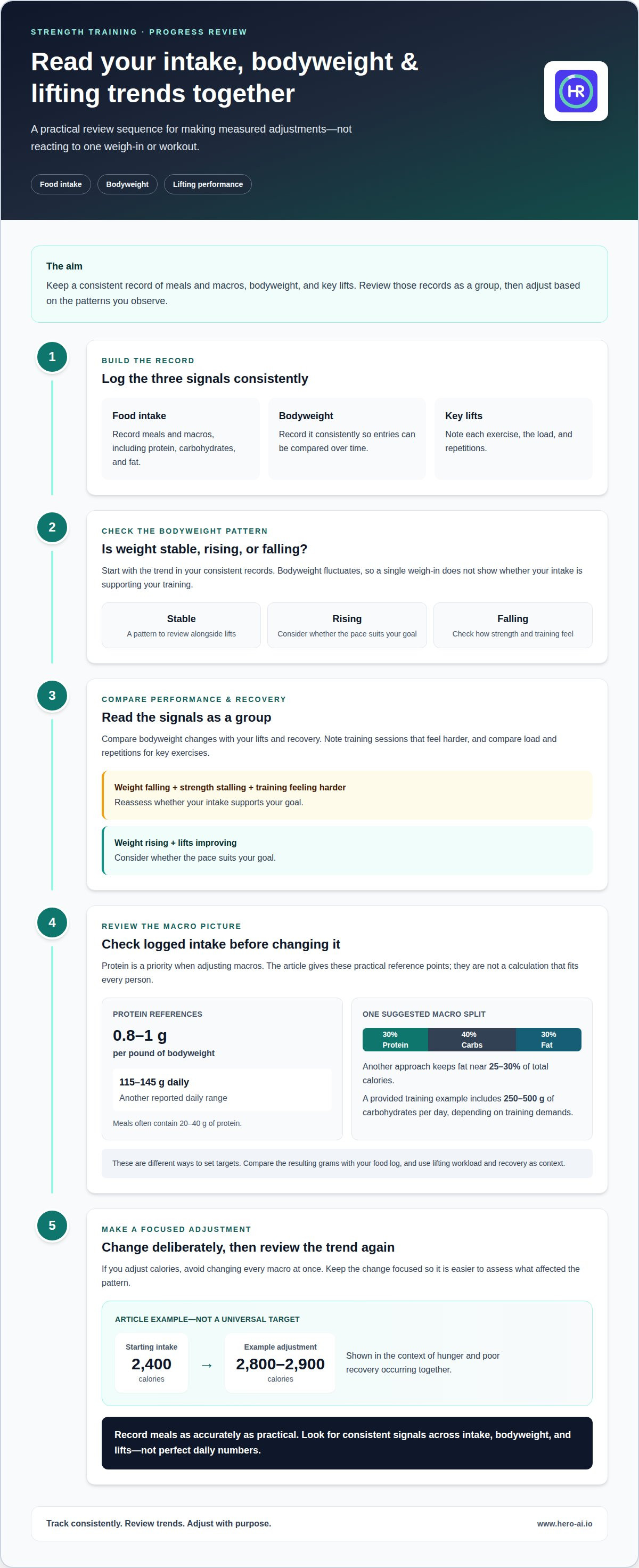
Use a consistent sequence to review your progress. First, check whether your bodyweight is stable, rising, or falling. Then compare that trend with changes in your lifts and recovery. Review your logged calories and macros before adjusting intake. If your weight is falling while strength stalls and training feels harder, reassess whether your intake supports your goal. If weight is rising while lifts improve, consider whether the pace suits your goal.
Protein deserves priority when you adjust macros. A commonly used intake range in the provided examples is 0.8-1 gram per pound of bodyweight. Another reported daily range is 115-145 grams, with meals often containing 20-40 grams of protein. These are practical reference points, not a calculation that fits every person. Start by identifying your current protein intake, then make a measured change rather than rebuilding every meal.
Carbohydrates and fat also contribute to macro balance. One suggested split for strength training is 30% protein, 40% carbohydrates, and 30% fat. Another approach keeps fat near 25-30% of total calories. These percentages describe different ways to set targets, so compare the resulting grams with your food log. The provided training example includes 250-500 grams of carbohydrates per day, depending on training demands. Use your lifting workload and recovery as context when reviewing carbohydrate intake.
Training demands can change appetite and recovery needs. One example increases intake from 2,400 calories to 2,800-2,900 calories when hunger and poor recovery occur together. Treat that as an example of adjusting what you already eat, not a universal target. Keep changes focused, then assess bodyweight and strength trends again. If you change calories, avoid changing every macro at once; otherwise, it becomes harder to identify which adjustment affected the pattern.
Use your log to guide decisions, not to chase perfect daily numbers. Record meals as accurately as practical, note demanding training sessions, and look for consistent signals across intake, bodyweight, and lifts. A protein target can help structure meals, while carbohydrates and fat round out the daily balance. Make adjustments in response to your goal and the trends in your records.
2. Estimating food portions without aiming for perfection
Food logs are useful only when entries reflect what you actually eat. Identify the main ingredients, then estimate portions consistently. For a bowl of rice, chicken, and vegetables, log each component separately when possible. For a mixed meal, choose the closest database entry and use the same approach next time.
Use package labels for packaged foods and a kitchen scale when convenient. For meals without labels, estimate portions with familiar household measures, such as a cup or spoon. Note whether you weighed food raw or cooked, since preparation changes its weight. Consistent measurement is more useful than switching methods from meal to meal.
How accurate are macro tracking apps and food databases? Accuracy depends on the database entry, portion estimate, and preparation details. Check that the selected food matches what you ate, including the serving description, and adjust the portion if it differs.
Log meals close to when you eat them. Search for the food, review matching entries, and save repeat meals when the app allows it. For a homemade recipe, enter the ingredients and divide the finished dish into the portions you serve. Photos and barcode scans can speed up logging, but review the food and serving details before saving.
Review food and lifting logs together. Pair meal entries with the day’s training record and look for practical patterns. For example, note whether you skipped a planned meal before a demanding session or whether your usual lunch changes on training days. Record each exercise, load, and repetition consistently. This makes sessions easier to compare without treating one unusual workout as a trend.
Syncing food logs with fitness apps can reduce duplicate entry, but keep bodyweight records in one place. If two apps show different measurements, choose one as your official record and use the other for workouts or nutrition. Check that dates and units match before comparing entries. This helps prevent duplicate weigh-ins from distorting your review.
What are the pros and cons of macro tracking for strength training? A food log can reveal meal patterns and make it easier to review protein, carbohydrate, and fat intake alongside your lifting. However, tracking takes time, and portion estimates can create a false sense of precision.
Are there risks or downsides to tracking macros? Tracking can become burdensome or draw too much attention to exact entries. Keep it focused on useful records, and simplify your approach if logging interferes with meals or training.
If manual entry slows your routine, photo-based meal logging is another way to record food and review portions.
3. Free workout and nutrition tracking options
A free tracking setup can pair one app for nutrition with another for lifting. Compare options by checking whether they record meals, exercises, bodyweight, and workout details without duplicate entry. Test a typical meal and training session before settling on a setup. You’ll see whether records are easy to enter, find, and review.
For strength training, log each exercise, load, repetition, and relevant note. Record a squat session as separate sets rather than one general “workout” entry. This gives you a clearer record for comparing sessions and reviewing your training plan. Nutrition records add context, but an app’s workout calorie estimate is not an exact measure of energy expenditure.
An all-in-one app can keep food and workout records together, reducing the need to switch tools. Separate apps may suit you better if you prefer one app’s food logging and another’s training notes. Either way, keep bodyweight records in one place. Entering the same measurement twice can create conflicting or duplicate records.
Carbohydrates are one part of nutrition to review around training. Compare your logged meals on lifting days with those on rest days. For example, note what you ate before a demanding session and how your usual meal pattern differed. These records can reveal patterns to monitor, but they can’t show that one meal caused a change in performance.
A workout entry in a food-tracking app can sit alongside your meal records. Enter the activity clearly, then keep a separate exercise log if the app doesn’t preserve sets and repetitions in a useful format. Avoid automatically adding estimated exercise expenditure to your food target. Review workout and food records separately before deciding whether to adjust intake.
Compare free options by entering the same sample day in each setup. Include a meal, a mixed dish, a lifting session, and a bodyweight entry. Check whether the nutrition record shows protein, carbohydrates, and fat, and whether the workout log retains exercises, loads, and repetitions. Note how easily you can correct a food entry or find a past session.
Choose a system that makes your records easy to review consistently. A nutrition app and a separate workout log can work if both are easy to maintain. An all-in-one tracker may suit your routine if its meal and exercise records are clear and accessible. Keep bodyweight records in one place, log consistently, and treat expenditure estimates as estimates, not direct measurements.
4. Calorie needs and muscle-building goals
A calorie target for muscle building depends on more than age or bodyweight. Basal metabolic rate estimates energy used at rest, while total daily energy expenditure includes movement and training. Consider an example: a 35-year-old woman weighs 150 pounds, has a basal metabolic rate of about 1,450 calories, and strength trains for an hour five days per week. Her estimated total daily energy expenditure is about 2,400 calories daily.
That estimate gives a starting point, not a complete plan. Her daily movement, training schedule, and food intake all affect how the target works in practice. For this example, a 10% daily increase gives a suggested intake of 2,640 calories per day. The calculation is 2,400 multiplied by 1.10. A tracker can make the difference between the estimated starting point and logged intake visible.
Use a consistent sequence when setting a calorie goal. First, record current intake and bodyweight. Next, compare those records with the muscle-building objective and the demands of the training routine. Then set an initial target and log meals against it. The 35-year-old example uses 2,640 calories per day as the adjusted target, rather than assuming that every person training for strength needs the same amount.
Check whether your target supports your goal by comparing intake with bodyweight and lifting records. If your weight isn’t moving in the intended direction, check the accuracy and completeness of your food entries before changing the target. A missed snack or inconsistent portion estimate can make logged intake differ from what you actually ate. Also consider whether your training volume or daily activity has changed since the initial estimate.
Keep the adjustment focused. If calories change, retain a consistent approach to logging meals and training so the next review remains useful. Avoid interpreting one meal or one weigh-in as evidence that the target needs revision. The example’s 2,640-calorie figure follows from its stated starting estimate and 10% increase; it is not a universal prescription for building muscle.
A macro tracker can support this process by recording daily calories alongside protein, carbohydrates, and fat. Use it to compare the planned target with logged meals, then assess the records alongside changes in bodyweight and strength. For the example woman, the practical question is whether the 2,640-calorie starting target aligns with her goal and observed trends. Her age, 150-pound bodyweight, resting estimate, and training schedule explain the calculation. Different inputs produce a different estimate.
5. Which macro trackers support tracking protein, carbohydrates, and fat?
Choose a food tracker that displays protein, carbohydrates, and fat for each entry and for the daily total. These fields let you compare logged meals with your personal targets. A calorie-only view won’t show whether a meal’s energy came mainly from protein, carbohydrates, or fat. Review both the meal breakdown and the full-day summary before choosing a tracking method.
Test the food database with a meal you eat regularly. Search for each ingredient, compare the serving description with your portion, and confirm that protein, carbohydrates, and fat are shown. For packaged food, compare the app entry with the nutrition label. For a homemade dish, enter the ingredients separately or select a matching recipe entry. This shows whether the records suit your usual meals.
Next, check how the tracker displays targets. You should be able to see logged amounts alongside your chosen goals, not just calories remaining. After logging lunch, for example, check whether your protein and carbohydrate totals update separately. A clear daily summary makes it easier to spot missing entries and see which macro needs attention.
Database size matters, but a long list alone doesn’t guarantee a suitable match. Entries with similar food names may use different serving sizes or preparation methods. Compare the description, portion unit, and macro values before saving. If you regularly eat the same breakfast, save or reuse the exact entry to keep future logs consistent.
For strength training, check whether the tool supports repeat meals, recipe entry, and quick corrections. These features can reduce repeated work when your meals follow a routine. Also check whether macro totals remain visible in past records. A tracker that makes previous days easy to compare is more useful than one that shows only today’s intake.
Test the workflow before committing to it. Log a breakfast, a mixed meal, and a snack, then review the day’s protein, carbohydrate, and fat totals. Check whether editing a portion updates the totals and whether you can replace an incorrect food without rebuilding the meal. These steps show whether the tracker supports consistent logging in your routine.
If manual food searches slow your logging, try photo-based meal logging to record meals with less entry work.
I prioritize protein when tracking macros. My personal protein minimum is 125 grams per day, with a target range of 125-145g. I would not intuitively eat 400 grams of carbohydrates per day.
If my protein intake is 100g late in the day and I’m exhausted, I may go to bed rather than eat more.
Hero AI: 1 year subscription
Hero AI can simplify meal logging when manual food searches interrupt your routine. Snap a meal photo, scan a barcode, or import a recipe from TikTok or Instagram to record calories and macros. Its food database contains over 3 million verified foods. You can also schedule workouts from social media content, bringing nutrition logging and workout planning into one platform.
Hero AI offers a 1 year subscription. It may suit you if you want photo-based meal logging and a way to organize workouts alongside nutrition tracking. Review the details and decide whether its approach fits your routine.
Build a tracking routine you can sustain
Choose a logging routine that fits your actual training week. Decide which meals to record, how to log workouts, and where to keep bodyweight records. Then follow the same process consistently. A macro tracker for strength training should make these tasks manageable, not add friction to meals or sessions.
Set a review point to decide whether your records are complete enough to guide an adjustment. If logging feels difficult, simplify the process before giving up. Repeat meals, saved recipes, and a consistent workout format can reduce unnecessary entry work. The aim is a useful record for making decisions, not perfect data.
If you want meal logging and workout planning in one platform, contact Hero AI for help. Start with a routine that fits your schedule, then refine it as your training needs change.
Frequently Asked Questions
What macro tracker apps are best for strength training?
Choose an app that records nutrition and supports the workout details you need to review. Check whether it separates protein, carbohydrates, and fat, and lets you record exercises, loads, and repetitions. If one app handles meals but not lifting details, use a separate workout log. Test your usual training-day routine before settling on a setup.
What are the prices and free features of popular macro tracker apps?
Prices and free features vary by app. Check whether a free version lets you log meals, view macro totals, save repeat foods, and review past records. Find out which functions require a subscription before relying on them. Compare options against your routine, such as logging a mixed meal or checking yesterday’s intake, rather than judging by the number of listed features.
How do I calculate daily calorie and macro targets for strength training?
Estimate your daily energy needs, then choose a calorie target that matches your goal. Set protein, carbohydrate, and fat targets within that plan and enter them in your tracker. Review your logs alongside bodyweight and lifting records. If your training schedule changes, note it before adjusting nutrition targets. This gives you more context for interpreting later trends.
How much protein should I eat daily to build or maintain muscle?
A commonly used reference for strength training is 0.8-1 gram of protein per pound of bodyweight daily. Use your bodyweight to calculate a starting range, then consider your overall food intake and training routine. You can distribute the target across meals you already eat. Tracking those meals can show whether your usual choices consistently reach the intended amount.
Which macro trackers connect with fitness watches and strength training apps?
Connections vary by tracker, watch, and workout app. Review which devices and services are compatible and what information transfers, such as activity or bodyweight. If your tools don’t share lifting details, keep a separate workout record with exercises, loads, and repetitions. Choose one place for bodyweight entries to avoid duplicate or conflicting records across connected apps.
Can macro trackers track meals by barcode scan, recipe, or photo?
Some trackers support barcode scanning, recipe entry, or photo-based logging, but methods vary. For packaged food, barcode or nutrition-label scanning can help identify an entry. Recipe tools can record ingredients in a prepared dish. Photo logging estimates foods and portions, so review the result and adjust quantities as needed. Choose input methods that suit the meals you log most often.


