

A meal photo can save time, but a photo food tracker subscription is useful only if it turns that capture into a food record you can use. If manual logging is hard to maintain, compare how an app handles different meals and whether its logging options fit your routine.
Feature lists don’t always show how tools work together. A photo diary may store meal images, while a nutrition tracker can combine photo recognition with other ways to log food. That difference matters if you want more than a visual record.
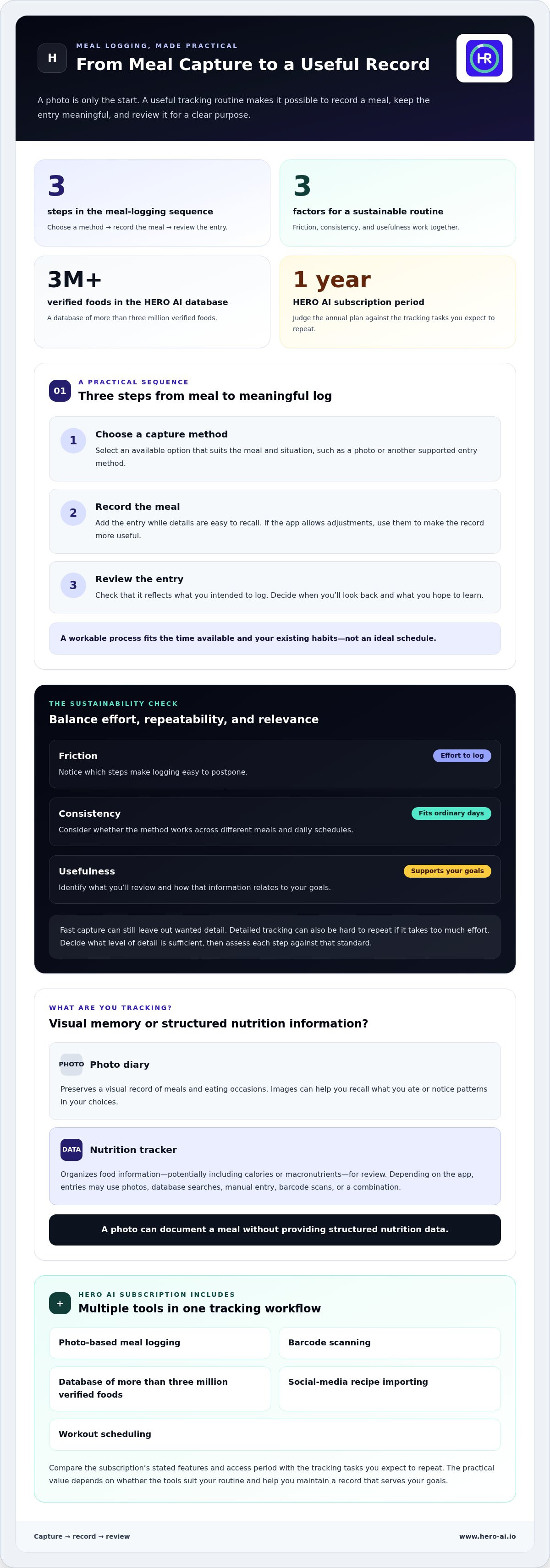
This article explains which features can support consistent tracking and how to compare a nutrition tracker with a photo-only food diary. It also covers HERO AI’s one-year subscription, which includes photo-based meal logging, barcode scanning, a database of more than three million verified foods, social-media recipe importing, and workout scheduling. Use the comparisons to decide whether an integrated tracking workflow and annual plan match your habits and goals.
Key Takeaways
- Assess a photo food tracker subscription by how well its records support your nutrition goals, not by photo capture alone.
- Map your usual meal-logging routine to see where different capture methods could reduce effort.
- Compare a visual food diary with nutrition tracking based on the detail you need and how you’ll use the log.
- Use your expected tracking frequency and preferred logging habits to judge whether an annual plan fits your routine.
Photo Food Tracker Subscription: What Are You Paying to Track?
A subscription provides paid access to an app’s tracking features for a stated period. The tools vary by service. A photo food tracker subscription might focus on capturing meals, organizing nutrition information, or combining several functions. The label alone doesn’t tell you what you can record or review.
Start by deciding what you want your log to do. A visual history can help you recall a meal. A nutrition record can help you review calories or macronutrients. These purposes can overlap, but they are not interchangeable: a photo can document a meal without providing structured nutrition data.
Photo food diary or nutrition tracker: what is the difference?
A photo diary is a visual record of meals and eating occasions. Looking back at images can help you remember what you ate or notice patterns in your choices. FoodView, for example, describes its free app as a photo diary for recording eating and drinking. Its stated scope does not include calorie tracking, barcode scanning, or manual data entry. That example describes one diary, not a standard feature set for every free app.
A nutrition tracker organizes food information, which may include calories or macronutrients. Depending on the app, you might create entries through photos, database searches, manual entry, barcode scans, or a combination of methods. The practical distinction is simple: a diary preserves a visual memory; a tracker structures information for review.
A photo diary stores visual records of meals; a nutrition tracker organizes food information, such as calories or macronutrients, for review.
What does a subscription change in daily tracking?
Paid access can bring multiple tracking functions together, but subscriptions differ. One app may emphasize nutrition information, while another focuses on meal images or includes tools beyond food logging. Don’t assume a paid plan automatically includes photo recognition, barcode scanning, a food database, or recipe tools. Check the stated features and access period to understand what the subscription provides.
HERO AI offers an annual subscription to an AI-powered health and fitness platform. Assess its value against the tracking tasks you expect to repeat, rather than the number of features alone. A capability is useful when it suits a real logging situation and helps you maintain a record that serves your goals.
Use these questions to clarify what you want to track:
- Do you need a visual reminder, structured nutrition information, or both?
- Will you log meals in one way, or do your recording situations vary?
- Do you plan to review the information, or mainly keep a visual history?
Regular use is central to practical value. A detailed tracker may not fit if you only want occasional photo records. A diary may fall short if your goal requires nutrition data. Compare the app’s functions with your routine and goals before deciding that its subscription will be useful.
How a Photo Food Tracker Subscription Fits Into a Meal-Logging Routine
A tracking tool becomes part of your routine when its steps fit naturally around eating, recording, and reviewing. A photo food tracker subscription can support that process, but the right fit depends on how you prefer to log and what you need from the resulting record. Low-effort capture helps only if the entry gives you information you’ll actually use.
A useful meal-logging workflow makes it easy to record a meal, keep the entry meaningful, and review it for a clear purpose.
A practical meal-logging sequence
Consider the full process, not just the moment you record food. Capture methods vary by app and subscription, so map the steps to the tools you’ll use:
- Choose a capture method. Select an available option that suits the meal and situation, such as a photo or another supported entry method.
- Record the meal. Add the entry while the details are easy to recall. If the app allows adjustments, use them to make the record more useful.
- Review the entry. Check that it reflects what you intended to log. Decide when you’ll look back at the record and what you hope to learn from it.
Imagine logging a meal during a short break. A process that requires several separate steps may be harder to repeat than one that fits the time available. Think about where you’ll log, how much detail you need, and whether you’re likely to complete the entry then or later. A workable routine should fit your existing habits, not depend on an ideal schedule.
What makes a tracking routine sustainable?
Ease of use, repeatability, and relevance all matter. Ease of capture is the effort required to make an entry. Repeatability means being able to follow the process on ordinary days. Relevance is whether the information supports your goals. A fast capture method can still produce a record without the detail you want.
Assess these factors together. If an entry is simple to create but difficult to interpret, it may not help when you review it. If it is detailed but takes too much effort to complete, you may use it inconsistently. Decide what level of detail is sufficient for your purpose, then judge each step against that standard.
- Friction: Notice which steps make logging easy to postpone.
- Consistency: Consider whether the method fits different meals and daily schedules.
- Usefulness: Identify what you’ll review and how it relates to your goals.
Automation can reduce manual steps, but it doesn’t guarantee consistent use or a useful record. A realistic routine accounts for missed entries and makes it straightforward to resume. To see how an integrated tracking platform could fit into that process, explore the HERO AI health and fitness platform.
Paid Photo Food Tracker vs Free Photo Diary: Compare the Actual Use
Start your comparison with what you want the record to do. A free photo diary can suit someone who wants a visual history of meals. A nutrition-oriented tracker may be a closer match if you need structured food information to review. Paid access alone doesn’t determine which tool is more useful. The key is whether its functions support your purpose and fit how you’ll log.
| Comparison point | Photo diary | Nutrition-oriented tracker |
|---|---|---|
| Main purpose | Keep a visual record of meals and eating occasions. | Organize food information for nutrition review. |
| Capture options | Photo capture is central to the diary format. | Options vary by app and plan; compare the methods you need. |
| Nutrition data | May focus on images without calorie tracking. | May record calories or macronutrients; check the specific data provided. |
| Routine fit | Useful if looking back at meal images meets your goal. | Useful if you intend to review structured nutrition entries. |
When a free photo diary may be sufficient
A photo diary may be enough if your goal is to remember what you ate, rather than track calories or other nutrition details. FoodView describes its free app as a diary for recording eating and drinking through photos. It states that the app doesn’t include calorie tracking, barcode scanning, or manual data entry. That’s one specific example, not a description of every free app or diary.
Ask whether images alone answer the questions you have. If you want a visual reminder of meals and eating occasions, a diary can serve that purpose without adding nutrition fields you don’t plan to use. A free option isn’t automatically inadequate; its fit depends on the record you want to keep.
When nutrition tracking may better match the goal
If you plan to review calories or macronutrients, compare the nutrition data each tool provides. Check whether its capture methods and records match your needs. Don’t assume every paid tracker includes the same functions, or that a photo automatically creates the level of detail you expect. Feature relevance matters more than a long list of tools.
For example, someone keeping meal memories may prefer an image-based record, while someone reviewing nutrition information needs entries that organize that information. Neither use case guarantees a particular health outcome. The aim is to select a tool that makes the intended record practical to maintain. For more context on photo-based logging, see Digital Food Journal with AI: How Automated Meal Logging Works.
Use this distinction to decide whether a photo food tracker subscription adds functions you’ll use regularly, or whether a visual diary already meets your needs. Compare purpose, capture options, available nutrition data, and routine fit before weighing the subscription itself.
How to Decide Whether a Photo Food Tracker Subscription Fits You
Choose based on the tracking you expect to do, not the number of features in a plan description. A photo food tracker subscription is more likely to fit when its core tools support your goal, match how you record meals, and seem practical at your expected frequency. Separate essential functions from optional extras before weighing an annual plan.
A five-point subscription-fit checklist
Use this checklist to compare your needs with the subscription’s stated functions and terms. Be specific about how you plan to record and use meal information.
- Define the record you need. Decide whether you want meal images, nutrition data, or both. If you need nutrition information, identify which details you intend to review.
- Match capture methods to your meals. Consider how you usually log food and whether the available methods fit those situations. An option is useful only if you expect to use it.
- Assess the review step. Ask whether you’ll look back at entries and how you’ll use the information. If you only want a visual history, advanced analysis may not add value.
- Estimate realistic use. Choose a logging and review frequency that fits your routine. Consider whether the process still feels manageable on a busy day.
- Read the plan terms. Compare the stated subscription period and terms on the offer page. Keep the commitment in view alongside the features you expect to use.
These points help distinguish a feature that solves a recurring need from one that simply sounds useful. A long list of tools doesn’t establish value if your routine uses only one function.
Questions to answer before choosing an annual plan
Before selecting an annual subscription, describe your intended use in plain language. For example: “I want to record meals regularly and review nutrition information,” or “I want a visual record without detailed nutrition tracking.” A clear goal makes it easier to judge both the app’s functions and the effort required to use them.
- What specific tracking goal should the plan support?
- How often do you realistically expect to log meals?
- How often will you review your records, and what information will matter?
- Which features are essential, and which are unlikely to be part of your routine?
Then consider whether the annual period aligns with your likely use. If your logging habits are still uncertain, base the decision on a realistic routine rather than an ideal one. For plan context, “HERO AI 1-Year Subscription: Functional Service Overview” relates to the annual offer; assess it alongside your tracking priorities.
Once you’ve identified the functions and commitment that fit your needs, review the HERO AI subscription.
What the HERO AI Photo Food Tracker Subscription Includes
HERO AI’s one-year subscription provides access to an AI-powered health and fitness platform. Its features cover several parts of a tracking routine, from recording meals to organizing workout schedules. It can suit people who want nutrition and fitness functions in one platform, provided those functions match what they plan to use.
Meal capture and nutrition information in HERO AI
For meal logging, HERO AI includes photo recognition and barcode scanning. A meal photo offers one capture method, while a barcode provides another way to log a food item. The platform also provides access to a database of more than three million verified foods. These tools support recording and organizing food information, but they should not be treated as a guarantee of measurement accuracy.
Consider how these methods fit your usual logging situations. You might take a photo of a prepared meal or scan a barcode when logging a packaged food. The database provides another source of food information within the platform. Compare these options with how you expect to record meals and what you want to review. The article “AI Calorie Counter: Automated Nutritional Data Capture and Analysis” offers related context on automated nutrition data capture.
Recipe imports, workout scheduling, and next steps
HERO AI also supports importing recipes from social platforms, including TikTok and Instagram. This can help bring a recipe you’ve found on social media into your food-tracking workflow. Workout scheduling is a separate platform function. Together, recipe importing and workout scheduling extend the platform beyond meal capture, while serving different purposes.
The article “Social Media Fitness Integration: Systems for Automated Health Tracking” provides related context on social-media fitness integration. For your own decision, compare the subscription’s features with the routine you expect to maintain. Do you plan to use photo recognition, barcode scanning, recipe imports, workout scheduling, or a combination? The annual subscription’s practical value depends on whether its nutrition and fitness features serve recurring needs, not simply on how many appear in a feature list.
In summary, HERO AI combines photo-based meal logging, barcode scanning, a verified food database, social-media recipe importing, and workout scheduling in a one-year subscription. These functions support different tracking tasks without promising a specific nutrition or fitness outcome. If that combination matches your intended use, view the HERO AI annual subscription.
Make Your Next Tracking Step Deliberate
Before choosing a photo food tracker subscription, identify one question you want your records to help you consider. It might relate to your routine or to the details you want to notice over time. A clear purpose gives you a reference point beyond the number of features in an app.
After you start tracking, return to that purpose periodically. Ask whether recording still feels manageable and whether the information is useful to you. An imperfect log can still provide a basis for reflection. You can adjust your approach as your priorities change, rather than treating a missed entry as a reason to stop.
Use this next step to make a considered choice about the tracking routine you want to build. To explore whether HERO AI’s annual plan aligns with that goal, review the HERO AI annual subscription.
A practical routine starts with a clear purpose. Choose the approach that feels relevant to your goals, and move forward at a pace you can sustain.
Frequently Asked Questions
Is a photo food tracker subscription worth it?
It can be worth it if the paid features support a tracking task you expect to do regularly. Someone who wants to compare meal images may not need nutrition tools, while someone reviewing food intake may value structured data. List the functions you’ll use in a typical week, then compare them with the plan period and terms. Don’t let unused features drive the decision.
Can a photo food tracker calculate calories from a meal image?
Some apps use image recognition to estimate or record nutrition information, while others save photos without calculating calories. The capability depends on the app. A meal image may not show every ingredient or preparation detail, so treat automated figures as tracking information rather than a clinical measurement. Review the app’s description to understand what it records, and don’t interpret an estimate as a guaranteed result.
Can I track food without taking a photo?
Yes, some trackers provide non-photo logging methods, though the options vary. HERO AI includes barcode scanning alongside photo-based meal logging. For example, scanning may suit a packaged item when taking a meal photo isn’t practical. Consider the foods you commonly record and whether the available methods suit them. Manual entry isn’t available in every app, since logging methods vary by service.
Does a photo food tracker subscription track macronutrients?
Some nutrition-focused services organize calorie and macronutrient information, but the available data differs by app. HERO AI supports calorie and macro tracking. Think about which information you plan to review and whether a meal record contains the details relevant to your tracking goal. Use app data as a personal tracking record, not as a substitute for individualized guidance from a qualified health professional.
Can I import recipes from TikTok or Instagram into a food tracker?
Some platforms support recipe imports from social media, but this isn’t a standard feature across all trackers. HERO AI includes recipe importing from platforms such as TikTok and Instagram. Its workout scheduling function is separate and supports scheduling workouts from social-media content. If you use both types of content, consider whether organizing them within one platform suits the way you plan meals and workouts.
Is a photo food diary the same as a calorie tracker?
No. A photo diary can preserve images without organizing calorie information. FoodView states that its diary doesn’t provide calorie tracking or barcode scanning. If you want to review calorie records, look for a tracker that specifically supports that function. If images alone meet your purpose, a diary may be sufficient. This distinction helps you choose a tool based on its intended use, rather than its format.


