

Which viral recipe calorie breakdown app can turn a social media recipe into a nutrition log you can use? Importing a video is only the first step. Ingredient amounts may be missing, serving counts may be unclear, and the details may need correcting before you log the meal.
A useful app connects recipe capture with a practical tracking workflow. The calorie estimate depends on the ingredients and quantities entered, as well as the number of servings. Comparing these details is as important as comparing headline features.
This guide explains what to assess when choosing an app for social recipes, including recipe importing, nutrition tracking, photo logging, barcode scanning, and food database coverage. It also explains which recipe details affect a calorie breakdown and how to handle gaps in a video’s instructions. Hero AI combines social media recipe importing with AI photo food tracking, barcode scanning, and a database of over 3 million verified foods. Its annual subscription includes access to these tools. Use the comparisons below to decide whether that combination fits the way you log meals.
Key Takeaways
- Distinguish a recipe video from a complete recipe and a meal entry. Identify which details need review before logging.
- Compare a viral recipe calorie breakdown app across capture, editable ingredients, serving adjustments, and meal logging.
- Compare manual calculators, general calorie trackers, and social-recipe import tools by the information they require and the workflow they support.
- Review ingredient amounts and serving details before relying on a recipe’s calorie breakdown.
- Assess how recipe importing fits alongside other food-tracking tools in your regular routine.
What a Viral Recipe Calorie Breakdown App Needs to Do
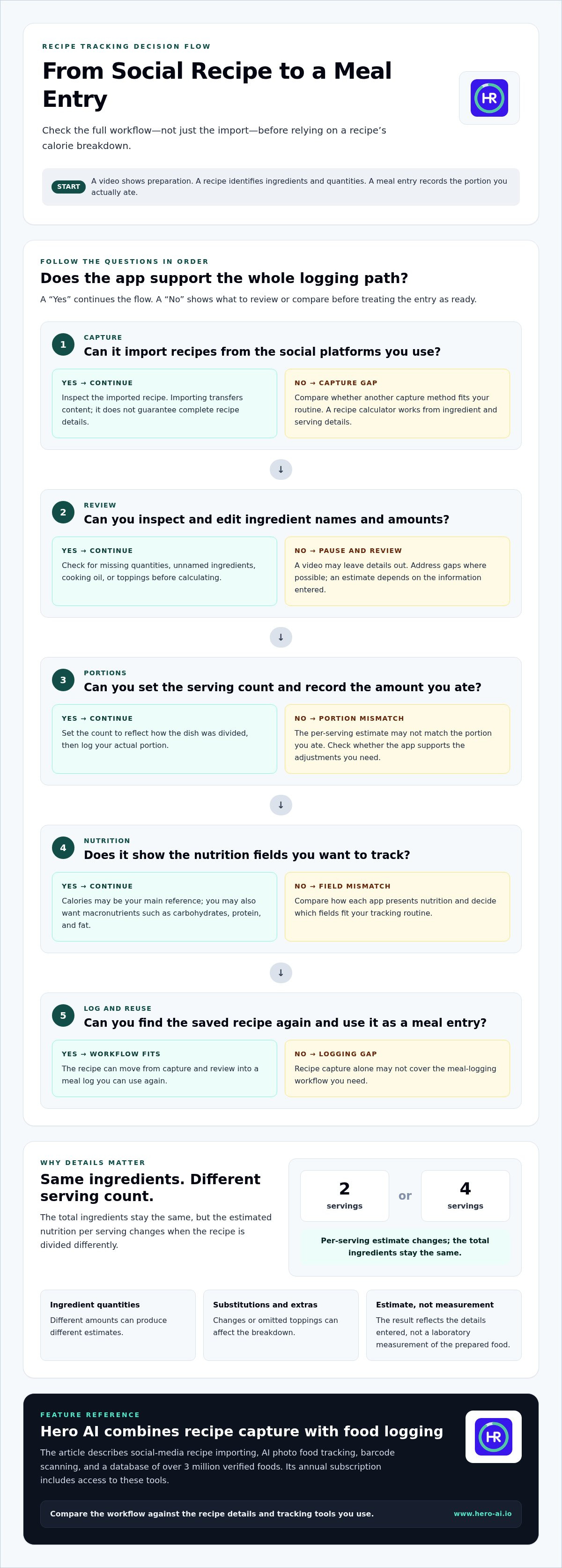
A viral recipe calorie breakdown app connects social-recipe capture with nutrition logging. It helps turn a post or video into a recipe you can review and record as a meal. These are related but separate steps: a video shows food being prepared, a recipe identifies ingredients and quantities, and a meal entry reflects the portion you actually ate.
A recipe calorie breakdown app estimates calories and other nutrition details from recipe ingredients and serving information. It can show an estimate for the whole recipe or an individual portion. The estimate depends on the information entered, so importing a recipe provides a starting point, not necessarily a complete or accurate record.
From a viral video to a trackable recipe
Start with a dish you want to make or eat. Capture or import the social-media recipe, then review the details provided. A video may show ingredients without naming exact quantities. It may also leave out a topping, cooking oil, or the number of portions the dish makes. Address those gaps before using the recipe as a nutrition entry.
Recipe import and nutrition calculation are different tasks. Importing transfers recipe content into a tool; calculating uses ingredient and portion details to estimate nutrition. Logging records the amount you ate, which may be less than or more than one recipe serving. For context on how social content can connect with broader health tracking, see this social media fitness integration guide.
What a calorie breakdown can tell you
A breakdown can show estimated calories for the complete recipe or a specified serving. It may also include macronutrients, commonly carbohydrates, protein, and fat. Calories represent energy, while macro figures describe the amounts of those nutrient categories. Calorie Counting Explained provides an overview of calorie counting and its general methods.
Quantities affect the result. A recipe entered with a measured amount of oil can produce a different estimate from one entered with a smaller or larger amount. Serving count matters too. If a dish is divided into four servings rather than two, the estimated nutrition per serving changes, even though the total ingredients stay the same. Substitutions and omitted extras can also affect the breakdown.
Treat the result as an estimate based on the information entered, not a laboratory measurement of the prepared food. Review the ingredient list, adjust unclear quantities where possible, and set a serving count that reflects how the dish was divided. Then log the portion you actually ate. This makes the entry more representative without suggesting more precision than the recipe details support.
How to Evaluate a Viral Recipe Calorie Breakdown App
Compare the full workflow, not just the number of features in an app description. A viral recipe calorie breakdown app should help you move from a social post to a recipe record you can review, adjust, and use when logging a meal. Check how each step works before deciding whether the tool suits your routine.
Separate essential functions from optional extras. Recipe capture, ingredient review, serving adjustment, and meal logging are central to this task. Photo tracking or barcode scanning may make everyday food logging more flexible, but they don’t replace complete recipe details. Focus on whether the app makes the steps you use clear and manageable.
Recipe capture and ingredient review
Start with the platforms where you find recipes. Check whether the app can import content from those social platforms, then inspect the imported recipe. Can you review and edit ingredient names and amounts before saving or logging it? A video may omit quantities or show an ingredient without naming it. Treat those gaps as prompts to edit the recipe, rather than assuming the app can infer details that aren’t provided.
Nutrition details and everyday tracking
Decide which nutrition fields you plan to use. Calories may be your main reference, or you may also want macronutrient information. Check whether the app presents those fields in a way that supports your tracking routine. Consider how recipe entries fit alongside other meal logging methods too. Photo food tracking, for example, offers another way to record meals; this photo food tracker analysis covers that related approach.
Use this checklist to compare the essential workflow:
- Capture: Does the app accept recipes from the social platforms you use?
- Review: Can you inspect and edit ingredients and quantities before saving?
- Portions: Can you set or adjust the serving count and record the amount you ate?
- Nutrition: Are the calorie and nutrition fields relevant to your tracking routine?
- Logging: Can you find the saved recipe again and use it as a meal entry?
Test the process with a recipe you expect to make. Count the steps from capture to a saved meal, and note where you need to supply missing information. A quick import is less useful if the resulting record is difficult to review, edit, or reuse. An extra feature matters only if it supports a regular tracking need.
For a workflow that combines social-media recipe importing with broader food logging, see the HERO AI food-tracking platform. Compare its features with the capture, review, and logging steps above.
Recipe Calculator, Calorie Tracker, or Social-Recipe App?
These tool types support different parts of food logging. A recipe calculator works from ingredient and serving details. A general calorie tracker records meals over time. A social-recipe workflow starts with content from a social platform and connects it to recipe review and meal logging. A viral recipe calorie breakdown app may combine parts of these workflows, but the features and steps vary.
A recipe analysis tool calculates nutrition from recipe ingredients and serving data. A broader food tracker records meals through one or more entry methods. Compare what you need: a nutrition estimate for a written recipe, a way to log different meals, or a path from social content to a trackable recipe.
| Tool type | Typical input | Best-fit workflow |
|---|---|---|
| Manual recipe calculator | Ingredient names, amounts, and serving count | Analyzing a written recipe when details are already available |
| General calorie tracker | Meal entries, which may use supported logging methods | Recording a range of meals as part of ongoing food tracking |
| Social-recipe import workflow | Recipe content from a supported social platform, followed by review | Starting from a social recipe and preparing it for nutrition logging |
When a recipe calculator is enough
A manual calculator generally asks you to enter the recipe ingredients and amounts, then set serving information to generate nutrition details. It can suit someone working from a complete written recipe who wants to analyze a dish without first capturing it from social media. The trade-off is manual entry: the result depends on the details you provide, and the calculator doesn’t by itself create a social-video import workflow.
When a broader tracker may fit better
A broader tracker may be useful if your meals come from different sources. You might start a social recipe as an import, then record another meal through photo food tracking or barcode scanning. These methods support different inputs. Consider whether you want one place for several meal types or only a calculator for recipes. This AI calorie counter overview covers the wider tracking context.
There is no universal winner. A calculator keeps the process focused when you have a written ingredient list and want recipe-level analysis. A tracker can support repeated meal logging beyond recipes, depending on its available methods. A social-recipe workflow connects finding a dish with preparing a log entry, but imported content still needs review before it becomes a useful nutrition record.
Compare the workflow you’ll actually use. Note whether you must enter ingredients from scratch, whether social content can be imported, and how the saved recipe becomes a meal entry. Then weigh those steps against your regular tracking habits. The best fit is the category that handles your common inputs without making recipe review or meal logging unnecessarily difficult.
How to Check a Viral Recipe Before Logging It
Before relying on a calorie breakdown, separate what the recipe states from what the video only suggests. This makes the saved entry more useful, especially when the post leaves out quantities or serving information. Use the steps below to build a record from the available details and identify any assumptions.
Review ingredients, quantities, and substitutions
- Collect the full recipe details. Check the video caption, written ingredient list, and accompanying instructions. A video may show an ingredient being added without stating its name or amount. Treat visible actions as clues, not a complete ingredient record.
- Compare the list with the preparation. Look for ingredients shown in the video but missing from the text, such as cooking oil, a sauce, or a topping. Also note listed ingredients that are difficult to identify on screen. A brief visual appearance usually isn’t enough to establish an exact quantity.
- Record changes you make. Add substitutions or extra ingredients before reviewing the nutrition breakdown. Replacing or omitting an ingredient can change the recipe’s nutrition profile. A breakdown based on the original list won’t represent your version if the ingredients differ.
- Mark uncertain amounts as assumptions. If the recipe says “a little” or shows an unmeasured pour, enter an amount only if you can estimate it. Keep that estimate distinct from confirmed recipe information. If the amount is unknown, acknowledge the uncertainty rather than treating the resulting figure as precise.
Set portions and save a repeatable entry
- Confirm the total servings. Check the written yield or count the portions the prepared dish produces. Don’t assume the number of people shown eating equals the recipe’s serving count. If the source gives no yield, use your own portion count and recognize it as an estimate.
- Match the logged amount to your portion. A nutrition value per serving depends on how the full recipe is divided. If you eat a larger or smaller portion, record the amount that reflects what you ate rather than automatically logging one serving. Changing the serving count changes the estimated amount per serving.
- Save the version you prepared. Keep the ingredient quantities, substitutions, and serving count consistent in the recipe record. If you prepare the dish again with different ingredients or portions, update the entry or create a separate version. This prevents an old breakdown from representing a recipe that has changed.
These checks make a recipe log more useful, but they can’t supply facts the source doesn’t provide. A viral recipe calorie breakdown app can organize information for tracking; unclear quantities still limit the estimate. For social-media recipe importing alongside other food-tracking tools, see HERO AI’s food-tracking platform.
How HERO AI Fits a Viral Recipe Tracking Workflow
HERO AI brings social-media recipe importing into a broader health and fitness platform. You can import recipes from platforms such as TikTok and Instagram and use them as part of your food-logging routine. Recipe importing sits alongside other ways to record food. It doesn’t mean every imported recipe includes complete ingredient details or an exact nutrition breakdown.
Use recipe importing alongside other logging methods
Different entry methods suit different situations. A social-media recipe can provide a starting point for logging a dish. AI photo food tracking offers another way to record food from a photo, while barcode scanning supports logging foods with a barcode. For example, a home-prepared dish may start with a social recipe, while a packaged food may be entered by scanning its barcode.
The platform also includes a database of over 3 million verified foods. That figure describes the food database, not the accuracy of every imported recipe. Review recipe information and adjust details when needed before relying on its breakdown. Importing connects social content with a tracking workflow, while the ingredient information entered still affects the nutrition estimate.
HERO AI’s annual subscription includes social-media recipe importing, AI photo food tracking, and barcode scanning. It brings recipe importing together with additional food-entry methods in one platform. Explore HERO AI's annual subscription and consider how these features fit your food-logging needs.
Decide whether the annual subscription fits your routine
Consider how often social recipes feature in your meal planning and how you record other foods. If you regularly save recipes from social platforms and want photo tracking and barcode scanning alongside them, the combined tools may suit your routine. If you rarely use social recipes, focus on whether the other included methods are relevant to the way you log food.
Map your usual entries to the available methods:
- Social-media recipes: Use recipe importing as a starting point, then review the recipe details.
- Meals recorded from photos: Use AI photo food tracking as another food-entry method.
- Foods with barcodes: Use barcode scanning where it suits the item being logged.
This comparison ties the decision to your actual use rather than to a feature list alone. The platform supports a broader logging routine, but each entry still depends on the information available and the method used. Choose the annual subscription based on whether these methods match the meals you track and the habits you expect to maintain.
Make Your Next Recipe Easier to Track
Choose a tracking routine you can repeat. For your next social-media recipe, save the source, note any details you adjust, and use the same recipe record when you prepare it again. This gives you a consistent starting point for logging, even when the video leaves some details open.
The best viral recipe calorie breakdown app is one that fits the way you find recipes and record meals. Decide what you’ll review before logging, then use that standard consistently. Keeping your entries clear and comparable makes it easier to review your own tracking over time.
Make social recipes part of a broader food-tracking routine with HERO AI’s annual subscription. Explore the included tracking methods and choose a routine you can maintain.
Frequently Asked Questions
Can an app calculate calories from a viral recipe video alone?
Usually, a video alone doesn’t provide enough information for a dependable calculation. It may not show every ingredient amount, brand, or portion size. A viral recipe calorie breakdown app can import recipe content, but that doesn’t establish complete nutrition data. Review the written recipe and enter or adjust missing details. If quantities remain unclear, treat the result as an estimate based on assumptions, not an exact figure.
How do ingredient substitutions affect a recipe's calorie breakdown?
Substituting an ingredient changes the recipe being calculated. If you use a different sauce or cooking fat, record that choice and the amount used instead of relying on the original ingredient list. Then review the serving information for the version you made. Nutrition details attached to the original social post may not describe your modified dish, so keep your logged recipe aligned with the ingredients you used.
Why can two apps show different calories for the same recipe?
Apps may use different database entries for ingredients, brands, and quantities, or make different assumptions about servings. Before comparing results, check that both entries use the same ingredient amounts and portion basis. A value for one portion, for example, can’t be directly compared with a value for the whole dish. Differences alone don’t prove an app is wrong; compare the inputs first.
Should I use recipe weight or serving count to log a meal?
Either method can work if it connects the full prepared recipe to the portion you ate. With servings, divide the dish consistently and log the share you consumed. With weight, use the recipe’s total yield and compare your portion with that yield. Weighing a portion is informative only if the total cooked recipe weight is also known. Keep your chosen method consistent for easier comparisons.
Can I track a viral recipe after changing its serving size?
Yes, if you know the full recipe’s ingredients and how many portions it makes. Keep the full dish distinct from the amount you eat, then adjust the logged portion to match. If the video doesn’t state a yield, determine how many portions you actually divide the prepared dish into. Don’t assume the app can identify your serving automatically. Use the same portion basis when you make the recipe again.
Does cooking change the calories in a recipe?
Cooking can change a dish’s weight as water evaporates or is absorbed, while added ingredients such as oil can affect the recipe’s total nutrition. A cooked portion may weigh less or more than the corresponding raw ingredients. Match your entry method to the data you have, such as raw ingredient amounts or cooked yield. Don’t interpret a weight change by itself as a precise change in calories.


