

A food photo can help you track portions, but it cannot provide an exact measurement on its own. A visual portion size calculator app estimates the foods and amounts it can recognize in an image. Treat the result as a consistent guide, not a substitute for weighing or measuring when precision matters.
A simpler way to understand what is on your plate can make portion tracking easier. Comparing food with your hand or a familiar object can help you estimate amounts without measuring every ingredient. Accuracy depends on the food’s shape, how it is arranged, and whether the image clearly shows its size.
This article explains what photo-based estimates can and cannot tell you, how hand and object comparisons work, and how portion size differs from serving size. It also covers ways to track food while working toward weight loss, muscle gain, or maintenance, so you can choose an approach that fits your goals.
Key Takeaways
- Use photo estimates as practical guides, and account for how food shape and presentation affect what an image can show.
- Apply hand and familiar-object comparisons to estimate portions when measuring tools aren’t available.
- Distinguish the amount you choose to eat from the serving size used on a nutrition label.
- Choose photo-based or number-based tracking according to the level of detail and consistency your routine requires.
- Adjust portion choices to support your goal, whether it’s weight loss, muscle building, or maintenance.
1. Can AI really estimate portion size from a photo?
Image recognition can estimate the foods shown and their apparent amounts, but a photo does not measure weight directly. A visual portion size calculator app can give you a practical starting estimate when the food is visible and distinct. Overlapping ingredients, sauces, or a lack of scale in the image can make that estimate less useful. A photo of chicken beside a fork provides more context than a close-up of chicken alone.
Portion calculators and photo tools answer different questions. A food portion calculator may ask you to select a food, the number of people, their ages, and the number of meals, then suggest an average portion based on those details. A photo estimate focuses on the food visible in a particular meal. For a shared recipe, enter the ingredients and meal details in a calculator; for a plated meal, photograph each visible component.
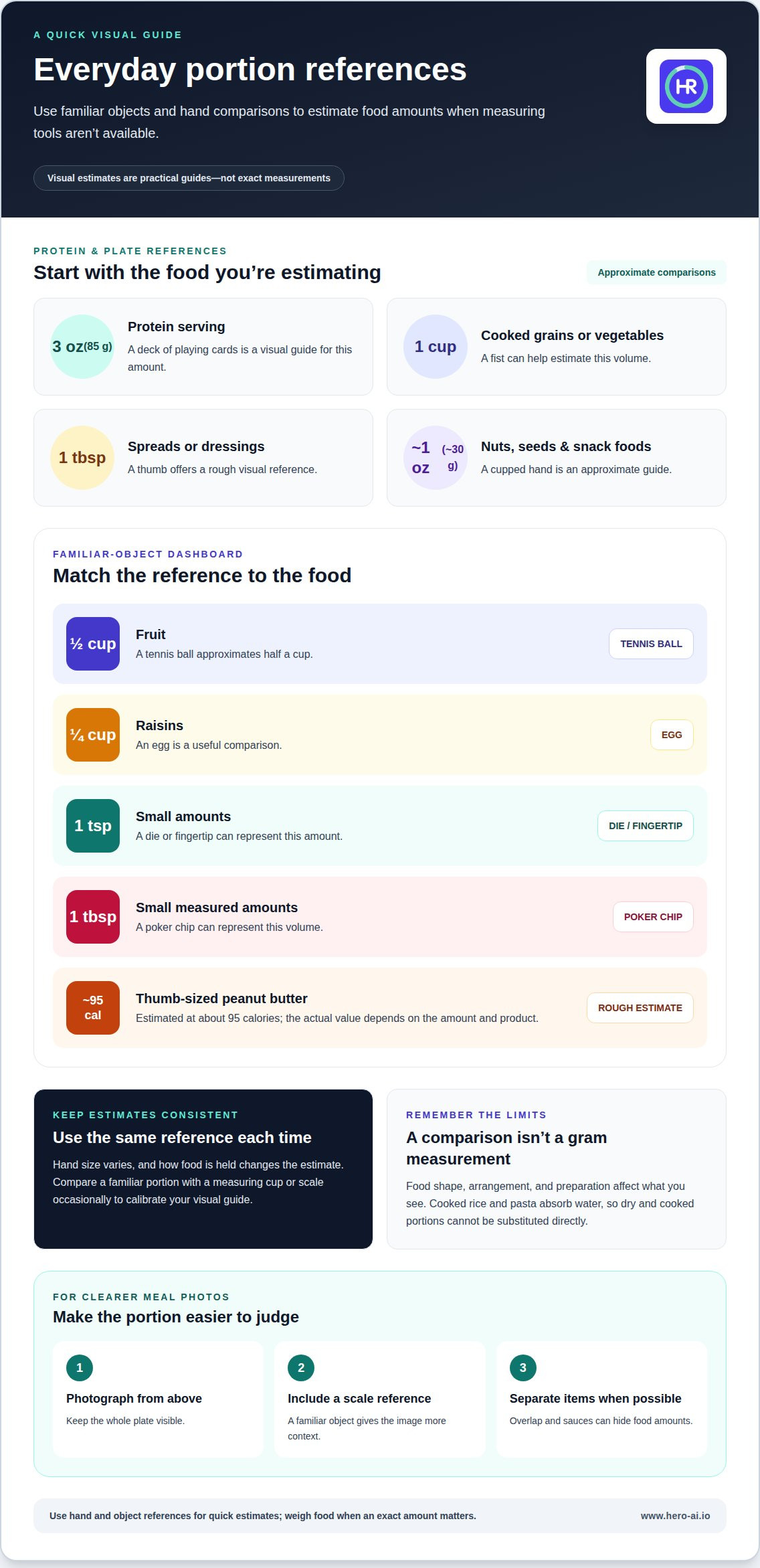
Reference points help make visual estimates more consistent. A deck of playing cards is a guide for a 3 oz (85 g) protein serving. A fist can help estimate 1 cup of cooked grains or vegetables, while a thumb gives a rough reference for 1 tablespoon of spreads or dressings. These comparisons are practical, not exact: hand size varies, and a mound can look different from a flat portion. Calibrate the method by comparing the same food with a measuring cup or scale occasionally.
You can manage portions without weighing every meal. Serve food on a plate, separate mixed dishes into visible components, and use the same cup, bowl, or hand reference each time. For example, compare a cooked grain portion with a cupped hand, then use that reference consistently at later meals. Estimate dry and cooked rice differently because rice absorbs water during cooking. Pasta also gains weight as it absorbs water.
To measure directly, place a digital kitchen scale on a level surface, set the empty container on it, and use the tare function before adding food. Record the displayed weight, then weigh each ingredient separately if you need individual amounts. This takes more steps than an app estimate, but gives you a measured weight rather than a visual approximation. Measuring cups offer a middle ground, especially for repeatable amounts of grains or liquids.
Meal-photo privacy depends on what an image captures and how an app handles uploaded data. A photo can reveal eating habits or background details such as faces, documents, or a home interior. Before uploading, crop out unrelated details and review the app’s privacy settings and data-use terms.
2. Visual portion estimation using hand and object comparisons
Hand and object references provide repeatable estimates without requiring measuring cups. A cupped hand is an approximate guide to 1 ounce, or about 30 g, of nuts, seeds, dried fruit, or snack foods. A small handful can represent about ¼ cup of nuts or trail mix. These comparisons help keep portions consistent, but hand size and how food is held affect the estimate.
Match the reference to the food’s volume, not just its shape. A tennis ball approximates half a cup of fruit, while an egg is a useful comparison for ¼ cup of raisins. A die or fingertip can represent 1 teaspoon, and a poker chip can represent 1 tablespoon. These familiar objects help estimate serving size when plates or containers differ.
Hand-based estimates can also describe different food groups. Hand comparisons can offer a rough visual guide to portions of grains, beans, or starchy carbohydrates. A thumb tip can serve as a rough visual reference for small amounts of butter, ghee, mayonnaise, or oil. For protein, use a food-specific reference and remember that a visual comparison cannot establish exact weight. A thumb-sized amount of peanut butter is estimated at about 95 calories, but the actual value depends on the amount and product.
Visual comparisons can help estimate portions, but they may not give an exact gram amount. Portion sizes of cooked rice, pasta, and potatoes can vary, so visual estimates are approximate. That equivalence applies to the cooked food. Dry rice and pasta change weight and volume as they absorb water, so a dry measure cannot be substituted directly for the cooked portion. Calories also depend on the food and preparation, not volume alone.
A photo records the meal, but perspective can distort size. Photograph food from above, keep the whole plate visible, and include a familiar object for scale. Separate items when possible. For example, a small portion of chicken is easier to estimate when it does not overlap vegetables or sit beneath sauce. The app’s result remains an estimate, not a measurement in grams.
Can visual portion apps handle homemade meals and mixed dishes? They can estimate recognizable foods in a photo, but a mixed dish may conceal ingredients and proportions. For a casserole or stew, the ingredients and recipe provide context that the image alone cannot.
Use hand comparisons for quick serving decisions, and use weighing when a precise gram amount matters. To maintain a consistent photo log alongside those visual references, photo-based meal tracking can support routine meal recording.
3. What's the difference between a portion size and a serving size?
A serving size is a reference amount used to present nutrition information for a food. A portion size is the amount actually placed on a plate or eaten. They can match, but they do not have to. If a label lists 1 tablespoon of olive oil as a serving and someone pours 2 tablespoons, the portion is twice that reference amount.
This distinction matters when estimating food visually. A photo shows the portion in front of you, while a label gives nutrition information for its stated serving. A visual estimate cannot tell you whether a plate contains one labeled serving unless you know the food and can judge its amount. A food database can connect a selected food with nutrition values, but the logged quantity still needs to reflect the portion eaten.
Label examples show how portions can exceed reference servings. A typical pour of peanut butter is 3-4 tablespoons, compared with a labeled 2-tablespoon serving. That difference can add 95-190 calories. A typical pour of olive oil is 2-3 tablespoons, while the labeled serving is 1 tablespoon. The excess can add 123-246 calories. These examples show why visual portion sizes and serving sizes should not be treated as interchangeable.
For children, a label’s serving amount is not automatically right for every meal. Appetite and food needs vary with age, growth, activity, and the rest of the meal. Serve an amount that suits the child’s appetite, then let them respond to hunger and fullness. Use the label to understand the food’s nutrition, not as an instruction to finish everything on the plate.
A balanced meal depends on the foods combined, not just the number of servings. One practical plate guide is to fill half the plate with vegetables, then consider protein, grains, and other foods as parts of the whole meal. A plate with vegetables, chicken, and cooked rice, for example, gives more context than counting each item as a separate serving.
Use labels and visual estimates for different tasks. A label helps you compare nutrition per stated serving; a photo or hand reference helps you record the amount actually eaten. If a meal includes a quarter of a package, compare that amount with the label’s serving information before logging it. This ties the record to what you consumed instead of assuming every package, plate, or bowl equals one serving.
4. Photo-based versus number-based portion tracking
Photo tracking records what a meal looks like, while number-based tracking records selected foods and quantities. Each method answers a different question: a photo documents visible components, while a numeric log can connect a selected food and amount to calorie information in a database. Choose based on whether visual records or quantity details matter more to your routine.
Photo-based calorie tracking uses image recognition to analyze visible food and estimate its contents. Plate angle, lighting, overlapping ingredients, and hidden oils can affect what the photo shows. A bowl of vegetables with dressing, for example, may look similar to one without it. A photo may identify the vegetables, but it cannot show the exact amount of dressing.
Number-based logging makes the quantity an explicit input. Select the food, then enter an amount in a unit such as grams, cups, or pieces. The calorie result depends on choosing a food entry that matches the food and its preparation. Cooked and raw chicken have different weights and nutrition values per listed amount, so choose an entry that matches what you ate.
Neither method removes estimation. A 30% portion-estimation error on a 300-calorie meal amounts to 90 calories. With a photo, the difference may come from perspective or hidden ingredients. With numeric tracking, it may come from selecting the wrong food entry or estimating the amount. This makes consistency important: use the same preparation description and quantity unit for repeated meals.
Hand references can bridge the two approaches. A cupped hand can serve as a rough visual reference for estimating a portion of grains, beans, or starchy carbohydrates. Use that comparison to estimate a portion, then record the corresponding amount if your tracking method requires a number. A familiar reference can help keep estimates consistent across meals, while a photo records what was served.
Choose a method based on the detail you need. Photo tracking suits a routine where quickly recording the whole meal matters more than entering every ingredient. Number-based tracking helps when you want to separate ingredients or compare amounts across meals. You can combine the methods by using a meal photo as a record, then adjusting food entries when portions or ingredients are clearer. For example, photograph chicken and vegetables, then enter each item separately if you need distinct calorie estimates.
Review a week of entries to check for consistency. If you eat the same breakfast several times, compare its photo, selected food, and recorded amount. Repeated mismatches can show what to adjust, such as choosing a better food match or recording portions more consistently.
5. Portion guidance for weight loss, muscle building, and maintenance
Portion choices work best when they match the goal and the whole meal. For weight loss, a useful starting structure is filling half the plate with vegetables. A healthy-plate guide uses a plate about 9 inches (23 cm) in diameter. This sets a visual boundary without requiring every ingredient to be weighed. It does not define an individual calorie target.
For muscle building, protein portions need attention across meals. A daily protein range of 1.6-2.2 g per kg of body weight is one guide. Another approach uses 0.4-0.55 g per kg per meal across 3-5 meals. For a person weighing 70 kg, that works out to 28-38 g of protein per meal. These figures help organize portions; they are not a complete meal plan.
Food examples make those targets easier to picture. A 70 kg person’s 28-38 g meal target can be reached with 140-170 g of chicken breast. Three ounces of cooked chicken breast provides about 26 g of protein. A ¾-cup serving of Greek yogurt provides about 18 g. Combining foods can help build a meal’s protein total without relying on one large serving.
Carbohydrate portions depend on whether rice or pasta is a main dish or a side. For a main meal, one guide uses about 75 g of dried rice or pasta per person. For a side dish, it uses about 37 g. Two ounces of dry pasta or rice yields about 1 cup cooked, so record whether the amount refers to dry or cooked food. Water absorption changes cooked weight.
Maintenance uses a consistent meal pattern rather than a single fixed portion. Keep familiar portions for meals that support your routine, then adjust based on changes in activity, appetite, and meal composition. A food scale can help calibrate foods that are easy to overpour. For example, cheese has a typical portion of 1½ ounces, or about 42 g. Nuts or nut butter commonly use a 1-ounce, or 28 g, portion reference.
For any goal, your record is more useful when the food entry matches its preparation and amount. If you weigh cooked food, select a cooked entry; for dry rice, select a dry entry. Butter, cheese, and peanut butter are energy-dense, so small differences in quantity can noticeably change a meal’s logged total. Use a scale when precision matters and visual references when a consistent estimate is enough.
To apply these portion references to everyday meals, track meals with photo recognition and review the recorded foods against your goal.
Hero AI
Hero AI supports meal tracking with photo recognition, barcode scanning, and recipe imports from TikTok and Instagram. Its food database contains over 3 million verified foods, helping connect meal entries with calorie and macro tracking. Use it when you want to record meals through images or food selection instead of relying only on hand comparisons. Photo-based results remain estimates, so weigh ingredients when exact quantities matter. Hero AI is available through a 1 year subscription. Contact Hero AI to discuss whether its tracking features suit your routine.
Make portion tracking fit your routine
Choose a tracking routine you can use for ordinary meals, not just carefully prepared ones. Start with a familiar meal and decide what you need from the record: a quick visual reference, a detailed food log, or both. Use that approach consistently long enough to see whether it supports your goal and fits your schedule. A visual portion size calculator app can be one part of the process, rather than the sole basis for every food decision.
Review the entries that are hardest to capture. Mixed recipes, changing portions, and meals eaten away from home may call for a different method than repeat meals. Adapt your routine to those situations instead of abandoning tracking when an estimate feels uncertain. The useful method is the one that gives you information you can act on.
For a photo-based approach to meal and nutrition tracking, contact Hero AI about portion tracking. Choose a method that supports steady, practical decisions.
Frequently Asked Questions
Can AI really estimate portion size from a photo?
AI can identify visible foods and estimate their portions from an image. For a clearer record, photograph each item before mixing it with sauces or other ingredients. If the meal has separate components, log them individually when you need more detail. A plate with rice, chicken, and vegetables, for example, is easier to review as three entries than as one combined dish.
Can I adjust just one portion without redoing the meal?
In Hero AI, you can adjust a food quantity, and the app recalculates its macros. This helps when an item’s amount changes after you log a meal. If you eat less rice than you first recorded, for example, update that entry rather than rebuilding the chicken and vegetable entries. Review the selected food and amount before saving the change.
How do I measure the right amount of pasta or rice?
Measure pasta or rice in the same state as the nutrition entry: dry before cooking, or cooked after preparation. For a shared batch, measure the total amount consistently, then divide the cooked food among plates. If you need gram-level detail, use a kitchen scale and select a matching food entry. Mixing dry weights with cooked-food data can make the log inconsistent.
What are healthy portion sizes for weight loss?
No single portion size suits every person or meal. Build meals from varied foods, include vegetables, and consider how your overall eating pattern supports your goal. A practical starting point is to keep meal portions consistent, then review hunger, activity, and progress over time. Adjust one part of the meal at a time, such as a snack or added ingredient.
What if the photo has no reference object?
You can still log the meal, but the image offers less context for estimating its size. Keep the whole plate in view and photograph it from an angle that shows the food’s surface and depth. Separate overlapping items before taking the picture when practical. If the amount matters for your tracking, adjust the estimate using a measured amount or familiar household measure.
What's the difference between a portion size and a serving size?
Use the nutrition label to understand the food, then record the quantity you actually ate. If you eat part of a packaged snack and save the rest, for example, log only the amount consumed. The package’s serving information helps you calculate nutrition for that amount. It does not mean you need to eat the full listed quantity at once.
What apps estimate portion sizes from food photos?
Food-tracking apps with image recognition can identify foods in meal photos and estimate quantities. Hero AI offers photo-based meal logging. When comparing app functions, look for ways to correct a food match, change its amount, and review nutrition details. These controls are useful when a photo includes toppings, sauces, or ingredients that are hard to distinguish visually.
How accurate are visual portion size calculator apps?
Accuracy depends on how clearly the image shows the food and whether the selected food entry matches its preparation. A plain serving of cooked vegetables is easier to interpret than a layered dish with hidden ingredients. Use photo estimates for consistent logging, and measure foods when exact weights matter to your records. Check that the logged item reflects how it was cooked and any additions.


